

テクスチャアトラス生成 - Texture AtlasGen
- Digital650 JPY
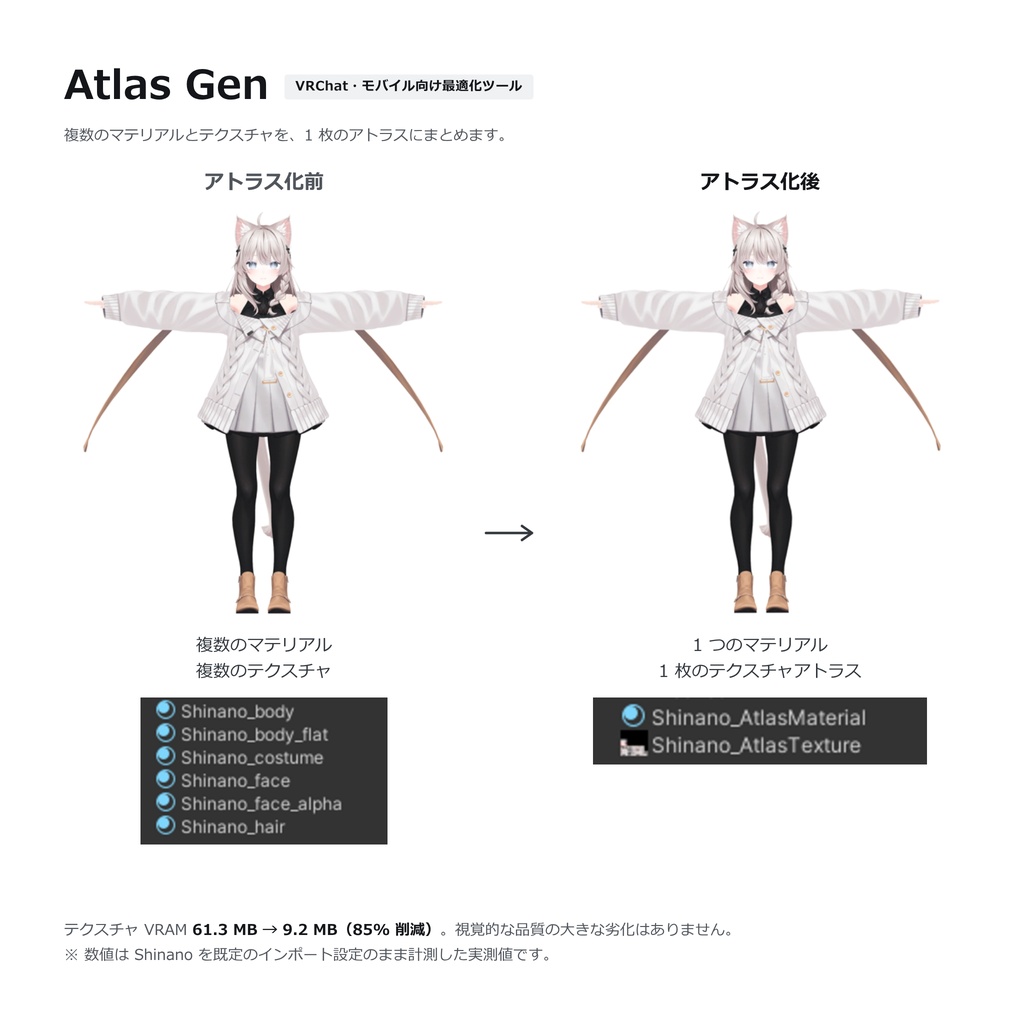
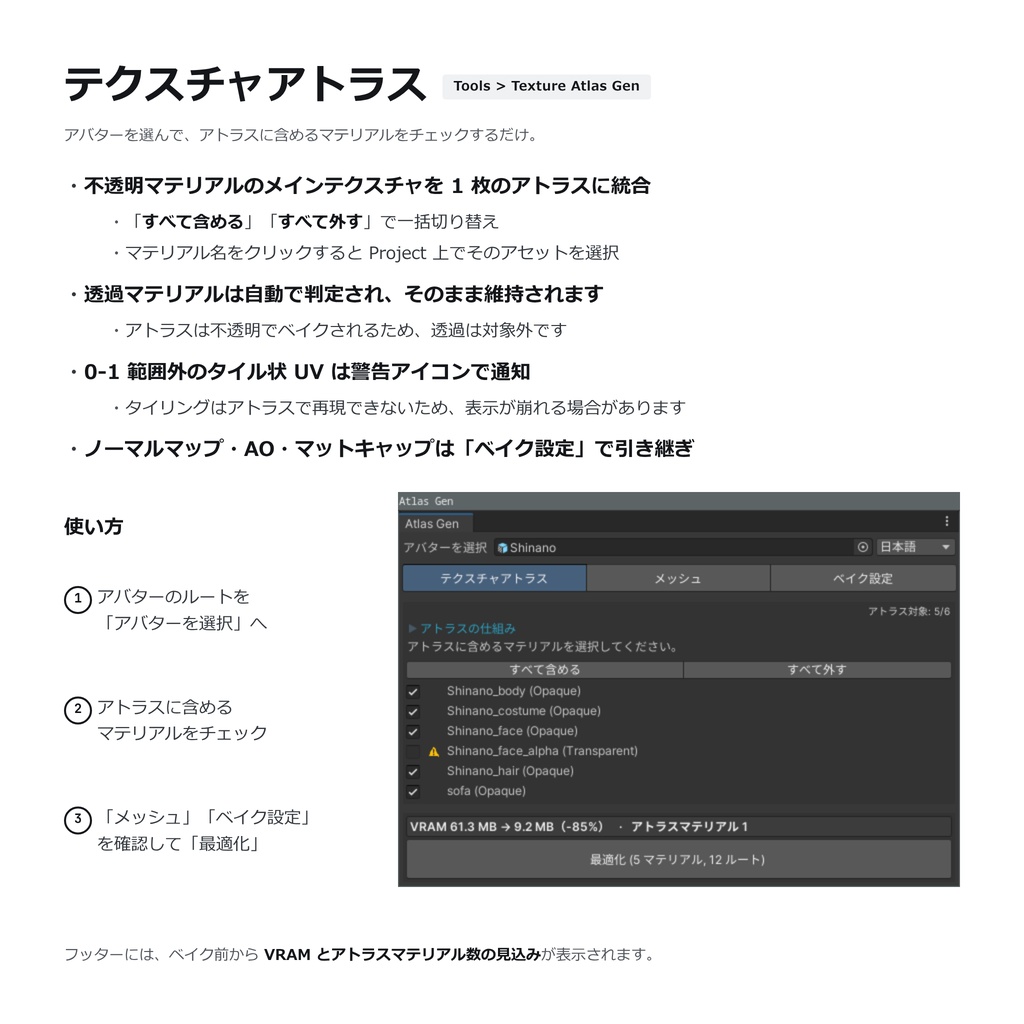
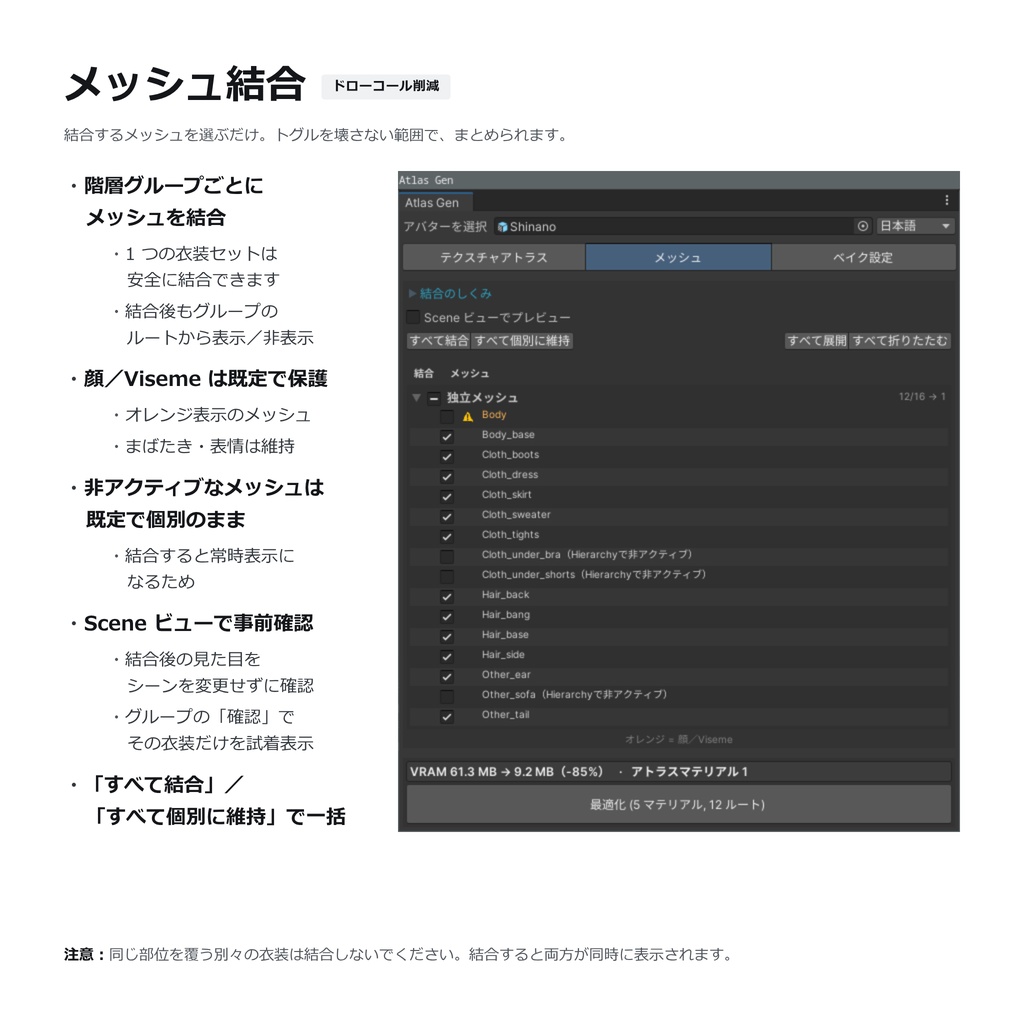
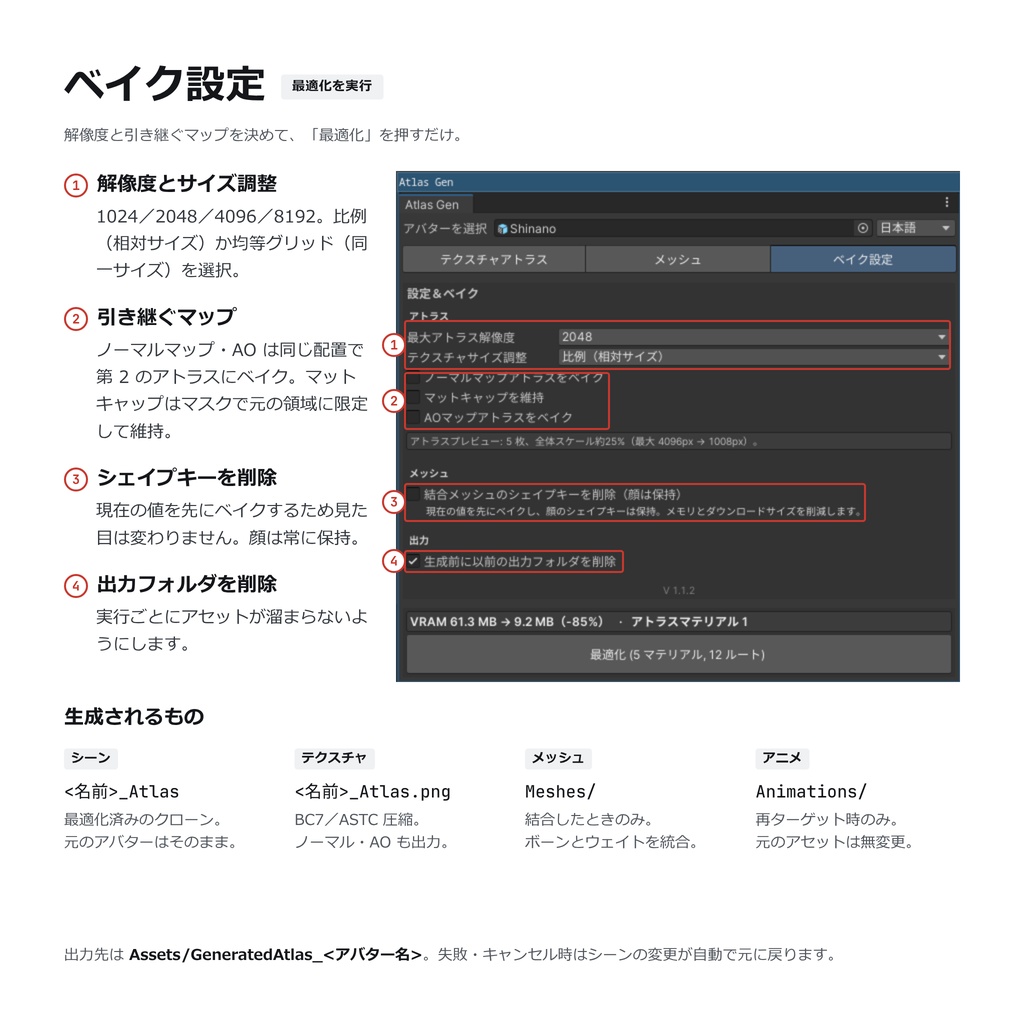


Texture AtlasGenは、VRChatアバターの複数のマテリアルで使われているテクスチャを1枚のアトラスにまとめ、マテリアル数・ドローコール・テクスチャVRAM使用量の削減を支援するUnityエディター拡張です。 元のアバターには直接変更を加えず、複製したアバターに対して処理を行うため、既存のデータを保持したまま最適化結果を確認できます。 ■ 主な機能 ・複数のマテリアルで使用されているメインテクスチャを1枚のテクスチャアトラスに統合 ・アトラス用マテリアルの自動生成 ・アトラス配置に合わせたメッシュUVの再配置 ・ノーマルマップアトラスの生成 ・AOマップアトラスの生成 ・生成したマスクによるマットキャップの維持(元の適用範囲を保持) ・階層単位でのメッシュ結合(独立メッシュ/階層グループを個別に選択可能) ・非アクティブな衣装・パーツを含む結合結果のSceneビュープレビュー ・BlendShapeアニメーションの結合後メッシュへのリターゲット ・VRC Avatar DescriptorのLipSync/EyeLookの参照先を、可能な範囲で自動修正 ・生成前のテクスチャVRAM使用量プレビュー ・PC向けBC7、Quest/Android向けASTC 6×6の圧縮設定を自動適用 ■ 対応シェーダー ・lilToon ・Poiyomi ・UnityChanToonShader/UTS2 ・Standard系シェーダーの一部 ■ 動作環境 ・Unity 2022.3.22f1 ・VRChat SDK3 ■ 使い方 1. unitypackageをプロジェクトにインポートします。 2. Unity上部メニューの「Tools > Texture Atlas Gen」からウィンドウを開きます。 3. 「アバターを選択」欄に、Hierarchy上のアバターのルートをドラッグ&ドロップします。自動でスキャンが実行されます(アバターの階層やマテリアルを変更した場合は、選択状態を保持したまま自動で再スキャンされます)。 4. 「テクスチャアトラス」タブで、アトラスに含めるマテリアルを確認・調整します。透過マテリアルは自動的に対象外となり、元のまま維持されます。 5. 「メッシュ」タブで、結合するメッシュ/グループを選択します。「Scene ビューでプレビュー」をオンにすると、結合対象のうち非アクティブなメッシュが結合後の状態でSceneビューに表示されます。各グループの「確認」ボタンでは、その衣装だけを着せた状態で表示し、パーツの重なりをチェックできます。 ※プレビューを正しく表示するには、Sceneビュー上部ツールバーのScene Visibility(目のアイコン)をオンにしてください。 6. 「ベイク設定」タブで、最大アトラス解像度、「ノーマルマップアトラスをベイク」「AOマップアトラスをベイク」「マットキャップを維持」などのオプションを設定します。ウィンドウ下部にはテクスチャVRAMの増減とアトラスマテリアル数が常時表示され、カーソルを合わせると生成内容の詳細を確認できます。 7. 「最適化 (○ マテリアル, ○ ルート)」ボタンをクリックすると、シーン上に複製「アバター名_Atlas」が作成され、生成されたテクスチャ・マテリアル・メッシュは「Assets/GeneratedAtlas_アバター名」フォルダに保存されます。生成後はウィンドウ下部の「クローンを選択」「フォルダを表示」ボタンからすぐにアクセスできます。 8. 複製の見た目、衣装のトグル、表情(LipSync/まばたき)に問題がないことを確認のうえ、通常の手順でVRChatへアップロードしてください。 ■ 注意事項 ・すべてのシェーダー機能や特殊なマテリアル設定への完全な対応を保証するものではありません。 ・透過マテリアルはアトラス化せず、元のマテリアルをそのまま保持します。 ・タイルUV(0~1範囲外のUV)、特殊なマスク、独自のシェーダー設定を使用している場合、見た目が変化することがあります。 ・マットキャップを維持するため、追加のアトラス用マテリアルが生成される場合があります。 ・結合対象のオブジェクトに設定された一部のToggle/Transformアニメーションは、結合後に完全には引き継がれない場合があります。該当する場合はConsoleに警告が表示されます。 ・顔(Viseme/まばたき)を含むメッシュは、既定では結合対象になりません。結合した場合、LipSync/EyeLookが正しく動作しなくなることがあるため、顔メッシュは個別のまま維持することをおすすめします。 ・Sceneビューのプレビュー機能は、Scene Visibility(目のアイコン)がオフの場合、正しく表示されません。 ・ロックされたシェーダー(Poiyomi等)では一部の設定を変更できないため、可能であればアンロックしてから生成してください。 ■ 更新履歴 v1.1.2 ・ノーマルマップアトラスの生成に対応しました。 ・AOマップアトラスの生成に対応しました。 ・生成したマスクを使用し、マットキャップを元の適用範囲に限定して維持できるようになりました。 ・生成前にテクスチャVRAM使用量の増減を確認できるプレビュー機能を追加しました。 ・メッシュ結合後の状態をSceneビューで確認できるプレビュー機能を追加しました。 ・BlendShape(ブレンドシェイプ)アニメーションを結合後のメッシュへリターゲットできるようになりました。 v1.1.1 ・アトラステクスチャの生成品質を改善しました。 ・メッシュ結合機能を追加しました。 ・独立メッシュ(Standalone Meshes)と階層メッシュグループを個別に制御できるようになりました。 ■ フィードバック 不具合のご報告、ご質問、ご要望がございましたら、BOOTHのメッセージまたはXよりお気軽にご連絡ください。
利用規約
本ソフトウェアを購入または使用することにより、以下の規約に同意したものとみなします。 ライセンス: お客様には、個人的なデバイスで本ツールを使用するための、個人的かつ譲渡不可能なライセンスが付与されます。 禁止事項: 第三者への本ツールの再配布、再販売、貸与、または共有は固く禁じられています。 本規約は将来変更されることがあります。常に最新のバージョンが適用されます。
Terms of Use
By purchasing or using this software, you agree to the following terms: License: You are granted a personal, non-transferable license to use the tool on your personal devices. Restrictions: You are strictly prohibited from redistributing, reselling, loaning, or sharing the tool with any third party. These terms may change over time. The latest version will always apply.