

【VRCahat向け】BSS(BlendShapeKeySaver)コピーツール
- 無料Digital0 JPY
- お布施用【無料版と同じ】Digital100 JPY
- もっとお布施用【無料版と同じ】Digital500 JPY
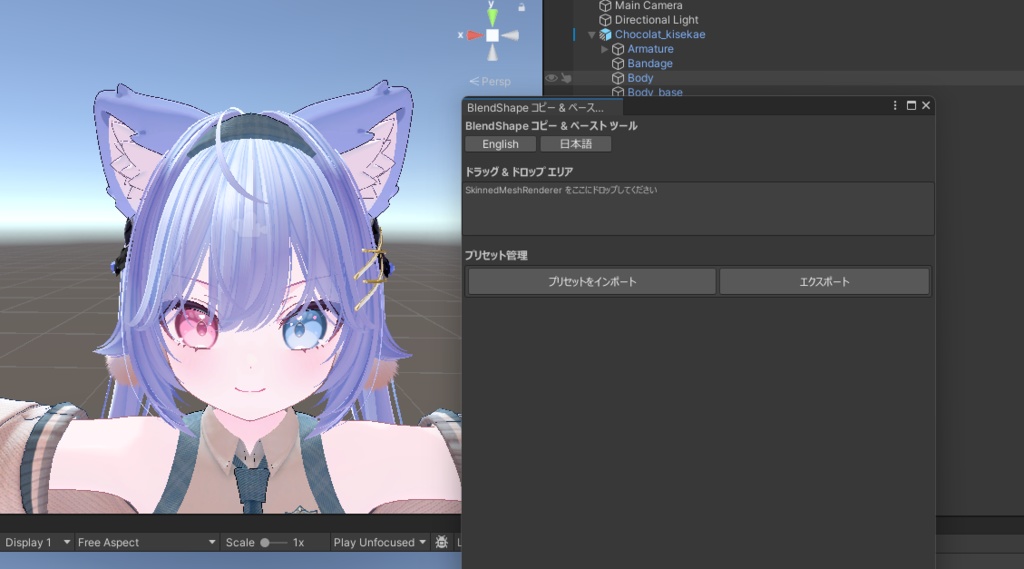
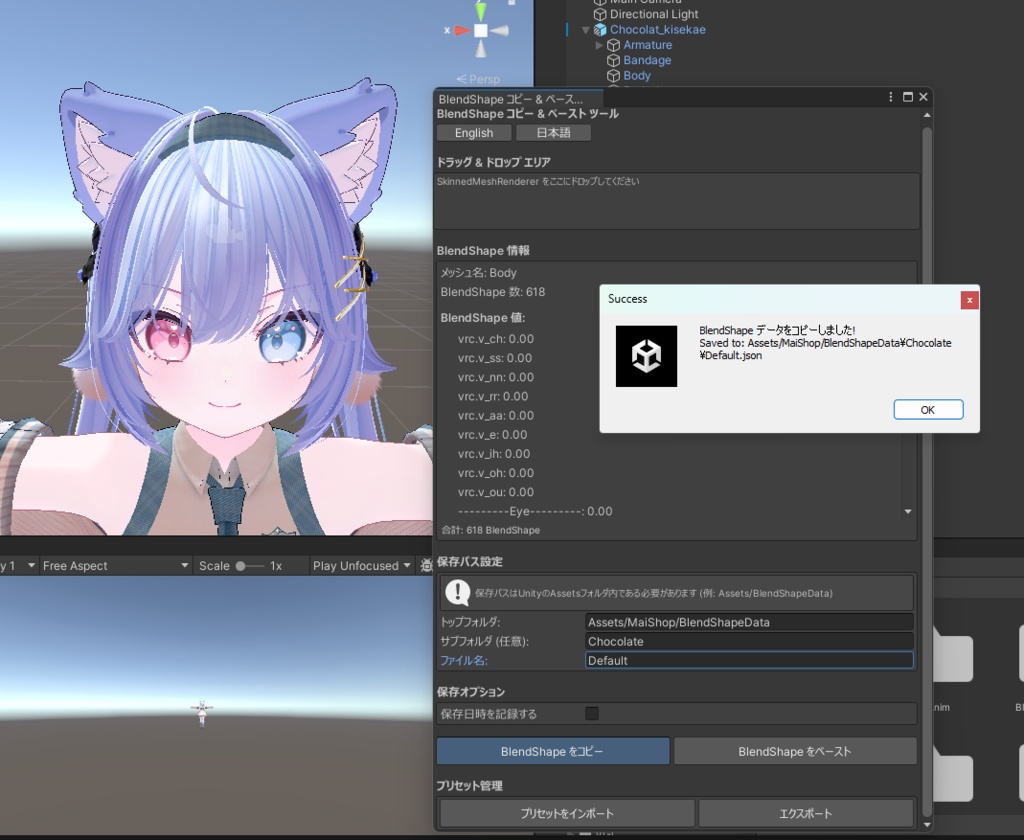
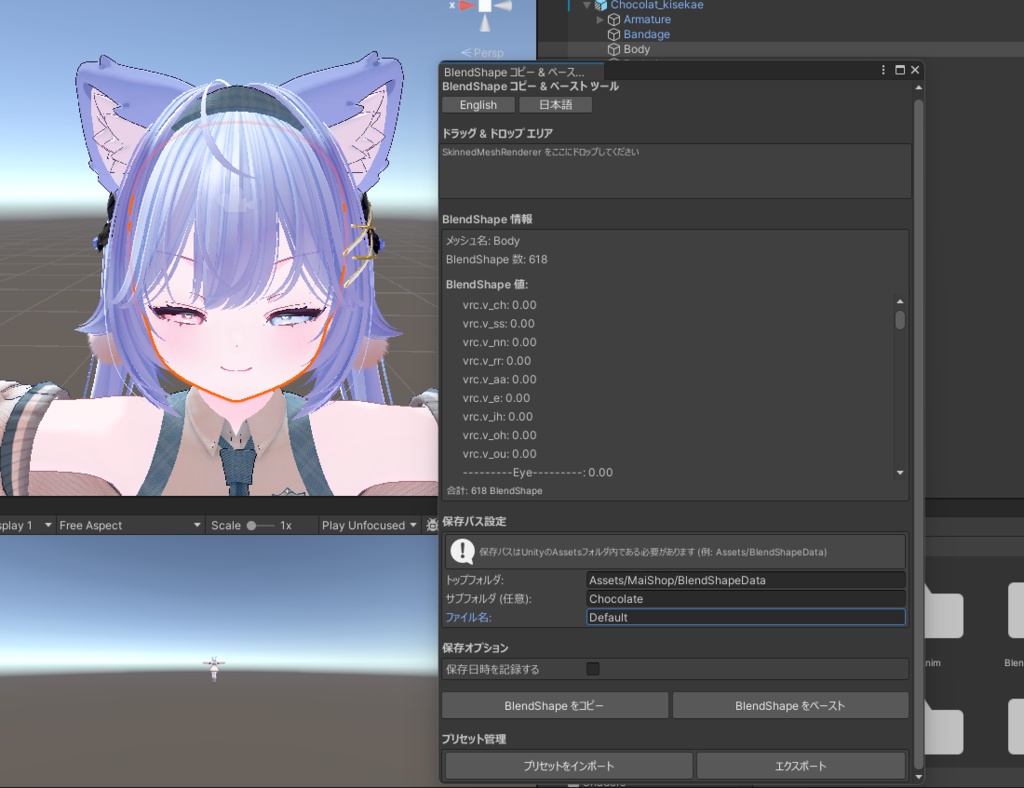



!!!アバターはついてきません!!! 【VRCahat向け】BSS(BlendShapeKeySaver)コピーツールは BlendShapeKeyを簡単に管理できるツールです。
【日本語】
【商品説明】 ■ 概要 「【VRCahat向け】BSS(BlendShapeKeySaver)コピーツール」は、Unity エディタ上で SkinnedMeshRenderer の BlendShape 値を簡単にコピー&ペーストできる便利なエディタ拡張ツールです。 VRChatアバター改変、表情やシェイプキーの調整作業を効率化します。 ■ 主な機能 ◆ BlendShape のコピー&ペースト - SkinnedMeshRenderer をドラッグ&ドロップするだけで簡単に操作 - 現在の BlendShape 値を一括でコピー - 保存したデータを別のメッシュにペースト - BlendShape キーの自動検証機能付き ◆ プリセット管理 - BlendShape データを JSON 形式でプリセット保存 - プリセットのインポート・エクスポート機能 - 保存日時の自動記録(オプション) - カスタマイズ可能な保存先フォルダ ■ 使い方 1. Unity エディタで「Tools > MaiShop > BlendShape Copy & Paste Tool」を選択 2. ツールウィンドウが開いたら、BlendShape を持つオブジェクトをドラッグ&ドロップ 3. 現在の BlendShape 値を確認 4. 「Copy BlendShapes」ボタンでデータをコピー&保存 5. 別のメッシュにドラッグ&ドロップして「Paste BlendShapes」でペースト ■ 動作環境 - Unity 2019.4 以降推奨 ■ ライセンス - 個人利用・商用利用可能 - 改変可能 - 改変時のみ再配布可能(改変していない場合再配布禁止) ■ クレジット表記例 「BlendShape Copy & Paste Tool by MaiShop」 ■ サポート - バグ報告や機能要望は Booth で受け付けています - アップデート情報は Booth ページでお知らせします ■ 更新履歴 v1.0.1(修正版) - 一部不具合の修正 v1.0.0 (初回リリース) - BlendShape コピー&ペースト機能 - プリセット保存・読み込み機能 - インポート・エクスポート機能 - 日本語・英語対応 ■ 注意事項 - BlendShape のキー名が完全に一致する必要があります - 保存先は Unity プロジェクトの Assets フォルダ内に限定されます ======================================== お問い合わせ: Twitter: https://x.com/tensei_mai ========================================
【英語】
【Product Description】 ■ Overview "BSS (BlendShapeKeySaver) Copy Tool for VRChat" is a convenient Unity editor extension that allows you to easily copy and paste BlendShape values of SkinnedMeshRenderer. It streamlines VRChat avatar modification and facial expression/shape key adjustment work. ■ Main Features ◆ BlendShape Copy & Paste - Easy operation with drag & drop of SkinnedMeshRenderer - Batch copy of current BlendShape values - Paste saved data to different meshes - Automatic BlendShape key validation ◆ Preset Management - Save BlendShape data as JSON format presets - Import and export preset functions - Automatic recording of save date/time (optional) - Customizable save destination folder ■ How to Use 1. Select "Tools > MaiShop > BlendShape Copy & Paste Tool" in Unity Editor 2. Once the tool window opens, drag & drop objects with BlendShapes 3. Check current BlendShape values 4. Copy & save data with "Copy BlendShapes" button 5. Drag & drop to another mesh and paste with "Paste BlendShapes" ■ System Requirements - Unity 2019.4 or later recommended ■ License - Personal and commercial use allowed - Modification allowed - Redistribution allowed only when modified (redistribution prohibited without modification) ■ Credit Example "BlendShape Copy & Paste Tool by MaiShop" ■ Support - Bug reports and feature requests are accepted on Booth - Update information will be announced on the Booth page ■ Update History v1.0.1 (revised version) - Fixed some bugs v1.0.0 (Initial Release) - BlendShape copy & paste function - Preset save and load function - Import and export function - Japanese and English support ■ Notes - BlendShape key names must match exactly - Save destination is limited to within the Unity project's Assets folder ======================================== Contact: Twitter: https://x.com/tensei_mai ========================================