

牛柄マイクロビキニ / Cow Micro Bikini - For ミルティナ/Milltina
- Digital1,000 JPY
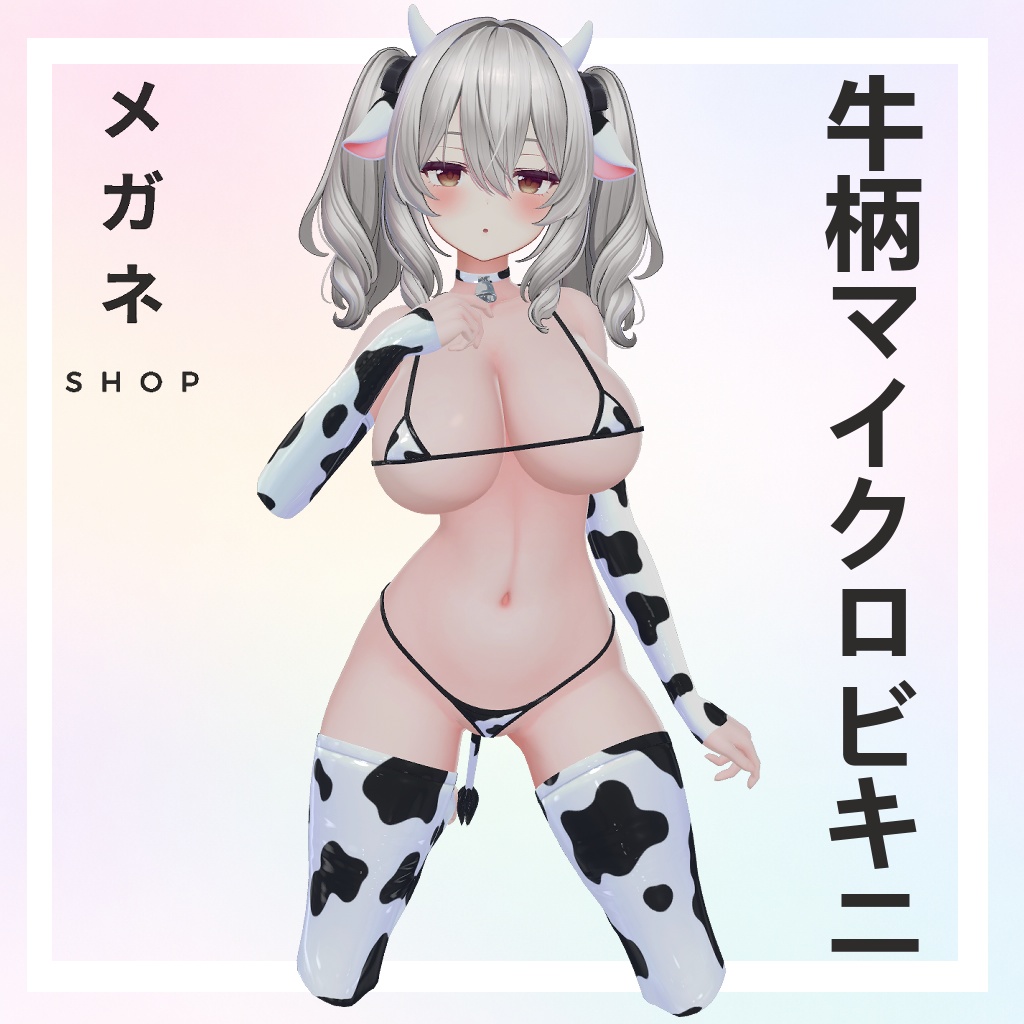

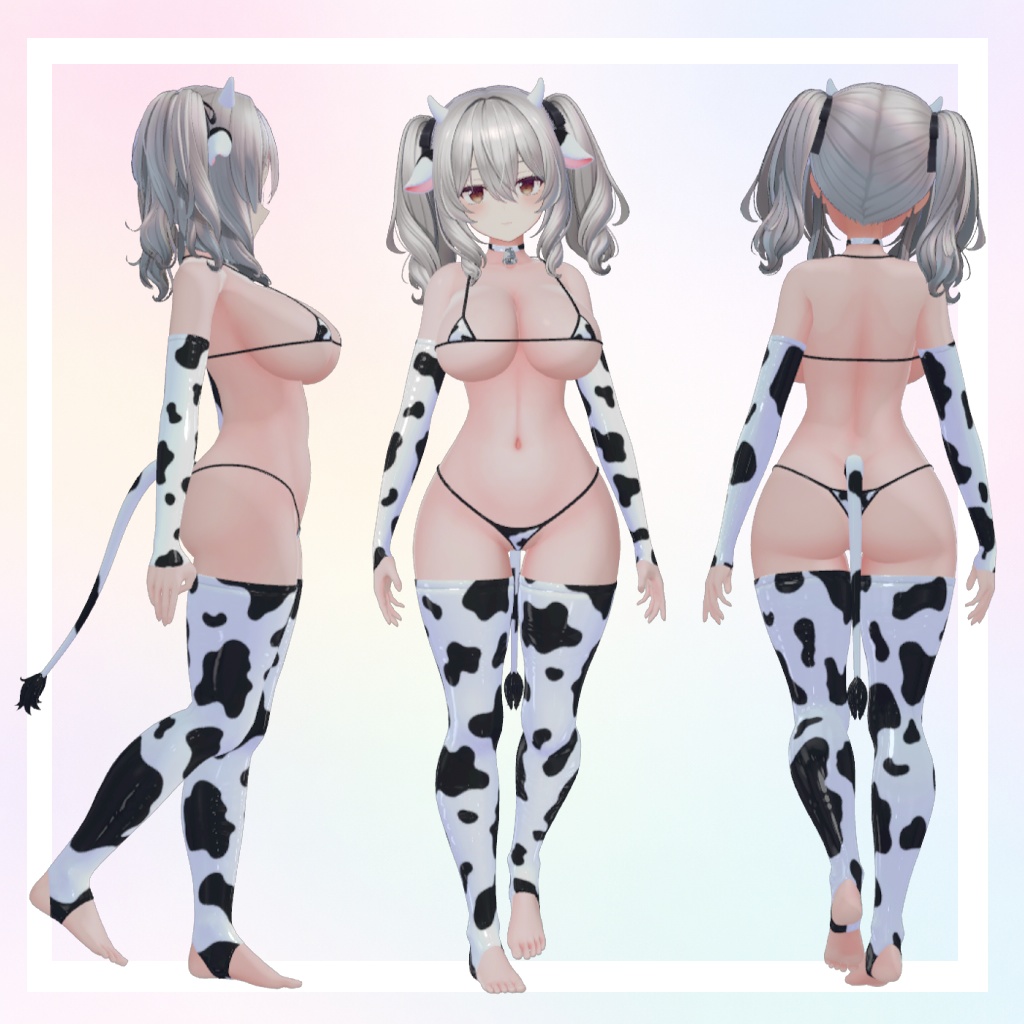


Overview / 概要 Cow Micro Bikini is a mini bikini outfit designed for the 3D avatar Milltina and is intended for use in VRChat. It features a striking black‑and‑white cow pattern and micro‑bikini style that complements Milltina’s body. The outfit is delivered as a Unity package and uses the lilToon shader for materials and shading. Only the outfit data is provided — Milltina is not included, and you must own the avatar separately booth.pm . 牛柄マイクロビキニは3Dアバター「ミリティナ」用にデザインされたミニビキニ衣装で、VRChatでの使用を想定しています。モノトーンの牛柄と極小ビキニスタイルがミリティナの体型にフィットします。衣装はUnityパッケージ形式で提供され、マテリアルとシェーディングにはlilToonシェーダーが使用されています。衣装データのみが含まれており、ミリティナ本体は付属しません(別途購入が必要です) booth.pm 。 Use this outfit only on PC VRChat; Quest is not supported due to texture size and polygon count limitations booth.pm . Please follow the instructions below to integrate the outfit into your avatar and observe the Terms of Use when using or modifying this asset. この衣装はPC版VRChatのみ対応です。Questはテクスチャサイズやポリゴン数の制限により非対応です booth.pm 。アバターへ組み込む手順および使用規約を遵守してご利用ください。
Package Contents / パッケージ内容
The download contains 牛柄マイクロビキニ.unitypackage. When imported into Unity you will find the following files: ダウンロードには 牛柄マイクロビキニ.unitypackage が含まれています。Unityにインポートすると次のファイルが得られます。 Item Description 説明 (Japanese) Cow Micro Bikini.prefab Prefab containing the outfit with materials and lilToon shader settings applied. 材質とlilToon設定が適用された衣装プレハブ Cow Micro Bikini.mat lilToon material asset for the bikini. ビキニ用lilToonマテリアル Cow Micro Bikini Mat Cap Mask 1 & 2 Mask textures used by the lilToon MatCap feature for shading effects. lilToonのMatCap機能で使用するマスクテクスチャ Cow Micro Bikini MatCap 1 & 2 MatCap textures that define the surface reflection. 表面反射を定義するMatCapテクスチャ Cow Micro Bikini Normal Normal map for surface detail. 表面ディテールのための法線マップ Cow Micro Bikini.fbx FBX mesh of the bikini. ビキニのFBXメッシュデータ
Requirements and Compatibility / 必要環境・対応状況
Avatar Compatibility: Designed for Milltina (booth.pm/en/items/6538026). Using this outfit on other avatars may require manual adjustment and is not officially supported. 対応アバター: ミリティナ (Milltina) 用に制作されています。他のアバターで使用する場合、手動調整が必要となり、正式にはサポートされません。 Unity Version: Use Unity 2022.3.x (same as the VRChat Creator Companion). Many booth outfits specify 2022.3.22f1 or later for VRChat booth.pm . Unityバージョン: VRChat Creator Companionと同じ Unity 2022.3.x を使用してください。多くのBooth衣装は2022.3.22f1以降を推奨しています booth.pm 。 Shader: Uses lilToon shader. Install lilToon before importing the outfit. Ensure you are using a recent lilToon version; the Milltina base uses lilToon booth.pm . シェーダー: lilToon シェーダーを使用します。衣装をインポートする前にlilToonをインストールしてください。ミリティナ本体もlilToonを利用しています booth.pm 。 VRChat SDK: Use VRChat SDK 3.0 (Avatars). The outfit is not intended for other platforms or engines booth.pm . VRChat SDK: VRChat SDK 3.0 (Avatars) を使用してください。他のプラットフォームやエンジンでは利用できません booth.pm 。 Quest Devices: Not supported due to high resolution textures and polygon counts booth.pm . Quest機器: テクスチャサイズやポリゴン数のため非対応です booth.pm 。 Poly Count: The outfit (including warmers) has approximately 10 895 vertices / 10 700 faces, equating to about 20 860 triangles. ポリゴン数: 本衣装(ウォーマーを含む)は約 10 895頂点/10 700面(三角面約 20 860)で構成されます。
Installation and Setup / インストールとセットアップ
Tip: Always make a backup of your project and avatar before importing new assets. ヒント: 新しいアセットをインポートする前に必ずプロジェクトとアバターのバックアップを作成してください。 Prepare your Unity Project. Open a Unity project configured for VRChat (install the VRChat Creator Companion and create an Avatars project). Import the lilToon shader package. Unityプロジェクトの準備。 VRChat向けに設定されたUnityプロジェクト(VRChat Creator Companionでアバタープロジェクトを作成)を開き、lilToon シェーダーパッケージをインポートします。 Import the Outfit Package. Drag 牛柄マイクロビキニ.unitypackage into the Unity editor. Select Import to bring all assets into your project. Import the materials and textures first (material, MatCap textures, and normal map), then the FBX. Some booth outfits emphasise importing material files before the FBX to ensure correct shader assignments booth.pm . 衣装パッケージのインポート。 牛柄マイクロビキニ.unitypackage をUnityエディターへドラッグ&ドロップし、Import を選択して全てのアセットをプロジェクトに取り込みます。マテリアルやテクスチャ(マテリアル、MatCapテクスチャ、ノーマルマップ)を先にインポートし、その後FBXをインポートします。一部の衣装ではシェーダー割り当てを正しく行うためにこの順序が推奨されています booth.pm 。 Add the Prefab to Your Avatar. In the Project window, locate Cow Micro Bikini.prefab. Drag it into your scene onto your Milltina avatar or into the Hierarchy under the avatar armature. To simplify dressing, you may use a Modular Avatar or Avatar Assembler approach similar to other outfits: import the outfit prefab, then apply it to your avatar so the bones and skinning match booth.pm . If you prefer manual placement, drop the FBX into the scene and parent it to the avatar’s skeleton. Ensure the bones match and adjust positioning as necessary. プレハブをアバターへ追加。 Project ウィンドウから Cow Micro Bikini.prefab を見つけ、シーン内のミリティナまたはアバターのヒエラルキーにドラッグします。 他の衣装と同様に Modular Avatar や Avatar Assembler を利用すると着替え作業が簡単になります:衣装プレハブをインポートし、骨やスキニングが一致するようにアバターに適用します booth.pm 。 手動で配置したい場合は、FBXをシーンに配置し、アバターの骨格にペアレントしてください。適切に位置調整を行います。 Adjust Shape Keys (Blendshapes). The outfit is sculpted for Milltina’s base mesh. If you notice penetration or clipping, use the provided shapekeys on the avatar to adjust body parts. Many outfits recommend using a Shrink_Hip or similar shapekey to reduce clipping booth.pm . If Milltina includes shapekeys such as Small or Flat chest, turning off physics bones or adjusting shapekeys may be required to avoid physics issues booth.pm . シェイプキー(ブレンドシェイプ)の調整。 衣装はミリティナのベースメッシュに合わせて造形されています。貫通やクリッピングが発生した場合は、アバターのシェイプキーを利用して体型を調整してください。多くの衣装では Shrink_Hip 等のシェイプキーでクリッピングを抑えることを推奨しています booth.pm 。ミリティナに Small や Flat chest などのシェイプキーがある場合、物理ボーンを一時的に無効にするかシェイプキーを調整して物理挙動の問題を防いでください booth.pm 。 Physics and Colliders. Add or adjust colliders and physics bones on the bikini straps if desired. When using shapekeys that drastically change body shape, temporarily disable physics bones and re-enable them after adjustments booth.pm . 物理設定とコライダー。 必要に応じてビキニのストラップにコライダーや物理ボーンを追加・調整してください。体型を大きく変えるシェイプキーを使用する際は、一時的に物理ボーンを無効化し、その後再度有効にしてください booth.pm 。 Preview and Build. Once satisfied, test the avatar using VRChat’s Preview Avatar to ensure the outfit behaves correctly in both standing and sitting positions. Then upload the avatar to VRChat using the SDK. プレビューとビルド。 設定が完了したら、VRChatの Preview Avatar で立ち姿や座り姿を確認します。その後、SDKを使用してアバターをVRChatにアップロードします。
Usage Notes / 使用上の注意
PC‑Only: This outfit is for PC VRChat. Please do not upload it to Quest — conversion to Quest is prohibited due to texture and polygon counts booth.pm . PC専用: 本衣装はPC版VRChat専用です。Questへのアップロードや変換は禁止されています booth.pm 。 Individual Use: You may modify the outfit to fit your own avatar, but you must own both this outfit and the avatar. If someone else modifies it for you, both parties must purchase the product; this rule appears frequently on other booth products booth.pm . 個人利用: 自身のアバターに合わせて衣装を改変することは可能ですが、衣装およびアバターの両方を所持している必要があります。第三者が改変する場合も双方が購入する必要があります booth.pm 。 Credits: When streaming or sharing content featuring this outfit, credit the creator and provide the Booth store link. This is similar to other products that allow streaming if credit is given booth.pm . クレジット表記: 配信や作品で本衣装を使用する際は、制作者名とBoothの販売ページへのリンクを記載してください。他の製品と同様、クレジットを表記することで配信が許可されています booth.pm 。 Support: The creator provides support only in Japanese. Because this is a digital product, no refunds or returns are available booth.pm booth.pm . サポート: サポートは 日本語のみ で行われます。デジタル商品の性質上、返金や返品はできません booth.pm booth.pm 。
Terms of Use & Prohibited Activities / 利用規約・禁止事項
本衣装は他のBooth製品と同様に3Dモデル用の VN3ライセンス(バージョン1.0)に基づきます booth.pm booth.pm 。購入および使用することで規約に同意したものとみなされます。規約が更新された場合は最新版が適用されます。 Allowed Uses / 許可されている使用 Personal Use in VRChat: You may wear the outfit on your avatar for personal activities, streaming, and social VR booth.pm . VRChatでの個人利用: 本衣装を自分のアバターに着せて、配信や交流に使用することができます booth.pm 。 Derivative Works: You may edit textures, adjust materials, and alter the mesh for your own use. When commissioning a third party to modify the outfit, both you and the commissioner must purchase a copy booth.pm . 二次創作: テクスチャやマテリアルの編集、メッシュの改変は自身の利用目的に限り可能です。第三者に改変を依頼する際は、依頼者・制作者双方が本製品を購入する必要があります booth.pm 。 Streaming and Videos: Livestreams and videos featuring the outfit are allowed if you provide credit and a Booth link to the product booth.pm . Corporate channels must obtain prior permission booth.pm . 配信・動画利用: クレジットとBoothリンクを明記すれば、配信や動画での使用が可能です booth.pm 。企業チャンネルでの利用は事前に許可が必要です booth.pm
Prohibited Activities / 禁止事項
Re‑distribution: Do not share, redistribute, or make this outfit or its modified versions available to those who have not purchased it. Uploading it to public VRChat pedestals or sharing the files outside your personal use is strictly prohibited booth.pm . 再配布: 購入者以外への共有や再配布は禁止です。VRChatの公開ペデスタルへのアップロードや、個人的用途以外でのファイル共有は厳禁です booth.pm 。 Resale and Reuse: Reselling the outfit (including on other marketplaces or as part of another product) is forbidden booth.pm . Do not extract textures or matcap maps for use in other products booth.pm . 転売・再利用: 衣装を他のマーケットプレイスで販売したり、別製品として再利用することは禁止されています booth.pm 。テクスチャやMatCapマップを他の製品に流用することも禁じられています booth.pm 。 Commercial Game Use: Do not use the outfit in game development, mods, or other commercial projects without explicit permission booth.pm booth.pm . 商用ゲームへの使用: 本衣装をゲーム開発やMODなど商用プロジェクトで使用することは、明示的な許可がない限り禁止です booth.pm booth.pm 。 Commission without Purchase: Commissioning a modeler to modify this outfit without both parties owning it is prohibited booth.pm . 未購入での依頼制作: 双方が購入していない状態で第三者に衣装を改変させることは許可されていません booth.pm 。 Derivative Model Sales: Selling derivative models or avatars that include this outfit (even if modified) is not allowed booth.pm . 二次モデルの販売: 本衣装を含む(改変した場合も含む)派生モデルやアバターの販売はできません booth.pm 。 Political/Religious Use: Using this asset for political, religious, or discriminatory content is prohibited booth.pm . 政治・宗教利用: 政治的、宗教的、差別的なコンテンツへの使用は禁止されています booth.pm 。 Other Use: Any other uses not explicitly permitted by the VN3 License are prohibited. The copyright remains with the creator, and violations may result in enforcement under the VN3 license booth.pm . その他: VN3ライセンスで明示的に認められていない使用は禁止です。著作権は制作者に帰属し、違反した場合はVN3ライセンスに基づき対処されます booth.pm
Credits & Contact / クレジット・お問い合わせ
Creator: Shy 2B 制作者: (制作者名/ブランド名を記載してください) Shader: lilToon by Rey. シェーダー: Rey 氏による lilToon シェーダー Base Avatar: Milltina (by DOLOS art ; sold separately at booth.pm/en/items/6538026). ベースアバター: ミリティナ(DOLOS art 製、booth.pm/en/items/6538026で別売り) For inquiries or support, please contact the creator via the Booth message system or their social media. Support is available in Japanese only booth.pm . お問い合わせはBoothのメッセージシステムまたは制作者のSNSからお願いいたします。サポートは日本語のみ対応です booth.pm 。
Terms of Service
Update History / 更新履歴
Date (YYYY‑MM‑DD) Version Notes 日付 (YYYY‑MM‑DD) バージョン 内容 2025‑12‑21 1.0 Initial release of Cow Micro Bikini for Milltina. 2025‑12‑21 1.0 ミリティナ向け「牛柄マイクロビキニ」を初リリ