

Quick Material Swap
- DownloadDigital0 JPY
- Additional DonationDigital200 JPY
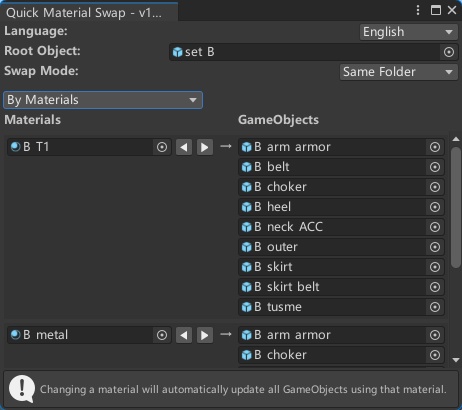

Quick Material Swap Unity Editor script to make changing materials on an object & its children much quicker. This tool allows users to quickly swap materials on GameObjects through an intuitive interface, with multiple view modes and smart swapping options. Please refer to the details https://github.com/MoeHero/UnityPlugins/tree/main/QuickMaterialSwap Features Material Swapping: Quickly replace materials through an intuitive interface Dual View Modes: By Materials: Group GameObjects by the materials they use By GameObjects: Show materials used by each GameObject Swap Modes: Same Folder: Cycle through materials within the same folder Sibling Folder: Switch to corresponding materials in sibling folders with the same name Multi-language Support: Interface available in multiple languages How to Use Open Unity and navigate to the "Tools/MoeGarden" menu in the top menu bar. Select "Quick Material Swap" to open the Quick Material Swap window. In the "Root Object" field, select the GameObject whose materials you want to view and edit. The script will automatically display all the materials used by the selected GameObject and its children in a list. View Modes By Materials: Shows all unique materials and which GameObjects use them By GameObjects: Shows each GameObject and the materials it uses Swap Modes Same Folder: Use the arrow buttons (◀ ▶) next to material fields to cycle through materials in the same folder Sibling Folder: Use the arrow buttons to switch to corresponding materials in sibling folders with the same name Tips Changing a material in the list will automatically change the material for any GameObject that used it. Changes are properly recorded using Unity's Undo System and can be undone using CTRL+Z. Acknowledgements This project is based on the original work by NotAKidoS. You can find the original project at: https://github.com/NotAKidoS/QuickMaterialSwap License This project is licensed under the MIT License - see the LICENSE file for details. Use of this Unity Script is done so at the user's own risk and the creator cannot be held responsible for any issues arising from its use.