
【無料版あり】CorePlace
- 支援版Digital500 JPY
- 無料版Digital0 JPY
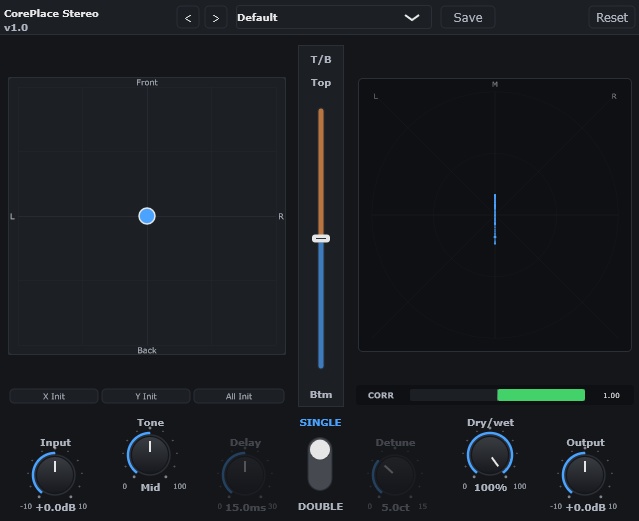
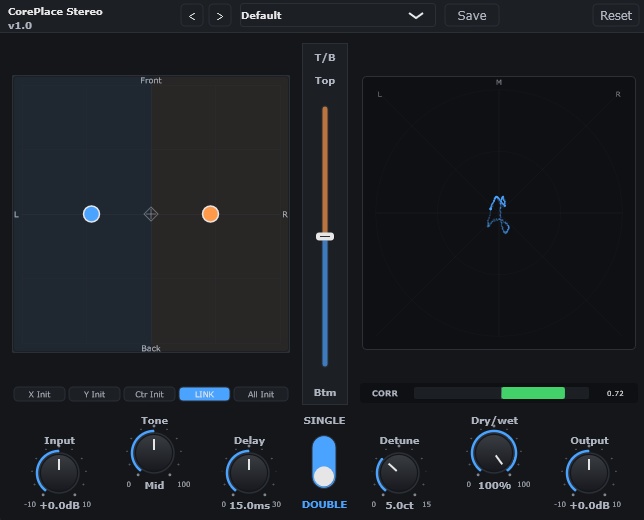
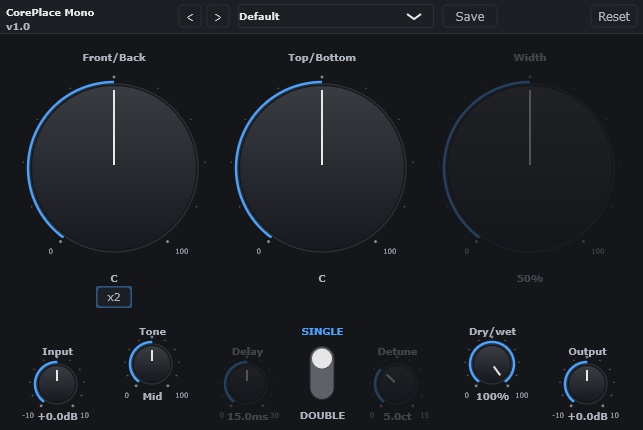
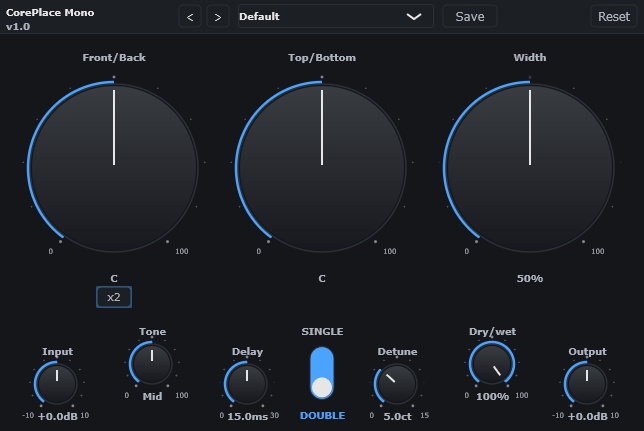


================================================== CorePlace - Placement Processor ================================================== ※無料版と支援版の中身は同じです。 ※Windowsのみ対応です。 音の「位置」を決める。直感的な配置コントロールプラグイン。 ※画像1枚目: Stereo版 SINGLEモード ※画像2枚目: Stereo版 DOUBLERモード ※画像3枚目: Mono版 SINGLEモード ※画像4枚目: Mono版 DOUBLERモード ---------------------------------------------------------------------- 概要 ---------------------------------------------------------------------- CorePlaceは、音声の「配置」をコントロールするVST3プラグインです。 ステレオ素材はXYパッド、モノラル素材は専用ノブで、音の前後感・ 左右の広がり・ダブリング効果を直感的に作り出せます。 複雑なパラメータを触らなくても、気軽に使えるプラグインです。 ---------------------------------------------------------------------- こんな方におすすめ ---------------------------------------------------------------------- ・音声をミックスの「前」に出したい ・コーラスやハモリを自然に広げたい ・ダブリング効果を簡単に作りたい ・モノラル素材に自然なステレオ感を加えたい ・複雑なプラグインは苦手だけど、いい感じにしたい ---------------------------------------------------------------------- 主な機能 ---------------------------------------------------------------------- 【Stereo版(XYパッド操作)】(画像1・2枚目参照) ステレオ音声を直感的に配置できます。 ・X軸: 左右のパン ・Y軸: 前後感(上=前方/近い、下=後方/遠い) ・SINGLEモード: 1つのポイントで全体の配置をコントロール ・DOUBLERモード: 左右独立した2つのポイントでダブリング効果を生成 - LINK: L/Rポイントを左右対称にミラー連動 - Center: 中央ポイントを追加して個別制御 - x2: EQ深さを2倍にして効果を強める 【Mono版(専用ノブ操作)】(画像3・4枚目参照) モノラル素材をステレオ空間に配置します。 ・F/B(Front/Back): 前後の奥行き感を調整 ・T/B(Top/Bottom): 周波数バランスで上下感を調整 ・WIDTH: Mid/Sideベースのステレオ幅を生成 【共通機能】 ・Depth EQ: 配置に連動した自然なEQ処理 ・T/B Tone Shaper: 4バンドEQによるトーン調整 ・内蔵コンプレッサー: ルックアヘッド付きの自動レベル管理 ・Delay / Detune: ダブラー効果の微調整(時間差・ピッチ差) ・ユーザープリセット: 設定の保存・読み込み ・Undo/Redo: Ctrl+Z / Ctrl+Y ---------------------------------------------------------------------- 2つのバリアント ---------------------------------------------------------------------- | Stereo版 | Mono版 ───────────────────────────────────────── 入力 | ステレオ | モノラル 出力 | ステレオ | ステレオ 操作方式 | XYパッド | 専用ノブ Goniometer | あり | なし SINGLE/DOUBLER | あり | あり 用途に応じて使い分けてください。どちらもZIPに同梱されています。 ---------------------------------------------------------------------- 動作環境 ---------------------------------------------------------------------- ・OS: Windows 10/11 (64bit) ・プラグイン形式: VST3 ・DAW: VST3対応のDAW ・動作確認済み: Studio One 他のDAWでの動作報告もお待ちしております。 問題なく動作した場合はぜひお知らせください。 ---------------------------------------------------------------------- 同梱内容 ---------------------------------------------------------------------- ・CorePlace_Stereo.vst3(Stereo版プラグイン) ・CorePlace_Mono.vst3(Mono版プラグイン) ・install.bat(インストーラー) ・CorePlace_Manual.pdf(操作マニュアル) ・README_ja.txt(日本語説明書) ・README_en.txt(英語説明書) ---------------------------------------------------------------------- インストール方法 ---------------------------------------------------------------------- 1. ダウンロードしたZIPを解凍 2. install.bat を右クリック→「管理者として実行」 3. DAWを再起動またはプラグインを再スキャン 4. プラグイン一覧からCorePlaceを選択 ---------------------------------------------------------------------- 今後の開発について ---------------------------------------------------------------------- ※現在はボーカル向けとしています 今後のアップデートで各種楽器にも簡単に使用できるようにしていく予定です ・Mono→Stereo版: ご要望があれば開発予定です ・AU(Mac版): 多くのご要望をいただければ対応を検討します ・AAX(Pro Tools): 開発者署名・審査等のハードルが高いため、 すぐの対応は難しい状況です その他のご要望にも可能な限りお応えしていきたいと考えています。 お気軽にご意見をお寄せください。 ---------------------------------------------------------------------- サポート ---------------------------------------------------------------------- ご不明な点がございましたら、Boothのメッセージ機能よりお問い合わせください。 ---------------------------------------------------------------------- 価格 ---------------------------------------------------------------------- 内容はどちらも同じです。機能制限はありません。 ・無料版: 0円 ・応援支援版: 800円 無料でご利用いただけます。 応援していただける方は、ぜひ支援版をご購入ください。 BOOSTしていただけると、さらに励みになります! いただいたご支援は、今後の新プラグイン開発に活用させていただきます。 ================================================== (C) 2026 Dice Creative Studio ==================================================
インストール方法
1. ダウンロードしたZIPを解凍 2. install.bat を右クリック→「管理者として実行」 3. DAWを再起動またはプラグインを再スキャン 4. プラグイン一覧からCorePlaceを選択 手動で配置したい場合は、同梱のCorePlace_Stereo.vst3、CorePlace_Mono.vst3をvst3用フォルダに移動してください。
同梱内容
・CorePlace_Stereo.vst3(Stereo版プラグイン) ・CorePlace_Mono.vst3(Mono版プラグイン) ・install.bat(インストーラー) ・CorePlace_Manual.pdf(操作マニュアル) ・README_ja.txt(日本語説明書) ・README_en.txt(英語説明書)
動作環境
・OS: Windows 10/11 (64bit) ・プラグイン形式: VST3 ・DAW: VST3対応のDAW ・動作確認済み: Studio One 他のDAWでの動作報告もお待ちしております。 問題なく動作した場合はぜひお知らせください。
アップデート履歴
[2026-03-07: v1.0] 新規リリース [2026-03-08: v1.1] ■ バグ修正 ・[Mono] ウィンドウを閉じて再度開くと全設定がデフォルトに戻るバグを修正 ■ 改善 ・[Mono] ×2ボタンをSINGLE/DOUBLEの両モードで常時表示に変更 ・[Stereo] SINGLEモードに×2モードを追加(ポイントダブルクリックで切替)
Introducing CorePlace (English)
================================================== CorePlace - Placement Processor ================================================== *The free and supporter editions are identical in content. *Windows only. Define where your sound sits. An intuitive placement control plugin. *Image 1: Stereo version — SINGLE mode *Image 2: Stereo version — DOUBLER mode *Image 3: Mono version — SINGLE mode *Image 4: Mono version — DOUBLER mode ---------------------------------------------------------------------- Overview ---------------------------------------------------------------------- CorePlace is a VST3 plugin that controls the "placement" of audio. With an XY pad for stereo sources and dedicated knobs for mono sources, you can intuitively shape front-to-back depth, left-right spread, and doubling effects. No need to dig into complex parameters — just drop it in and go. ---------------------------------------------------------------------- Who Is This For? ---------------------------------------------------------------------- - You want to push a vocal to the "front" of your mix - You want to naturally widen choruses and harmonies - You want an easy way to create doubling effects - You want to add natural stereo width to mono sources - You're not into complex plugins but still want great results ---------------------------------------------------------------------- Key Features ---------------------------------------------------------------------- 【Stereo Version (XY Pad)】(See images 1 & 2) Intuitively place stereo audio in the sound field. - X-axis: Left/right panning - Y-axis: Front/back depth (top = front/close, bottom = back/far) - SINGLE mode: One point controls the overall placement - DOUBLER mode: Two independent L/R points generate a doubling effect - LINK: Mirror L/R points symmetrically - Center: Add a center point for individual control - x2: Double the EQ depth for a stronger effect 【Mono Version (Dedicated Knobs)】(See images 3 & 4) Place mono sources in a stereo sound field. - F/B (Front/Back): Adjust depth perception - T/B (Top/Bottom): Adjust tonal balance for vertical positioning - WIDTH: Generate stereo width using Mid/Side processing 【Common Features】 - Depth EQ: Natural EQ processing linked to placement - T/B Tone Shaper: 4-band EQ for tonal adjustment - Built-in Compressor: Automatic level management with lookahead - Delay / Detune: Fine-tune doubler effect (time offset & pitch shift) - User Presets: Save and load your settings - Undo/Redo: Ctrl+Z / Ctrl+Y ---------------------------------------------------------------------- Two Variants ---------------------------------------------------------------------- | Stereo | Mono ------------------------------------------------------ Input | Stereo | Mono Output | Stereo | Stereo Control | XY Pad | Dedicated Knobs Goniometer | Yes | No SINGLE/DOUBLER | Yes | Yes Choose the variant that fits your workflow. Both are included in the ZIP. ---------------------------------------------------------------------- System Requirements ---------------------------------------------------------------------- - OS: Windows 10/11 (64-bit) - Plugin format: VST3 - DAW: Any DAW that supports VST3 - Verified with: Studio One We welcome reports from users on other DAWs. If it works well for you, please let us know! ---------------------------------------------------------------------- Package Contents ---------------------------------------------------------------------- - CorePlace_Stereo.vst3 (Stereo version plugin) - CorePlace_Mono.vst3 (Mono version plugin) - install.bat (Installer) - CorePlace_Manual.pdf (User manual) - README_ja.txt (Japanese readme) - README_en.txt (English readme) ---------------------------------------------------------------------- Installation ---------------------------------------------------------------------- 1. Extract the downloaded ZIP file 2. Right-click install.bat → "Run as administrator" 3. Restart your DAW or rescan plugins 4. Select CorePlace from your plugin list ---------------------------------------------------------------------- Future Development ---------------------------------------------------------------------- *Currently optimized for vocals. Future updates will make it easy to use with various instruments as well. - Mono→Stereo version: Will be developed if there is demand - AU (Mac): Will be considered if there is significant demand - AAX (Pro Tools): Due to the developer signing and review requirements, this is not feasible in the near term We will do our best to accommodate other requests as well. Feel free to share your feedback! ---------------------------------------------------------------------- Support ---------------------------------------------------------------------- If you have any questions, please contact us via Booth's messaging feature. ---------------------------------------------------------------------- Pricing ---------------------------------------------------------------------- Both editions are identical. There are no feature restrictions. - Free edition: ¥0 - Supporter edition: ¥800 You can use it completely free of charge. If you'd like to support us, please consider purchasing the supporter edition. A BOOST would be even more encouraging! All support will be used toward developing new plugins. ================================================== (C) 2026 Dice Creative Studio ==================================================