

VRC Public Instance Browser
- DownloadDigital100 JPY
- DonationDigital10,000 JPY
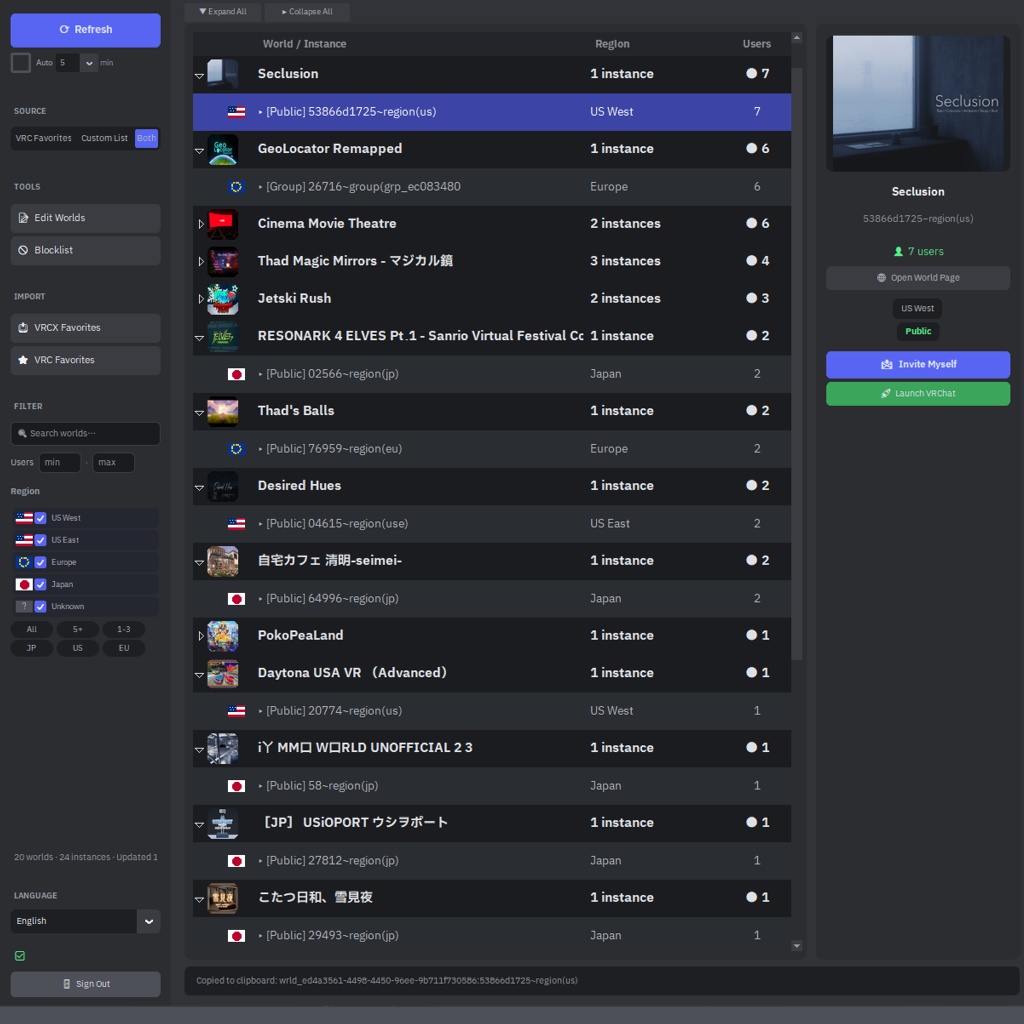

The VRC Public Instance Browser periodically checks public instances of worlds you're interested in and displays their current player counts. What it can do: 🔍 Monitor Display live player counts for all public instances of your favorite worlds 🚀 Instant Join Simply click an instance to launch VRChat and join immediately 🌏 Filter by Region Display only the regions you want (Japan / US / EU, etc.) 📌 Pin & Organize Pin frequently visited worlds to the top Group worlds into folders for cleaner organization 🌐 6-Language Support English / Japanese / Korean / Chinese / Spanish / Portuguese Getting Started: 1) Launch VRC Public Search.exe 2) Log in with your VRChat account 3) Select the target world sources (VRC Favorites / Custom Lists / Both) 4) Press Refresh → Fetch public instances and display player counts 5) Right-click on a world → Pin / Group / Copy link / Join, etc. Additional Features: ・Add world IDs (wrld_...) in the World List Editor (sidebar) ・Use Quick Presets ("5+", "1-3", "JP", "US") for one-click filtering ・Import favorites from VRCX ・Settings and world lists are automatically saved