

【無料】Minecraft Ghastling Pet
- 無料版Digital0 JPY
- Buy Me A CoffeeDigital500 JPY

Minecraft Ghastling Pet
JP
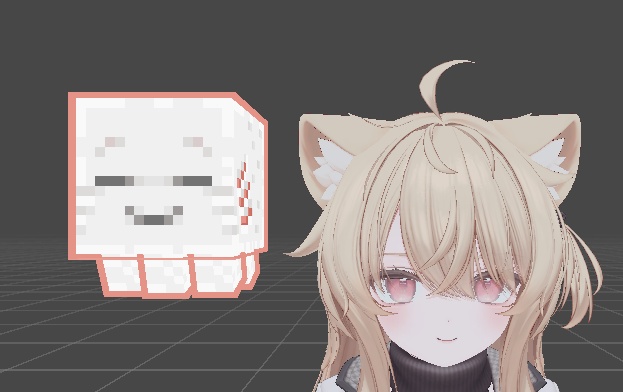
無料版と「Buy Me A Coffee」版は同じ内容です。 君に付き添える小乐魂~ インポート方法: 1.プレファブをモデルのルートノードに入れて、その後Root/FollowTargetの位置(頭部のどちらかの側)を修正する 2.ヘッドボーンをフォローターゲットのParent ConstraintコンポーネントのConstraint Setting/Sourcesに入れて、アクティブをクリックする 3. Ghastling ToggleオブジェクトのMAオブジェクトトグルの反転条件オプションを開きます(デフォルトではモデルが非表示です。切り替え機能が不要な場合は、Ghastling Toggleオブジェクトを削除できます) 追加機能:小楽魂をタップすると音響効果がランダムに発動しますよ~ モデルとフォローロジックはこの著者から:https://9livewolf.booth.pm/ インポート後にバグが発生した場合は、ご連絡ください
EN
The free version and the "Buy Me A Coffe" version have the same content. A Ghastling that can follow you~ Import method: 1. Place the prefabricated part into the root node of the model, and then modify the position of Root/FollowTarget (either side of the head) 2. Place the Head bone into the Constraint Setting/Sources of the Parent Constraint component of the FollowTarget, and then click Active 3. Enable the toggle condition option for the MA Object Toggle of the Ghastling Toggle object (the model is hidden by default. If the toggle function is not needed, the Ghastling Toggle object can be deleted) Extra feature: Touching Ghastling will randomly trigger sound effects~ The model and following logic are sourced from this author: https://9livewolf.booth.pm/ If any bugs occur after importing, please contact me
CN
免费版和Buy Me A Coffe版是相同的内容。 一只可以跟随你的小乐魂~ 导入方法: 1.将预制件放入模型根节点,随后修改Root/FollowTarget的位置(头部任意两侧) 2.将Head骨骼放入FollowTarget的Parent Constraint组件里的Constraint Setting/Sources,然后点击Active 3.打开 Ghastling Toggle 对象的 MA Object Toggle 的反转条件选项(默认隐藏模型,如果不需要切换功能,可删除Ghastling Toggle对象) 额外功能:触摸小乐魂会随机触发音效哦~ 模型和跟随逻辑来源于此作者:https://9livewolf.booth.pm/ 如导入后出现Bug请与我联系