
HT03 【VRoid】カラフルキャンディ (20 Colors) Hair Texture / ヘアーテクスチャ
- [Standard Ver.] BasicDigital500 JPY
- [Standard Ver.] EXDigital800 JPY
- [Corporate Ver.] BasicDigital1,000 JPY
- [Corporate Ver.] EXDigital1,600 JPY

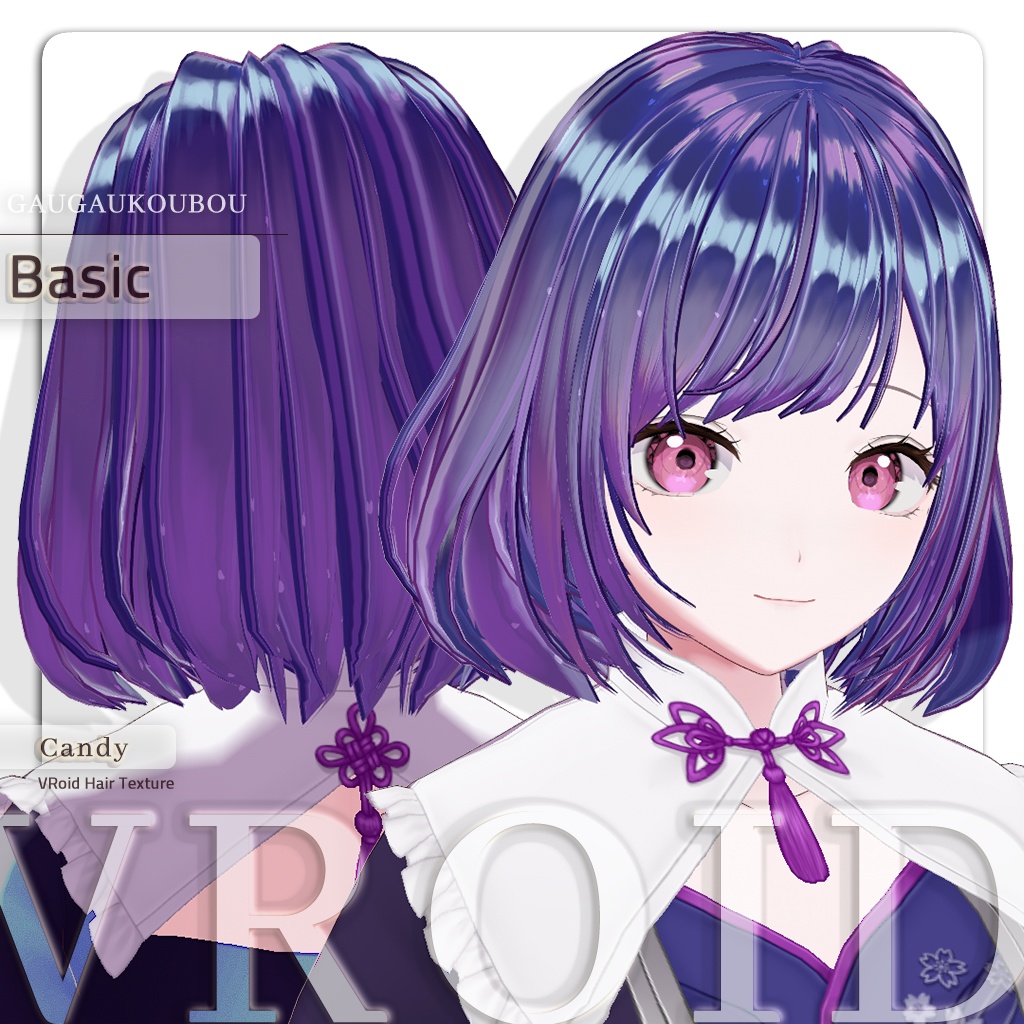




■以下に内容・注意事項・利用規約が記載されています。必ずご購入前にお読みください。
◆商品説明
■プレビューについての注意:VRoid Hubでの3Dプレビューに関して、実際の影色はプレビューより明るく、彩度が低くなっています。実際の色味や仕上がりについては、商品画像をご参照ください。 ■メリット:ほとんどの異なる長さ・形状の髪型に適用可能。 ■デメリット:髪の横幅、ハイライト位置、オフセットを調整する必要があります。オプションが多く、調整に手間がかかります。
◆各バージョンの特徴
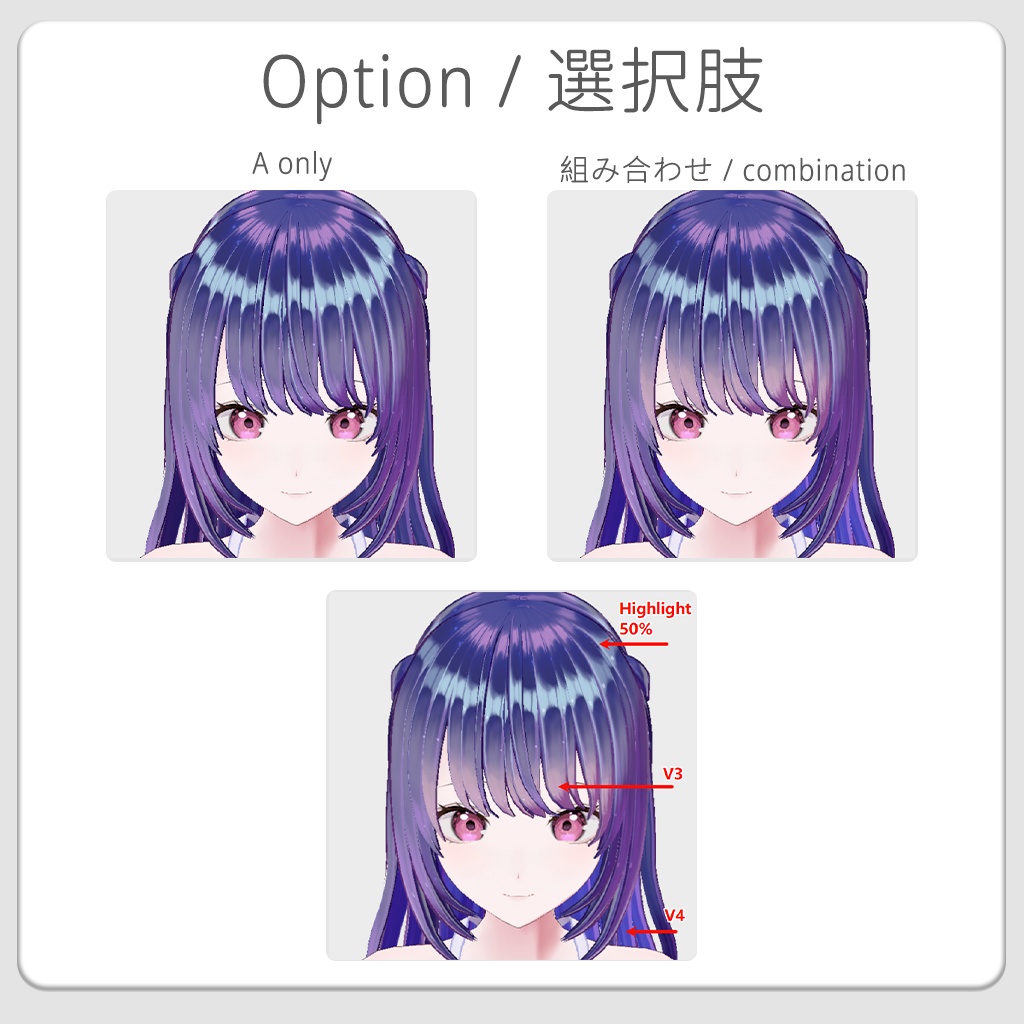
■Lite版: レイヤー構造なし(ハイライト+シングルテクスチャ)。髪型調整後にインポートするだけで完成します。説明書なしで、手早く仕上げたい方に最適です。 ■Basic版:Aタイプ。 レイヤー構造あり(ハイライトのみ分割)。インポートする画像数がEX版より少なく、基本的な使い方に適しています。 ■EX版:Aタイプ+Bタイプ レイヤーを細かく分割(ハイライト、影、色変化レイヤーを含む)しており、高い自由度と究極のディテールを求める方におすすめです。
◆商品内容
●.vroidcustomitem` ファイル(マテリアルおよびレイヤー構造インポート用) ●20色のPNG、PSD ●シェーダー設定の参考画像(アウトライン、影色の参考) ●Basic版テクスチャ【各カラー】×10枚、EX版テクスチャ【各カラー】×17枚 多機能・カスタマイズレイヤー系:V1、V2、V3、V4、V5 ハイライト系:Highlight_1、Highlight_2、Highlight_3 ベーステクスチャ:Basic_A 、Base、Detail_1、Detail_2、Detail_3
◆レイヤー機能の説明
レイヤーの表示切替および不透明度調整により、効果強度をコントロールできます。 これらの機能を組み合わせることで、よりクオリティの高い仕上がりになります。 V1:全体の色変更 V2:内側の色変更 V3:毛先の透け感 V4:毛量アップ(ボリューム追加) V5:束髪・三つ編み用
◆使用方法
■Lite版の使い方(最も簡単) 1. 髪型の【テクスチャパラメータ】を調整します。おすすめの設定は【横幅】:1、【オフセット】:0、【ハイライト位置】:仕上がりを見ながら微調整します。 2. 好みの色を選び、【テクスチャを編集】に入ってテクスチャを読み込みます。 3. 【アウトラインカラー】と【かげ色】を調整し、【ルック】の設定を変更します。 ●レイヤー構造のインポートや、より詳細な調整方法については、以下の説明書リンクをご参照ください。 https://serious-ink-db6.notion.site/HT03-VRoid-20-Colors-Hair-Texture-1-0-b1107136e03583129069019620395836?source=copy_link
◆注意事項
⚠直接使用できず、テクスチャの調整が必要です。 ⚠ヘアプリセット以外の3Dモデル・衣装テクスチャ・イヤリングは付属していません。 ⚠必ず利用規約と仕上がりを確認し、納得された上でご購入下さい。本製品を購入およびダウンロードすることにより、お客様は利用規約に同意したものとみなされます。 ⚠デジタルデータの特性により、ご購入後の返品及び返金・減額の請求、又は購入代金支払いの拒絶はできません。
◆利用規約(簡易版)
●商用利用→一部許可。ゲーム、ライブ配信、VRChat、MMD、SNSなどの利用が可能。 ●法人、企業利用の場合は【企業用】バージョンを購入してください。 ●改変 → 可 ●再配布・販売 → 不可 ●団体、多人使用 → 使用者の状況(個人または法人)に応じて人数(使用分)ごとに購入 ●クレジット必要ではありません。 ●詳細版はこちら https://gaugaukoubou.fanbox.cc/posts/6610192
---------------------------------------------------------
■The Content, Cautions, and Rules of Usage listed below should be read and confirmed before making any purchases.
◆ Product Description
■Preview Notice: Regarding the 3D preview on VRoid Hub, the actual shadow color appears brighter and less saturated than shown in the preview. Please refer to the product images for the most accurate representation of colors and final results. ■Advantages: Compatible with most hairstyles of different lengths and shapes. ■Disadvantages: You need to adjust the hair’s width, Highlight Position, and Offset before importing.
◆ Features of Each Version
■ Lite Version: No layer structure. Includes a highlight texture and a single base texture. Simply adjust the hairstyle and import the texture to use it. Suitable for users who want quick results without reading the manual. ■ Basic Version: Type A Includes a layer structure with only the highlight layers separated. Compared to the EX version, it requires importing fewer images and is suitable for basic use. ■ EX Version: Type A + Type B Includes a finely divided layer structure (highlight, shading, and color variation layers). Recommended for users who want greater flexibility and maximum detail.
◆ Product Contents
● .vroidcustomitem file (for importing materials and layer structure) ● 20 Colors – PNG & PSD ● Shader reference images (outline and shadow color settings) ● Basic Version Textures Per Color x 10 ● EX Version Textures Per Color x 17 ● Functional & Customization Layers: V1, V2, V3, V4, V5 ● Highlight Layers: Highlight_1, Highlight_2, Highlight_3 ● Base Layers: Basic_A, Base, Detail_1, Detail_2, Detail_3
◆ Layer Function Explanation
You can control effect intensity by toggling layer visibility and adjusting opacity. Combining these functions allows for higher-quality results. V1: Overall color adjustment V2: Inner color adjustment V3: Semi-transparent effect at hair tips V4: Increased hair volume V5: For hair strands and braids
◆ How to Use the Lite Version (Simplest Method)
1. Adjust the hairstyle Texture Parameters. Recommended settings: Width: 1, Offset: 0, and Highlights Position can be fine-tuned based on the desired result. 2. Choose your preferred color, enter Edit Texture, and import the texture. 3. Adjust Outline Color and Shader Color, then modify the Look settings. ● If you want to import the layer structure or learn more detailed ways to use the textures, please refer to the manual at the link below. https://serious-ink-db6.notion.site/HT03-VRoid-20-Colors-Hair-Texture-1-0-b1107136e03583129069019620395836?source=copy_link
◆Cautions
⚠It cannot be used directly and requires texture adjustments. ⚠This product exclusively consists of the hair preset. Character models, clothing, and other elements shown in the preview images are not included in the product. ⚠Please be sure to read and confirm the Rules of Usage. Once the purchase is made and the product is downloaded, you will be considered to have agreed to the the Rules of Usage. ⚠Due to the characteristics of digital products, refunds for any reason will not be provided once the purchase has been made.
◆Terms of use (simplified version)
●Commercial use is partially permitted for applications such as games, live streaming, VRChat, MMD, and social media platforms. ●For corporate and business use, please purchase the Corporate version. ●Modification → Permitted ●Redistribution and sale → Prohibited ●For group or multi-user usage, purchase according to the number of users (individual or corporate). ●No credit needed.
◆更新履歴 / Update history
◆2026/03/01◆开始贩售 Start of sales ◆2026/03/06◆更新 Update ・【Lite】版と説明書を追加しました。 ・C11のV1〜V5テクスチャのカラーを修正しました。 ・Added the [Lite] version and instruction manual. ・Fixed the colors of the V1-V5 textures for C11.