

VRC Dance Installer & VMD (MMD) Converter
- Digital1,000 JPY
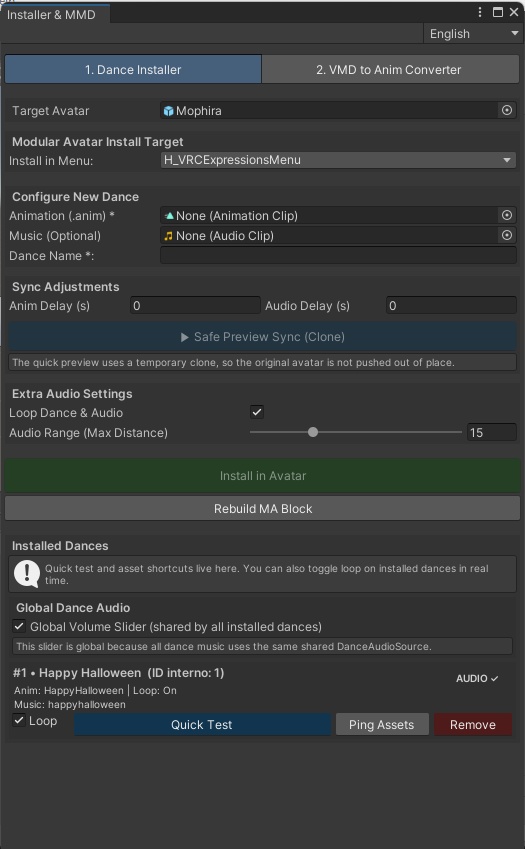
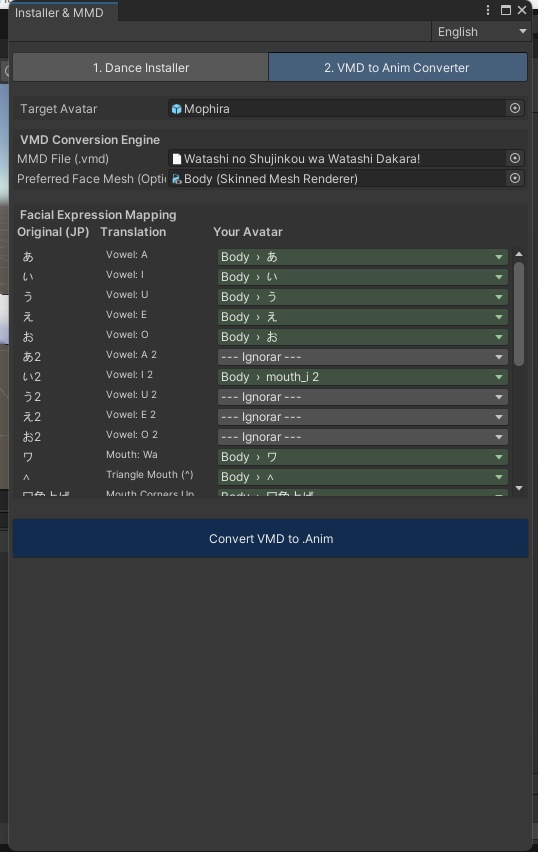


[VRChat] King Script: VRC Dance Installer & VMD Converter PT ⚠️ Requer Modular Avatar Link oficial: https://modular-avatar.nadena.dev/ 💃 Ferramenta para adicionar danças MMD ao avatar de forma rápida, organizada e segura no Unity. Combina conversão VMD, instalação automática e fluxo com Modular Avatar, evitando edição destrutiva do avatar. ✨ Funções VMD to Anim com auto-mapeamento facial melhorado para morphs MMD Instalação automática de dança, música, parâmetros e menu Preview seguro com clone para testar sync sem mexer no avatar original Gerenciamento de danças instaladas com teste rápido, loop em tempo real, mostrar assets e remover Controle global de volume para todas as danças do mesmo DanceAudioSource Menus automáticos em submenus numerados Reconstrução do bloco MA quando necessário 🆕 Atualização 2026-03-21 Principais mudanças em relação ao script antigo: ✅ Migração para Modular Avatar ✅ Instalação não destrutiva ✅ Preview com clone temporário ✅ Auto-match facial VMD muito mais inteligente ✅ Melhor suporte a morphs MMD em japonês ✅ Loop em tempo real nas danças instaladas ✅ Volume global compartilhado ✅ Melhor organização dos menus e da lista de danças Histórico v1.0 Beta — 2026-03-19 06:00 Versão atual — 2026-03-21 Como usar Instale o Modular Avatar no projeto Arraste o avatar em Target Avatar Selecione animação .anim, música (opcional) e nome da dança Ajuste o delay e teste no Preview Seguro de Sincronia (Clone) Clique em Instalar no Avatar Para VMD: selecione o .vmd, revise o mapeamento facial e clique em Converter VMD para .Anim Licença Uso pessoal e comercial: Permitido Revenda / redistribuição: Proibido Aviso: sempre faça backup do avatar/projeto antes de usar. EN ⚠️ Requires Modular Avatar Official link: https://modular-avatar.nadena.dev/ 💃 A tool to add MMD dances to your avatar quickly, cleanly, and safely in Unity. It combines VMD conversion, automatic dance installation, and a Modular Avatar workflow to avoid destructive edits. ✨ Features VMD to Anim with improved facial auto-mapping for MMD morphs Automatic installation of dance, music, parameters, and menu Safe clone preview for sync testing without affecting the original avatar Installed dance management with quick test, real-time loop, show assets, and remove Global volume control for all dances using the same DanceAudioSource Automatic numbered submenus MA block rebuild when needed 🆕 Update 2026-03-21 Main changes from the old script: ✅ Migrated to Modular Avatar ✅ Non-destructive installation ✅ Temporary clone preview ✅ Much smarter VMD facial auto-match ✅ Better support for Japanese MMD morphs ✅ Real-time loop for installed dances ✅ Shared global volume control ✅ Better menu and installed dance organization Version History v1.0 Beta — 2026-03-19 06:00 Current version — 2026-03-21 How to use Install Modular Avatar in your project Drag your avatar into Target Avatar Select the .anim, music (optional), and dance name Adjust delay and test with Safe Sync Preview (Clone) Click Install in Avatar For VMD: select the .vmd, review facial mapping, then click Convert VMD to .Anim License Personal / commercial use: Allowed Resale / redistribution: Prohibited Disclaimer: always back up your avatar/project before use. JP ⚠️ Modular Avatar が必要です 公式リンク: https://modular-avatar.nadena.dev/ 💃 Unity上でMMDダンスを素早く、安全かつ整理された形でアバターに追加するためのツールです。 VMD変換、ダンス自動導入、Modular Avatar ワークフローを組み合わせ、破壊的な編集をできるだけ避けます。 ✨ 主な機能 MMDモーフ対応を強化した VMD→Anim変換 ダンス、音楽、パラメーター、メニューの 自動インストール 元アバターに影響しにくい クローンプレビュー インストール済みダンス管理(クイックテスト、リアルタイムループ、アセット表示、削除) 同じ DanceAudioSource を使う全ダンス向け グローバル音量 番号付きサブメニュー自動整理 必要時の MAブロック再構築 🆕 2026-03-21 アップデート 旧版からの主な変更: ✅ Modular Avatar 対応 ✅ 非破壊インストール ✅ 一時クローンプレビュー ✅ VMD表情の自動マッチ精度向上 ✅ 日本語MMDモーフ対応強化 ✅ インストール済みダンスの リアルタイムループ ✅ 共通 グローバル音量 ✅ メニューとダンス管理を改善 バージョン履歴 v1.0 Beta — 2026-03-19 06:00 現行版 — 2026-03-21 使用方法 プロジェクトに Modular Avatar を導入 Target Avatar にアバターを設定 .anim、音楽(任意)、ダンス名を設定 遅延を調整し Safe Sync Preview (Clone) で確認 Install in Avatar をクリック VMD変換時は .vmd を選び、表情マッピング確認後 Convert VMD to .Anim をクリック 利用規約 個人 / 商用利用: 可能 再配布 / 転売: 禁止 免責事項: 使用前にアバター / プロジェクトのバックアップを取ってください。