

Poiyomi Bulk Copier
- Poiyomi Bulk CopierDigital500 JPY
- Coffee cost sponsorship (The composition is the same)Digital1,000 JPY
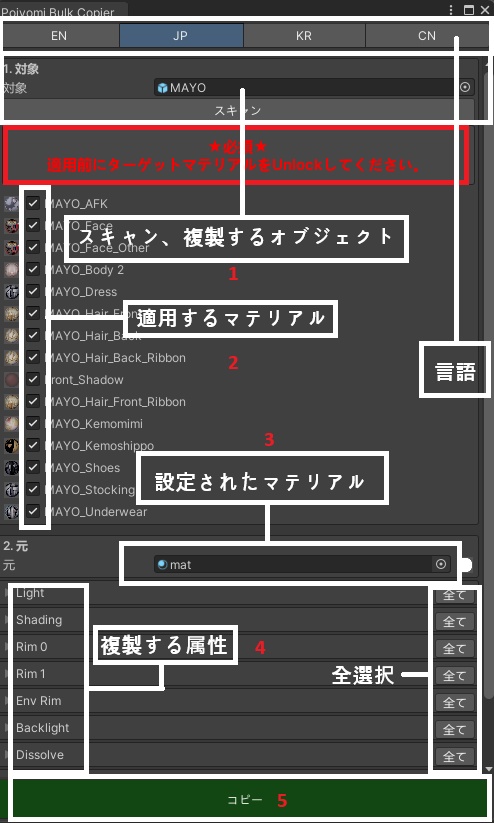


English [Product Description] This tool allows you to copy desired material properties from a source Poiyomi material (https://github.com/poiyomi/PoiyomiToonShader) to multiple other Poiyomi materials. It includes a material backup function and a feature to copy source properties. You can also modify the source material's properties in real-time directly within the tool window. [How to Use] Select Poiyomi Tools / Poiyomi Bulk Copier from the top toolbar in Unity to open the tool window. Drag and drop an object from the Hierarchy into the Drag Object field. Click the Scan button to automatically load materials using Poiyomi. From the loaded list, select the target materials you wish to paste onto. Drag and drop the material you want to copy from into the 'Source Material' field below. Select the properties you wish to copy. Click the Copy button to complete the process. Please refer to the video for a usage example. [Environment] Operation has been verified in Unity 2022.3.22f and Poyomi Toon, (Pro) Performance in other versions is not guaranteed. [Precautions] The Poiyomi version of the source material must match the version of the target materials. You must Unlock the shaders via "Unlock Shader" before applying the changes. Please send any bug reports or suggestions to ehddlfma1@gmail.com. Any discovered bugs will be fixed, and patch notes will be provided upon update. Please note that new features and other updates may be added in the future. The license belongs to the shop owner; any reproduction or modification is strictly prohibited. Legal action may be taken upon discovery of such violations. ------------------------------------------------------------------- Japanese 【商品説明】 本ツールは、Poiyomi (https://github.com/poiyomi/PoiyomiToonShader) を使用しているマテリアルから、希望するプロパティを他の複数の Poiyomi マテリアルにコピーできるツールです。マテリアルのバックアップ機能と、ソースマテリアルの属性を他のマテリアルにコピーする機能を備えています。ソースマテリアルのプロパティは、ツールウィンドウ上でリアルタイムに修正することも可能です。 【使用方法】 Unity の上部ツールバーから Poiyomi Tools / Poiyomi Bulk Copier を選択してツールウィンドウを開きます。 Hierarchy のオブジェクトを Drag Object 項目にドラッグ&ドロップします。 Scan ボタンをクリックし、Poiyomi を使用しているマテリアルを自動的にロードします。 ロードされたリストから、貼り付け先となるマテリアルを選択します。 下の 「Source Material」 項目に、コピー元となるマテリアルをドラッグ&ドロップします。 コピーしたいプロパティを選択します。 Copy ボタンをクリックすれば完了です。 使用例については動画をご参照ください。 【動作確認環境】 Unity 2022.3.22f および Poyomi Toon, (Pro) での動作を確認済みです。その他のバージョンでの動作は保証いたしかねます。 【注意事項】 ソースマテリアルと適用先マテリアルの Poiyomi バージョンが一致している必要があります。 必ず Unlock Shader を実行し、アンロックした状態で適用してください。 その他、バグ報告やご要望などがございましたら、ehddlfma1@gmail.com 까지ご連絡ください。 バグが発見された場合は随時修正を行い、修正時にはパッチノートを公開いたします。また、今後は機能追加やその他のアップデートを予定しております。 ライセンスは本ショップのオーナーに帰属しており、複製および修正は固く禁じられています。これに違反した場合、法的措置を講じることがあります。 ------------------------------------------------------------------- Chinese 【产品说明】 本工具可以将源 Poiyomi 材质 (https://github.com/poiyomi/PoiyomiToonShader) 的特定属性批量复制到多个其他 Poiyomi 材质中。它具备材质备份功能以及将源材质属性复制到其他材质的功能。您还可以在工具窗口中实时修改源材质的属性。 【使用方法】 在 Unity 顶部工具栏中选择 Poiyomi Tools / Poiyomi Bulk Copier 以打开工具窗口。 将 Hierarchy 中的对象拖放到 Drag Object 栏目中。 点击 Scan 按钮,自动加载使用 Poiyomi 的材质。 在加载的列表中,选择要粘贴属性的目标材质。 在下方的 ‘Source Material’ 栏目中,拖放想要复制的源材质。 选择要复制的属性。 点击 Copy 按钮即可完成。 使用示例请参考视频。 【运行环境】 已在 Unity 2022.3.22f 及 Poyomi Toon, (Pro)环境下确认运行。不保证在其他版本中的正常运行。 【注意事项】 源材质的 Poiyomi 版本必须与目标材质的版本保持一致。 必须先通过 Unlock Shader 进行解锁后再进行应用。 如有任何漏洞(Bug)反馈或建议,请发送邮件至 ehddlfma1@gmail.com。 若发现漏洞(Bug),我们将及时进行修复,并发布更新公告(Patch Notes)。后续还将进行功能新增及其他相关更新。 版权归本店铺所有,严禁任何形式的复制或修改。一经发现,我们将保留追究法律责任的权利。 ------------------------------------------------------------------- 한국어 【상품 설명】 이쪽은, Poiyomi(https://github.com/poiyomi/PoiyomiToonShader)를 사용하는 머티리얼로부터 희망하는 머티리얼의 속성을 다른 복수의 Poiyomi 머티리얼에 카피할 수 있는 툴입니다. 머티리얼의 백업 기능과 소스 머티리얼의 속성을 다른 머티리얼에 복사하는 기능이 있습니다. 소스 머티리얼의 속성도 도구 창에서 실시간으로 수정할 수 있습니다. 【사용 방법】 Unity의 상단 툴바에서 Poiyomi Tools/Poiyomi Bulk Copier를 선택하여 툴 윈도우를 엽니다. Hierarchy의 객체를 Drag Object 항목으로 드래그 앤 드롭합니다. Scan 버튼을 클릭하여 Poiyomi 를 사용하는 머티리얼을 자동으로 로드합니다. 로드된 목록에서 붙여넣을 머티리얼을 선택합니다. 아래의 'Source Material' 항목에 복사할 머티리얼을 드래그 앤 드롭합니다. 복사할 속성을 선택합니다. Copy 버튼을 클릭하면 완료됩니다. 사용 예는 비디오를 참조하십시오. Unity 2022.3.22f 및 Poyomi Toon, (Pro )에서의 동작을 확인하고 있습니다. 다른 버전에서의 동작은 보증하지 않습니다. 주의사항 : 소스 마테리얼의 Poiyomi 버전과 적용시킬 마테리얼의 버전이 일치해야 하며 언락 쉐이더를 통해서 언락을 해주신 후 적용을 시켜주셔야 합니다. 기타 버그 , 건의사항은 ehddlfma1@gmail.com으로 주시기바랍니다. 버그 발견시 수정될수있고 수정시 패치노트를 작성할 예정입니다. 추후 기능 추가 및 기타 업데이트 가능성이 있습니다. 라이센스는 본 상점주인에게 있으며 복제 및 수정 을 금지합니다. 적발시 법적 대응을 할수 있습니다.