
Blendshape Enchanter | 表情 Animation ⇔ Blendshape 簡単相互変換
- Digital0 JPY
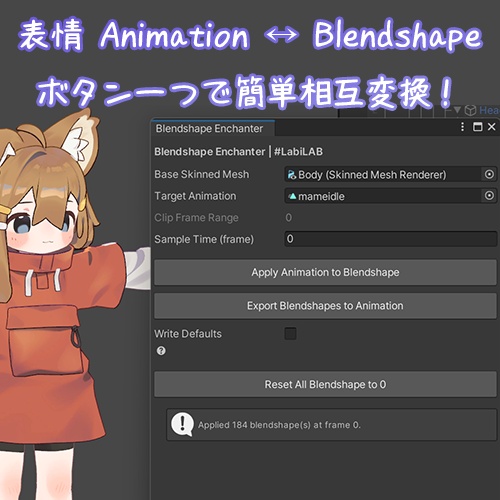
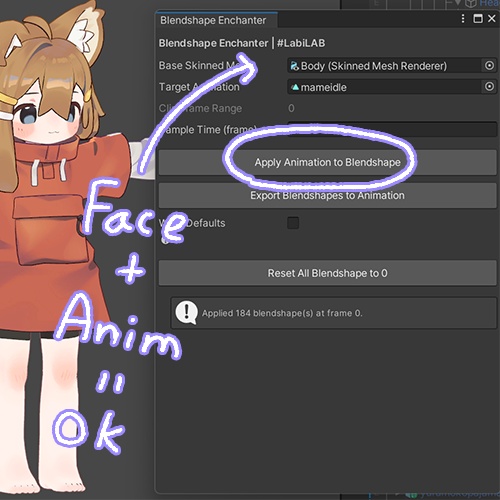
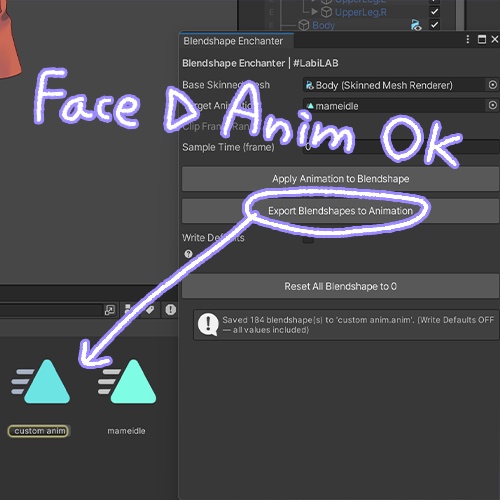
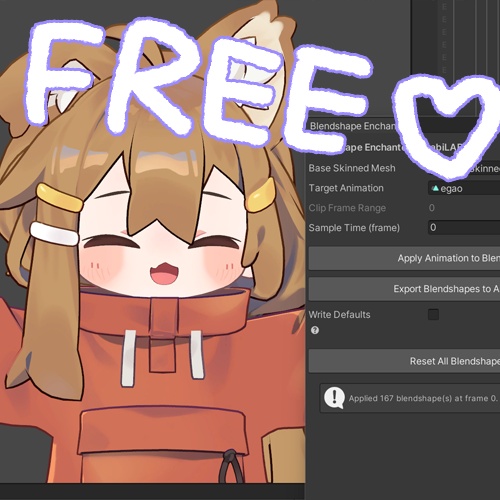


※v1.01 Added filtering for blendshapes used by VRChat Avatar Descriptor (Visemes/Eye Look). Can now include/exclude standard MMD blendshapes. Added direct overwriting of existing animation clips during export. ※日本語は機械翻訳を使用しているため、正確ではない場合があります。ご了承ください。 EN/JP/KR description supported --- Blendshape Enchanter is a lightweight Unity editor extension for VRChat avatar customization. It lets you apply blendshape values from an animation clip and export current blendshape values to a new animation clip directly in the Unity Editor. If you have ever used the Animation window to edit facial expressions manually, this tool can simplify your process. ☆ Features [Apply Animation to Blendshape] Applies blendshape values from an animation clip to a SkinnedMeshRenderer at a selected frame. Useful when you want to load an existing facial expression from a .anim file. [Export Blendshapes to Animation] Exports the current blendshape values of the selected mesh to a new .anim file. Includes a Write Defaults option to choose whether zero-value blendshapes should be recorded. [Reset All Blendshapes to 0] Resets all blendshape values on the selected mesh to 0. ☆ How to Use 1. Import the .unitypackage into your Unity project. 2. Open Tools > Blendshape Enchanter, or right-click a GameObject in the Hierarchy and select GameObject > Blendshape Enchanter. 3. Assign a SkinnedMeshRenderer and, if needed, an Animation Clip. Then click the function you want to use. ☆ Requirements Unity 2022.3.22f1 --- Blendshape Enchanterは、ブレンドシェイプとアニメーションクリップのプロパティ間の変換を簡単に行うためのツールです。アニメーションクリップのブレンドシェイプ値を読み込んで適用したり、現在のモデルに適用されているブレンドシェイプ値をアニメーションクリップとして書き出すことができます。 ☆ 機能 [Apply Animation to Blendshape] アニメーションクリップの特定のフレームに記録されたブレンドシェイプ値をSkinnedMeshRendererに適用します。既存の表情ファイル(.anim)を適用したい場合に便利です。 [Export Blendshapes to Animation] 選択したメッシュの現在のブレンドシェイプスライダーの値を、新しい .anim ファイルとして書き出します。値が0のブレンドシェイプを記録するか無視するかを選択できる「Write Defaults」オプションが含まれています。 [Reset All Blendshapes to 0] 選択したメッシュのすべてのブレンドシェイプ値を0に初期化します。 ☆ 使い方 1. .unitypackage ファイルをUnityプロジェクトにインポートします。 2. Unity上部のツールバーから Tools > Blendshape Enchanter を開くか、 ヒエラルキー(Hierarchy)上の対象オブジェクトを右クリックして Blendshape Enchanter を選択します。 3. SkinnedMeshRendererと、必要に応じてアニメーションファイルをドラッグ&ドロップします。 その後、目的の機能ボタンをクリックします。 ☆ 要件 Unity 2022.3.22f1 --- Blendshape Enchanter는 블렌드쉐이프 값과 애니메이션 클립의 프로퍼티 간 전환을 쉽게 하기 위해 만든 도구입니다. 애니메이션 클립의 블렌드쉐이프 값을 불러와서 적용하거나, 현재 모델에 적용된 블렌드쉐이프 값을 애니메이션 클립으로 내보낼 수 있습니다. 성형 에셋을 사도 애니메이션 창 켜놓고 번거롭게 수치 입력하는 게 불편해서 만들었습니다. ☆ 기능 [Apply Animation to Blendshape] 애니메이션 클립의 특정 프레임에 기록된 블렌드쉐이프 값을 SkinnedMeshRenderer에 적용합니다. 기존에 만들어진 표정(.anim) 파일을 적용하고 싶을 때 유용합니다. [Export Blendshapes to Animation] 선택한 메쉬의 현재 블렌드쉐이프 슬라이더 값을 새로운 .anim 파일로 내보냅니다. 값이 0인 블렌드쉐이프를 기록할지 무시할지 선택할 수 있는 Write Defaults 옵션이 포함되어 있습니다. [Reset All Blendshapes to 0] 선택한 메쉬의 모든 블렌드쉐이프 값을 0으로 초기화합니다. ☆ 사용법 1. .unitypackage 파일을 유니티 프로젝트에 임포트합니다. 2. 유니티 상단 툴바에서 Tools > Blendshape Enchanter를 열거나, 하이어라키(Hierarchy)의 원하는 오브젝트를 우클릭한 후 Blendshape Enchanter를 클릭합니다. 3. SkinnedMeshRenderer가 담긴 원하는 오브젝트와, 필요한 경우 애니메이션 파일을 드래그앤 드롭해서 지정한 후, 원하는 기능의 버튼을 클릭합니다. ☆ 요구사항 Unity 2022.3.22f1