
Universal Curve Shaper
- Digital0 JPY
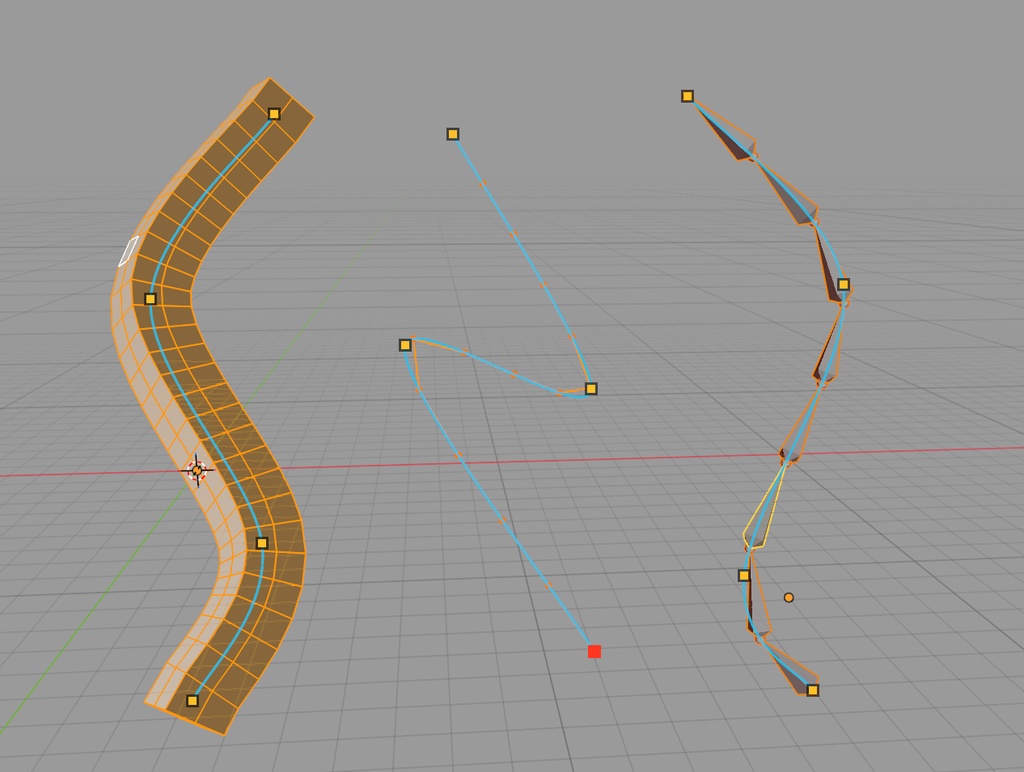

【日本語】 Universal Curve Shaper は、Blender 上で選択したメッシュのエッジチェーン/エッジループ、フェイス選択されたジオメトリ、ポーズボーンチェーン、編集ボーンチェーンを、3D View 上の仮想カーブで直感的に変形できる Blender アドオンです。 主な機能 - メッシュ編集モードで、選択したエッジチェーンやエッジループをカーブ状にリシェイプ - フェイス選択モードでは Geometry Mode として動作し、選択ジオメトリを中心カーブに沿って変形 - ポーズモードで連続したボーンチェーンをリシェイプ - アーマチュア編集モードで編集ボーンチェーンをリシェイプ - 3D View 上でオレンジ色の制御点を直接ドラッグして調整 - 操作中に Q / W で制御点数を変更、A で均等配置を切り替え、S でカーブをスムーズ化 - アドオン設定から制御点サイズ、カーブ線幅、キーマップを調整可能 対応環境 - Blender 3.6 以降 - バージョン: 0.5.2 インストール方法 1. Blender の Edit > Preferences > Add-ons を開きます。 2. Install... をクリックします。 3. universal_curve_shaper.zip を選択します。 4. Universal Curve Shaper を有効化します。 使い方 - メッシュ編集モード、ポーズモード、またはアーマチュア編集モードで対象を選択します。 - Alt+Shift+C を押すか、メニューの Curve Reshape を実行します。 - 制御点をドラッグして形状を調整します。 - Enter または Space で確定、Esc または右クリックでキャンセルできます。 備考 - カーブオブジェクトは作成されません。変形用の仮想カーブとして表示されます。 - Geometry Mode は、変形方向に十分な分割があるメッシュで特に効果的です。 - 本アドオンは独立した実装です。 --- 【English】 Universal Curve Shaper is a Blender add-on that lets you reshape selected mesh edge chains / loops, selected mesh geometry, pose bone chains, and armature edit-bone chains with an interactive virtual curve directly in the 3D View. Main Features - Reshape selected mesh edge chains and edge loops in Mesh Edit Mode - Geometry Mode for face selections, bending selected geometry along a virtual center curve - Reshape continuous bone chains in Pose Mode - Reshape edit-bone chains in Armature Edit Mode - Drag orange control points directly in the 3D View - During the operation: Q / W changes the control point count, A toggles even spacing, and S smooths / flattens the curve - Preferences for control point size, curve line width, and add-on keymaps Compatibility - Blender 3.6 or later - Version: 0.5.2 Installation 1. Open Edit > Preferences > Add-ons in Blender. 2. Click Install... 3. Select universal_curve_shaper.zip. 4. Enable Universal Curve Shaper. Basic Usage - Select target edges, faces, pose bones, or edit bones. - Press Alt+Shift+C, or run Curve Reshape from the relevant menu. - Drag the control points to adjust the shape. - Confirm with Enter or Space, or cancel with Esc / right click. Notes - No actual curve object is created. The curve is a virtual editing guide. - Geometry Mode works best on meshes with enough segments along the deformation direction. - This add-on is an independent implementation.