
【動く配信素材】飲めるジュースVtuber素材【Live2D】VtubeStudio//nizimaLIve
- Digital800 JPY


毎週腕素材をリリースしている腕素材屋さんです。 ぜひ配信のネタにしてください! 素材導入方法は毎週Youtubeで放送します。 ⭐︎Lita公式サイト⭐︎ https://lita-art.net/
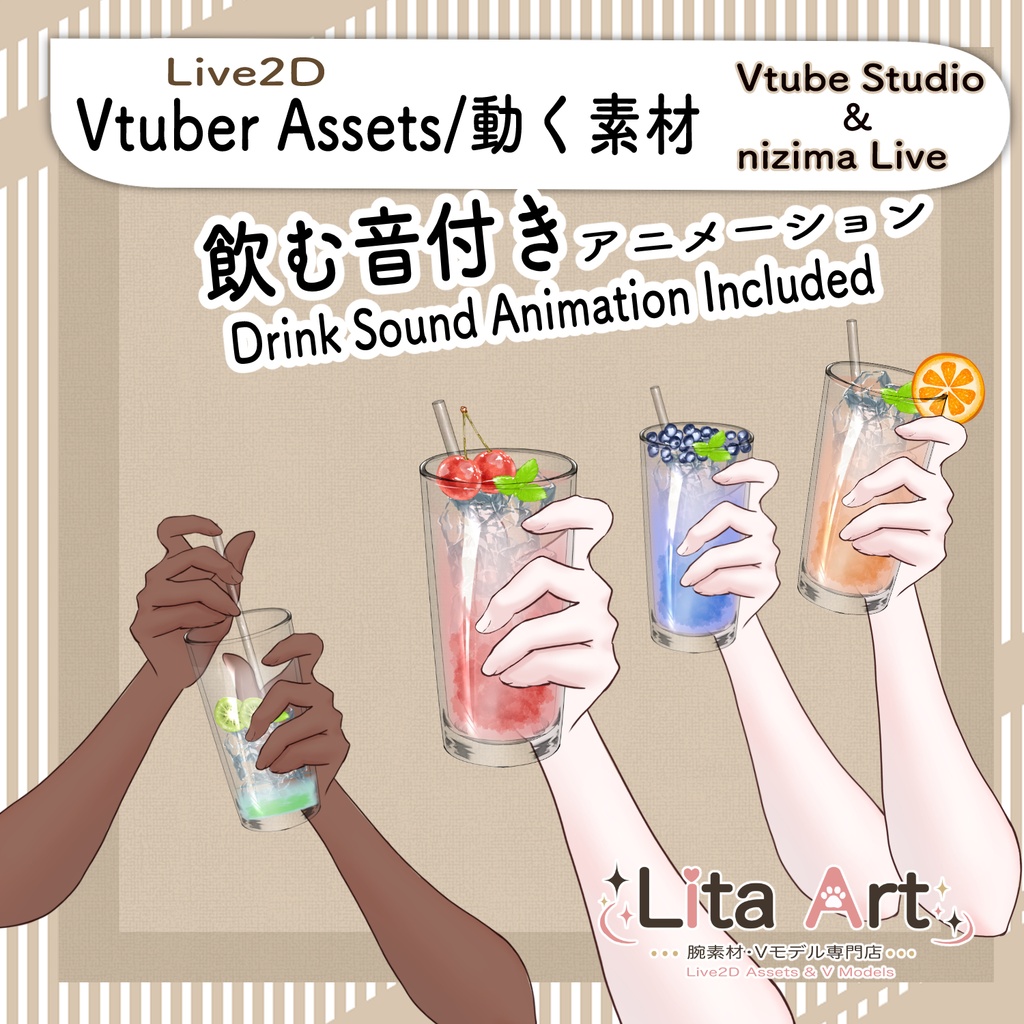
VtubeStudio & nizima Liveで使えるVtuberのLive2D素材です。
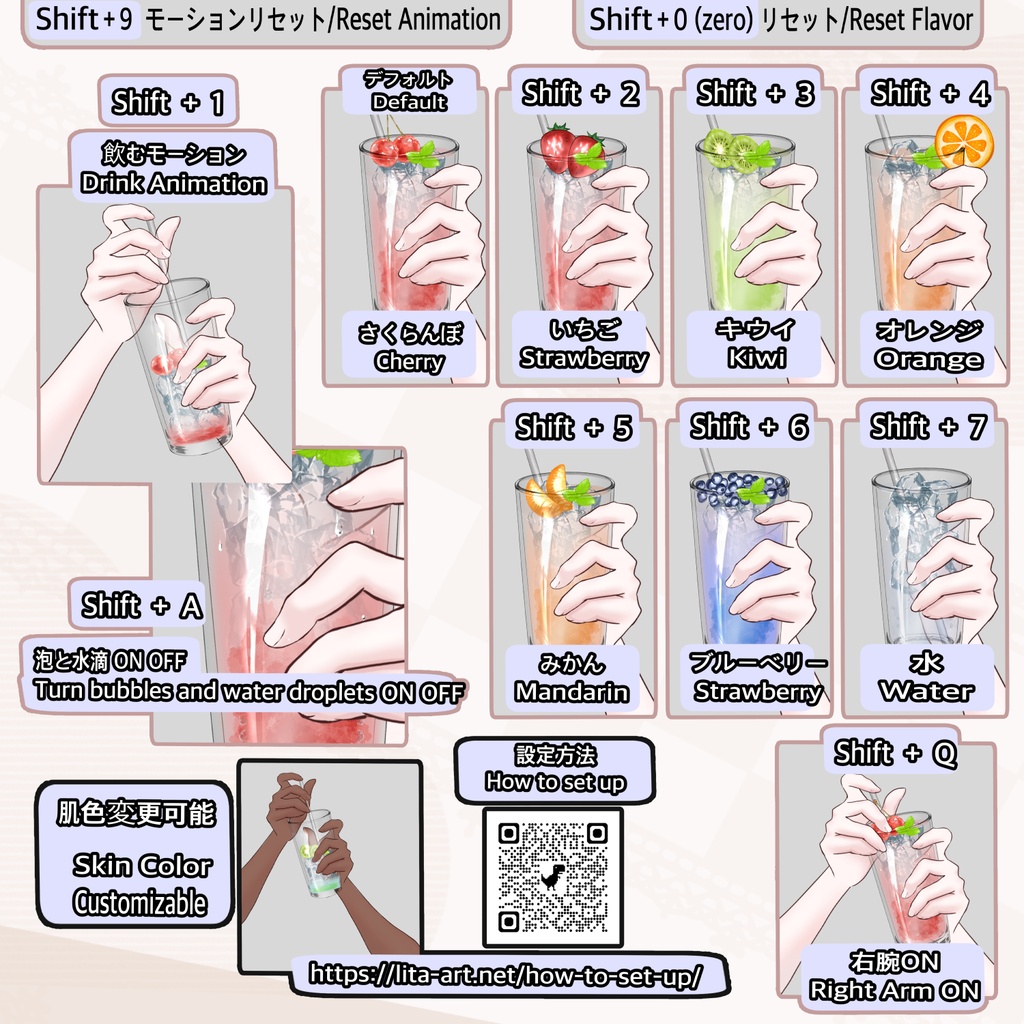
※nizima Liveでは音は再生されません。VtubeStudioで再生できます※ ☆★☆★☆★☆★☆★☆★☆★☆★☆ キーバインド設定 🎮 【Shift+1】飲む 🎮 【Shift+9】モーションリセット 🎮 【Shift+2】いちご 🎮 【Shift+3】キウイ 🎮 【Shift+4】オレンジ 🎮 【Shift+5】みかん 🎮 【Shift+6】ブルーベリー 🎮 【Shift+7】水 🎮 【Shift+Q】右腕ON 🎮 【Shift+A】泡と水滴ON 🎮 【Shift+0】リセット ☆★☆★☆★☆★☆★☆★☆★☆★☆★☆★☆★☆ 表情パラメータで色変更可能箇所 腕色 (SkinColor) ☆★☆★☆★☆★☆★☆★☆★☆★☆★☆★☆★☆ お借りした音はこちら https://taira-komori.net/eating01.html#google_vignette https://pixabay.com/ja/sound-effects/search/slurp/?pagi=2 ☆★☆★☆★☆★☆★☆★☆★☆★☆★☆★☆★☆ 詳しい導入方法は動画で解説しています。
Assets for VTube Studio & nisimaLive
※Sound will not play in nizima Live. Sound can be played in VTube Studio.※ ☆★☆★☆★☆★☆★☆★☆★☆★☆ Keybind Settings 🎮 【Shift+1】Drink 🎮 【Shift+9】Reset Motion 🎮 【Shift+2】Strawberry 🎮 【Shift+3】Kiwi 🎮 【Shift+4】Orange 🎮 【Shift+5】Mandarin Orange 🎮 【Shift+6】Blueberry 🎮 【Shift+7】Water 🎮 【Shift+Q】Right Arm ON 🎮 [Shift + A] Turn bubbles and water droplets ON 🎮 【Shift+0】Reset ☆★☆★☆★☆★☆★☆★☆★☆★☆★☆★☆★☆ Color Change Available via Expression Parameters Arm Color (SkinColor) ☆★☆★☆★☆★☆★☆★☆★☆★☆★☆★☆★☆ Sound Credits https://taira-komori.net/eating01.html#google_vignette https://pixabay.com/ja/sound-effects/search/slurp/?pagi=2 ☆★☆★☆★☆★☆★☆★☆★☆★☆★☆★☆★☆ Detailed setup instructions are explained in the video.
---Lita アイテムの共通商品説明---
✅ 商用利用・編集可能ですが、著作権は放棄していません。 ✅ クレジット表記は任意です。 ✅ ご利用の際は、下記URL記載の 利用規約 に同意したものとみなします。 🔗 https://lita-art.net/terms-and-condition/ ⚠️ 成人向けコンテンツへの使用規制はしていません。 常識の範囲内でご使用ください。 ーーーーーーーーーーーー Litaのアイテムは、表情ファイルエディター、またはアートメッシュでの色調整が可能です。(表情ファイルエディタからは一部できないものもあります。初期の作品のほとんどはアートメッシュからの色変更になります!) 説明書(VtubeStudio)→ https://note.com/litaruismart/n/n120985de98c0 表情ファイルエディタから可能な場合は、colorと書いてあるパラメータが存在します。そのパラメータをいじって色変更して遊んでみてください! 色変更パラメータ: Color1 – 乗算明暗 Color2 – 乗算カラー Color3 – スクリーン明暗 Color4 – スクリーンカラー 設定方法の詳細はこちらをご覧ください! (VtubeStudio)🔗 https://lita-art.net/2026/01/26/how-to-change-color/ ーーーーーーーーーーーー 音付きと書いてあるアイテムには効果音が含まれています(VtubeStudioのみ対応) 音なしで使いたい場合は、VTube Studio上で音を消して使用できます。 設定方法はこちら↓ https://lita-art.net/2026/04/16/ja_how-to-sound-off/ ーーーーーーーーーーーー 質問・ご相談はDMにて受付中! お気軽にご連絡ください✨ 🔹 LitaのX(Twitter): https://x.com/LitaVtuber 🔹 Litaのホームページ: https://lita-art.net/ ーーーーーーーーーーーー VTube Studio and nizimaLive key bindings have already been set up and tested. The setup guide for nizimaLive is currently being prepared. ✅ Commercial use and editing are allowed, but copyright is not waived. ✅ Credit is optional. ✅ By using this item, you are considered to have agreed to the Terms of Use listed at the URL below. 🔗 https://lita-art.net/terms-and-condition/ ⚠️ There are no specific restrictions on use in adult-oriented content. Please use it within the bounds of common sense. ーーーーーーーーーーーー Lita’s items can be color-adjusted using the Expression File Editor or by editing the ArtMesh. Some items may not support color changes through the Expression File Editor. Most older items can only be color-adjusted through the ArtMesh. Guide for VTube Studio: https://note.com/litaruismart/n/n120985de98c0 If color changes are supported through the Expression File Editor, there will be parameters labeled “color.” Try adjusting those parameters to customize the colors! Color change parameters: Color1 – Multiply Brightness Color2 – Multiply Color Color3 – Screen Brightness Color4 – Screen Color For detailed setup instructions, please see here: VTube Studio 🔗 https://lita-art.net/2026/01/26/how-to-change-color/ ーーーーーーーーーーーー Items marked as “with sound” include sound effects. VTube Studio only. If you want to use the item without sound, you can turn off the sound in VTube Studio. Setup guide: https://lita-art.net/2026/04/16/ja_how-to-sound-off/ ーーーーーーーーーーーー Questions and inquiries are accepted via DM. Please feel free to contact me anytime ✨ 🔹 Lita’s X/Twitter: https://x.com/LitaVtuber 🔹 Lita’s Website: https://lita-art.net/ ーーーーーーーーーーーー