
LUNA Bridge — Lab x5 Trial Edition v2.0.4 RS-232C / USB-Serial to TCP Bridge for Electronics & Lab Use
- Digital0 JPY
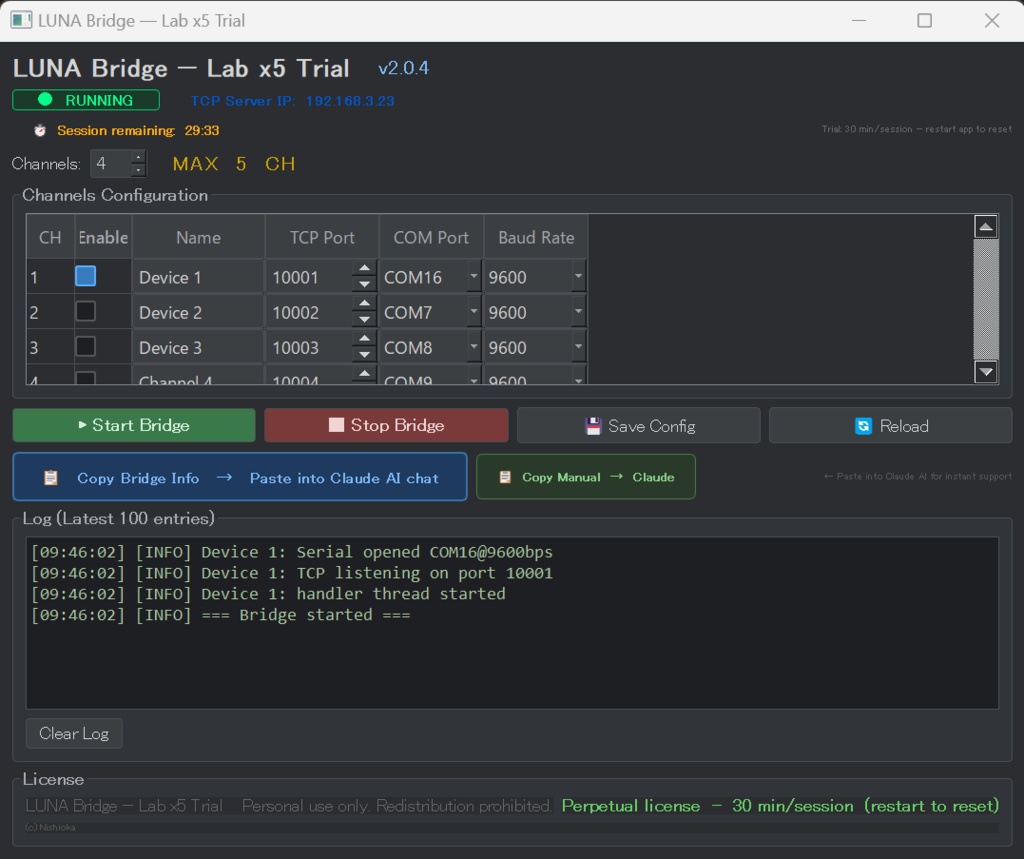

LUNA Bridge — Lab x5 Trial Edition v2.0.4 RS-232C / USB-Serial to TCP Bridge for Electronics & Lab Use ────────────────────────────────────────────────────────── Connect your ESP32, Arduino, instruments, and serial devices to Claude AI and any TCP-capable application — no drivers, no hassle. LUNA Bridge converts up to 5 RS-232C / USB-serial ports into TCP network ports on your Windows PC. Your application or AI assistant connects over Wi-Fi just as if it were wired directly to the device. ■ WHAT IT DOES Serial Device (ESP32 / instrument / sensor) → COM port on Windows PC → LUNA Bridge → TCP port (Wi-Fi / LAN) → Claude AI / your app / any TCP client ■ TYPICAL USE CASES • ESP32 / Arduino serial monitor, sensor logging, firmware debug • DMM / bench instruments SCPI command control (voltage, current, frequency) • Industrial / PLC Modbus RTU, custom protocol • GPS / GNSS receiver NMEA data acquisition • Data logger / sensor unit any RS-232C / USB-serial output ■ KEY FEATURES • Up to 5 channels — run multiple devices simultaneously • Baud rates: 300 – 115200 bps (all standard rates) • One-click "Copy Bridge Info → Claude AI" for instant AI support • One-click "Copy Manual → Claude AI" — Claude instantly understands the app and guides you through any operation • Settings auto-saved and reloaded on next launch • Single EXE — no installation required ■ CLAUDE AI INTEGRATION Paste the bridge info into Claude chat and ask naturally: "Read the sensor value from port 10001" "Send MEAS:VOLT:DC? to the DMM and return the result" Claude reads and writes serial commands through the TCP bridge. ■ TRIAL TERMS • Free to use — no expiry date • 30-minute continuous session limit per run • Restart the application to begin a new 30-minute session • Purchase the full Lab x5 edition for unlimited session length ■ SYSTEM REQUIREMENTS • Windows 10 / 11 (64-bit) • USB-to-serial adapter or RS-232C port • No Python or additional runtime required ■ LINKS Full edition (no session limit): https://onstepninja.booth.pm/ Project page / GitHub: https://github.com/OnStepNinja/LUNA © Nishioka Sadahiko 📚 LUNA Docs / AiBridgeMCP — Start here for setup guides, technical references, and FAQ. Ask questions directly inside NotebookLM and get answers from the official documentation. 👉 https://notebooklm.google.com/notebook/f2ce997f-18c2-44c4-8738-973b204c190c 💬 AiBridgeMCP Community — Join our Facebook group to ask questions, share your results, and connect with other users. The developer is also a member. Everyone is welcome. 👉 https://www.facebook.com/groups/1230935959149731