

(VRChat/Unity)BlendShapeまとめる君
- Digital300 JPY

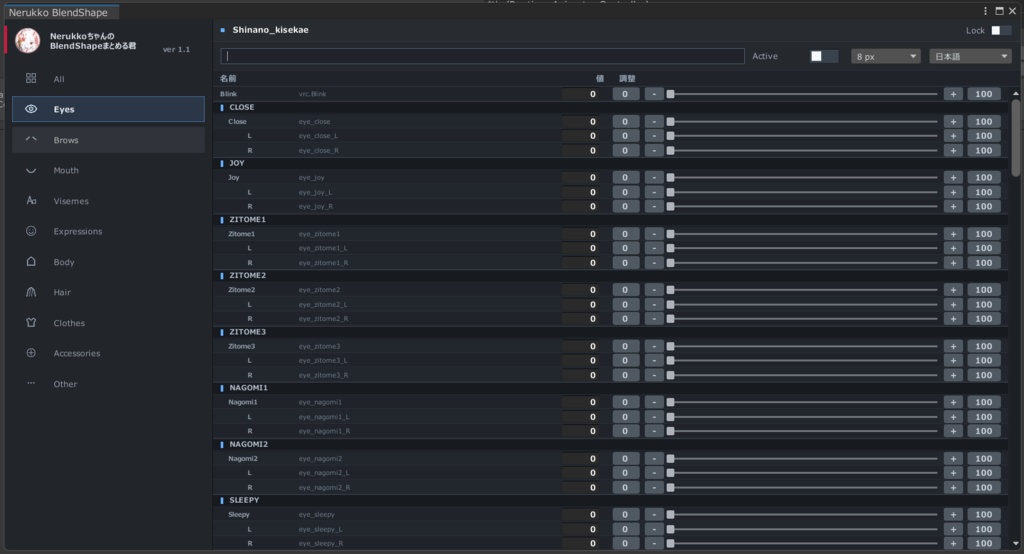




NerukkoちゃんのBlendShapeまとめる君 ============================================================ 日本語 ============================================================ VRChat アバター向けの BlendShape を、 見やすく整理して、調整しやすくする Unity Editor 拡張です。 ▼POINT! アバターの Root Object を選ぶだけで、全体の BlendShape をまとめて確認・調整できます。 Face / Body / Clothes / Hair など、子 mesh に入っている BlendShape もまとめて検出します。 ▼POINT! Inspector で BlendShape キーを探し回る手間を減らせます。 検索機能付きなので、BlendShape が多いアバターや衣装でも目的の項目を見つけやすくなります。 ▼POINT! BlendShape 名をもとに、自動でカテゴリ分け・階層整理します。 一覧で並ぶだけでは見づらい項目も、まとまりごとに確認できます。 ▼POINT! 余計な機能をできるだけ削ったシンプル設計です。 検索、数値入力、スライダー、- / + 長押しなど、調整しやすい操作に絞っています。 ──────────────────── 整理イメージ ──────────────────── たとえば、次のような BlendShape 名がある場合、 Nipple_ON Nipple_big Nail_hand_Oval Nail_hand_Square Nail_foot_Oval Nail_foot_Square このように、名前のまとまりで整理して表示します。 Nipple ON big Nail hand Oval Square foot Oval Square 存在しないカテゴリは表示されません。 選択中の Object に含まれる BlendShape だけをもとに表示します。 ──────────────────── できること ──────────────────── ・選択中 Object / 子 Object の BlendShape を自動検出 ・Root Object から子 mesh の BlendShape もまとめて確認 ・実際にヒットしたカテゴリだけを表示 ・BlendShape 名をもとに自動カテゴリ分類 ・名前の共通部分をもとに階層表示 ・L / R など左右差分の整理表示 ・検索による BlendShape の絞り込み ・Active フィルターで値が入っている項目を確認 ・数値入力による直接編集 ・スライダーによる値の調整 ・- / + ボタン長押しによる連続調整 ・変更済みの値を控えめに強調表示 ・日本語 / English / 한국어 の表示切り替え ・文字サイズを 8 px ~ 14 px で切り替え ・検索履歴を最大5件まで保存し、検索欄クリックで再入力 ・Lock 機能で表示中の Object を固定 ──────────────────── 動作環境 ──────────────────── ・Unity 2022.3.22f1 ・VRChat Avatar SDK 環境 ・Windows 版 Unity Editor VRChat アバター改変環境での利用を想定しています。 ──────────────────── 使い方 ──────────────────── 1. Unity プロジェクトに unitypackage を import します 2. Unity メニューから Tools > NerukkoちゃんのBlendShapeまとめる君 を開きます 3. Hierarchy でアバター、顔 mesh、衣装 mesh、または親 Object を選択します 4. 左側のカテゴリから確認したい項目を選びます 5. 検索欄、数値入力、スライダー、- / + ボタンで調整します ──────────────────── 配布内容 ──────────────────── ・NerukkoBlendShapeMatomeruKun.unitypackage ・README.md ──────────────────── ご利用前に ──────────────────── 本ツールは、Unity Editor 上で BlendShape の確認と調整をしやすくするための補助ツールです。 アバター、衣装、髪などのデータ構成や BlendShape 名は制作元によって異なるため、 分類や表示がすべての環境で完全に一致するとは限りません。 ご利用前に、必要に応じて Unity プロジェクトやアバターデータのバックアップをおすすめします。 本ツールは非公式ツールです。 VRChat、Unity、各アバター・衣装制作者とは関係ありません。 ──────────────────── 検索用キーワード ──────────────────── Unity, VRChat, VRC, VRChatアバター, アバター改変, BlendShape, ブレンドシェイプ, 表情改変, 衣装改変, Unity Editor拡張, Unityツール, VRChat便利ツール, アバター制作, SkinnedMeshRenderer, VCC, ALCOM, Unity 2022, 表情調整, アバター調整, BlendShape整理 ============================================================ English ============================================================ A Unity Editor extension that makes VRChat avatar BlendShapes easier to view, organize, and adjust. ▼POINT! Just select the avatar Root Object to check and adjust BlendShapes across the avatar. BlendShapes inside child meshes such as Face, Body, Clothes, and Hair are detected together. ▼POINT! You do not need to search through the Inspector to find which mesh contains BlendShapes. With search support, large avatar or outfit BlendShape lists become much easier to handle. ▼POINT! BlendShapes are automatically categorized and organized by name. Items that are hard to read in a flat list become easier to understand as groups. ▼POINT! Simple and focused. The tool is built around search, numeric input, sliders, and hold - / + adjustment. ──────────────────── Organization example ──────────────────── If your avatar has BlendShape names like: Nipple_ON Nipple_big Nail_hand_Oval Nail_hand_Square Nail_foot_Oval Nail_foot_Square they can be shown like this: Nipple ON big Nail hand Oval Square foot Oval Square Only categories that actually contain BlendShapes are shown. ──────────────────── Features ──────────────────── - Detects BlendShapes from the selected Object and child Objects - Can check child mesh BlendShapes from the avatar Root Object - Shows only categories that actually contain matching BlendShapes - Automatically categorizes BlendShapes by name - Builds readable hierarchies from shared name parts - Organizes left / right pairs such as L and R - Search by BlendShape name - Active filter for checking non-zero values - Direct numeric input - Slider control - Hold - / + buttons to adjust values continuously - Subtle highlight for modified values - UI language switch: Japanese / English / Korean - Text size options from 8 px to 14 px - Search history for up to 5 recent searches - Lock for keeping the displayed Object fixed ──────────────────── Requirements ──────────────────── - Unity 2022.3.22f1 - VRChat Avatar SDK environment - Unity Editor for Windows ──────────────────── How to use ──────────────────── 1. Import the unitypackage into your Unity project. 2. Open Tools > NerukkoちゃんのBlendShapeまとめる君. 3. Select an avatar, face mesh, outfit mesh, or parent Object in the Hierarchy. 4. Choose a category from the left side. 5. Use search, numeric input, sliders, and - / + buttons to adjust values. ──────────────────── Included files ──────────────────── - NerukkoBlendShapeMatomeruKun.unitypackage - README.md ──────────────────── Before use ──────────────────── This tool is a Unity Editor utility for checking and adjusting BlendShape values. BlendShape names and structures differ depending on the avatar, outfit, hair, and creator. Because of this, automatic classification may not match every asset perfectly. Please back up your Unity project and avatar data when needed before use. This is an unofficial tool. It is not affiliated with VRChat, Unity, or any avatar / outfit creator.