

ゆらゆらしっぽ - Tail Sway【MA・心拍数連動】
- Digital300 JPY
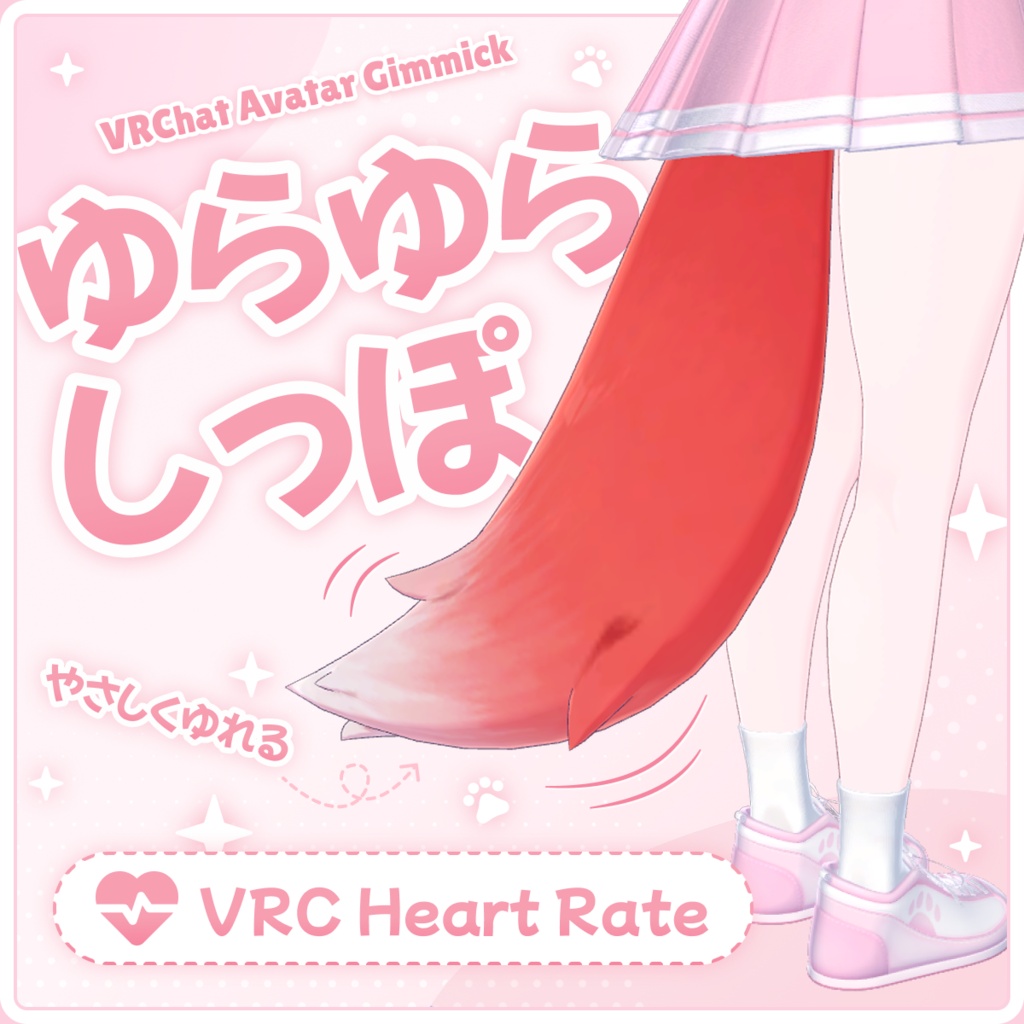
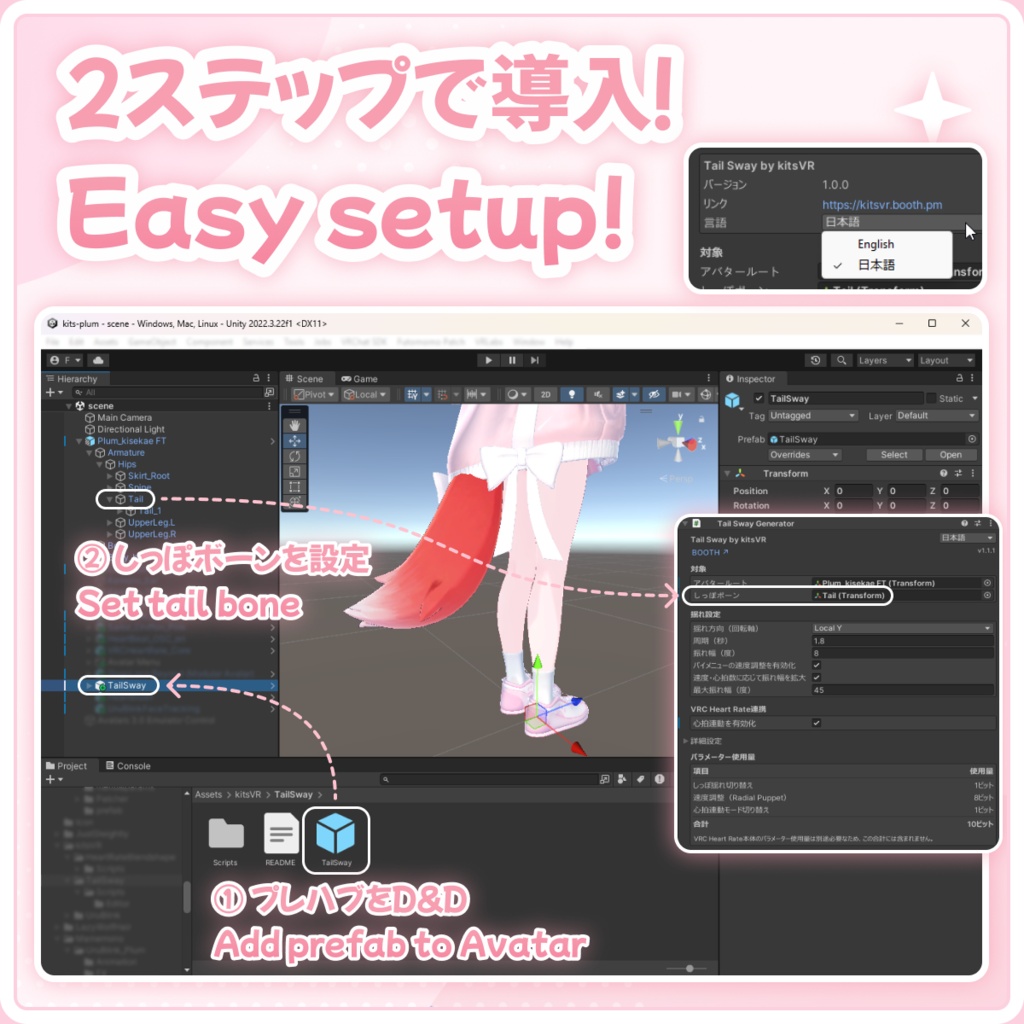
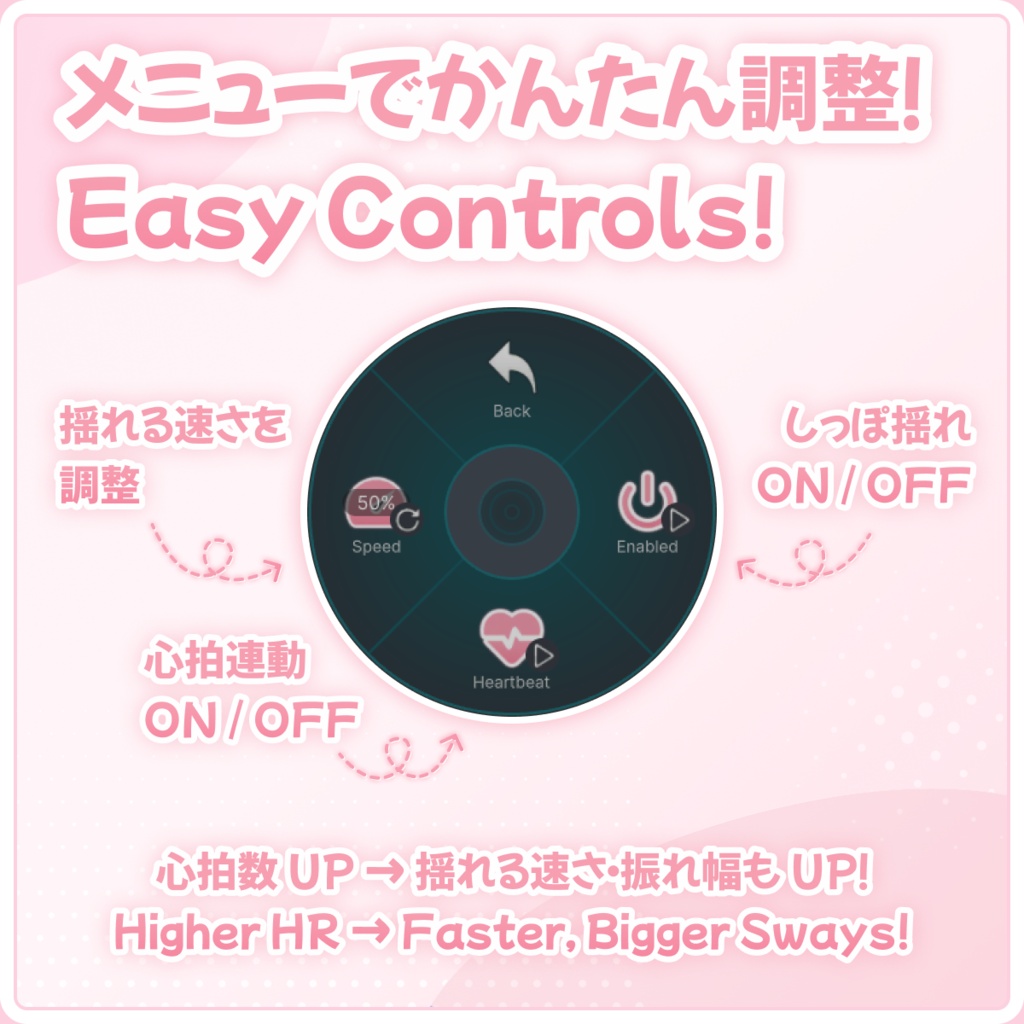


アバターのしっぽに、やさしく自然な揺れをプラス。 Tail Swayは、VRChatアバターのしっぽをゆるやかに左右へ揺らす軽量ギミックです。プレハブをアバター直下へD&Dして、しっぽボーンを指定するだけ。ボーンの初期角度を基準にビルド時にアニメーションを自動生成するため、アニメーションクリップやAnimator Controllerを手作業で用意する必要はありません。 付属のパイメニューから、しっぽ揺れのON/OFF、Radial Puppetによる速度調整、VRC Heart Rateとの心拍連動を操作できます。速度や心拍数に応じて振れ幅を大きくすることもでき、気分や鼓動がしっぽの動きに反映されます。 --- Give your avatar's tail a soft, gentle sway. Tail Sway is a lightweight VRChat avatar gimmick that adds a smooth, looping motion to a tail. Just place the prefab under your avatar and assign the tail bone. The animation is generated from the bone's resting rotation at build time, so no manual animation or Animator Controller setup is required. The included Expression Menu lets you turn the sway on or off, adjust its speed with an optional radial control, and switch to VRC Heart Rate integration. When enabled, each heartbeat drives the next sway, while higher speed or heart rate can also produce a wider movement.
Supported Avatars / 対応アバター
The avatars below have been tested and confirmed to work. Other avatars may work too. If Tail Sway does not work with yours, please send me a BOOTH message. 以下のアバターで動作確認済みです。一覧にないアバターでも動作する場合があります。うまく動作しない場合は、BOOTHのメッセージからご連絡ください。 ・Chocolat / ショコラ - https://booth.pm/ja/items/6405390 ・Eku / エク - https://booth.pm/ja/items/7328764 ・Kipfel / キプフェル - https://booth.pm/ja/items/5813187 ・Lasyusha / ラシューシャ - https://booth.pm/ja/items/4825073 ・Lime / ライム - https://booth.pm/ja/items/4876459 ・Manuka / マヌカ - https://booth.pm/ja/items/5058077 ・Mayo / まよ - https://booth.pm/ja/items/8122803 ・Milltina / ミルティナ - https://booth.pm/ja/items/6538026 ・Plum / プラム - https://booth.pm/ja/items/7770415 ・Shinano / しなの - https://booth.pm/ja/items/6106863 ・Sio / しお - https://booth.pm/ja/items/5650156
日本語
■ 特徴 ・しっぽを左右にゆるやかに揺らす、なめらかなループアニメーション ・揺れ方向(回転軸)、周期、振れ幅を調整可能 ・パイメニューからの速度調整に対応(任意) ・VRC Heart Rateの鼓動タイミングに連動(任意) ・速度または心拍数に応じた振れ幅の変化に対応(任意) ・しっぽボーンの初期回転を基準にアニメーションを自動生成 ・アバタールート/しっぽボーンの自動設定機能 ・Modular Avatar対応プレハブをアバター直下へドラッグ&ドロップするだけで導入可能 ・生成されるアニメーションはPC/Quest両対応 ・インスペクターは日本語/英語に対応 ・Tail Sway本体のファイルを同梱せずにアバターを配布・納品したい場合に使える「MA化」機能(任意・実行前のバックアップ推奨) しっぽの付け根をTail Swayで動かし、それ以降の揺れをPhysBoneで表現する使い方を想定しています。 ■ 導入に必要なもの ・VRChat SDK - Base / Avatars ・Modular Avatar https://modular-avatar.nadena.dev/ja/ 心拍連動を使用する場合のみ必要: ・VRC Heart Rate https://bekosan.booth.pm/items/7381862 VRC Heart Rateは心拍連動機能を使用する場合のみ必要です。導入していない場合でも、通常のしっぽ揺れ機能は使用できます。 ■ 導入方法 1. Modular AvatarとTail SwayをUnityプロジェクトへインポートします。 2. 同梱のTailSway.prefabをアバター直下へドラッグ&ドロップします。 3. アバタールートとしっぽボーンを指定するか、自動設定ボタンを使用します。 4. 揺れ設定を調整し、必要に応じて速度調整や心拍連動を有効にします。 5. 通常どおりアバターをビルドまたはアップロードします。 心拍連動機能を使用する場合は、ビルド前にVRC Heart Rateを導入・設定してください。 パイメニューはModular Avatarによって自動的に追加され、しっぽ揺れのON/OFF、心拍連動モード、速度調整(任意)を操作できます。 ■ Expression Parameters使用量 常に使用: ・kitsVR/TailSway/Enabled - 1ビット しっぽ揺れのON/OFFを切り替えます。 パイメニューの速度調整を有効にした場合: ・kitsVR/TailSway/Speed - 8ビット Radial Puppetで通常モードの揺れ速度を調整します。 心拍連動を有効にした場合: ・kitsVR/TailSway/Heartbeat - 1ビット 通常のしっぽ揺れと心拍連動モードを切り替えます。 心拍連動時に使用するVRC Heart Rateパラメーター: ・VRCHR/Local_CyclePhase_Float ・VRCHR/Local_Trigger ・VRCHR/Local_FullHR_Float VRC Heart Rate本体のパラメーター使用量は、Tail Swayとは別途必要です。 ■ 動作確認環境 ・Unity 2022.3.22f1 ・VRChat SDK Base/Avatars 3.10.4 ・Modular Avatar 1.17.1 ・VRC Heart Rate 1.0.5(心拍連動機能を使用する場合) 任意の心拍連動機能で動作確認済みの心拍数入力: ・VRCOSC 2026.708.0 + Bluetooth Heartrate v2.0.20 — https://vrcosc.com/ ・HeartOSC v1.2.0 — https://play.google.com/store/apps/details?id=red.kitsu.heartosc 上記以外のバージョンでの動作は保証していません。 Tail Swayが生成するアニメーションはPC版・Quest版アバターの両方に対応しています。VRC Heart RateはOSC入力と心拍数の手動調整に対応しています。Quest単体でOSCを使用する場合は、OSC送信側の接続先にQuestのIPアドレスを指定してください。 ■ 内容物 ・Tail Swayプレハブ ・Tail Sway Generator/エディター拡張スクリプト ・しっぽ揺れ/心拍連動モード/速度調整用パイメニュー ・日本語/英語対応インスペクターUI ■ 本商品に含まれないもの ・アバター、衣装、しっぽモデル ・PhysBone設定 ■ 利用規約 本規約では、以下のように区分します。 ・「本体データ」:Tail Swayに含まれるスクリプト、プレハブ、エディター拡張、その他のファイル ・「生成物」:Tail Swayによって生成されたアニメーションクリップ、アニメーターコントローラー、MA化後のModular Avatar設定、およびそれらを改変したデータ ・本体データは購入者本人のみ利用できます。個人利用・商用利用を問わず、ご自身の制作に使用・改変できます。 ・改変の有無を問わず、本体データの再配布、再販売、譲渡、共有を禁止します。本体データを直接扱う方は、それぞれ本商品をご購入ください。 ・生成物は自由に利用できます。個人利用・商用利用を問わず、使用、改変、再配布、販売、コミッションでの納品、アバターパッケージ・テンプレート・その他の商品への同梱が可能です。クレジット表記は不要です。 ・生成物に本体データを含めたり、第三者が本体データを取り出せる状態で配布したりすることは禁止します。 ・本商品の使用によって生じたトラブルや損害について、作者は責任を負いません。 ■ クレジット Tail Sway by kitsVR https://kitsvr.booth.pm VRC Heart Rate:べこ様 https://bekosan.booth.pm/items/7381862 VRC Heart Rateおよび商品画像に使用しているアバター・衣装は、本商品に含まれません。 ■ 更新履歴 ・1.1.3 - 一部のアバター構成でVRC Heart Rate連携が正しく導入されない問題を修正 ・1.1.2 - 心拍連動を有効にすると、VRC Heart Rate導入済みの環境では必要なVRCHeartRate_Coreプレハブをアバタールートへ自動配置するよう改善。重複配置を防止し、既存設定向けの導入ボタンも追加 ・1.1.1 - TailRoot/Tail1/Tail.001という名前のしっぽボーンを自動検出できるよう改善。対象未設定時の導入フロー、設定のグループ化、状況に応じた検証メッセージ、ツールチップ、しっぽのPhysBoneで「Is Animated」が無効な場合の自動修正など、インスペクターを全面的に改善。Tail Sway本体のファイルに依存しない「MA化」機能を追加 ・1.1.0 - パイメニューでの速度調整、速度に応じた振れ幅調整、対象の自動設定、インスペクターの改善を追加 ・1.0.0 - 初版
English
■ Features ・Smooth, looping left-right tail sway ・Adjustable sway axis, cycle duration, and amplitude ・Optional radial speed control in the Expressions Menu ・Optional heartbeat-synchronized motion via VRC Heart Rate ・Optional amplitude scaling based on speed or heart rate ・Automatically adapts to the tail bone's resting rotation ・Avatar root and tail bone auto-assignment helper ・Drag-and-drop Modular Avatar setup with included menu controls ・Generated animations support both PC and Quest avatars ・English and Japanese Inspector UI ・Optional destructive Bake to MA workflow for exporting or bundling avatars without the Tail Sway product files Tail Sway is designed to work alongside PhysBones: it animates the base of the tail while PhysBones provide secondary motion along the rest of it. ■ Requirements ・VRChat SDK - Base and Avatars ・Modular Avatar https://modular-avatar.nadena.dev/ Required only for heart rate integration: ・VRC Heart Rate https://bekosan.booth.pm/items/7381862 VRC Heart Rate is an optional dependency and is not included with this product. Tail Sway can be used normally without it. ■ Setup 1. Import Modular Avatar and Tail Sway into your Unity project. 2. Place the included TailSway.prefab under your avatar. 3. Assign the avatar root and tail bone, or use the auto-assign button. 4. Adjust the sway settings and enable any optional features you want. 5. Build or upload the avatar as usual. When heart rate integration is enabled, import and configure VRC Heart Rate before building the avatar. The included Expressions Menu controls are installed automatically by Modular Avatar and provide the Tail Sway toggle, heart rate mode, and optional radial speed control. ■ Expression Parameters Always used: ・kitsVR/TailSway/Enabled - 1 bit Enables or disables the tail sway. Used when radial speed control is enabled: ・kitsVR/TailSway/Speed - 8 bits Adjusts the sway speed with a radial control. Used when heart rate integration is enabled: ・kitsVR/TailSway/Heartbeat - 1 bit Switches between the normal sway and heart rate mode. VRC Heart Rate parameters used by the integration: ・VRCHR/Local_CyclePhase_Float ・VRCHR/Local_Trigger ・VRCHR/Local_FullHR_Float VRC Heart Rate's own parameter cost is separate from Tail Sway's parameter usage. ■ Verified Environment ・Unity 2022.3.22f1 ・VRChat SDK Base/Avatars 3.10.4 ・Modular Avatar 1.17.1 ・VRC Heart Rate 1.0.5 (optional heart rate integration) Verified heart-rate inputs for the optional integration: ・VRCOSC 2026.708.0 + Bluetooth Heartrate v2.0.20 — https://vrcosc.com/ ・HeartOSC v1.2.0 — https://play.google.com/store/apps/details?id=red.kitsu.heartosc Other versions may work but are not officially supported. Animations generated by Tail Sway are compatible with both PC and Quest avatars. VRC Heart Rate supports either OSC input or manual heart-rate controls. When using OSC with a standalone Quest, configure the OSC sender to target the Quest's network IP address. ■ Included ・Tail Sway prefab ・Tail Sway Generator and editor scripts ・Expressions Menu controls for sway, heart rate mode, and speed ・English/Japanese Inspector UI ■ Not Included ・Avatar, outfit, or tail model ・PhysBone setup ■ Terms of Use For these terms: ・“Product Files” means the scripts, prefab, editor tools, and other files included with Tail Sway. ・“Generated Output” means animation clips, Animator Controllers, and baked Modular Avatar configuration produced by Tail Sway, including edited versions of that output. ・The Product Files are licensed to the purchaser only. You may use and modify them for personal or commercial work. ・Do not redistribute, resell, share, or transfer the Product Files, whether original or modified. Anyone who needs direct access to the Product Files must purchase their own copy. ・Generated Output may be used freely under these terms. You may use, modify, redistribute, sell, or deliver it as part of commissioned work, and you may include it in avatar packages, templates, or other products. Personal and commercial use are both permitted, and credit is not required. ・Generated Output must not include the Product Files or make the Product Files available or extractable by others. ・The creator assumes no responsibility for any problems or damages arising from use of this product. ■ Credits Tail Sway by kitsVR https://kitsvr.booth.pm VRC Heart Rate by Bekosan https://bekosan.booth.pm/items/7381862 VRC Heart Rate and the models/outfits shown in product images are not included. ■ Update History ・1.1.3 - Fixed VRC Heart Rate integration setup for some avatar configurations ・1.1.2 - VRC Heart Rate integration now automatically adds the required VRCHeartRate_Core prefab to the Avatar Root when enabled, with duplicate prevention and a one-click setup button ・1.1.1 - Improved automatic detection of TailRoot, Tail1, and Tail.001 bones; redesigned the Inspector with a focused setup flow, grouped settings, contextual validation, tooltips, and an Auto Fix when a tail PhysBone has Is Animated disabled; and added the optional destructive Bake to MA workflow for exports that do not include the Tail Sway product files ・1.1.0 - Added optional radial speed control, speed-based amplitude scaling, automatic target assignment, and Inspector improvements ・1.0.0 - Initial release