
ビューアフィルターソフト「CV-Vivid」
- Digital980 JPY
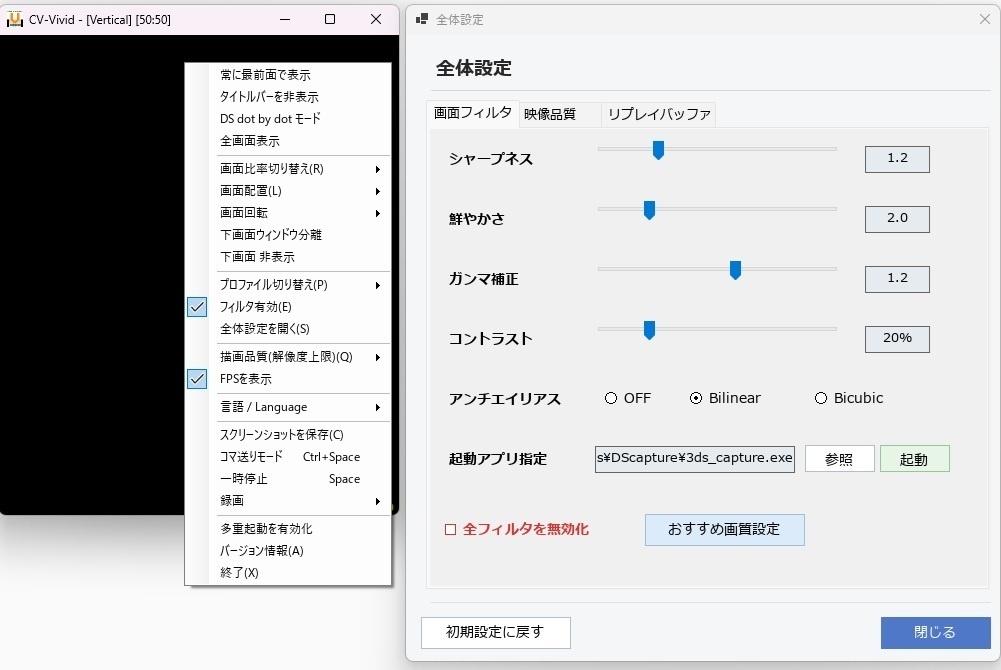

所謂、偽トロキャプチャーと呼ばれているデバイス用の専用ソフトウェアです。 ビューアの映像をシャープネス、彩度、ガンマ、コントラスト、アンチエイリアスをかけて高画質化して表示します。 ver3.6より録画機能にも対応し、リプレイバッファ録画により設定した時間まで遡って動画を保存することも可能になりました。 起動中は仮想映像キャプチャデバイスとして使用することができ、OBSやZoom等のソフトで直接映像を取り込むこともできます。 リアルタイムの画像処理の仕様上わずかに遅延が発生しますが、 ゲーム向けの最近のPCであれば5ms程度、古めのスペックの低いPCでも20-30ms程度で体感できるほどの遅延はないと思います。 2コア等の極端に低い性能のPCでは遅延や映像のカクつきが発生する可能性がありますので使用は厳しいと思われます。 滑らかな映像にならない場合は映像描画設定を下げてご使用ください。 DS・3DS用のキャプチャーボードが導入されていない環境では何も使用できませんのでご注意ください。 PCのスペックが不足している場合は映像が滑らかに表示されない場合があります。 使用方法についてはこちらをご覧ください。 https://cv-vivid.3dscontroller.com/ 3DS Capture、DS Capture、n3DS_view、new3DS_viewに対応。 Windows 10 / 11対応。Mac非対応。 ------------------------------------------------------------------------------------ This is dedicated software for 3DS Capture boards. It enhances the viewer's video feed in real-time, delivering a high-quality display with adjustments for sharpness, saturation, gamma, contrast, and anti-aliasing. Starting from ver.3.6, a recording feature has been added, including a replay buffer that allows you to save video retroactively for a set duration. While running, it can also function as a virtual video capture device, allowing you to capture the video feed directly in applications like OBS or Zoom. **Important Notes on Latency** Due to the nature of real-time image processing, a very slight delay will occur. However, on modern gaming PCs, the delay is only about 5ms, and even on older, lower-spec PCs, it is around 20–30ms, which is virtually imperceptible during gameplay. **System Requirements & Precautions** * **Required Hardware:** This software cannot be used at all without a DS/3DS capture board installed in your console. * **PC Performance:** On extremely low-spec PCs (such as dual-core CPUs), latency or stuttering may occur, making the software difficult to use. If your PC specifications are insufficient or the video does not display smoothly, please lower the video rendering settings to reduce the load. * **Supported Capture Software:** Compatible with 3DS Capture, DS Capture, n3DS_view, and new3DS_view. * **Supported OS:** Windows 10 / 11 (Mac is not supported). **How to Use** Please visit our website for detailed instructions: [https://cv-vivid.3dscontroller.com/](https://cv-vivid.3dscontroller.com/?utm_source=gemini) ------------------------------------------------------------------------------------ [ 2026/9/28 ver3.81 ] 描画負荷の軽減と補完処理を調整。 描画品質設定に自動調整を追加し、負荷に合わせて描画処理品質を自動的に調整する機能を追加。 リプレイバッファ録画の負荷を軽減。 ファイル数が非常に多くなったため単一ファイルに組み込み変更。 以前のファイルはすべて削除してください。設定はレジストリに残ります。 [ 2026/9/28 ver3.7 ] 仮想カメラデバイスとして使用できる機能を実装。 一時停止・映像バッファ遡り表示機能を追加。 [ 2026/9/13 ver3.6 ] 右クリックメニューに下画面の非表示機能を追加。 録画機能として全録画とリプレイバッファ録画を実装。 [ 2026/8/15 ver3.5 ] ソフトの多重起動に対応。 [ 2026/7/17 ver3.4 ] 言語設定を追加。 [ 2026/7/16 ver3.3 ] フィルタ詳細設定にガンマ補正の項目を追加。 3DSでStartボタンを押しながらのソフト起動によるDS等倍表示モードに対応。 右クリックメニューからDS dot by dotモードを有効にすることで、 通常の本体による拡大表示よりもくっきりとした映像になります。 横並び、上下画面比率変更にも対応し、スクリーンショット保存時もトリミングするよう変更。 ウィンドウが画面外の座標に復元しないように調整。 [ 2026/7/14 ver3.2 ] 設定の保存と復元時の不具合を修正。 フィルタ詳細設定を開いたときにフィルタが全無効になることがある不具合を修正。 [ 2026/7/13 ver3.1 ] 設定の保存と復元時の不具合を修正。 負荷軽減のため、最後の拡大描画の処理をGPUによるDirect2Dに置き換え。 GPU非搭載のPCの場合は逆に重くなってしまう可能性があり、FPSが低下する場合は同梱の旧バージョンの実行ファイルをご使用ください。 [ 2026/7/10 ver2.0 ] 初期バージョン公開