
VRCBento 400 Calorie Material Studio
- EnglishDigital2,221 JPY
- JapaneseDigital2,221 JPY
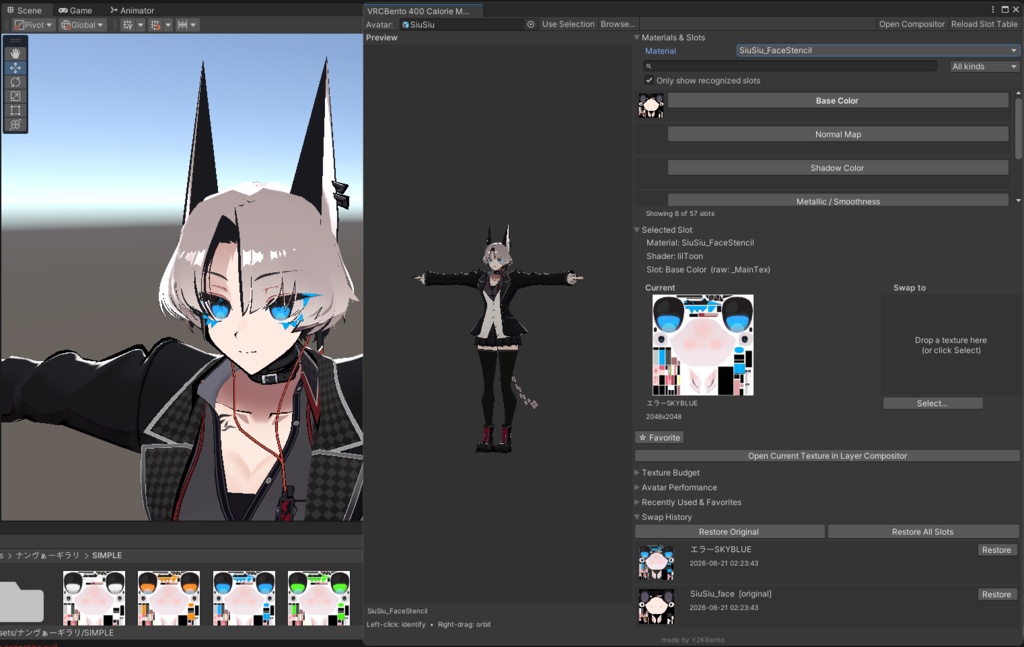
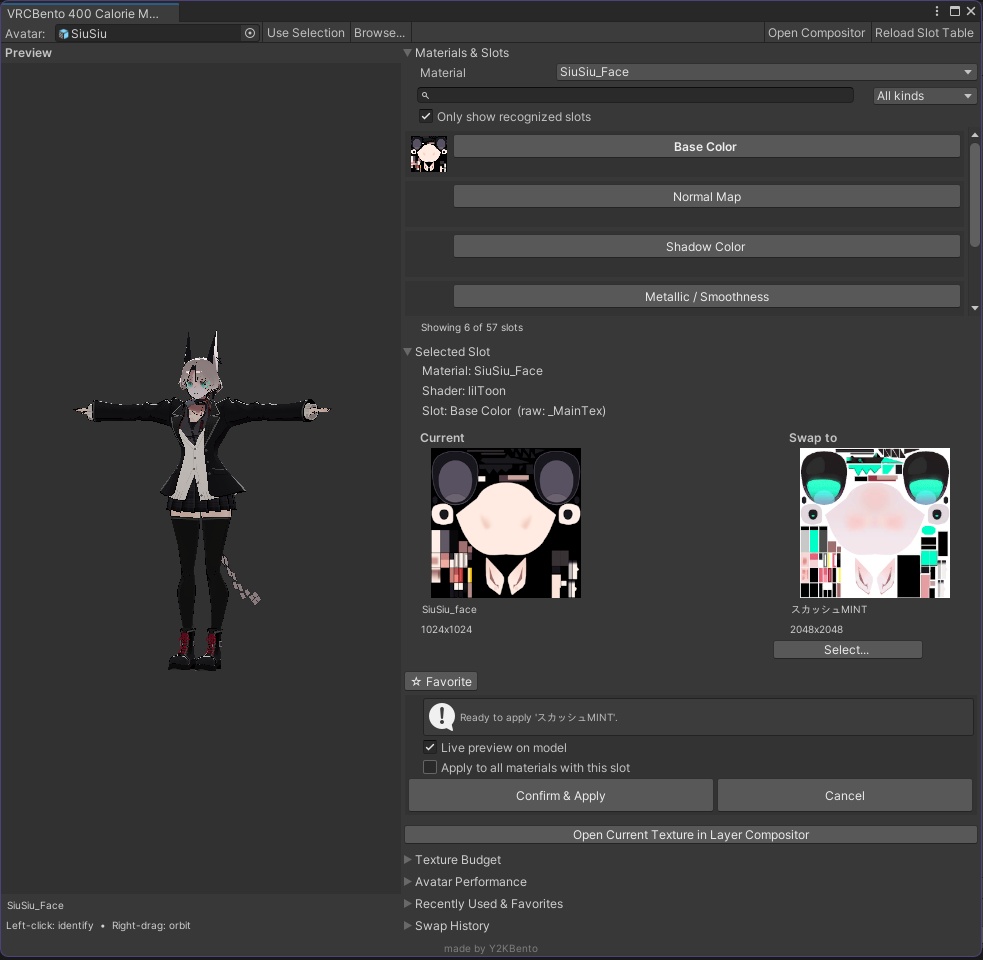
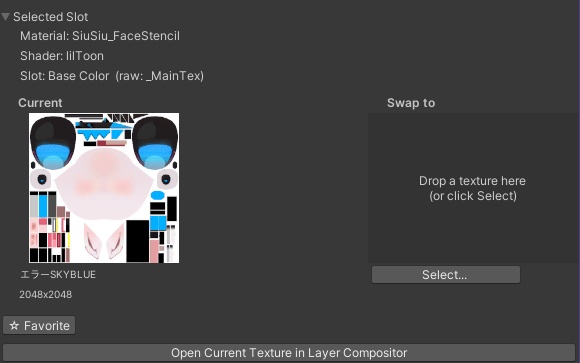
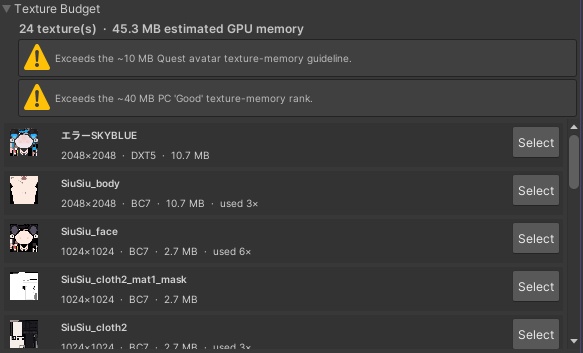
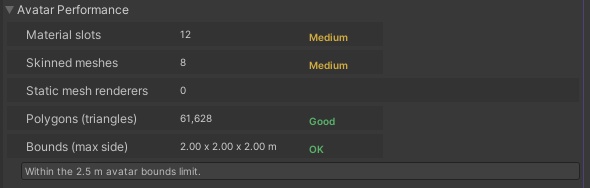
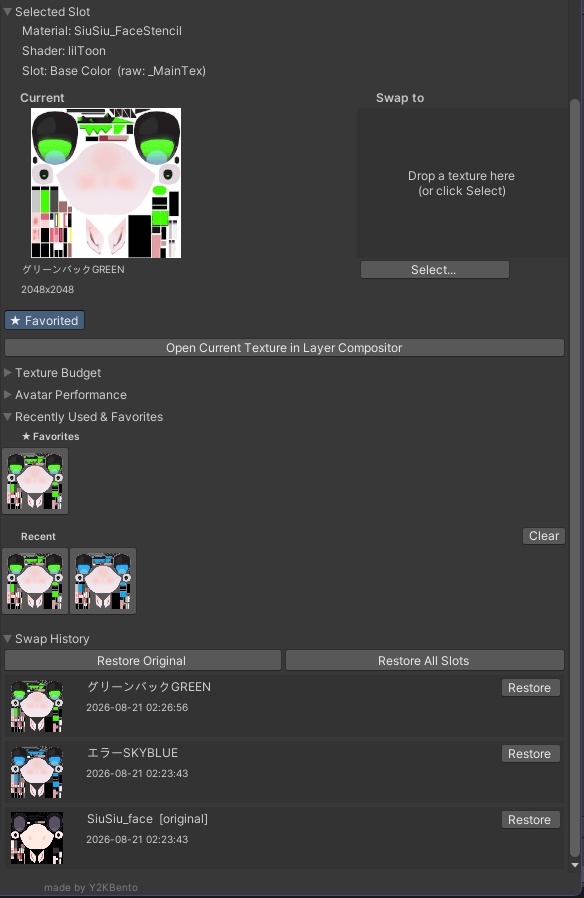
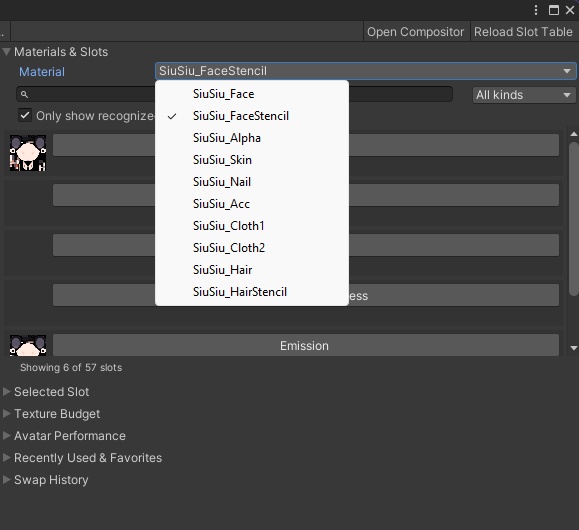
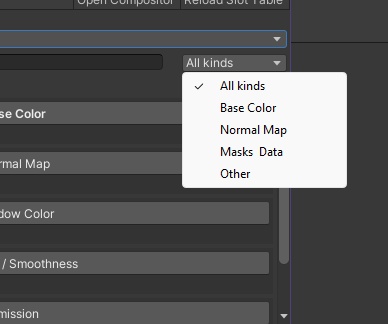


VRCBento 400 Calorie Material Studio is a Unity Editor extension built for one job: making VRChat avatar retexturing instant, visual, and safe. Click any part of your avatar to see exactly which material and texture is driving it, pick a new texture, watch it preview live on the model — then apply with full confidence. No more hunting through the Inspector. No more guessing which _MainTex belongs to which mesh. No more breaking shared materials by accident. Features Click-to-identify preview Orbit around your model (right-drag) and click any surface to instantly identify the material, renderer, and texture slot behind it. Works with static and skinned meshes, with a real mesh raycast you can trust. Smart slot & material picker Search your textures, filter by kind, or show only recognized slots. Big 150px side-by-side Current vs. Swap-to previews so you always know exactly what you're changing before you change it. Live preview — zero risk See your swap applied to the actual model using non-destructive MaterialPropertyBlock previews before you commit. Nothing touches your materials until you hit Confirm. Material safety guard Detects shared and project materials, then lets you Make Copy, Edit In Place, or Cancel. Copies are auto-named Material_RendererName so you never corrupt an asset another avatar depends on. Full shader support Built-in slot tables for VRChat Toon Lit, Standard, lilToon, and Poiyomi — it knows the right texture property for every material, with a fallback for custom shaders. History, recent & favorites Every swap is tracked per-avatar. Star your favorites (pinned to the top of Recents), right-click to remove, and restore any single slot — or Restore All — whenever you change your mind. Layer compositor Stack textures, apply blend modes and transforms, drag-to-reorder layers, and preview the result before flattening. Flatten to File to export a baked texture, or Flatten & Apply it straight onto the avatar. Save and load layer stacks for reuse. Performance at a glance Texture Budget foldout — GPU memory vs. VRChat Quest/PC guidelines. Avatar Performance foldout — material slots, skinned meshes, poly count, bounds, ranked Excellent / Good / Medium / Poor. Built for speed Keyboard shortcuts for everything (G Use Selection, C Open Compositor, F Reframe), auto import settings, human-readable filenames, and an unreadable-mesh guard that offers one-click Read/Write enable. VRChatアバターのリテクスチャを、何時間もかけず数分で。 Unityエディタ上で直接、アバターのテクスチャ差し替えとマテリアル編集を最速・最安全に行えるツールです。 このツールについて VRCBento 400 カロリー マテリアル スタジオは、「VRChatアバターのリテクスチャを 直感的に、視覚的に、そして安全に」というただ一つの目的のために作られたUnityエディタ拡張です。アバターの任意のパーツをクリックするだけで、その見た目を決めているマテリアルとテクスチャを特定し、新しいテクスチャを選び、モデル上でライブプレビューを確認して、自信を持って適用できます。 もうインスペクターを探し回る必要はありません。どのメッシュにどの _MainTex が割り当てられているか推測する必要もありません。共有マテリアルをうっかり壊してしまう心配もありません。 主な機能 クリックで特定できるプレビュー モデルを回転させながら(右ドラッグ)任意の面をクリックすると、その表面のマテリアル・レンダラー・テクスチャスロットを即座に特定します。スタティックメッシュにもスキンメッシュにも対応し、信頼できる実メッシュのレイキャストを採用しています。 スマートなスロット&マテリアルピッカー テクスチャを検索したり、種類で絞り込んだり、「認識済みスロットのみ表示」に切り替えたりできます。150pxの大きめの「現在 vs 差し替え先」プレビューを並べて表示するので、変更前に何がどう変わるかを常に正確に把握できます。 ライブプレビュー — リスクゼロ 非破壊の MaterialPropertyBlock プレビューで、コミットする前に実際のモデルに適用した結果を確認できます。確認するまではマテリアルに一切手が加わりません。 マテリアル安全ガード 共有マテリアルやプロジェクト内マテリアルを検出し、コピーを作成・その場で編集・キャンセルの3択を提示します。コピーには自動で Material_RendererName という名前が付けられるため、他のアバターが依存しているアセットを誤って壊す心配がありません。 幅広いシェーダー対応 VRChat Toon Lit、Standard、lilToon、Poiyomi のスロットテーブルを内蔵。マテリアルごとに正しいテクスチャプロパティを認識し、カスタムシェーダーにも優雅にフォールバックします。 履歴・最近使った項目・お気に入り すべての差し替え履歴をアバターごとに記録。お気に入りはスターを付けて(最近使った項目の先頭にピン留め)、右クリックで削除できます。気が変わったらいつでも、単一スロットの復元や すべて復元 が可能です。 レイヤーコンポジター テクスチャを重ね、ブレンドモードや変形を適用し、レイヤーをドラッグで並べ替えて、フラット化する前に結果をプレビューできます。ファイルにフラット化 でベイク済みテクスチャを書き出したり、フラット化して適用 でそのままアバターに反映したり。レイヤースタックの保存・読み込みにも対応しています。 パフォーマンスを一目で把握 テクスチャバジェット 折りたたみ — GPUメモリとVRChatのQuest/PCガイドラインを比較。 アバターパフォーマンス 折りたたみ — マテリアルスロット数、スキンメッシュ数、ポリゴン数、バウンドを表示し、Excellent / Good / Medium / Poor でランク付け。 スピード重視の設計 すべてをキーボードショートカットで操作可能(G 選択を使用、C コンポジターを開く、F プレビューをリフレーム)。インポート設定の自動化、人間に読みやすいファイル名、読み書き無効メッシュへのワンクリックRead/Write有効化ガードも搭載しています。
Terms of Use.
Do NOT redistribute or resell. Do NOT claims as your own. Do NOT attempt to change or modify the script. DO NOT INCLUDE THE PACKAGE IN YOUR AVATAR WHEN YOU SELL IT.