
〚Windows動作┊OBS外観〛SKR OBS Kisekae #03 Jiraikei Pink
- Digital700 JPY
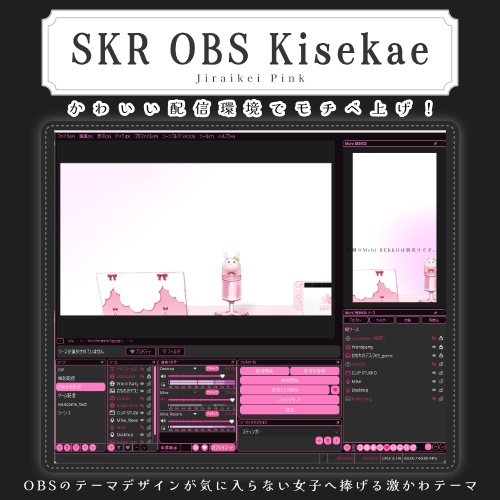

〚商品に関して〛 味気ないOBSを着せ替え! OBS Studioの操作画面を変更できる外観テーマです。 シーン・ソース・音声ミキサー・ボタンなど、 いつものOBSを着せ替えられます。 ※一部の方でテーマが反映されない問題が発生しておりましたので、Themeのフォルダ名を「Themes」に変更しました。 もし購入済みの方で反映されない場合はお試しください。 ------------------------------------------------------- ■変わるところ ・OBS全体の背景 ・シーン/ソースなどのパネル ・文字や入力欄 ・ボタン ・音量スライダー ・音声メーター ・表示/非表示のアイコン ・ロックアイコン ・追加/削除/設定などの操作アイコン ・画像/メディア/ブラウザなどのソースアイコン OBSのいろいろな部分を、 テーマ合わせたカラーとアイコンに変更します。 ------------------------------------------------------- ■配信画面には影響しません 変わるのは、配信者さんが操作する「OBSの見た目」です。 配信に映る画面やゲーム、立ち絵、背景、オーバーレイなどの色は変わりません。 いつもの配信画面はそのままで、 自分が操作するOBSだけを着せ替えられます。 ------------------------------------------------------- ■こんな方におすすめ ・OBSをいい感じにしたい ・おしゃれなデザインが好き ・配信環境の見た目にもこだわりたい ・いつものOBSから気分を変えたい ・デスクトップや周辺機器と色を揃えたい ------------------------------------------------------- ■導入方法 1. ダウンロードしたZIPを解凍します。(これを読んだという事は済んでいます) 2. Themeのフォルダごと指定のフォルダに入れてください。 指定場所:OBS起動→ファイル→設定フォルダを表示→OBSを閉じる→その中にThemeフォルダをドラッグ&ドロップ ※まともに反映されないので中身だけや、フォルダの中身の位置を変えたりして入れないでください! 3. OBSを再起動します。 4. OBSの「設定」→「外観」からテーマを選択します。 元のOBSデザインへ戻したい場合は、 「設定」→「外観」から元のスタイルを選ぶだけで戻せます。 ------------------------------------------------------- ■同梱内容 ・テーマファイル ・専用アイコン ・日本語導入説明書 ------------------------------------------------------- ■動作環境 ・Windows ・OBS Studio ※対応するOBS Studioのバージョンは商品ページ記載の動作確認環境をご確認ください。 ※現在macOS・Linux向けの動作確認は行っていません。 ------------------------------------------------------- ■ご購入前にご確認ください ※本商品はOBS Studioの「操作画面」を変更する外観テーマです。 配信画面そのものを装飾するオーバーレイ素材ではありません。 ※OBS Studio本体は付属していません。 ※OBSのすべての画面やアイコンが変更されるものではありません。 使用しているOBSのバージョンや機能、プラグインなどによって、一部にテーマが適用されない場合があります。 ※ブラウザードックなど、それぞれ独自のデザインを持つ画面にはテーマが適用されない場合があります。 ※OBS Studioのアップデートにより、表示が変化したり正常に適用できなくなる場合があります。 ※本製品はOBS Projectによる公式製品ではありません。 ------------------------------------------------------- ■お問い合わせ 不具合やご不明な点がございましたら、 BOOTHのメッセージよりお問い合わせください。 ------------------------------------------------------- ■オーダーメイドについて 自分専用のOBSテーマのオーダーメイドを承ります。 希望のカラーの雰囲気を教えていただければ、それと使用しやすいところと合わせて制作いたします。 オーダーメイド価格:2,000円 大まかな制作期間:2週間(フィードバック等込み) 納品物 ・オーダーメイド専用ファイル一式 可能納期:その時で変化しますのでお問い合わせください (※多忙により他の案件とあわせての制作のため余裕をいただきます) 依頼連絡先▼(DMにお願いします) https://x.com/ask_skrmchi6o6 ©skrmchi / SKRMCHI
English┊NOTICE: AI TRANSLATION
============================================================ SKR OBS Kisekae - General User Guide Created by: skrmchi ============================================================ NOTICE: AI TRANSLATION This English guide has been translated from Japanese using AI. Some expressions may differ slightly from the original Japanese text. If there are any discrepancies, the original Japanese version takes precedence. ============================================================ ABOUT THIS PRODUCT Give your OBS a fresh new look! SKR OBS Kisekae is a custom appearance theme that changes the look of the OBS Studio interface. Customize your OBS workspace, including scenes, sources, audio mixers, buttons, and more, to match your personal style. ------------------------------------------------------- ■ WHAT CHANGES ・Overall OBS background ・Scene and source panels ・Text and input fields ・Buttons ・Volume sliders ・Audio level meters ・Show / Hide icons ・Lock icons ・Add / Remove / Settings icons ・Image / Media / Browser source icons Various parts of the OBS interface will be customized with colors and icons matching the selected theme. ------------------------------------------------------- ■ YOUR STREAM APPEARANCE WILL NOT CHANGE This theme only changes the appearance of the OBS interface that you use to control your stream. It does NOT change the colors or appearance of your actual stream, games, VTuber models, backgrounds, or overlays. Your stream will look exactly the same. Only your OBS workspace gets a makeover! ------------------------------------------------------- ■ RECOMMENDED FOR ・Streamers who want to personalize their OBS interface ・People who love stylish and cute designs ・Creators who care about their streaming workspace ・Anyone who wants to refresh the usual OBS appearance ・Users who want to match OBS with their desktop or peripherals ------------------------------------------------------- ■ OBS VERSION COMPATIBILITY [IMPORTANT] This product includes two different theme versions for different OBS Studio versions. ・OBS Studio 32.x (Stable Release) ・OBS Studio 33.x (Beta Release) Please make sure to install the theme that matches your OBS Studio version. Using a theme designed for a different OBS version may cause visual issues, missing elements, or incorrect layouts. * You can check your OBS version by going to: Help → About OBS Studio * You do not need to install both versions. Only install the one compatible with your OBS Studio. ------------------------------------------------------- ■ INSTALLATION GUIDE 1. Extract the downloaded ZIP file. (If you are reading this guide from the extracted folder, you have already completed this step.) 2. Select the theme that matches your OBS version and place it in the correct location. [HOW TO OPEN THE INSTALLATION FOLDER] ① Launch OBS Studio. ② Go to File → Show Settings Folder. ③ Close OBS Studio. ④ Drag and drop the corresponding "Themes" folder into the folder that opened. * If the folder is named "Theme", rename it to "Themes" by adding an "s" at the end. * Do not move only the files inside the theme folder or change the internal folder structure. Doing so may prevent the theme from working correctly. * If a "Themes" folder already exists, do not delete it. Instead, add the theme files and custom icons to their appropriate locations inside the existing folder. 3. Restart OBS Studio. 4. Go to Settings → Appearance and select your installed theme. Your OBS makeover is complete! To restore the original OBS appearance, simply go to: Settings → Appearance and select your previous theme or style. ------------------------------------------------------- ■ INCLUDED FILES ・Theme for OBS Studio 32.x ・Theme for OBS Studio 33.x ・Custom theme icons ・Japanese installation guide ------------------------------------------------------- ■ SYSTEM REQUIREMENTS ・Windows ・OBS Studio 32.x / 33.x * The OBS Studio 33.x theme is intended for the beta version. * Compatibility with macOS and Linux has not been tested. ------------------------------------------------------- ■ IMPORTANT NOTES BEFORE USE * This product is an appearance theme that customizes the OBS Studio interface. It is NOT an overlay that decorates your actual stream. * OBS Studio itself and any materials used in your streaming canvas are NOT included. * Not every OBS window or icon will be changed. Some elements may remain unchanged depending on your OBS version, enabled features, or installed plugins. * Certain windows with their own interface designs, such as browser docks, may not be affected by the theme. * Future OBS Studio updates may change the interface or cause compatibility issues with the theme. * This product is an independent third-party theme and is NOT an official product of the OBS Project. ------------------------------------------------------- ■ SUPPORT & CONTACT If you experience any issues or have questions about this product, please contact me through BOOTH messages. ©skrmchi / SKRMCHI ============================================================