
Hierarchy Mover / ヒエラルキー内移動ツール
- 通常版 Standard versionDigital500 JPY
- 愛情多め版 Love-Filled versionDigital1,000 JPY
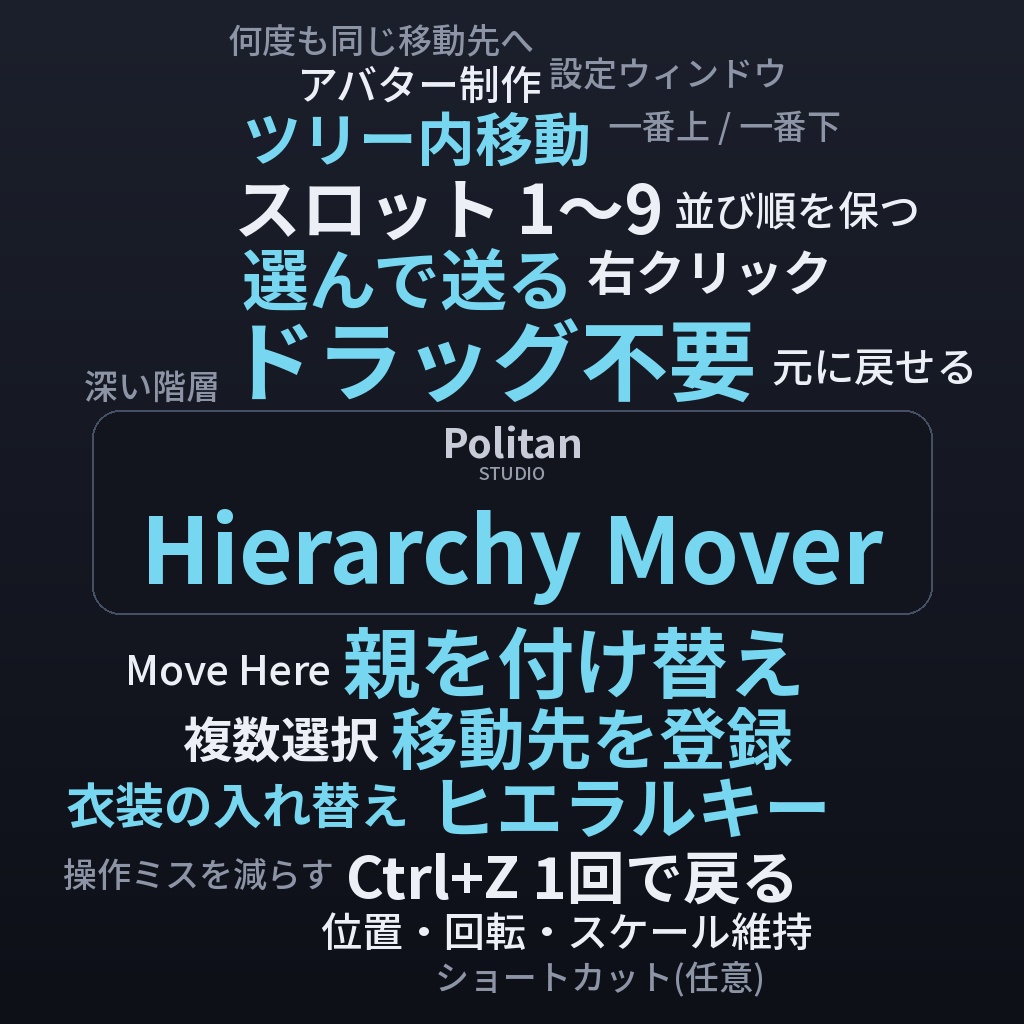
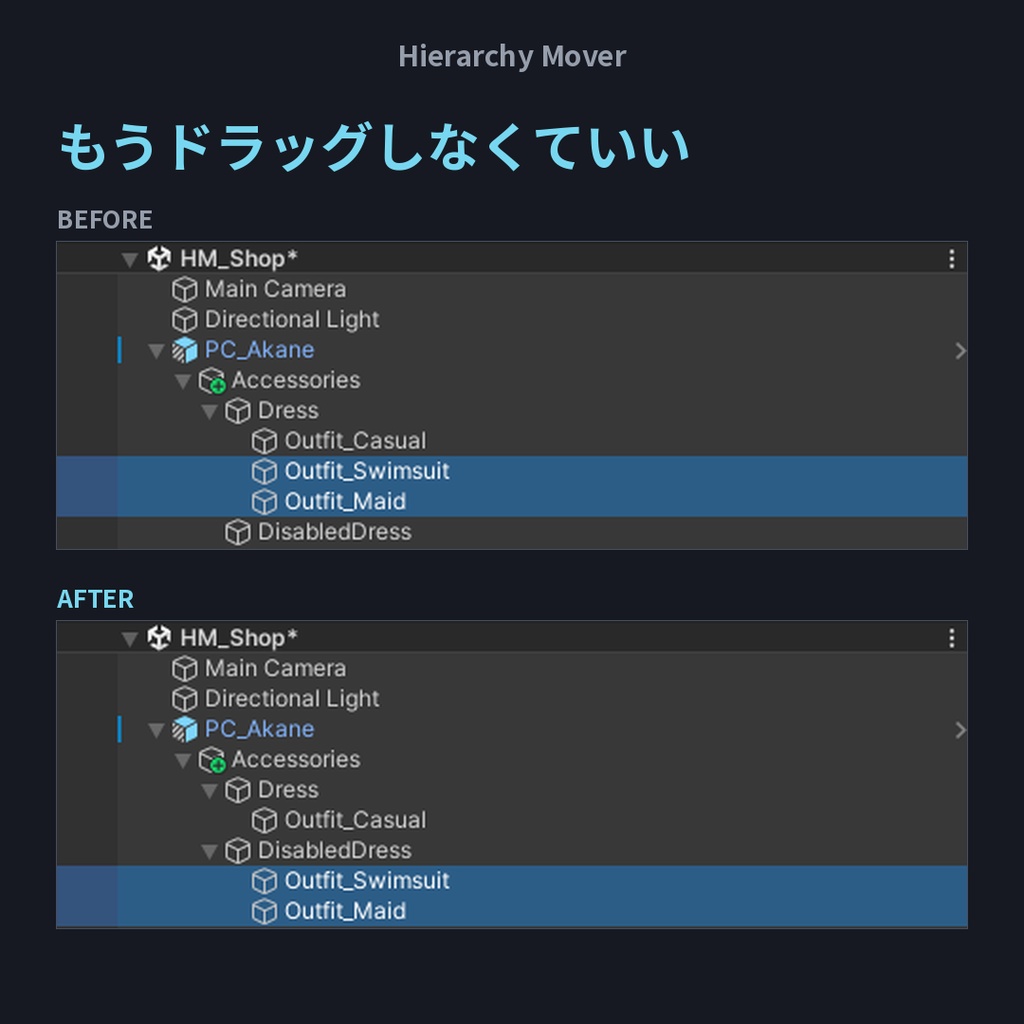
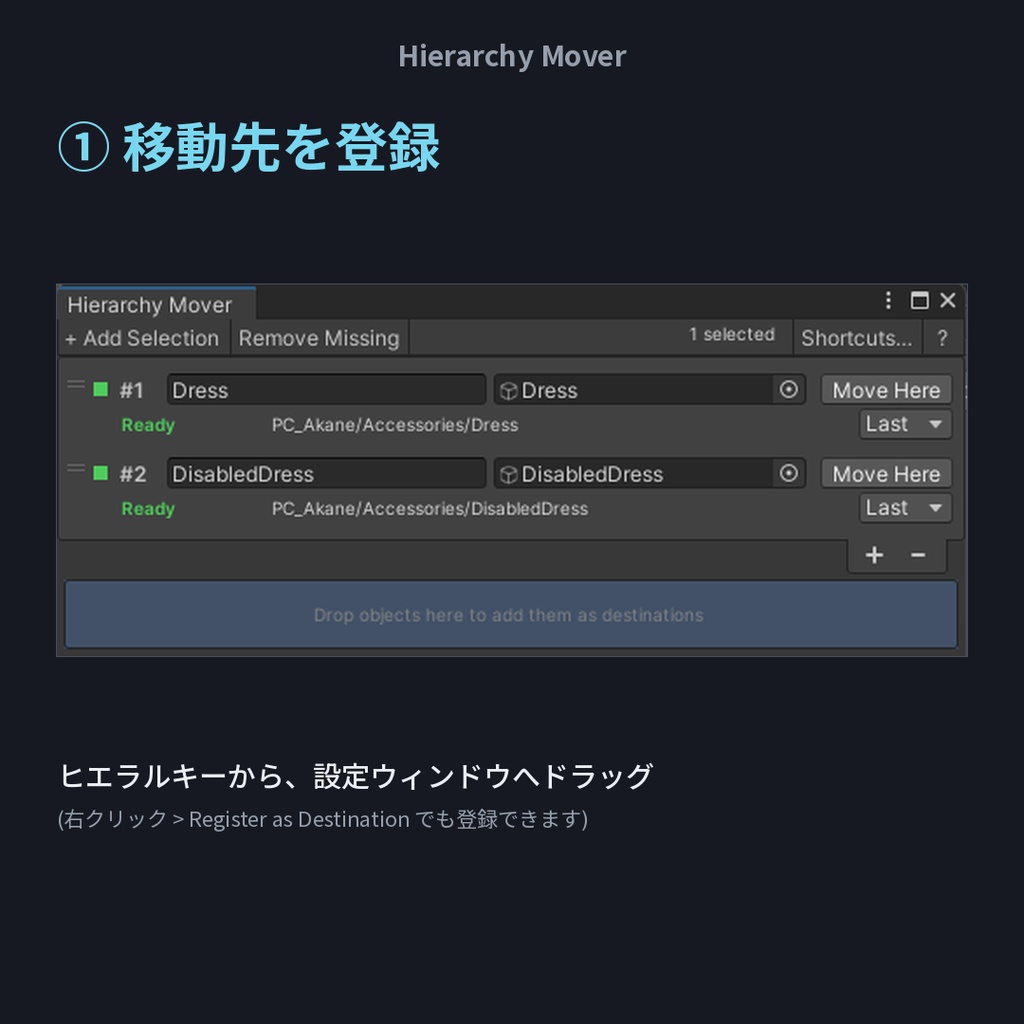
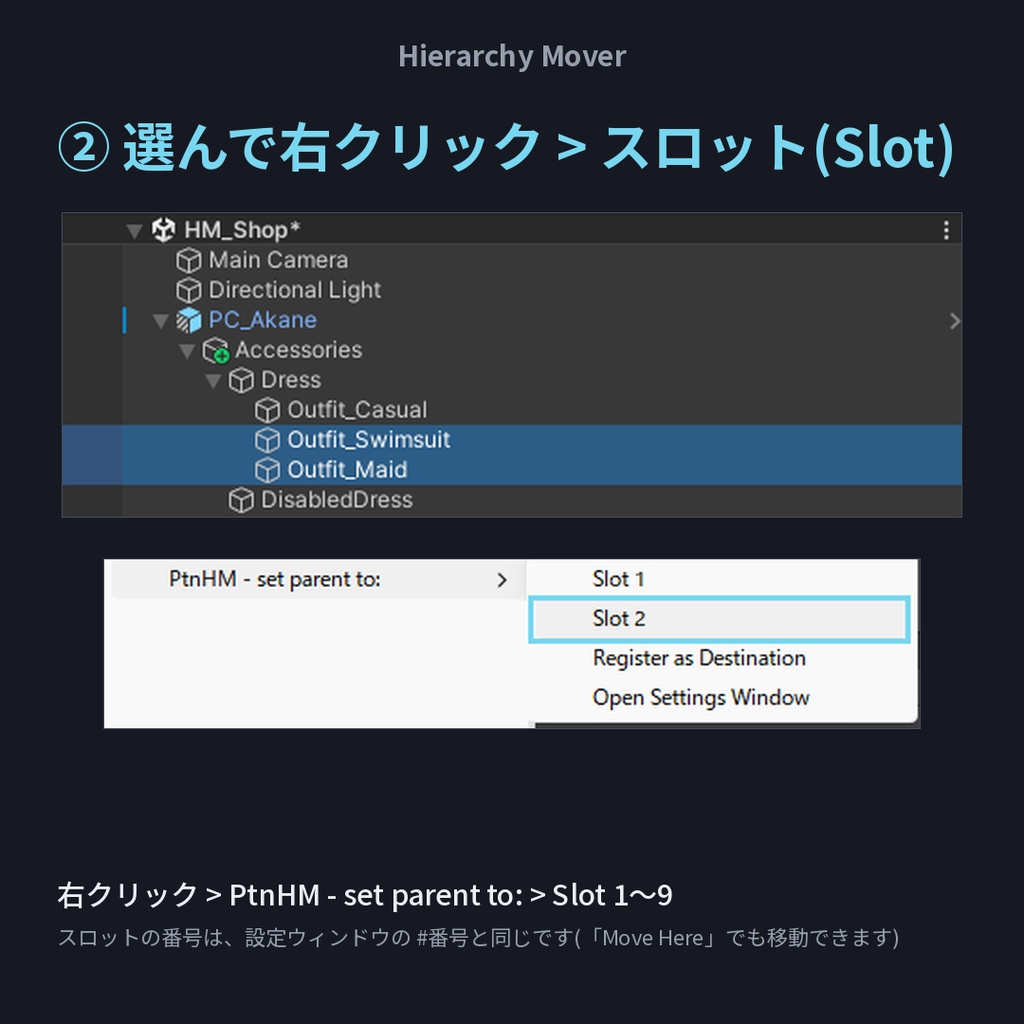
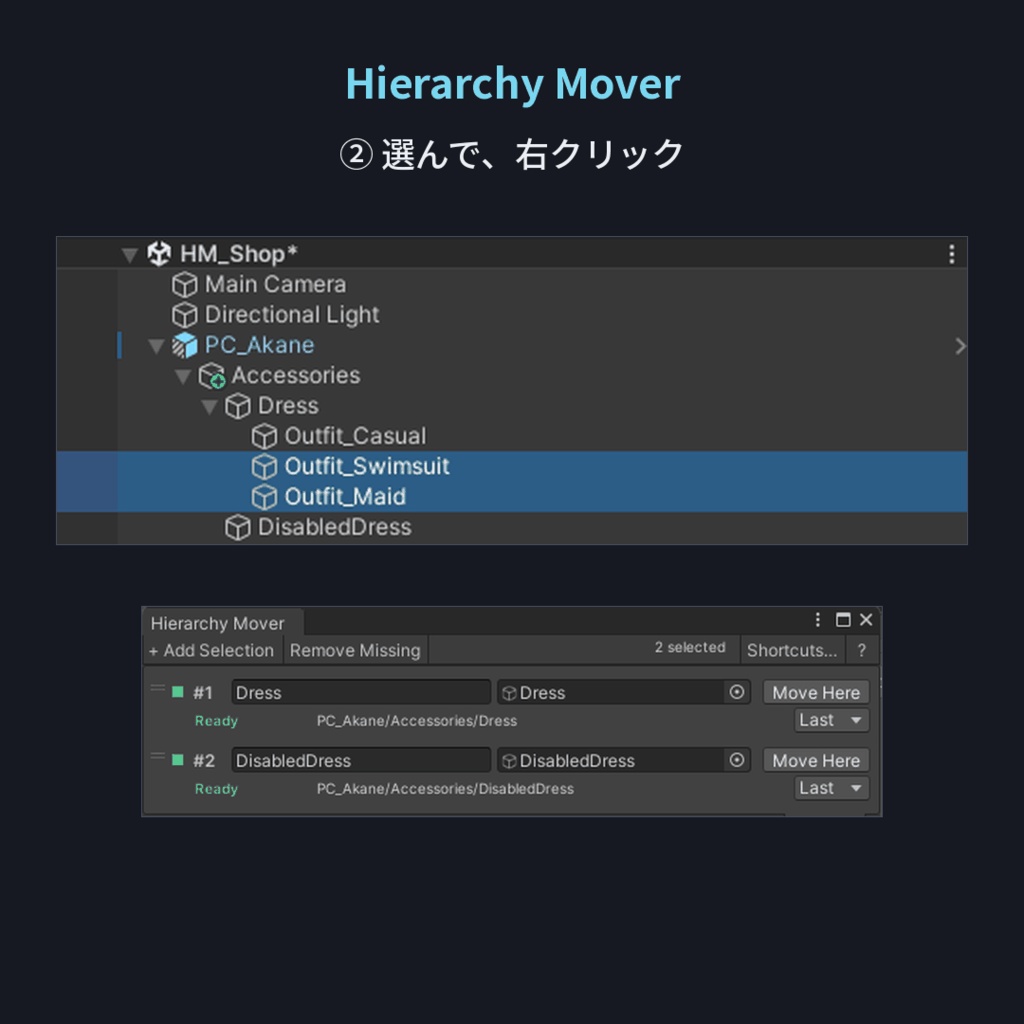


🛠️ Hierarchy Mover v1.0 Unityのヒエラルキー(Hierarchy)で、オブジェクトの親を付け替える操作を、右クリックだけで済ませるツールです。 A Unity tool that replaces drag & drop re-parenting in the Hierarchy with "select, pick a slot". ❤ Made with Love ❤ ━━━━━━━━━━━━━━━━━━━━━━ 💡 もうドラッグしなくていい - ツリー内移動操作を加速 ✨ こんな方に ・Dress / DisabledDress のようなグループ間で、衣装などを何度も入れ替えている方 ・深い階層へのドラッグ&ドロップで、操作ミスをした経験がある方 ・同じ移動先へ、繰り返しオブジェクトを送る作業が多い方 🎯 主な機能 【移動先(Destination)を登録】 オブジェクトを右クリック、設定ウィンドウへドラッグ、または選択して「+ Add Selection」。最初の9件がスロット(Slot)1〜9になり、行のドラッグで順番を変えられます(10件目以降はスロットがなく、設定ウィンドウの「Move Here」で移動します)。 【選んで、送る】 オブジェクトを選択して、右クリック > PtnHM - set parent to: > Slot 1〜9。設定ウィンドウの「Move Here」でも移動できます。複数選択はまとめて移動し、並び順も保たれます。 【ヒエラルキーのドラッグ&ドロップと同じ動作】 Unity 標準のドラッグ&ドロップと同じ方式で、親と並び順だけが変わり、見た目の位置・回転・スケールは保たれます。移動先の一番上(First)・一番下(Last)のどちらへ置くかは、行ごとに選べます。 【Ctrl+Z 1回で元に戻る】 複数オブジェクトの移動も、まとめて1回で戻せます。 【ショートカットキー(任意)】 スロット1〜9に、Unity のショートカット(Shortcuts)でキーを割り当てられます。 【動かせないものはスキップ】 移動先が自分自身や子孫になる場合、Prefab Mode のオブジェクトなどはスキップし、理由をコンソールに出します。Prefab インスタンスの内側の子は、Unity の仕様により、Prefab > Unpack Completely などを行った後でないと移動できません(本ツールは Unpack をしません)。 📌 ご利用の前に ・先にシーンを保存してください。一度も保存していないシーンには、移動先を登録できません。 ・アニメーションはヒエラルキーのパスで対象を探します。FX で切り替えている衣装などを移動すると、アニメーションが効かなくなることがあります。移動後に FX のトグルを確認してください。 ・メニューと設定ウィンドウは英語表示です。 📥 導入 .unitypackage を Unity プロジェクトにドラッグ&ドロップ → Import。メニュー Tools/PolitanStudio/Hierarchy Mover、またはヒエラルキーの右クリックから使えます。 ⚙️ 動作環境 Windows の Unity 2022.3.22f1 で動作確認。ほかのパッケージは不要です。Mac は未確認です。 🖼️ 掲載画像の撮影用アバター: 茜犬 -Akane- (minto-akayama / CC0) ━━━━━━━━━━━━━━━━━━━━━━ 💝 通常版 ¥500 / 愛情多め版 ¥1,000 中身はまったく同じで、機能に差はありません。 「役に立った」「応援したい」と思っていただけたら、愛情多め版をご検討ください。 心から感謝します。 ━━━━━━━━━━━━━━━━━━━━━━ ⚖️ 免責事項 ・開発には一部 AI を使用しています。複数選択の移動・Undo・見た目の位置の保持・移動先の登録などは Unity 2022.3.22f1 で動作を確認していますが、予期しない動作の可能性はゼロではありません。必ずバックアップを取り、自己責任でご利用ください。 ・ご利用のサービス、およびご使用のアバター・衣装などの利用規約に沿った範囲でご利用ください。 ・データ破損その他の損害について、当方は責任を負いかねます。 ・Unity の更新に伴い動作しなくなる可能性があります(追従は保証しません)。 ❤ 愛を込めて。快適なアバターライフの一助となれば幸いです。 ━━━━━━━━━━━━━━━━━━━━━━ English ━━━━━━━━━━━━━━━━━━━━━━ 💡 No more dragging — speed up moving objects within the Hierarchy tree. ✨ Who it's for ・Creators who keep moving outfits between groups like Dress / DisabledDress ・Anyone who has made mistakes while dragging into a deep Hierarchy ・Anyone who sends objects to the same destinations again and again 🎯 Features 【Register destinations】 Right-click an object, drag objects into the settings window, or select them and press "+ Add Selection". The first nine become Slot 1–9; drag rows to reorder (from the tenth on there is no Slot; use "Move Here"). 【Select and send】 Select objects, then right-click > PtnHM - set parent to: > Slot 1–9. "Move Here" in the settings window works too. Several selected objects move together and keep their order. 【Same as Hierarchy drag & drop】 Works the same way as Unity's own drag & drop: only the parent and sibling order change, and position, rotation and scale in the scene are kept. Per destination you can choose whether objects go to the top or the bottom. 【One Ctrl+Z undoes it all】 Even a multi-object move. 【Shortcut keys (optional)】 Bind keys to Slot 1–9 in Unity's Shortcuts. 【Skips what can't move】 A destination that is the object itself or its descendant, objects in Prefab Mode, and so on are skipped with the reason in the Console. Children inside a prefab instance can only be moved, under Unity's own rules, after an operation such as Prefab > Unpack Completely (this tool never unpacks prefabs). 📌 Before you use it ・Save your scene first. A scene that has never been saved cannot hold destinations. ・Animations find objects by their Hierarchy path. Moving an object that an animation controls (for example an outfit toggled from your FX layer) can break that animation. Check your FX toggles after moving such objects. 📥 Install Drag the .unitypackage into your project and Import. Open from Tools/PolitanStudio/Hierarchy Mover, or from the Hierarchy right-click menu. ⚙️ Requirements Confirmed with Unity 2022.3.22f1 on Windows (Mac not tested). No other packages required. 🖼️ Avatar used in the images: Akane (茜犬) by minto-akayama (CC0) ━━━━━━━━━━━━━━━━━━━━━━ 💝 Standard ¥500 / Love-Filled ¥1,000 The contents are exactly the same — there is no difference in functionality. If this tool helped you and you'd like to support it, please consider the Love-Filled Edition. Thank you, truly. ━━━━━━━━━━━━━━━━━━━━━━ ⚖️ Disclaimer ・AI was used in part during development. Multi-object moves, Undo, position preservation and destination registration were checked on Unity 2022.3.22f1, but unexpected behavior is not impossible. Please back up your data and use at your own risk. ・Please use within the terms of service of the services you use and of your avatar/costume assets. ・I am not responsible for data corruption or any other damage. ・This tool may stop working with future Unity updates (compatibility is not guaranteed). ❤ With love. I hope this tool helps you enjoy a comfortable avatar life.
