

【Free!! Japanese⇄English Translation Tool】🎀 KoeBridge Lite+ EN for VRChat
- Lite+ EN Installer PackageDigital0 JPY
- [Support] Lite+ EN Installer Package (same contents as the free version)Digital500 JPY
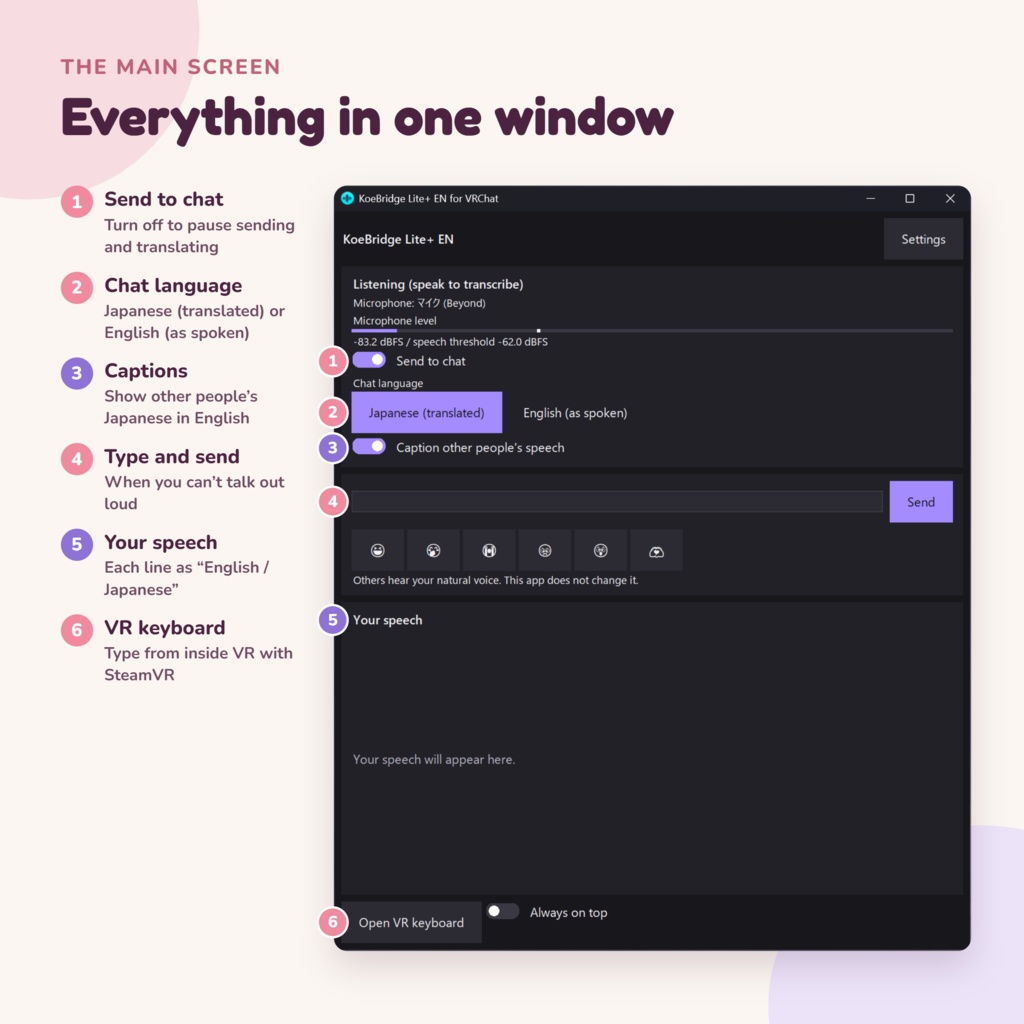
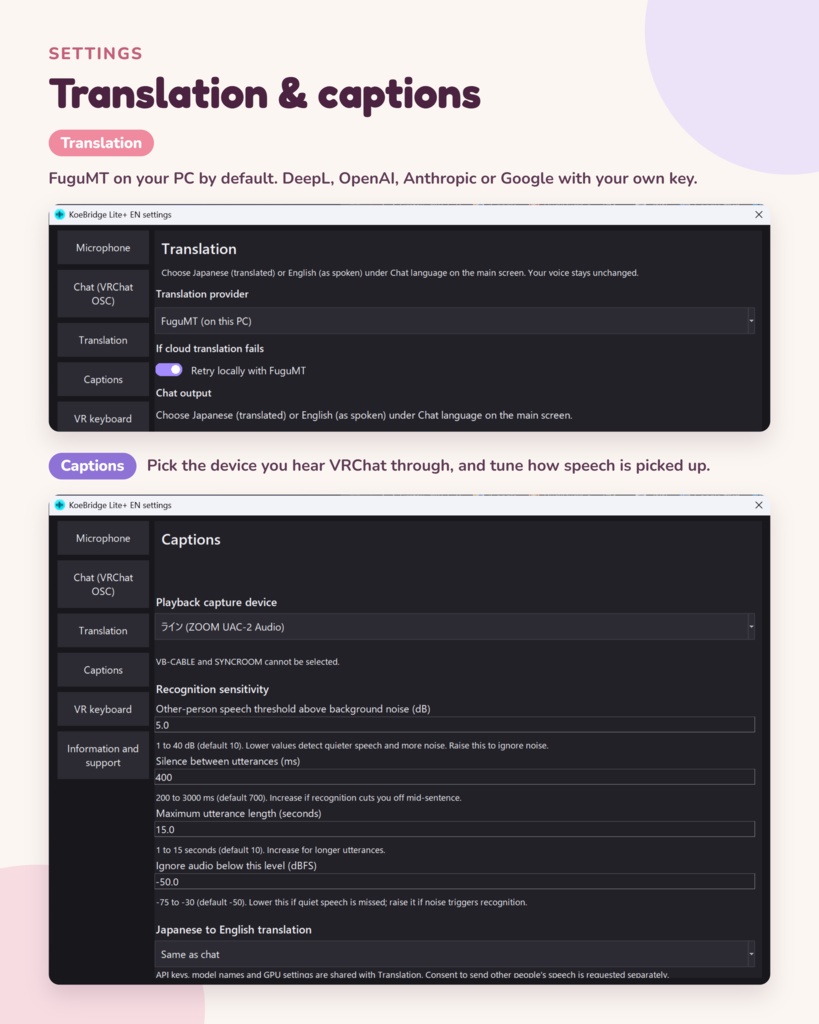
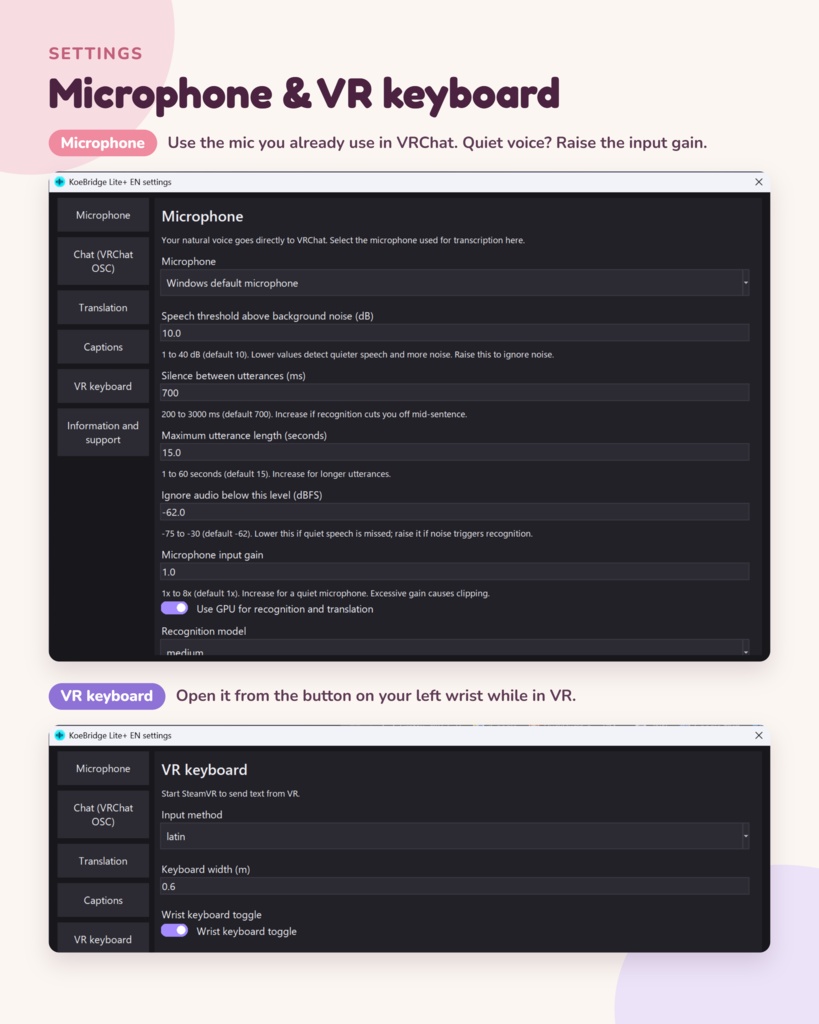


Talk with Japanese friends — in your own voice. KoeBridge Lite+ EN is a free Windows tool for VRChat. Speak English, and it shows your words in Japanese in the VRChat chatbox. When someone speaks Japanese, it shows English captions in VR and on your PC. Your voice is not changed. Other people hear your natural voice. ※KoeBridge Lite+ EN for VRChat is not an official VRChat tool and is not affiliated with VRChat Inc.
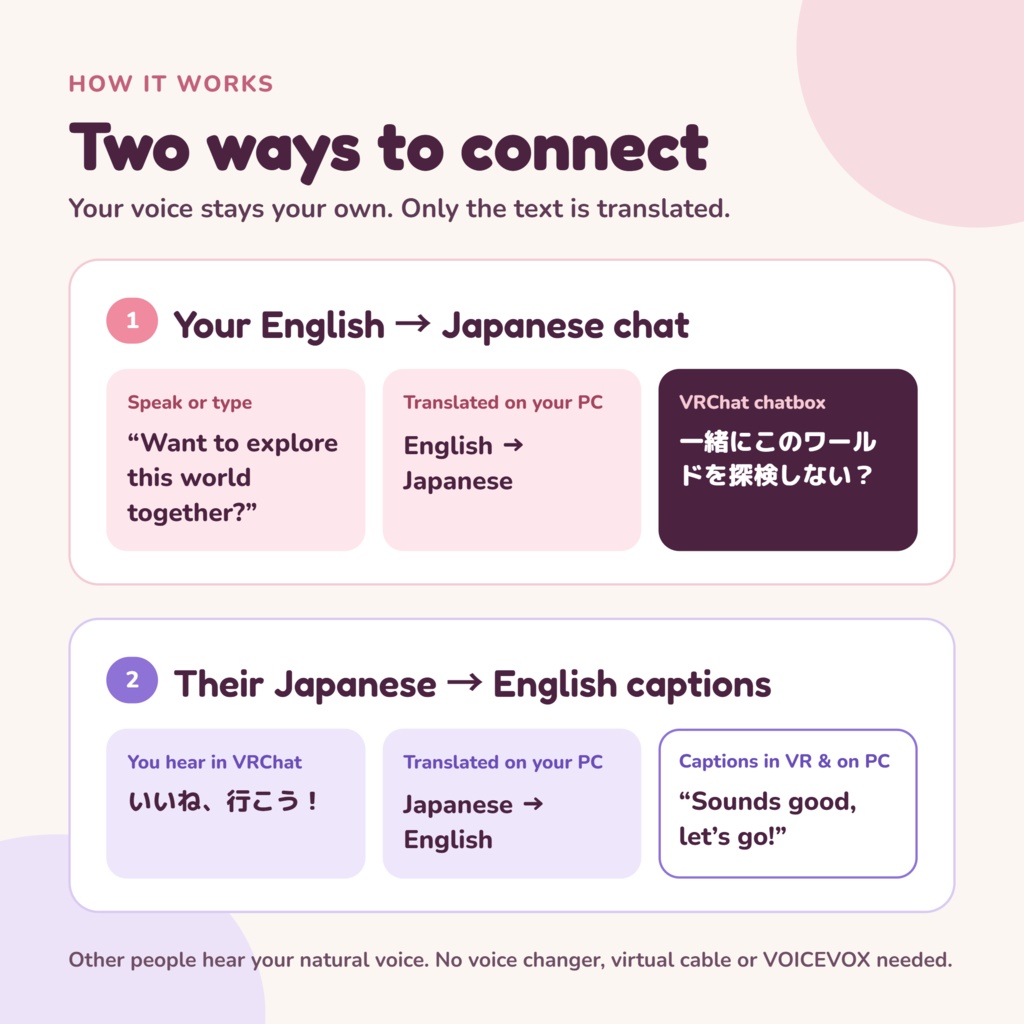
🔁 How it works
1. Speak English into your microphone (or type) 2. Your speech is turned into text and translated into Japanese 3. The Japanese appears in the VRChat chatbox 【Their Japanese → English captions】 1. The app listens to the Japanese you hear in VRChat, right on your PC 2. It translates it into English 3. English captions appear in VR and in a caption window on your PC
✨ Main features
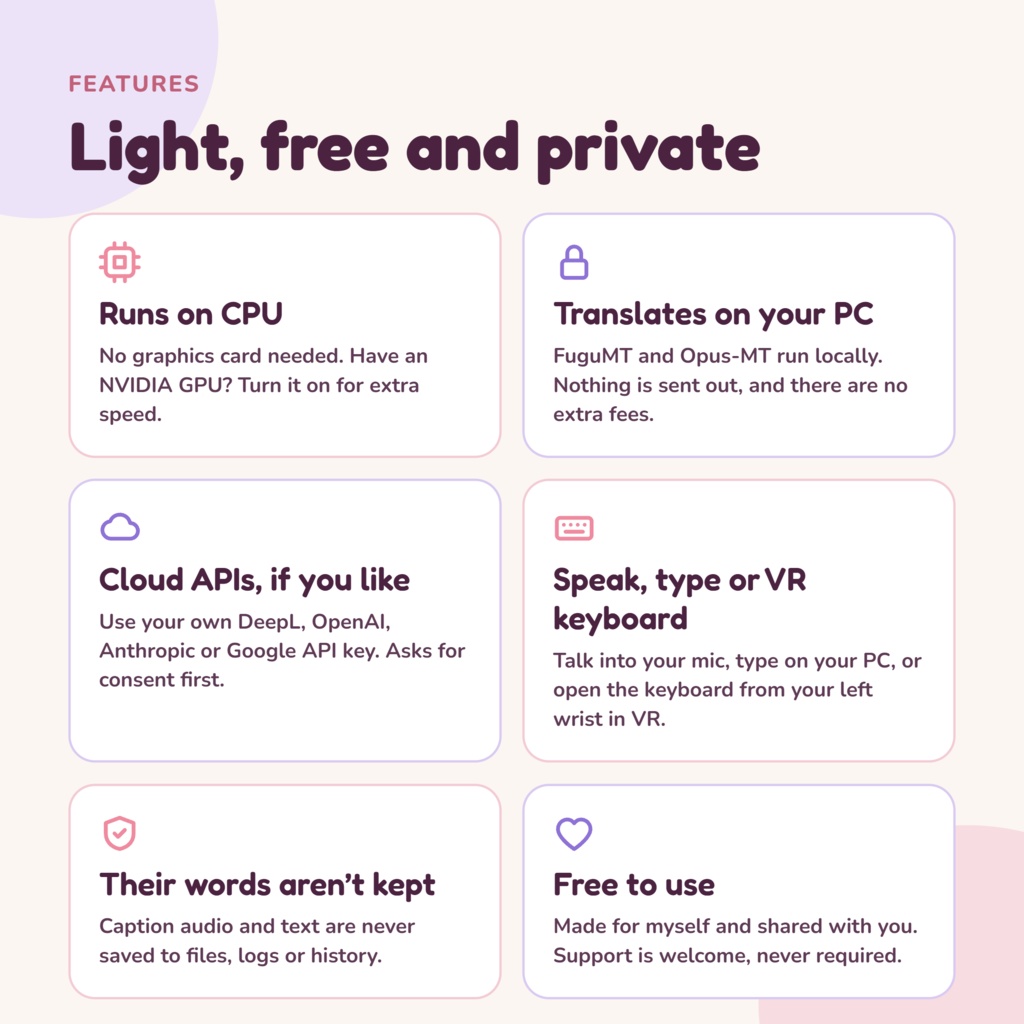
・Voice input Just talk. Your speech is transcribed and translated automatically ・Text input Type English and send it as Japanese, even when you can't speak out loud ・VR keyboard Type from inside VR, with an "EN" button on your left wrist ・Chatbox output Sends to the VRChat chatbox through OSC. Choose Japanese (translated) or English (as spoken) ・English captions Shows other people's Japanese as English, in VR and in a caption window on your PC ・Choose how to translate On-PC translation (FuguMT and Opus-MT) costs nothing extra and sends nothing out If you have an API key for DeepL, OpenAI, Anthropic or Google, you can use that instead ・Microphone sensitivity Adjust the input gain and the speech threshold so quieter voices get picked up. Changes apply right away ・History Check what you said afterwards (other people's speech is never kept) ・Easy-to-read pastel UI Stays tidy in a narrow window, and remembers its position and size
💜 Recommended for
・You have Japanese friends in VRChat and want to talk more ・You like visiting Japanese worlds and events ・You're learning Japanese and want a little help ・You can't follow spoken Japanese yet and want to see what's being said ・You want to use your own voice, not a voice changer
🇯🇵 For your Japanese friends
Your Japanese friends can use the Japanese versions of KoeBridge. KoeBridge+ and KoeBridge Lite+ turn their Japanese into English chat, and your English into Japanese captions. https://5ka.booth.pm/items/9008627 (The Japanese versions have a Japanese interface.)
🌐 About translation and captions
【On-PC translation (default)】 ・English → Japanese uses FuguMT, and Japanese → English uses Opus-MT. ・Translation runs on your PC, so what you say is not sent anywhere. There are no extra costs. 【Cloud translation (only if you choose it)】 ・You can choose DeepL, OpenAI, Anthropic or Google. ・You need to sign up with the company and get your own API key. Usage fees are billed to you by that company. ・The text to be translated is sent to the company you choose. The app asks for your consent for each company before anything is sent. ・Sending other people's speech for captions needs a separate consent from your own speech. ・API keys are encrypted so that only your Windows user can read them. They are deleted when you uninstall, even if you keep your other data. 【Captions】 ・Captured audio, other people's speech and caption text are never saved to files, logs or history. ・Captions listen to the sound coming out of your PC. With speakers, your own voice can get mixed in, so headphones or earphones are recommended.
💝 Support
KoeBridge Lite+ EN is free to use. I made it for myself, and I'm sharing it. If you like it, I'd be really happy if you supported me with the [Support] version, or with a boost when you download ✨ (The [Support] version has exactly the same contents as the free version.)
🛡 Built to be safe
① Other people's speech is not kept The voices and text picked up for captions are never saved. They are sent to cloud translation only if you agree. ② Components come from official sources AI models and other components are downloaded directly from their official sources during setup, and checked with hash values to make sure they are the right files. Translation models are downloaded in their original form from the official source and converted on your PC. ③ An installer that keeps your PC clean No administrator rights are needed. The app installs only in your user area. When you uninstall, files that can't be confirmed as KoeBridge's own are left untouched. The KoeBridge apps never delete each other's folders.
🖥 Requirements
・Windows 10 / 11 (64-bit) ・A microphone ・VRChat for PC ・An Internet connection during installation (setup downloads the components it needs) ・No GPU needed (by design). It hasn't been tested yet on a PC without a GPU. If you have an NVIDIA GPU, you can use it to make things faster ・No virtual audio cable or VOICEVOX needed ・Headphones or earphones recommended (when using captions) ・Folder size after installation: about 3 GB on CPU, about 4.3 GB with GPU (with the medium recognition model) ・Free disk space: 6 GB or more on CPU, 10 GB or more with GPU 【When using cloud translation】 ・An API key from the company (may be paid) ・An Internet connection while you use it ※Sizes are estimates. They vary with your PC and the recognition model you choose. ※You need a pixiv account to download from BOOTH.
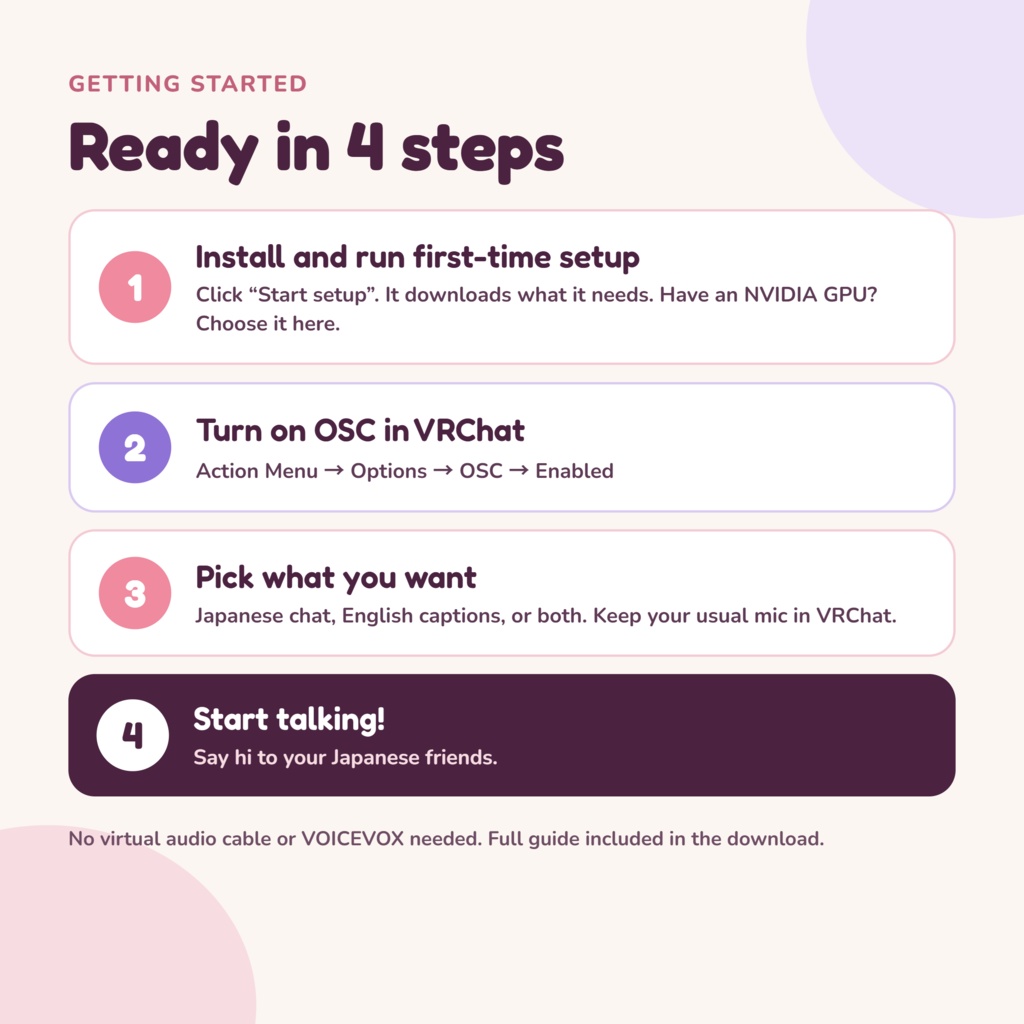
🔧 Getting started
1. Install KoeBridge Lite+ EN and run first-time setup (if you have an NVIDIA GPU, you can choose to use it here) 2. Turn on OSC in VRChat (Action Menu → Options → OSC → Enabled) 3. Choose whether to send Japanese to the chat, and whether to show English captions 4. Start talking! (You can keep using your usual microphone in VRChat.) For details, see KoeBridge-Guide.txt included in the download.
⚠ Good to know
・It takes a moment for your words to reach the chat after you finish speaking. Quick back-and-forth and short reactions are a little tricky. ・Captions take about 1 to 4 seconds to appear after the other person finishes speaking. Things said while you are talking, or right after, may be skipped. ・Speech recognition can make mistakes depending on background noise and how people speak. ・Translations can be wrong or sound unnatural. For anything important, please check with the other person. ・Chat is English → Japanese only, and captions are Japanese → English only. Other languages are not supported. ・The app's interface, installer and documents are in English. ・Cloud translation prices, models and conditions may change at each company's discretion.
🤖 About the use of AI
KoeBridge was made with the help of AI. ・Writing the program: ChatGPT (OpenAI) ・Reviewing the code, and writing the documents and this page: Claude (Anthropic) What to build, how it should work, and how careful to be about safety are decided by Itsuka Kisaragi (如月いつ佳). Code written by AI goes through tests and installer safety checks, and is then tried on a real PC. ※"Whisper" for speech recognition and "FuguMT" and "Opus-MT" for translation, which run inside the app, are also AI technologies. This section is about the AI used to make the app.
📜 Terms of use
By downloading or using this tool, you agree to the following. (The full text is in the LICENSE file included in the download.) 【You may】 ・Use this tool to talk in VRChat and other services ・Use it in streams and videos (including commercial streams) 【You may not】 ・Redistribute, sell or lend this tool (including unmodified copies) ・Modify this tool, or distribute modified versions ・Reuse all or part of this tool's program in other software or services ・Impersonate real people, or use it to deceive people ・Use it for fraud, defamation, or anything else against the law or public order and morals ・Use it in a way that breaks the terms of third-party components and services 【When you stream or make videos】 ・Captions and translations show other people's words. When they appear on screen, please be considerate of the people speaking. 【When you use cloud translation】 ・Follow the terms of use and pricing of the company you choose. You are responsible for managing your API key and paying its fees. 【Other】 ・The copyright of this tool belongs to Itsuka Kisaragi (如月いつ佳). ・These terms may change without notice. Please check this page for the latest version.
©️ Credits and rights
・KoeBridge Lite+ EN for VRChat: © Itsuka Kisaragi (如月いつ佳). All Rights Reserved. ・Components such as Whisper, CTranslate2, FuguMT (CC BY-SA 4.0) and Opus-MT (Apache License 2.0) are downloaded from their official sources during setup. For each license, see THIRD_PARTY_NOTICES.txt included in the download. ・DeepL, OpenAI, Anthropic and Google services belong to their respective companies. This tool is not affiliated with any of them. ・"VRChat" is a trademark of VRChat Inc.
📝 Disclaimer
・The creator is not liable for any damage caused by using, or being unable to use, this tool, except in cases of the creator's intentional misconduct or gross negligence. ・Updates or changes to VRChat, Windows or the translation services may stop this tool from working without notice. ・The accuracy of translations and captions is not guaranteed. The creator is not responsible for misunderstandings caused by translation errors. ・Cloud translation fees are between you and each company. The creator cannot cover them.
💌 Contact
Bug reports and "it would be nice if..." ideas are welcome through BOOTH messages. Please include the product name and version. Messages in English are fine. I may not be able to reply to or act on everything, but I read them all 🙏
🗓 Update history
2026/10/30 ・KoeBridge Lite+ EN for VRChat 1.0.0: first release