

【商用利用OK】Unityで簡単!色替えメニューが作れるツール【Insomnia Angel . Color HUD Toolkit】
- Digital500 JPY
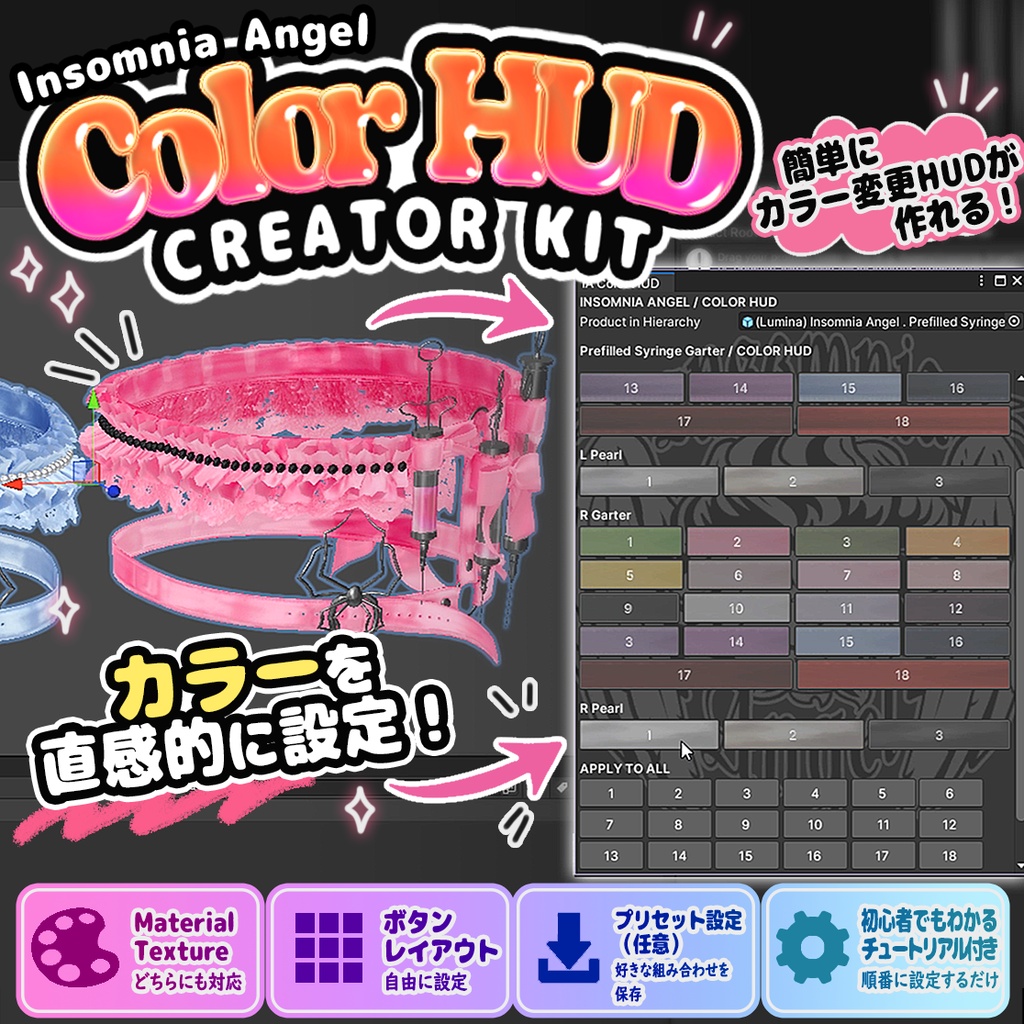
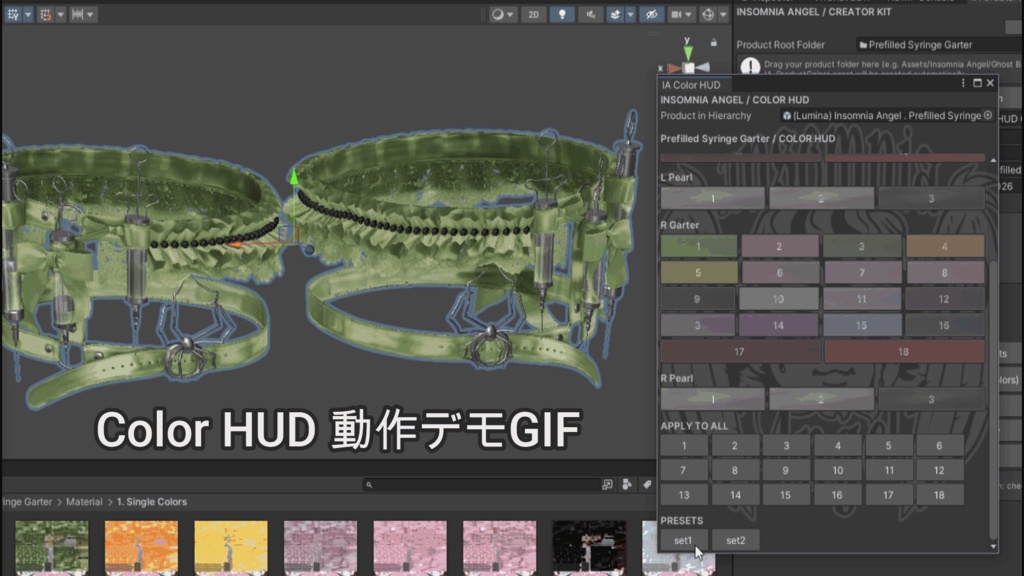


あなたの3Dアイテムに、かんたん色変更メニューを! Insomnia Angel Color HUD Creator Kitは、 Unityで制作した3Dアイテムに、 購入者がボタンひとつで色を変更できるメニューを 追加するためのクリエイター向けツールです。 「赤い靴にしたい!」 「リボンだけピンクにしたい!」 「全部まとめて白にしたい!」 そんなカスタマイズを、購入者がUnity上で わかりやすく操作できるようになります。 作成した色変更メニューは、 あなたの販売商品に同梱して配布できます。 -------------------------------------------------------------------- Give your 3D creations an easy-to-use color customization menu! Insomnia Angel Color HUD Creator Kit is a Unity Editor tool that lets creators add a simple color selection menu to their 3D products. No programming knowledge required! "Make these shoes red!" "Change only the ribbon to pink!" "Turn everything white!" Your customers can make these changes directly in Unity with simple buttons. You can include the finished color customization menu with the 3D products you sell.
■ 無料でお試しいただけます! / Try It for Free!
✦ 購入者側のカラー変更操作を体験できます! 🎨👻 Insomnia Angelで無料配布中の「Ghost Bag」には、このCreator Kitで作成した購入者向けColor HUDが付属しています! Unity上で色のボタンをクリックして切り替える操作や、カラー変更メニューの使い心地を、実際にお試しいただけます。 「購入者にはどんな画面が表示されるの?」 「どれくらい簡単に色を変更できるの?」 そんな方は、ぜひGhost Bagで体験してみてください!💖 ※ Ghost Bagに付属するのは購入者向けのColor HUDです。Creator Kit本体や、制作者向けの設定機能は含まれていません。 ▼ Ghost Bag(無料) https://insomnia-angel.booth.pm/items/9073045 ━━━━━━━━━━━━━━━━━━ ✦ Try the Customer Experience for Free! 🎨👻 Our free Ghost Bag comes with a customer-facing Color HUD created using this Creator Kit! You can try the actual color customization interface in Unity, click the color buttons, and see how easy it is for your customers to customize their items. Wondering what the customer interface looks like or how it works? Download Ghost Bag for free and give it a try! 💖 ※ Ghost Bag includes the customer-facing Color HUD only. It does not include the Creator Kit or any creator-side setup features. ▼ Ghost Bag (FREE) https://insomnia-angel.booth.pm/items/9073045
■ Color HUDとは? / What is a Color HUD?
✦ Color HUDって何? 「HUD」は、色や設定をボタンで操作するためのパネルのようなものです。 「Unity上で使えるカラー変更メニュー」と考えていただくとわかりやすいと思います。 例えば、リボン・靴・金具のあるアイテムの場合、 ・リボン → ピンク ・靴 → ブラック ・金具 → ゴールド というように、それぞれのパーツの色をボタンで変更できます。 購入者がUnityのマテリアル設定を一つずつ探す必要はありません。 ※このColor HUDはUnity Editor上で動作します。 VRChatのワールド内やゲーム内に表示されるHUDではありません。 ✦ What is a Color HUD? A HUD is a control panel that allows users to change colors or settings through buttons. You can think of it as a color customization menu inside the Unity Editor. For example, if your product includes ribbons, shoes, and metal accessories, customers can choose: ・Ribbon → Pink ・Shoes → Black ・Metal → Gold Each part can be customized using simple buttons, without manually searching through material settings. IMPORTANT: This Color HUD works inside the Unity Editor. It is NOT an in-game HUD and does not appear inside VRChat worlds.
■ 主な機能 / Main Features
✦ 主な機能 ■ パーツごとのカラー変更 リボン、金具、靴底など、パーツごとに異なるカラーを設定できます。 ■ Material / Textureの切り替え マテリアルそのものを変更する方式と、指定したマテリアルのメインテクスチャのみを変更する方式に対応しています。 ■ カラーボタンのプレビュー ボタンに色やテクスチャのプレビューを表示できます。 テクスチャ内の好きな場所を指定して、ボタンの見た目に使用することもできます。 ■ Apply to All 対応するパーツの色をまとめて変更できる機能です。 ■ PRESETS 制作者がおすすめするカラーの組み合わせを登録できます。 購入者はプリセットを選択するだけで、複数パーツの色をまとめて変更できます。 ■ Background Logo お好きな画像を設定して、Color HUDの背景を飾ることができます。 ■ 複数Prefabへの対応 同じ商品の複数Prefabに対して設定を登録・検証できます。 ■ Customer HUDの書き出し 購入者に必要なカラー変更ツールを、UnityPackageとして書き出せます。 制作者専用のCreator Kitを同梱する必要はありません。 ✦ Features ■ Individual Part Customization Set different color variations for ribbons, metal parts, soles, and other components. ■ Material / Texture Switching Supports both full material replacement and main texture switching for a selected material. ■ Color Button Previews Display color or texture previews on your buttons. You can also choose a specific area of a texture to use as the button preview. ■ Apply to All Change supported parts together using a single action. ■ PRESETS Create recommended color combinations. Customers can apply multiple color selections at once by choosing a preset. ■ Background Logo Customize the Color HUD background with your own image. ■ Multiple Prefab Support Register and validate settings across multiple prefabs of the same product. ■ Customer HUD Export Export a customer-facing color customization tool as a UnityPackage. You do not need to distribute the Creator Kit itself.
■ 便利なポイント / Why Use It?
✦ 制作者にも購入者にも便利 【制作者のメリット】 ・商品ごとにカラー変更メニューを作成できます。 ・色替え用のマテリアルやテクスチャを整理して登録できます。 ・おすすめの配色をPRESETSとして用意できます。 ・購入者向けの操作画面をUnityPackageとして配布できます。 ・複数Prefabの設定をまとめて確認できます。 【購入者のメリット】 ・Unityの複雑なマテリアル設定を探す手間が減ります。 ・色をボタンで切り替えられます。 ・パーツごとに好きな色を組み合わせられます。 ・プリセットからおすすめの配色を選べます。 ・プレビューを見ながらカラーを選択できます。 カラー変更を、よりわかりやすく、楽しい体験にするためのツールです。 ✦ Convenient for Both Creators and Customers 【For Creators】 ・Create a dedicated color customization interface for each product. ・Organize and register material or texture variations. ・Offer recommended color combinations through PRESETS. ・Distribute the customer interface as a UnityPackage. ・Check configurations across multiple prefabs. 【For Customers】 ・Spend less time searching through Unity material settings. ・Switch colors using simple buttons. ・Mix and match colors for individual parts. ・Choose recommended combinations from presets. ・Select colors using visual previews. Designed to make color customization more accessible, convenient, and enjoyable.
■ 使い方はかんたん! / Simple Setup!
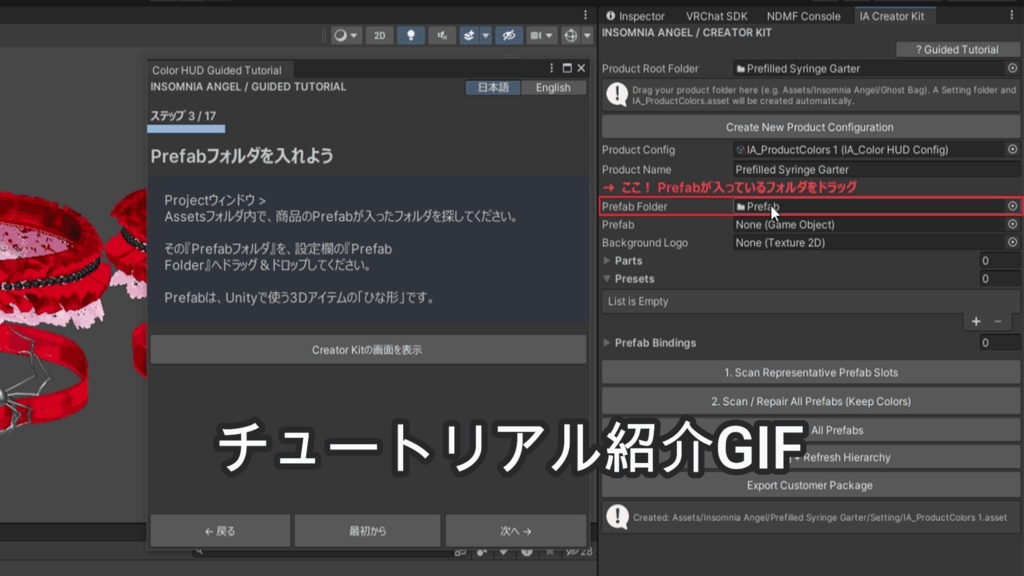
✦ 初めての方でも安心のガイド付き Color HUD Creator Kitには、日本語・英語対応のガイド付きチュートリアルが付属しています。 Unityの操作に慣れていない方でも、画面の案内に沿って設定を進められます。 ・全17ステップの詳しいチュートリアル ・赤い文字と枠で操作する場所を案内 ・ドラッグ&ドロップする場所を具体的に説明 ・MaterialとTextureの違いを解説 ・各パーツの確認方法やカラー登録を説明 ・プレビューやPRESETSなどの任意機能も紹介 ・エラーが発生した際の確認ポイントも案内 ・商品の書き出し方法までサポート チュートリアルはいつでも起動できます。 通常のCreator Kitと、チュートリアル付きのCreator Kitを別々のメニューから起動できるため、操作に慣れた後も快適にご利用いただけます。 ✦ Beginner-Friendly Guided Tutorial Included Color HUD Creator Kit includes a guided tutorial available in both Japanese and English. Even if you are not familiar with Unity, the tutorial will guide you through the setup process step by step. ・17 detailed tutorial steps ・Red text and outlines highlight where to work ・Clear drag-and-drop instructions ・Explanations of Material and Texture modes ・Guidance on identifying parts and registering colors ・Optional features such as previews and PRESETS ・Troubleshooting tips for common configuration errors ・Instructions for exporting your finished product You can launch the tutorial whenever you need it. The regular Creator Kit and the tutorial-enabled version have separate menu entries, so you can work without the tutorial once you are comfortable with the process.
■ 基本的な使い方 / How It Works
✦ 基本的な使い方 ① UnityにCreator Kitをインポートします。 ② Tools > Insomnia Angel > Color HUD Creator Kit (with Tutorial) を開きます。 ③ 商品フォルダとPrefabを指定します。 ④ 色を変更したいパーツを確認し、MaterialまたはTextureの切り替え方式を選択します。 ⑤ 各パーツにカラーバリエーションを登録します。 ⑥ 必要に応じて、ボタンのプレビュー、背景画像、PRESETSを設定します。 ⑦ Prefabの登録・検証を行い、設定を保存します。 ⑧ Customer HUDを書き出します。 ⑨ 商品本体を別途UnityPackageとして書き出します。 完成したCustomer HUDを商品に付属させることで、購入者はUnity上でカラー変更メニューを利用できます。 ※詳しい操作方法は付属のチュートリアルをご覧ください。 ✦ How It Works ① Import the Creator Kit into Unity. ② Open Tools > Insomnia Angel > Color HUD Creator Kit (with Tutorial). ③ Select your product folder and prefab. ④ Identify the parts you want to customize and choose Material or Texture switching. ⑤ Register the available color variations for each part. ⑥ Optionally configure button previews, a background image, and PRESETS. ⑦ Register and validate your prefabs, then save the configuration. ⑧ Export the Customer HUD. ⑨ Export your actual product separately as a UnityPackage. By including the finished Customer HUD with your product, your customers can use the color customization interface inside Unity. Please refer to the included tutorial for detailed instructions.
■ 制作者向けと購入者向けの違い / Creator Kit vs. Customer HUD
✦ Creator KitとCustomer HUDについて 本商品には、役割の異なる2つのツールがあります。 【Creator Kit】 3Dアイテム制作者が使用する設定ツールです。 ・商品やPrefabの登録 ・カラーバリエーションの設定 ・プレビューやPRESETSの設定 ・設定の検証 ・Customer HUDの書き出し 【Customer HUD】 制作者が作成した商品に付属させる、購入者向けのカラー変更ツールです。 ・登録済みのカラーを選択 ・パーツごとの色変更 ・Apply to All ・PRESETSの使用 Creator Kitは制作者専用です。 購入者に配布するのは、商品用に書き出したCustomer HUDです。 ※Customer HUDの書き出しデータには、商品本体のモデル・Prefab・マテリアル・テクスチャは含まれません。 これらは商品本体として別途エクスポートする必要があります。 ✦ Creator Kit vs. Customer HUD This toolkit uses two different tools with separate purposes. 【Creator Kit】 The setup tool used by 3D asset creators. ・Register products and prefabs ・Configure color variations ・Set up previews and PRESETS ・Validate configurations ・Export the Customer HUD 【Customer HUD】 The customer-facing color customization tool included with your finished product. ・Select registered colors ・Customize individual parts ・Use Apply to All ・Apply PRESETS The Creator Kit is for creators only. Your customers receive the Customer HUD exported for your specific product. IMPORTANT: The exported Customer HUD does not include your product models, prefabs, materials, or textures. These assets must be exported separately as part of your actual product package.
■ 動作環境・注意事項 / Requirements & Important Notes
✦ 動作環境・注意事項 ・Unity Editor上で動作するツールです。 ・Unity Editorの操作と、基本的なPrefab・Materialの知識が必要です。 ・VRChat内で動作するHUDではありません。 ・VRChatのアバターにメニューを追加するツールではありません。 ・購入者がUnity上でカラーを選択するためのツールです。 ・登録できるカラーは、制作者が用意したマテリアルまたはテクスチャです。 ・カラー変更用の素材を自動生成する機能はありません。 ・商品本体のモデルやカラーバリエーションは付属しません。 ・使用するUnityバージョンや商品構成によっては、個別の調整が必要になる場合があります。 【対応Unityバージョン】 正式に動作確認したUnityバージョンは、販売ページの対応環境欄をご確認ください。 ※ご購入前に、商品説明と利用規約を必ずご確認ください。 ✦ Requirements & Important Notes ・This tool runs inside the Unity Editor. ・Basic familiarity with Unity, prefabs, and materials is recommended. ・It is NOT an in-game VRChat HUD. ・It does not create an in-game avatar menu. ・It is designed for customers to select colors inside Unity. ・Available colors are based on materials or textures provided by the creator. ・It does not automatically generate new color variations. ・No product models or color variation assets are included. ・Some products or Unity setups may require additional configuration. 【Supported Unity Versions】 Please check the compatibility information on the product page for officially tested Unity versions. Please read the product description and Terms of Use before purchasing.
■ 利用規約 / Terms of Use
✦ 利用規約 / Terms of Use 本商品を購入・ダウンロード・使用した時点で、以下の利用規約に同意したものとみなします。 【許可事項】 ・購入者本人によるCreator Kitの使用 ・個人制作および商用制作への使用 ・本ツールを使用した3Dアイテムの販売・無料配布 ・制作した商品に、その商品専用のCustomer HUDを同梱すること ・Creator Kitを使用して複数の商品を制作すること ・ご自身の制作環境に合わせたツールの改変 制作できる商品数に制限はありません。 商用利用に際して、追加料金や売上に対するロイヤリティは必要ありません。 【禁止事項】 ・Creator Kit本体の再配布、再販売、譲渡、共有 ・Creator Kitのソースコードを第三者に提供する行為 ・Creator Kitを改変したものの再配布・販売 ・Customer HUDを単体の汎用ツールとして再配布・販売する行為 ・第三者が新たな商品用のColor HUDを自由に制作できる形での配布 ・購入者以外がCreator Kitを使用できる状態にする行為 ・本ツールの全部または一部を、自作のツールであると偽って販売する行為 【Customer HUDの配布について】 ご自身が制作・販売する3Dアイテムに、その商品専用のCustomer HUDを付属させることは許可されています。 ただし、Creator Kit本体や制作者向けの設定・書き出し機能を配布することは禁止します。 商品本体をUnityPackageとしてエクスポートする際は、必ず「Color HUD Toolkit (DO NOT EXPORT)」フォルダが含まれていないことを確認してください。 【ライセンスについて】 本商品は購入者本人に対する使用ライセンスです。 著作権および知的財産権はInsomnia Angelに帰属します。 複数人でCreator Kitを使用する場合、使用者ごとにライセンスをご購入ください。 【免責事項】 本ツールの使用によって発生したデータの破損、制作物の不具合、その他の損害について、制作者は法令で認められる範囲で責任を負いません。 重要なプロジェクトで使用する前に、必ずバックアップを作成してください。 本ツールの動作や、すべてのUnity環境・外部アセットとの互換性を保証するものではありません。 ✦ Terms of Use By purchasing, downloading, or using this product, you agree to the following Terms of Use. 【Permitted Uses】 ・Personal use of the Creator Kit by the license holder ・Personal and commercial 3D asset creation ・Selling or distributing 3D assets made using this toolkit ・Including a product-specific Customer HUD with your own 3D assets ・Creating multiple products using the Creator Kit ・Modifying the toolkit for your own production workflow There is no limit on the number of products you may create. No additional commercial license fees or sales royalties are required. 【Prohibited Uses】 ・Redistributing, reselling, transferring, or sharing the Creator Kit ・Providing the Creator Kit source code to third parties ・Redistributing or selling modified versions of the Creator Kit ・Redistributing or selling the Customer HUD as a standalone general-purpose tool ・Distributing the toolkit in a form that allows third parties to create new Color HUDs for unrelated products ・Allowing unlicensed users to access or use the Creator Kit ・Claiming or selling this toolkit, in whole or in part, as your own original tool 【Customer HUD Distribution】 You may include a product-specific Customer HUD with 3D assets that you create and distribute. However, you must not distribute the Creator Kit itself or its creator-facing configuration and export tools. When exporting your product as a UnityPackage, always make sure that the "Color HUD Toolkit (DO NOT EXPORT)" folder is NOT included. 【License】 This product is licensed to the individual purchaser. All copyrights and intellectual property rights remain with Insomnia Angel. If multiple people need to use the Creator Kit, each user must purchase their own license. 【Disclaimer】 To the extent permitted by applicable law, the creator is not responsible for data loss, project damage, product malfunctions, or other damages resulting from use of this toolkit. Always back up important projects before using the toolkit. Compatibility with every Unity environment or third-party asset is not guaranteed.
Unityバージョン / Unity Version Unity 2022.3(2022.3.22f1で制作)
画像内使用アイテム
⚠️ ご購入前にご確認ください 商品画像・サムネイルに登場するガーターは、Color HUD Creator Kitの使用例として掲載しているものです。 本商品にガーターやその他の3Dモデルは含まれていません。 使用しているガーターはこちらから別途ご購入いただけます。 👉 https://insomnia-angel.booth.pm/items/7586675 ━━━━━━━━━━━━━━ ⚠️ Please Read Before Purchasing The garter shown in the product images and thumbnails is used for demonstration purposes only. This product does not include the garter or any other 3D models. The garter featured in the images is available separately here: 👉 https://insomnia-angel.booth.pm/items/7586675