
Migaki|AI生成曲も、自作曲も。歌の表情を残して整えるマスタリングアプリ【Windows】
- Digital3,000 JPY
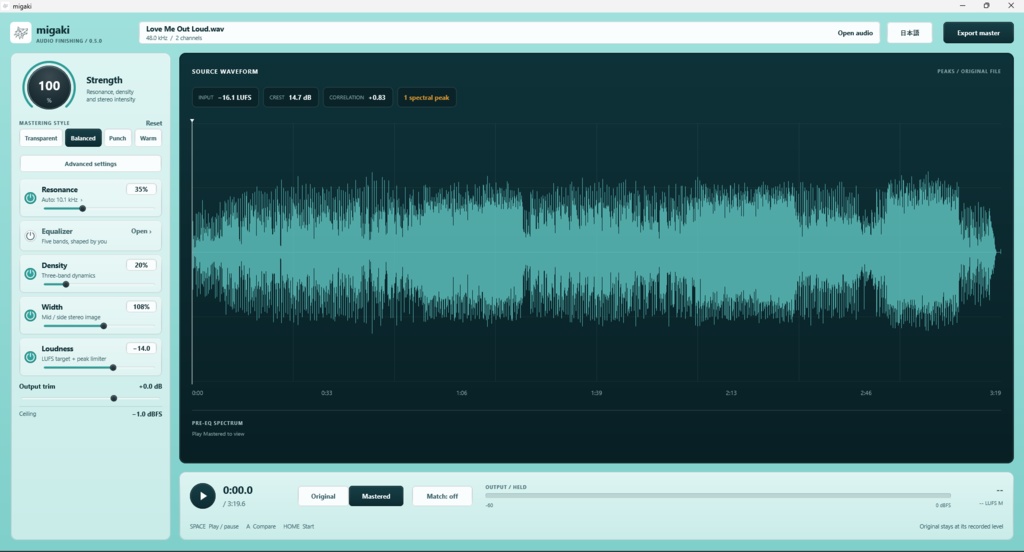

✅生成AI特有のサウンドをより高品位に。 高音をやわらかく。歌の勢いは残したままに。 ✅曲は気に入っている。でも、少し耳に刺さる高域のシャリシャリ。 歌い終わりの余韻は好きだから、高音をまとめて下げたくはない・・・ Migakiは、そんな曲の最後のひと仕上げに使える、 Windows用のマスタリングアプリです。 AIで作った曲はもちろん、 自分で歌って録音した曲や、DAWでミックスした音源にも 簡単に使えるマスタリングツールとしてご利用いただけます。 ━━━━━━━━━━━━━━━━━━ ■ こんな曲の仕上げに ━━━━━━━━━━━━━━━━━━ ・AIで作った曲の、高音のざらつきを和らげたい ・自分でミックスした曲の音量や左右の広がりを、配信や動画に使う前に整えたい ・歌の抑揚やドラムの立ち上がりを大切にしながら、少しだけ聴きやすくしたい ━━━━━━━━━━━━━━━━━━ ■ 気になる響きに、必要なところだけ ━━━━━━━━━━━━━━━━━━ Migakiは曲を解析し、周りより飛び出した帯域を、その響きが目立つ場面で抑えます。 たとえばシンバルが刺さるときも、高音全体を下げずに、気になる響きに絞って調整できます。 ━━━━━━━━━━━━━━━━━━ ■ 迷ったら、Balancedから ━━━━━━━━━━━━━━━━━━ 曲をドラッグ&ドロップすると、標準の「Balanced」がセットされます。 Aキーで原音と処理後を聴き比べてみてください。 「少しかかりすぎかな」と思ったら、左上の「処理の強さ」を下げるだけ。 レゾナンス・密度・ステレオ幅の効きをまとめて調整できます。 元の雰囲気を活かしたいときは「Transparent」 ドラムに押し出しがほしいときは「Punch」 少し温かみを足したいときは「Warm」 ━━━━━━━━━━━━━━━━━━ ■ そのまま書き出しまで ━━━━━━━━━━━━━━━━━━ 配信や動画に合わせて目標音量を選び、WAVまたはMP3で保存できます。DAWは不要です。 ======================================= ZIPを展開し、migaki.exe を起動してお使いください。 対応環境 Windows 10 / 11(64bit) 読み込み WAV / MP3 / AIFF / FLAC 書き出し WAV(16bit・24bit)/ MP3(320kbps) 言語 日本語・英語の画面切り替え対応。両言語の使い方ガイドを同梱 =================================== 🌎Soften the harsh highs of AI-generated music. Keep the energy of the vocals intact. ✅ You love the track. But there’s a little too much harshness and sizzle in the highs. You love the way the vocals linger at the end of each phrase, so you don’t want to turn down the entire high end… Migaki is a mastering app for Windows, designed to give tracks like these their final polish. Along with AI-generated music, Migaki is an easy-to-use mastering tool for your own vocal recordings and tracks mixed in a DAW. ━━━━━━━━━━━━━━━━━━ ■ Give your tracks the finishing touch ━━━━━━━━━━━━━━━━━━ ・Soften rough, harsh highs in AI-generated music. ・Adjust the loudness and stereo width of your mixes before using them in videos or releasing them online. ・Make your tracks a little easier to listen to while preserving vocal dynamics and the attack of the drums. ━━━━━━━━━━━━━━━━━━ ■ Target the harshness, only where it’s needed ━━━━━━━━━━━━━━━━━━ Migaki analyzes your track and reduces frequency peaks that stand out from the surrounding sound, only when they become prominent. For example, when cymbals sound piercing, you can target the troublesome frequencies without turning down the entire high end. ━━━━━━━━━━━━━━━━━━ ■ Not sure where to start? Try Balanced ━━━━━━━━━━━━━━━━━━ Drag and drop a track, and the default “Balanced” preset is applied. Press the A key to compare the original and processed sound. If the processing feels a little too strong, simply lower “Processing Amount” in the upper-left corner. This adjusts the strength of the resonance, density, and stereo width processing together. Choose “Transparent” to preserve the original character. Choose “Punch” to give the drums more impact. Choose “Warm” to add a little warmth. ━━━━━━━━━━━━━━━━━━ ■ Ready to export ━━━━━━━━━━━━━━━━━━ Choose a target loudness to suit your release or video, then save your track as WAV or MP3. No DAW required. ======================================= Extract the ZIP file and launch migaki.exe to get started. System requirements: Windows 10 / 11 (64-bit) Supported input formats: WAV / MP3 / AIFF / FLAC Export formats: WAV (16-bit / 24-bit) / MP3 (320 kbps) Languages: Switch between Japanese and English in the app. User guides in both languages are included.