

指さしでハート PointPop|相手を指さす・投げキッスすると、指した相手の胸もとでハートや光がぱっとはじけるギミック【VRChat・NDMF・Modular Avatar・非破壊】【無料お試し版あり】
- 製品版Digital450 JPY
- 無料お試し版Digital0 JPY
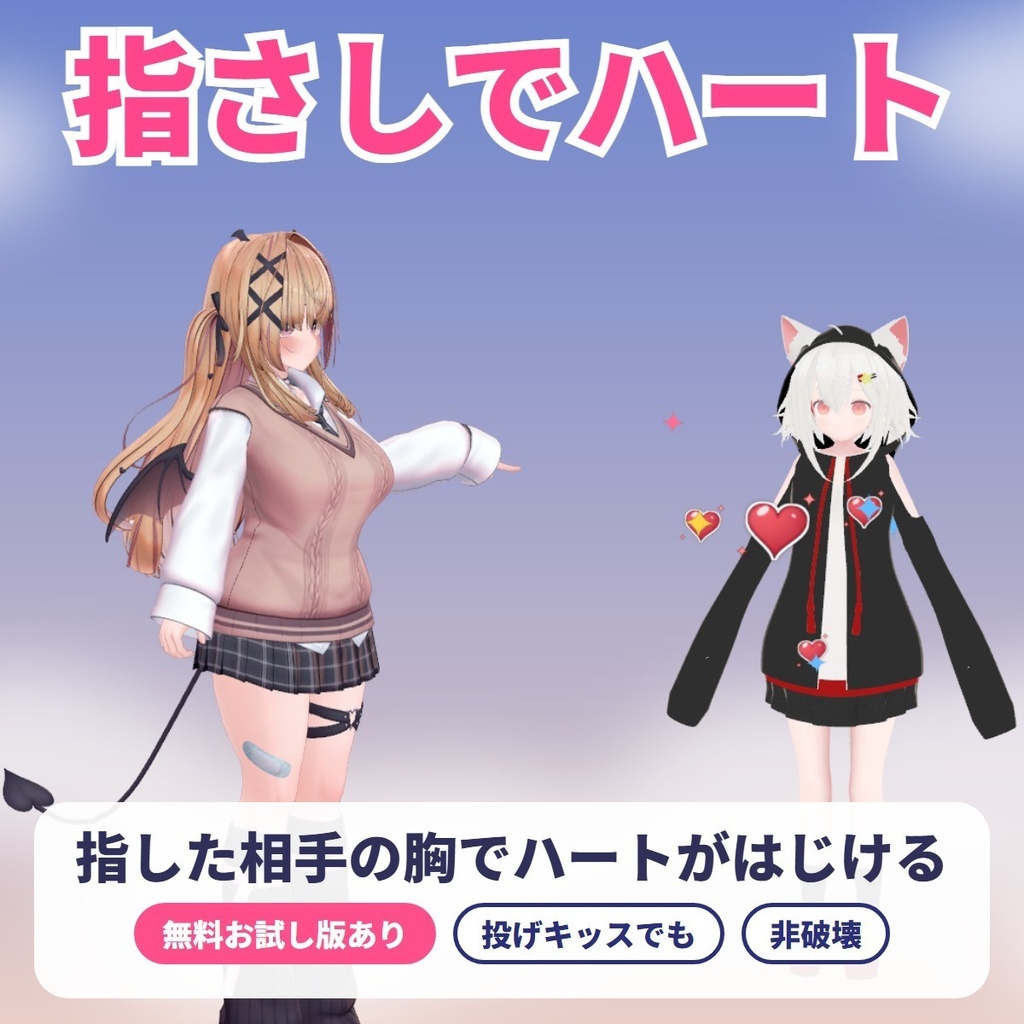
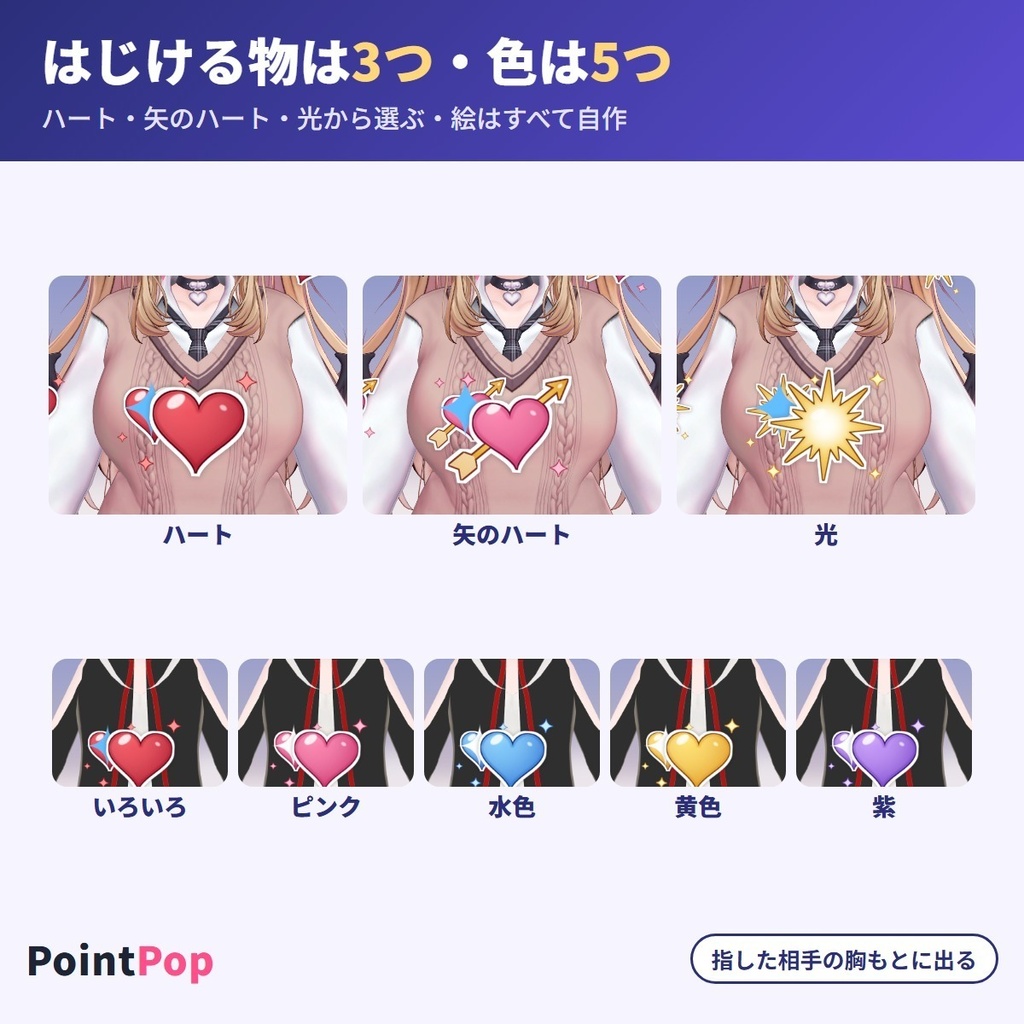
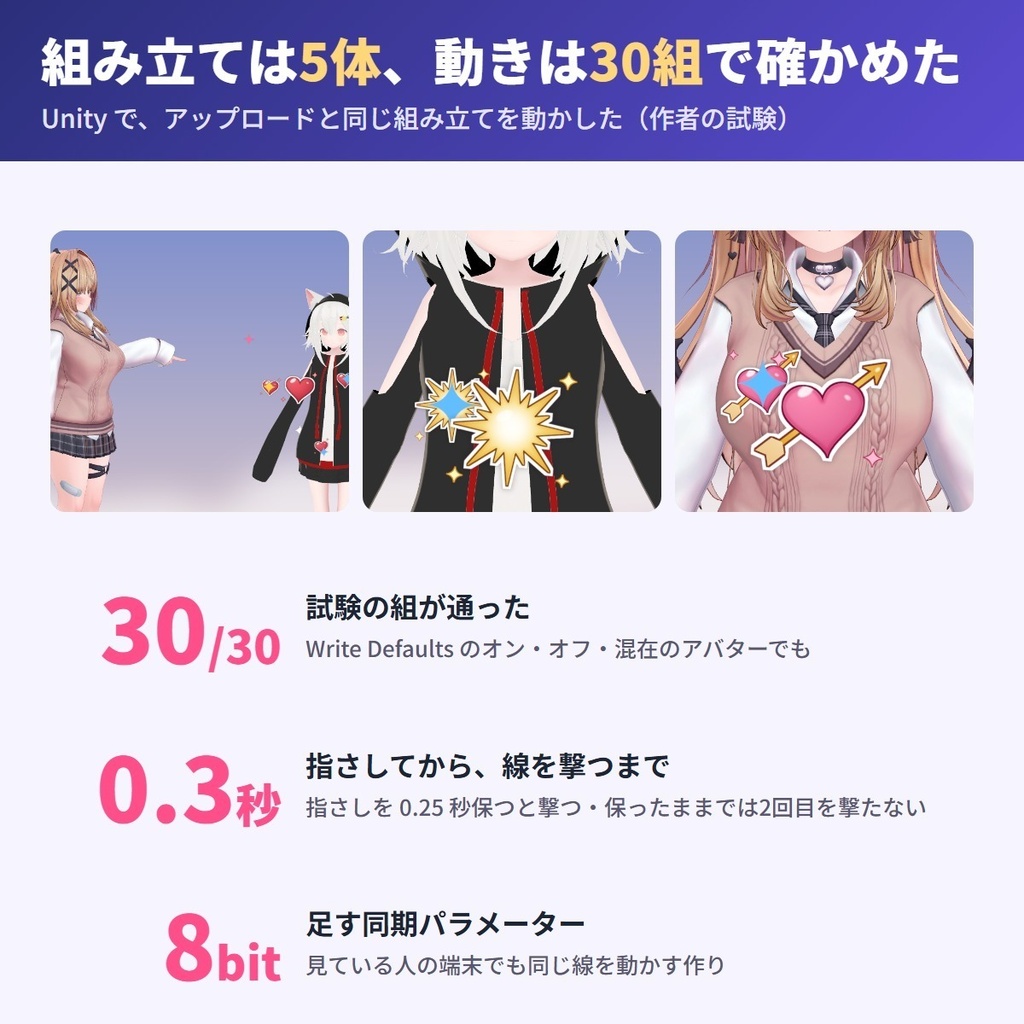
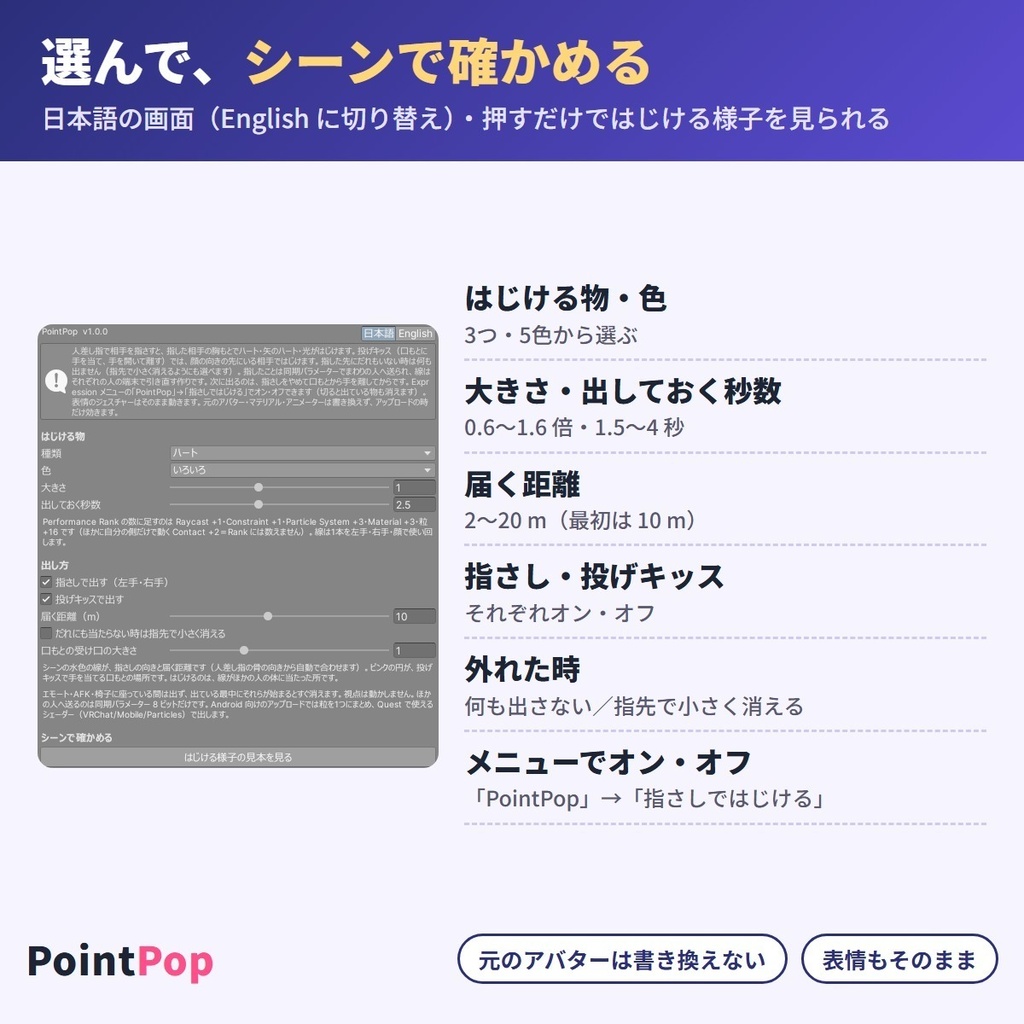
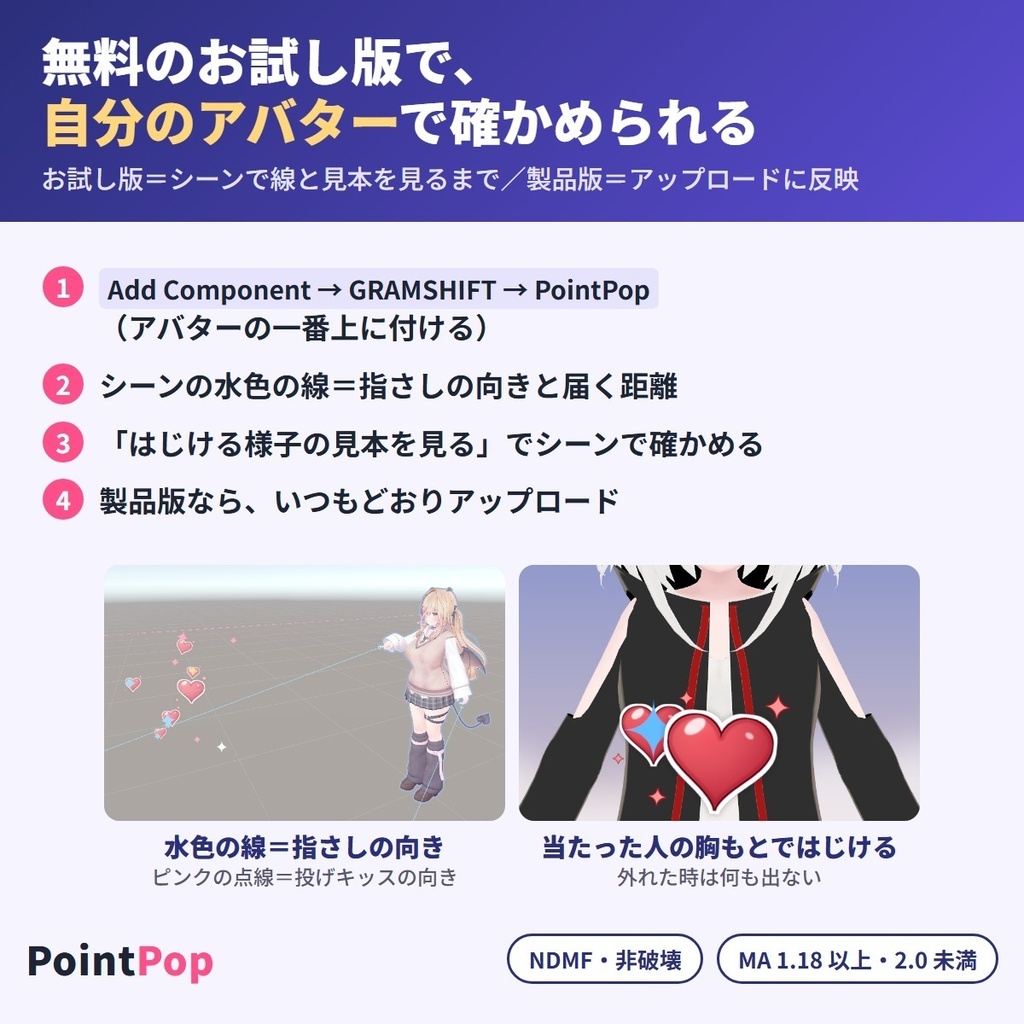


相手を指さす(または投げキッスをする)と、指した相手の胸もとでハート・矢のハート・光がぱっとはじける、あいさつ・お礼・「あなたに!」の合図になる VRChat アバター用のギミックです。自分のほっぺの横に出す姉妹の「PosePop」と違い、PointPop は指した相手の所に出します。写真や配信で相手を呼ぶ一瞬にも。指先から VRChat SDK の線(VRCRaycast・Hit Players)を出し、人に当たった時だけ、当たった所ではじけます。届く距離は最初 10 m(2〜20 m)。見ている人の端末でも同じ線を動かして、当たった所にはじける作りです。買う前に無料お試し版で、指さしの向きと届く距離、はじける様子を自分のアバターのシーンで確かめられます。 はじける物(ハート・矢のハート・光)・色(いろいろ・ピンク・水色・黄色・紫)・大きさ・出しておく秒数(最初は 2.5 秒)を選べ、製品版は Expression メニューの「PointPop」→「指さしではじける」でオン・オフできます。絵はすべて自作。指さしの表情もそのまま出ます。元のアバターはそのまま(非破壊・Modular Avatar 対応)。人型(Humanoid)のアバター向けで、VRChat SDK 3.10.6 以上が要ります。 English / 简体中文 / 한국어:下の段落に説明があります(descriptions below) ■ まずは無料お試し版で、自分のアバターを確かめる ・お試し版(無料):指さしの向きと届く距離の線、口もとの受け口の表示と、シーンではじける物の見本まで使えます(アバターに入れて使うのは製品版) ・製品版(450円):上に加えて、アップロードするアバターに、指さし・投げキッスで出る仕組みと Expression メニューの「PointPop」→「指さしではじける」が入ります。製品版は単体でも、お試し版の上からでも入れられます ■ できること ・ハンドサインの「指さし(FingerPoint)」の手を相手へ向けると、指の先の線が当たった相手の胸もとで、はじける物がぱっと大きくなって出る(まわりに小さな写しも広がり、PC ではきらめきも出る)。決めた秒数で消える ・投げキッス:手を口もとへ当ててから、手を開いて離すと、顔の向いている先の相手の所ではじける ・左手・右手のどちらの指さしでも出る。両手で同時にしても出るのは1つ。指さしのままでは続けて出ず、一度やめて向け直すと次が出る ・はじける物:ハート/矢のハート/光。色:いろいろ/ピンク/水色/黄色/紫 ・大きさ:0.6〜1.6 倍(アバターの背丈に合わせる)。出しておく秒数:1.5〜4 秒。届く距離:2〜20 m ・当たった人にだけ出る(人が2人並んでいる時は手前の人)。外れた時は「指先で小さく消える」も選べる ・自分の体を指しても出ない ・メニューで切った時・エモート・AFK・椅子が始まった時はすぐ消え、その間は出ない(メニューで切ると、見ている人の端末にも消す合図を送る作り) ・「はじける様子の見本を見る」で、アップロード前にシーンで様子を見られる(保存されない) ・Android(Quest)向けにアップロードすると、Particle System を1つにまとめ(きらめきは PC だけ)、Quest で使えるシェーダーで出す ・Write Defaults がオフのアバター・オンとオフが混ざったアバターでも、服などの切り替えを戻さない ・同じアバターに PosePop と一緒に入れられる ・視点は動かず、エモートの動きとトラッキングにも触らない ・日本語/English 切り替え(メニューの名前もアップロードした時の言葉) ■ 使う前に ・アバターの規約で、アニメーション・メニューを足す改変が許されているか確かめてください ・人型(Humanoid)のアバター向けです ・同期パラメーターを 8 bit 使います ・PC の Performance Rank:足す数は Raycast +1・Constraint +1・Particle System +3・粒(Total Particles)+16・Material +3(Contact は Rank に数えません)。Raycast は1つまで Excellent の項目です。試した5体はどれも元の Raycast・Particle System が 0 で、Particle System と粒の項目は Excellent→Good。総合 Rank が下がったのは5体中0体 ・Quest(Android)の Performance Rank:足す数は Raycast +1・Constraint +1・Particle System +1・粒 +6・Material +1(Contact は Rank に数えません)。Quest の表では Particle System が1つでも Poor のため、総合 Rank は Poor 以下になります(試した5体では Medium の1体が Poor に。ほかの4体は元から Very Poor で変わらず) ■ 使い方 1. VRChat SDK - Avatars 3.10.6 以上と、Modular Avatar 1.18 以上 2.0 未満(NDMF が含まれます)を入れてから、unitypackage をプロジェクトに入れる 2. アバターの一番上(VRC Avatar Descriptor の付いた物)に「Add Component → GRAMSHIFT → PointPop」を付ける(ヒエラルキーの右クリック → GRAMSHIFT → PointPop でも付きます) 3. はじける物・色・大きさ・届く距離を選び、「シーンで確かめる」→「はじける様子の見本を見る」で様子を見る 4. いつもどおりアップロードし、VRChat で相手を指さす ■ 動作環境 ・Unity 2022.3 / VRChat SDK3 Avatars 3.10.6 以上 / Modular Avatar 1.18 以上 2.0 未満(NDMF が含まれます) ・3.10.6 より前の SDK では動かず、Console と小さな窓にお知らせが出ます(アップロードは止めません) ・Quest(Android)向けは VRChat/Mobile/Particles のシェーダーで出します(見つからない時は Console にお知らせが出ます。VCC / ALCOM で VRChat SDK を更新してください) ・試したアバター:ゆめか(Arka_X 様)・HAOLAN(かなリぁ 様)・RadDollV3(三丁目の魔界 様)ほか、作りの違う2体の計5体 ■ 試した結果 ・作りの違う5体で、組み立て・Performance Rank(PC と Quest)・元のアバターの変化を確かめました。5体とも組み立てのエラーは0、元のマテリアル・メッシュの変更は0、元の FX のレイヤーは全部そのまま残りました ・下の動きは 30 組の設定で確かめました(PosePop と一緒・Android 向け・Write Defaults がオフ/混ざったアバターの組を含む) ・Apply on Play で本物の VRCRaycast 1.1 を組み立てたアバターで:2 m 先の相手を指すと相手の胸の高さではじけた。届く距離の外・だれもいない向きでは何も出なかった。自分の胸・足もとを指しても出なかった。投げキッスでも相手の胸もとではじけた。2人並べると手前の人ではじけた ・指さしを入れてから撃つまで 0.264〜0.300 秒(0.25 秒保ってから撃つ・90〜30 fps)。出ている時間 2.50〜2.53 秒(最初の 2.5 秒) ・右手だけ・左手だけの指さしで、それぞれの手から撃った。指さし以外の手の形・短すぎる指さしでは撃たなかった ・メニューでオフにすると、撃つ前・出ている間とも 0.033 秒で消え、見ている人の側の組み立てでも 0.017 秒で消えた。エモート・AFK・椅子が始まると 0.017 秒で消え、その間は撃たなかった ・見る側の組み立てでは、合図から 0.133 秒で出て 2.52 秒で消え、持ち主と違う所から撃った物は0。読み込み直した直後は何も出ていない状態から始まった ・Write Defaults がオフ・混ざったアバターで、オフにしてある服は出る前・出ている間・消えた後とも隠れたままで、メニューで戻すと元どおり出た ・人型(Humanoid)でないアバターと、手の形を1つも選んでいない時は、何も足さずお知らせを出す。お試し版は、アップロード・Manual bake・Apply on Play の形に何も足さない ■ よくある質問 Q. 指した相手にも見えますか? A. どこから撃ったか(左手・右手・顔)を同期パラメーターで送り、見ている人の端末でも同じ線を動かして、当たった所にはじける作りです。作者の試験の見る側の組み立てでは、合図から 0.133 秒で出て、持ち主と違う所から撃った物は0でした。 Q. PosePop とどう違いますか? A. PosePop はピースを頬の横へ持っていくと自分のほっぺの横に出ます。PointPop は指さし・投げキッスを向けた相手の胸もとに出ます。同じアバターに両方入れられます(作者の試験で両方の部品が入り、組み立てのエラーは0)。 Q. 指さしの表情はそのままですか? A. ジェスチャーの値を読むだけで、元の FX のレイヤーは書き換えません。作者の試験では、元の FX のレイヤーは全部そのまま残りました。 Q. Quest(Android)向けにもアップロードできますか? A. Android(Quest)向けにもアップロードできます。Particle System を1つにまとめ、Quest で使えるシェーダーで出す作りです。 ■ 制限 ・指の向きを相手へ向けられる VR 向けです ・当たるのは人(プレイヤーの体)だけです。ワールドの物には出ません ・見る人の設定や Minimum Displayed Rank で Particle System・Raycast が切られると、はじける物は見えません ・エモート・AFK・椅子の間は出ません。終わってから約1秒たち、指さしを一度やめると、また出るようになります ・はじける物の絵は決まっています(選べるのは3つのどれか1つと、色5つ) ・ほかの人に見えるのは同期の値が届いてからで、少し遅れて見えることがあります ・音は鳴りません ・人型(Humanoid)でないアバターでは使えません ・お試し版はシーンの見た目だけで、アップロードしたアバターには入りません ・PointPop を2つ以上付けた時は最初の1つだけを使い、どれを使ったかを Console と設定の画面に出します(EditorOnly の下の物は使いません) ・VRCHeadChop がすでに14個以上あるアバターでは足さず、お知らせを出します ■ 困った時は うまく動かない時は、このページの「ショップへのお問い合わせ」から気軽にどうぞ(アバターの名前と、表示された文があると早く調べられます)。
利用規約
・VRChat などで使うアバターの改変に、個人・法人・商用を問わず使えます ・このツールを使って作ったアバター・改変データの公開・販売に、このツール側の制限はありません(元のアバターの規約に従ってください) ・ツール(製品版・お試し版・同梱の絵)の改変・逆コンパイル・解析はできません ・ツールのファイル(同梱の絵を取り出した物を含む)の再配布・転売・共有、買っていない人への譲渡はできません ・お試し版を製品版の形にして配ること、お試し版の制限を外すための改変はできません ・同梱の「利用規約_Terms.txt」が正です Terms (summary): you may use it to modify avatars for VRChat etc., for personal, corporate or commercial use; this tool puts no limit on publishing or selling avatars or edit data made with it (follow the original avatar's terms); you may not modify, decompile or analyze the tool (full, trial or the included images); the tool files (including images taken out of it) may not be redistributed, resold, shared or given to people who did not buy it; you may not turn the trial into the full version or remove its limits. The included "利用規約_Terms.txt" is authoritative.
更新履歴
1.0.0(2026-11)公開 1.0.0 (2026-11) released
English
Point at someone (or blow them a kiss), and a heart, an arrow heart or a burst of light pops on that person's chest: an avatar gimmick for VRChat. Unlike our sister product "PosePop", which pops next to your own cheek, PointPop pops on the person you point at. Use it for a hello, a thank-you or a "this one's for you!" sign, in photos and streams too. A ray from your fingertip (VRChat SDK VRCRaycast, Hit Players) pops only when it hits a player, right where it hits; the reach is 10 m by default (2-20 m). It syncs where it fired from (left hand, right hand or face), and it is built so that each viewer's client runs the same ray and pops it where it hits. Choose the effect (heart, arrow heart or light), the color (mixed, pink, sky blue, yellow or purple), the size and the seconds it stays (2.5 by default). In the full version, "PointPop" → "Point and pop" in the Expressions menu turns it on or off. All the artwork is our own. Your pointing facial expression still shows, and your original avatar stays as it is (non-destructive, Modular Avatar). For Humanoid avatars, VRChat SDK 3.10.6 or later. ■ Try it on your avatar with the free trial first ・Trial (free): shows the pointing lines, the reach and the mouth areas, and previews the pop in the scene (to use it on your uploaded avatar, get the full version) ・Full version (450 yen): adds the pointing and blow-kiss gimmick and "PointPop" → "Point and pop" in the Expressions menu to the avatar you upload. Import it on its own or on top of the trial ■ What it does ・Aim the "FingerPoint" hand sign at someone: the effect pops out big on their chest where the ray hits (small copies spread around it, plus sparkles on PC), then fades after the seconds you set ・Blow kiss: touch your hand to your mouth, then open it and move it away; it pops on the person your face is turned to ・Either hand works (pointing with both hands at once pops just one). Holding the point does not pop again; point again for the next one ・Size 0.6-1.6 times (scaled to the avatar's height), seconds 1.5-4, reach 2-20 m ・It pops only on the person it hits (the nearer one if two are in line). For a miss you can also choose "fade small at the fingertip" ・Pointing at your own body does not pop ・It clears right away when you turn it off or when an emote, AFK or a chair starts ・"Preview the pop" shows it in the scene before you upload ・Android (Quest) uploads use 1 Particle System and a Quest shader ・Works with Write Defaults off or mixed and with PosePop on the same avatar ・Your view, emotes and tracking are not touched ・Japanese / English switch ■ Before you use it ・Check that your avatar's terms allow adding animations and menus ・Uses 8 bits of synced parameters ・Performance Rank (PC) adds: Raycast +1, Constraint +1, Particle System +3, Total Particles +16, Material +3 (Contacts do not count toward the rank). On the 5 avatars tested, Particle Systems and Total Particles went from Excellent to Good and the overall rank went down on 0 of 5 ・Performance Rank (Quest) adds: Raycast +1, Constraint +1, Particle System +1, Total Particles +6, Material +1. On the Quest table even 1 Particle System is Poor (of the 5 avatars, the 1 Medium avatar became Poor; the other 4 were already Very Poor) ■ How to use 1. Install VRChat SDK - Avatars 3.10.6 or later and Modular Avatar 1.18 or later, below 2.0 (includes NDMF), then import the unitypackage 2. "Add Component > GRAMSHIFT > PointPop" on the top of your avatar (or right-click in the Hierarchy > GRAMSHIFT > PointPop) 3. Choose the effect, color, size and reach, and check it with "Preview the pop" 4. Upload as usual, and point at someone in VRChat ■ Requirements ・Unity 2022.3 / VRChat SDK3 Avatars 3.10.6 or later / Modular Avatar 1.18 or later, below 2.0 (includes NDMF) ・With an older SDK it does not run, and a notice appears in the Console and a small window (uploads are not stopped) ・For Quest (Android), it uses the VRChat/Mobile/Particles shader (a notice appears in the Console if it is not found; update the VRChat SDK in VCC / ALCOM) ・Avatars tested: Yumeka (by Arka_X), HAOLAN (by かなリぁ), RadDollV3 (by 三丁目の魔界) and 2 others, 5 in total ■ Test results ・5 avatars built in different ways: build errors 0, changes to original materials and meshes 0, original FX layers all kept ・30 setting combinations (with PosePop, Android builds, Write Defaults off or mixed) all passed ・On avatars built with the real VRCRaycast 1.1 via Apply on Play: pointing at a player 2 m away popped at their chest height; out of reach or facing nobody, nothing showed; pointing at your own chest or feet did not pop; the blow kiss popped on the other player's chest; with two players in line, it popped on the nearer one ・From starting to point to firing: 0.264-0.300 s. Time shown: 2.50-2.53 s (2.5 s setting) ・Right-only and left-only points each fired from that hand. Other hand signs and too-short points did not fire ・Turning it off cleared it in 0.033 s, before the shot or while showing (0.017 s in the viewer-side build). An emote, AFK or chair cleared it in 0.017 s and it did not fire meanwhile ・Viewer-side build: it appeared 0.133 s after the signal and faded after 2.52 s, with 0 pops from a wrong starting point ■ FAQ Q. Can the person I point at see it too? A. It sends where it fired from as a synced parameter, and it is built so that each viewer's client runs the same ray and pops it where it hits. In the author's viewer-side build it appeared 0.133 s after the signal. Q. How is it different from PosePop? A. PosePop pops next to your own cheek with a peace sign. PointPop pops on the chest of the person you point at. Both can go on the same avatar. Q. Is my pointing facial expression kept? A. It only reads the gesture value and does not rewrite your original FX layers. In the author's tests, all original FX layers were kept. Q. Can I upload it for Quest (Android)? A. You can upload it for Android (Quest) too: it uses 1 Particle System and a Quest shader. ■ Limitations ・For VR, where you can aim your hand ・It hits only players, not world objects ・If a viewer's settings or Minimum Displayed Rank turn off Particle Systems or Raycasts, it is not visible ・It does not pop during emotes, AFK or chairs (it pops again about 1 second after they end, once you stop pointing) ・The images are fixed (3 effects, 5 colors). No sound ・Others see it once the synced value arrives, so it may look a little late ・Non-Humanoid avatars are not supported ・The trial is not added to the avatar you upload ・With 2 or more PointPop components, only the first one is used ・On avatars that already have 14 or more VRCHeadChop components, it does not add one and shows a notice ■ Need help? If it does not work well, feel free to use "Contact the shop" on this page (the avatar name and any message shown help us look into it faster).
简体中文
指向某人(或对他飞吻),一颗爱心、箭穿爱心或一团光就会在对方胸前弹出:这是适用于 VRChat 的虚拟形象小机关。我们的姊妹产品“PosePop”会在你自己的脸颊旁弹出,而 PointPop 则弹在你所指的人身上。打招呼、道谢,或是表达“这个送给你!”,拍照和直播时也能用。从指尖发出的射线(VRChat SDK VRCRaycast,Hit Players)只有击中玩家时才会弹出,并且就在击中的位置;默认射程 10 米(可设 2–20 米)。它会同步发射的来源(左手、右手或脸部),其设计是让每位观看者的客户端也运行同样的射线,并在击中处弹出。 可选择效果(爱心、箭穿爱心或光)、颜色(混合、粉色、天蓝、黄色或紫色)、大小以及停留秒数(默认 2.5 秒)。完整版中,表情菜单(Expressions menu)里的“PointPop”→“Point and pop”(指向即弹出)可开启或关闭效果。所有图案均为我们原创。你指向时的表情照常显示,原始虚拟形象保持不变(非破坏性,Modular Avatar)。适用于 Humanoid 虚拟形象,需要 VRChat SDK 3.10.6 或更高版本。 ■ 先用免费试用版在你的虚拟形象上试一试 ・试用版(免费):显示指向线、射程和嘴部范围,并在场景中预览弹出效果(要在上传的虚拟形象上使用,请使用完整版) ・完整版(450 日元):为你上传的虚拟形象添加指向与飞吻机关,以及表情菜单(Expressions menu)中的“PointPop”→“Point and pop”(指向即弹出)。可单独导入,也可叠加在试用版之上 ■ 功能介绍 ・用“FingerPoint”手势对准某人:效果会在射线击中的对方胸前大幅弹出(周围还会散开小型副本,在 PC 上还有闪光),然后在你设定的秒数后淡出 ・飞吻:手贴近嘴边,再张开并移开;会在你面朝的人身上弹出 ・左右手均可(双手同时指向也只弹出一个)。保持指向不会再次弹出;要再次指向才会触发下一次 ・大小 0.6–1.6 倍(按虚拟形象身高缩放),秒数 1.5–4,射程 2–20 米 ・只在击中的人身上弹出(两人排成一列时为前面的人)。未击中时也可选择“fade small at the fingertip”(在指尖缩小淡出) ・指向自己的身体不会弹出 ・关闭时,或开始做表情动作、AFK 或坐椅子时,会立即清除,期间不会弹出 ・“Preview the pop”(预览弹出效果)可在上传前于场景中查看 ・Android(Quest)上传使用 1 个 Particle System 和 Quest 着色器 ・支持 Write Defaults 关闭或混合的情况,并可与同一虚拟形象上的 PosePop 共用 ・不会影响你的视角、表情动作和追踪 ・日语 / 英语切换 ■ 使用前须知 ・请确认你的虚拟形象的使用条款允许添加动画和菜单 ・使用 8 bit 的同步参数 ・Performance Rank(PC)增加:Raycast +1,Constraint +1,Particle System +3,Total Particles +16,Material +3(Contact 不计入等级)。在测试的 5 个虚拟形象上,Particle System 和 Total Particles 从 Excellent 降到 Good,整体等级下降的为 5 个中的 0 个 ・Performance Rank(Quest)增加:Raycast +1,Constraint +1,Particle System +1,Total Particles +6,Material +1。在 Quest 的评级表中,即使只有 1 个 Particle System 也是 Poor(5 个虚拟形象中,1 个 Medium 的变为 Poor,其余 4 个本来就是 Very Poor) ■ 使用方法 1. 安装 VRChat SDK - Avatars 3.10.6 或更高版本,以及 Modular Avatar 1.18 或更高版本(低于 2.0,包含 NDMF),然后导入 unitypackage 2. 在虚拟形象的最上层执行“Add Component > GRAMSHIFT > PointPop”(添加组件 > GRAMSHIFT > PointPop),或在 Hierarchy 中右键 > GRAMSHIFT > PointPop 3. 选择效果、颜色、大小和射程,并用“Preview the pop”(预览弹出效果)确认 4. 照常上传,然后在 VRChat 中指向某人 ■ 运行环境 ・Unity 2022.3 / VRChat SDK3 Avatars 3.10.6 或更高版本 / Modular Avatar 1.18 或更高版本(低于 2.0,包含 NDMF) ・使用旧版 SDK 无法运行,并会在 Console 和一个小窗口中显示提示(不会阻止上传) ・Quest(Android)版使用 VRChat/Mobile/Particles 着色器(找不到时 Console 会显示提示;请通过 VCC / ALCOM 更新 VRChat SDK) ・测试过的虚拟形象:Yumeka(作者 Arka_X)、HAOLAN(作者 かなリぁ)、RadDollV3(作者 三丁目の魔界)以及另外 2 个,共 5 个 ■ 测试结果 ・5 个制作方式各不相同的虚拟形象:构建错误 0,对原始材质和网格的改动 0,原始 FX 层全部保留 ・30 种设置组合(搭配 PosePop、Android 构建、Write Defaults 关闭或混合)全部通过 ・在通过 Apply on Play 使用真实 VRCRaycast 1.1 构建的虚拟形象上:指向 2 米外的玩家,会在该玩家的胸部高度弹出;超出射程或没有面对任何人时不显示;指向自己的胸口或脚下不会弹出;飞吻会在对方玩家的胸前弹出;两名玩家前后排成一线时,会弹在较近的那位身上 ・从开始指向到发射:0.264–0.300 秒。显示时间:2.50–2.53 秒(设置为 2.5 秒) ・仅右手和仅左手时,各自从那只手发射。其他手势以及过短的指向不会发射 ・关闭后,无论射出前还是显示中都在 0.033 秒内清除,在观看者端构建中 0.017 秒内清除;开始做表情动作、AFK、坐椅子时 0.017 秒内清除,期间不会射出 ・观看者端构建:信号发出后 0.133 秒出现,2.52 秒后淡出,从与所有者不同的起点弹出的次数为 0 ■ 常见问题 Q. 被我指向的人也能看到吗? A. 它会把发射来源作为同步参数发送出去,其设计是让每位观看者的客户端也运行同样的射线,并在击中处弹出。在作者的观看者端构建中,信号发出后 0.133 秒出现。 Q. 和 PosePop 有什么不同? A. PosePop 在你自己的脸颊旁配合剪刀手弹出。PointPop 则弹在你所指之人的胸前。两者可以装在同一个虚拟形象上。 Q. 指向时的表情会保留吗? A. 它只读取手势数值,不会改写原有的 FX 层。在作者的测试中,原有的 FX 层全部保留。 Q. 能上传到 Quest(Android)吗? A. 可以为 Android(Quest)上传,使用 1 个 Particle System 和 Quest 着色器。 ■ 限制事项 ・适用于能够用手瞄准的 VR ・只会击中玩家,不会击中世界中的物体 ・如果观看者的设置或 Minimum Displayed Rank 关闭了 Particle System 或 Raycast,就看不到效果 ・做表情动作、AFK 或坐椅子期间不会弹出(结束约 1 秒后,先停止指向一次,就会再次弹出) ・图像是固定的(3 种效果、5 种颜色)。没有声音 ・其他人在同步数值到达后才会看到,所以可能显得稍有延迟 ・不支持非 Humanoid 虚拟形象 ・试用版不会添加到你上传的虚拟形象中 ・如果有 2 个或更多 PointPop 组件,只使用第一个 ・在已有 14 个或更多 VRCHeadChop 组件的虚拟形象上,不会再添加,并会显示提示 ■ 需要帮助? 如果运行不顺利,欢迎使用本页面上的“Contact the shop”(联系店铺)(附上虚拟形象名称和显示的任何信息,能帮助我们更快排查)。
한국어
누군가를 가리키거나(또는 키스를 날리거나) 하면, 그 사람의 가슴에 하트, 화살 하트, 빛의 폭발이 팝! 하고 나타납니다. VRChat용 아바타 기믹입니다. 자신의 볼 옆에 나타나는 자매 상품 "PosePop"과 달리, PointPop은 가리킨 상대에게 나타납니다. 인사, 감사, "이건 너를 위한 거야!" 표시에 쓰세요. 사진 촬영이나 방송에서도 좋습니다. 손끝에서 나가는 레이(VRChat SDK VRCRaycast, Hit Players)가 플레이어에게 닿았을 때만, 닿은 바로 그 위치에 나타납니다. 기본 사거리는 10m(2~20m)입니다. 발사 위치(왼손, 오른손, 얼굴)를 동기화하고, 보는 사람의 클라이언트에서도 같은 레이가 실행되어 닿은 곳에 나타나도록 만들어졌습니다. 효과(하트, 화살 하트, 빛), 색상(믹스, 핑크, 하늘색, 노랑, 보라), 크기, 표시 시간(기본 2.5초)을 고를 수 있습니다. 정식판에서는 Expressions 메뉴의 "PointPop" → "Point and pop"(가리켜서 팝)으로 켜고 끌 수 있습니다. 모든 그림은 직접 제작했습니다. 가리키는 표정도 그대로 유지되며, 원본 아바타는 변경되지 않습니다(비파괴, Modular Avatar). Humanoid 아바타용이며 VRChat SDK 3.10.6 이상이 필요합니다. ■ 먼저 무료 체험판으로 내 아바타에 시험해 보세요 ・체험판(무료): 가리키는 선, 사거리, 입 영역을 표시하고 씬에서 팝을 미리 볼 수 있습니다(업로드하는 아바타에 넣어 쓰려면 정식판) ・정식판(450엔): 업로드하는 아바타에 가리키기와 키스 날리기 기믹, 그리고 Expressions 메뉴의 "PointPop" → "Point and pop"(가리켜서 팝)을 추가합니다. 단독으로도, 체험판 위에 덮어서도 가져올 수 있습니다 ■ 기능 ・"FingerPoint" 핸드 사인으로 누군가를 겨냥하면, 레이가 닿은 가슴 위에 효과가 크게 나타나고(주위에 작은 복제본도 퍼지고, PC에서는 반짝임도 나옵니다), 설정한 시간 뒤에 사라집니다 ・키스 날리기: 손을 입에 대고, 손을 펴서 앞으로 보내세요. 얼굴이 향한 상대에게 나타납니다 ・양손 모두 사용 가능합니다(양손으로 동시에 가리켜도 하나만 나타남). 가리킨 채로 있어도 다시 나타나지 않으며, 다음에는 다시 가리켜야 합니다 ・크기 0.6~1.6배(아바타 키에 맞춰 조정), 표시 시간 1.5~4초, 사거리 2~20m ・맞은 사람에게만 나타납니다(두 사람이 일렬이면 앞사람). 빗나갔을 때는 "fade small at the fingertip"(손끝에서 작게 사라짐)도 선택할 수 있습니다 ・자신의 몸을 가리켜도 나타나지 않습니다 ・끄거나, 이모트·AFK·의자가 시작되면 즉시 사라지고 그동안은 나타나지 않습니다 ・"Preview the pop"(팝 미리보기)으로 업로드 전에 씬에서 확인할 수 있습니다 ・Android(Quest) 업로드는 Particle System 1개와 Quest 셰이더를 사용합니다 ・Write Defaults 꺼짐 또는 혼합 상태에서도, 같은 아바타의 PosePop과도 함께 작동합니다 ・시점, 이모트, 트래킹에는 영향을 주지 않습니다 ・일본어 / 영어 전환 ■ 사용 전에 ・아바타의 이용 약관에서 애니메이션과 메뉴 추가가 허용되는지 확인하세요 ・동기화 파라미터를 8비트 사용합니다 ・Performance Rank(PC) 증가분: Raycast +1, Constraint +1, Particle System +3, Total Particles +16, Material +3 (Contact은 랭크에 포함되지 않음). 테스트한 5종에서 Particle Systems와 Total Particles는 Excellent에서 Good으로 내려갔고, 전체 랭크가 내려간 아바타는 5종 중 0종이었습니다 ・Performance Rank(Quest) 증가분: Raycast +1, Constraint +1, Particle System +1, Total Particles +6, Material +1. Quest 기준표에서는 Particle System 1개만으로도 Poor입니다(5종 중 Medium이던 1종은 Poor가 되었고, 나머지 4종은 이미 Very Poor였습니다) ■ 사용 방법 1. VRChat SDK - Avatars 3.10.6 이상과 Modular Avatar 1.18 이상 2.0 미만(NDMF 포함)을 설치한 뒤 unitypackage를 가져옵니다 2. 아바타 최상위에서 "Add Component > GRAMSHIFT > PointPop"(컴포넌트 추가 > GRAMSHIFT > PointPop)을 선택합니다(또는 Hierarchy에서 우클릭 > GRAMSHIFT > PointPop) 3. 효과, 색상, 크기, 사거리를 고르고 "Preview the pop"(팝 미리보기)으로 확인합니다 4. 평소처럼 업로드하고 VRChat에서 누군가를 가리켜 보세요 ■ 필요 환경 ・Unity 2022.3 / VRChat SDK3 Avatars 3.10.6 이상 / Modular Avatar 1.18 이상 2.0 미만(NDMF 포함) ・이전 SDK에서는 작동하지 않으며, Console과 작은 창에 안내가 표시됩니다(업로드는 중단되지 않음) ・Quest(Android)용은 VRChat/Mobile/Particles 셰이더를 사용합니다(찾을 수 없으면 Console에 안내가 표시됩니다. VCC / ALCOM으로 VRChat SDK를 업데이트하세요) ・테스트한 아바타: Yumeka(Arka_X 제작), HAOLAN(かなリぁ 제작), RadDollV3(三丁目の魔界 제작) 외 2종, 총 5종 ■ 테스트 결과 ・제작 방식이 다른 아바타 5종: 빌드 오류 0, 원본 머티리얼과 메시 변경 0, 원본 FX 레이어 모두 유지 ・설정 조합 30가지(PosePop 사용, Android 빌드, Write Defaults 꺼짐 또는 혼합) 모두 통과 ・Apply on Play로 실제 VRCRaycast 1.1을 넣은 아바타에서: 2m 떨어진 플레이어를 가리키면 그 플레이어의 가슴 높이에 나타남, 사거리 밖이거나 아무도 향하지 않으면 아무것도 표시되지 않음, 자신의 가슴이나 발을 가리켜도 나타나지 않음, 키스 날리기는 상대 플레이어의 가슴에 나타남, 두 명이 일렬로 서 있으면 가까운 쪽에 나타남 ・가리키기 시작부터 발사까지: 0.264~0.300초. 표시 시간: 2.50~2.53초(2.5초 설정) ・오른손만, 왼손만 설정해도 각각 그 손에서 발사됨. 다른 핸드 사인이나 너무 짧은 가리키기는 발사되지 않음 ・끄면 발사 전과 표시 중 모두 0.033초 만에, 보는 쪽 빌드에서도 0.017초 만에 사라짐. 이모트, AFK, 의자가 시작되면 0.017초 만에 사라지고 그동안 발사하지 않음 ・보는 쪽 빌드: 신호 후 0.133초에 나타나 2.52초 뒤에 사라졌고, 소유자와 다른 시작점에서 나타난 경우는 0건 ■ 자주 묻는 질문 Q. 가리킨 상대에게도 보이나요? A. 발사 위치를 동기화 파라미터로 보내고, 보는 사람의 클라이언트에서도 같은 레이가 실행되어 닿은 곳에 나타나도록 만들어졌습니다. 제작자의 보는 쪽 빌드에서는 신호 후 0.133초에 나타났습니다. Q. PosePop과는 어떻게 다른가요? A. PosePop은 브이 사인과 함께 자신의 볼 옆에 나타납니다. PointPop은 가리킨 상대의 가슴에 나타납니다. 같은 아바타에 둘 다 넣을 수 있습니다. Q. 가리키는 표정은 그대로인가요? A. 제스처 값을 읽기만 하며 원본 FX 레이어는 수정하지 않습니다. 제작자의 테스트에서 원본 FX 레이어는 모두 그대로 남았습니다. Q. Quest(Android)용으로도 업로드할 수 있나요? A. Android(Quest)용으로도 업로드할 수 있으며, Particle System 1개와 Quest 셰이더를 사용합니다. ■ 제한 사항 ・손으로 겨냥할 수 있는 VR용입니다 ・플레이어에게만 닿으며, 월드 오브젝트에는 닿지 않습니다 ・보는 사람의 설정이나 Minimum Displayed Rank 때문에 Particle Systems나 Raycasts가 꺼져 있으면 보이지 않습니다 ・이모트, AFK, 의자 중에는 나타나지 않습니다(끝나고 약 1초가 지난 뒤, 가리키기를 한 번 멈추면 다시 나타남) ・이미지는 고정입니다(효과 3종, 색상 5종). 소리는 없습니다 ・다른 사람에게는 동기화된 값이 도착한 뒤 보이므로 조금 늦게 보일 수 있습니다 ・Humanoid가 아닌 아바타는 지원하지 않습니다 ・체험판은 업로드하는 아바타에 추가되지 않습니다 ・PointPop 컴포넌트가 2개 이상이면 첫 번째만 사용됩니다 ・VRCHeadChop 컴포넌트가 이미 14개 이상 있는 아바타에는 추가하지 않고 안내를 표시합니다 ■ 도움이 필요하신가요? 잘 작동하지 않으면 이 페이지의 "문의하기"를 편하게 이용해 주세요(아바타 이름과 표시된 메시지를 알려 주시면 더 빨리 확인할 수 있습니다).