

VRoid便利セットMA for VRChat - T'zルームさんの便利セットの表情・FaceEX を MA で(+舌・靴を脱ぐ・スカート)【無料・Modular Avatar】
- Digital0 JPY
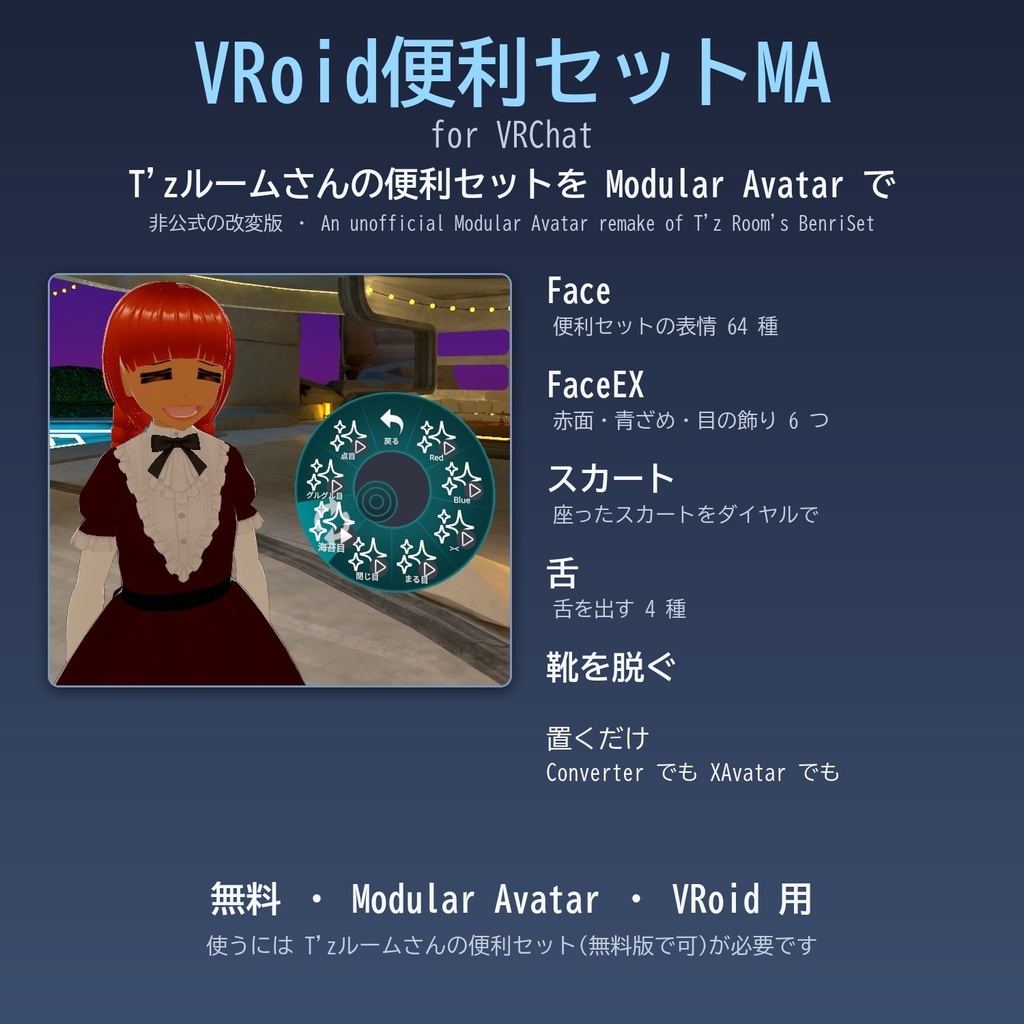
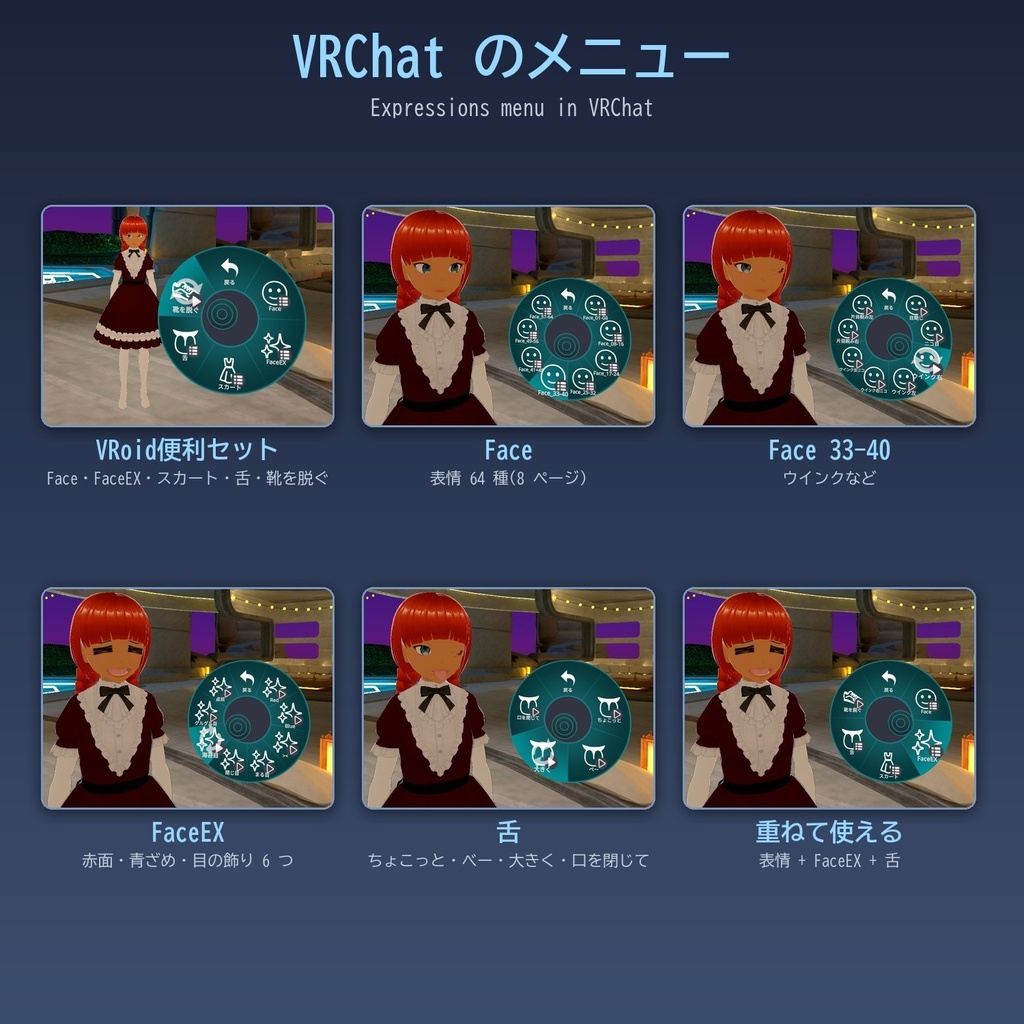
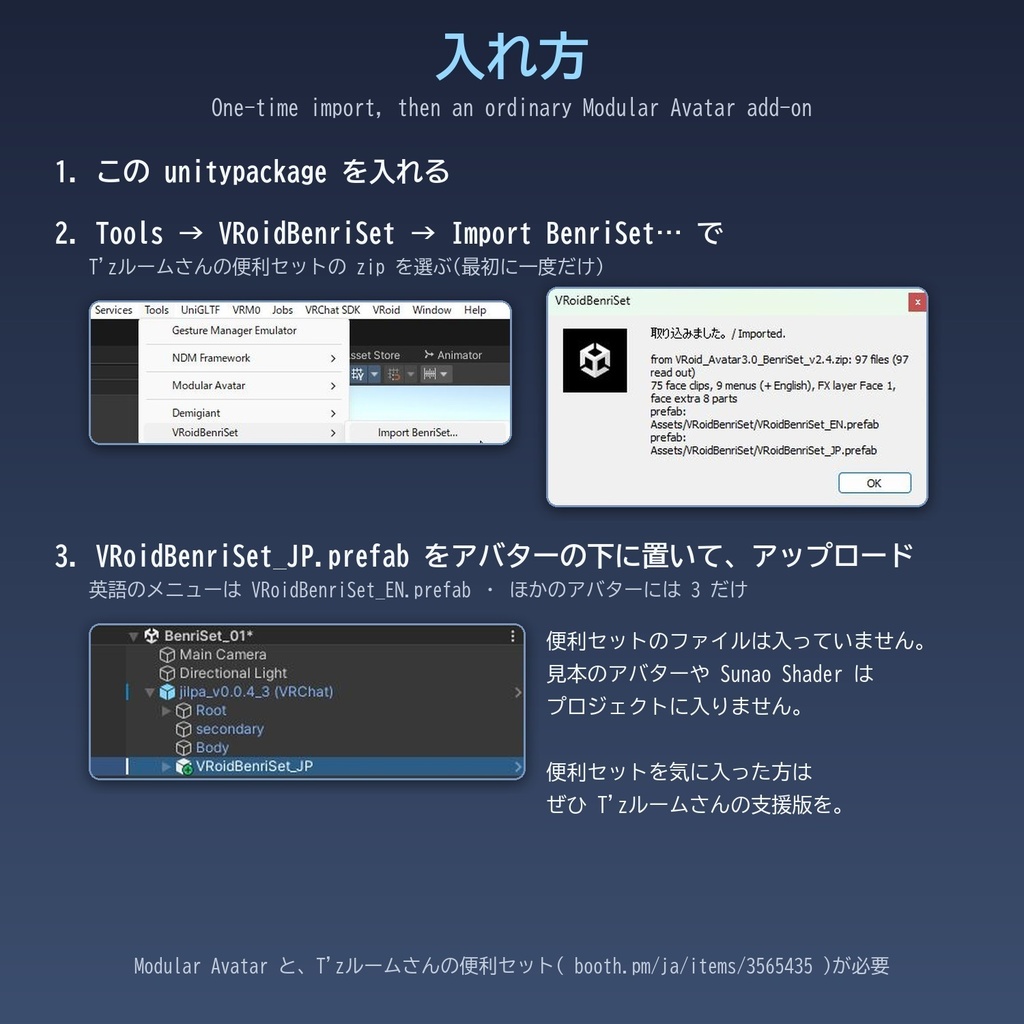


ジョンおじさまからの委託販売のようなものになります(今回は無料です)。以下、ジョンおじさまからの説明です。: T'zルーム さんの「【VRoidStudio正規版】VRoid用Avatar3.0便利セット【VRChat想定】」( https://booth.pm/ja/items/3565435 )を元に、Modular Avatar の部品として作り直したものです。アバターの下に置くだけで、メニューにボタン「VRoid便利セット」がひとつ入ります。 ・Face: 便利セットの表情 64 種 ・FaceEX: 赤面・青ざめと、目の飾り 6 つ(><・まる目・閉じ目・海苔目・グルグル目・点目) ・スカート: 座ったときのスカートを直すダイヤル(前を押さえる・横を前へ) ・舌: 舌を出す 4 種(ちょこっと・べー・大きく・口を閉じて) ・靴を脱ぐ ■ 大事なこと ・これは T'zルーム さんの便利セットを元にした、非公式の改変版です。元の便利セットから大きく作り変えているので、おかしなところがあれば、それはこちら(JRF)の誤りです。T'zルーム さんにはお問い合わせしないでください。 ・この配布物には、便利セットのファイルは入っていません。使う方が手に入れた便利セットの zip(無料版で足ります)から、最初に一度だけ Unity の中で表情などを取り込んで作ります。 ・便利セットを気に入った方、支援の気持ちのある方は、ぜひ T'zルーム さんの便利セットの支援版をお求めください( https://booth.pm/ja/items/3565435 )。表情 64 種と顔の飾りは T'zルーム さんの作品です。 ■ 元の便利セットとの違い ・エモートは入れていません。エモートは今は Modular Avatar の部品がいろいろあるので、そちらを使えばよいと考えました(ねここや さんの EmoteBox( https://necocoya.booth.pm/items/2291899 )など)。VRChat の標準のエモートを残したい方は、拙作の VRoidDefaultSet( https://j-rockford.booth.pm/items/9166762 )もどうぞ(FaceMood もこちらにあります。一緒に使えます)。 ・顔の飾り(FaceEX)は、アップロードのときにアバターの目の位置と大きさに自動で合わせます。Sunao Shader は要りません。元の便利セットでは使われていなかった目の飾りも出せるようにしました。 ・スカート・舌・靴を脱ぐは、新しく足した機能です。 ・VRM Converter for VRChat で変換したアバターでも、XAvatar(XWear Packager で取り込んだもの)でも、同じ prefab で動きます。パラメーターの名前は元の便利セットに合わせました(Face 1・Face 2)。 ■ 入れ方 最初に一度だけ取り込みの操作をすれば、あとはふつうの Modular Avatar の部品と同じです。 1. この unitypackage を入れる。 2. Unity のメニュー Tools → VRoidBenriSet → Import BenriSet… で、便利セットの zip を選ぶ(便利セットの見本のアバターや Sunao Shader はプロジェクトに入りません)。 3. VRoidBenriSet_JP.prefab(英語のメニューは VRoidBenriSet_EN.prefab)をアバターの下に置いて、アップロード。 ほかのアバターには 3 だけです。 ■ 注意 ・靴を脱ぐは、あまり完璧ではありません。靴底のぶん、足が床から浮きます。VRoid の新しいハイヒールなど、靴の下の足の面がない衣装では、つま先が欠けて見えます。 ・舌は、口の大きさで見え方がかなり変わります。 ・スカートには拙作の VRoidSkirtDial( https://j-rockford.booth.pm/items/9147262 )の機能がすでに入っています。VRoidSkirtDial を一緒に入れる必要はありません(入れるならどちらか一方に)。VRoid 製のスカートにだけ効きます。 ・ポリゴン数を削ったアバターでは、かなり機能が制限されます(目の飾りでまつ毛が消えない、舌・靴が見つからないことがある、など)。 ・VRoid の標準の顔・体の作りを前提にしているので、人型から離れたアバターほど、うまく合わなくなります。 ・顔の飾りの位置を自動で合わせたくないときや、目の飾り・舌・靴を脱ぐが要らないときは、prefab のコンポーネントのチェックで切れます。 ・必要なもの: Modular Avatar、T'zルーム さんの便利セット(v2.4 で確かめました)。 なぜこういう制約があるのか、どう解いたのかは、同梱の TechnicalNotes に書きました。 この道具は Claude Code(Claude Opus 5.5)に作ってもらいました。Unity のプロジェクトを見せて AI と相談しながら進めれば、こういう仕掛けも作れる、というご紹介を兼ねて Booth に置くことにしました。 同じ作者の小さな道具: ・OscPoser(任意のポーズを VRChat でとらせる) https://j-rockford.booth.pm/items/9099989 ・VRoidSkirtDial(座ったスカートをダイヤルで直す) https://j-rockford.booth.pm/items/9147262 ・VRoidDefaultSet(VRoid の標準の表情・エモートをボタンひとつに) https://j-rockford.booth.pm/items/9166762 無料です。ライセンス: この配布物は MIT License(メニューのアイコンは Noto Emoji(SIL Open Font License 1.1)から作りました)。取り込みで作られる表情・顔の飾りは、T'zルーム さんの便利セットの規約に従います(再配布・商用利用はしないでください。それを含むアバターの配布・販売もしないでください)。 VRoid は pixiv 株式会社の商標または登録商標です。VRChat は VRChat Inc. の商標です。この道具は非公式のもので、pixiv 株式会社・VRChat Inc.・T'zルーム さんとは関係ありません。
--- English ---
VRoid BenriSet MA for VRChat: a free Modular Avatar remake of T'z Room's "VRoid Avatar3.0 BenriSet" ( https://booth.pm/ja/items/3565435 ). Place it under your avatar and one "VRoid BenriSet" button is added: - Face: the BenriSet's 64 expressions - FaceEX: blush (red / blue) and 6 eye decorations - Skirt: dials that fix a sitting skirt (Press Front, Sides Forward) - Tongue: 4 ways to stick out the tongue - Take Off Shoes Important: - This is an unofficial, modified version based on T'z Room's BenriSet. It is heavily reworked, so any problem is my (JRF's) mistake; please do not contact T'z Room about it. - This package contains no BenriSet files. The expressions and face extras are built once inside Unity from the BenriSet zip you download yourself (the free version is enough). - If you like the BenriSet and want to support its author, please get T'z Room's supporter version ( https://booth.pm/ja/items/3565435 ). The 64 expressions and the face extras are T'z Room's work. Differences from the original: no emotes (use a Modular Avatar emote add-on such as Necocoya's EmoteBox, https://necocoya.booth.pm/items/2291899 ; for VRChat's standard emotes and FaceMood, see my VRoidDefaultSet, https://j-rockford.booth.pm/items/9166762 , which works together with this). The face extras are fitted to the avatar's eyes automatically at upload, without Sunao Shader, and the eye decorations unused in the original now work. Skirt, Tongue and Take Off Shoes are new. The same prefab works on avatars converted with VRM Converter for VRChat and on XAvatars imported with XWear Packager. Parameter names follow the original (Face 1, Face 2). Installation: after a one-time import, it is an ordinary Modular Avatar add-on. 1. Import this unitypackage. 2. In Unity, choose Tools → VRoidBenriSet → Import BenriSet… and pick the BenriSet zip (its sample avatar and Sunao Shader are not added to your project). 3. Place VRoidBenriSet_EN.prefab under your avatar and upload. For other avatars, only step 3. Notes: - Take Off Shoes is not perfect: the feet float by the thickness of the soles, and on outfits with no foot faces under the shoes (such as VRoid's newer high heels) the toes look cut off. - How the tongue looks depends a lot on the size of the mouth. - The skirt dials are the same as my VRoidSkirtDial ( https://j-rockford.booth.pm/items/9147262 ); you don't need it as well (use only one). They work only on skirts made in VRoid. - Reduced-polygon avatars get quite limited features (eyelashes stay with eye decorations, the tongue or shoes may not be found, etc.). - It assumes VRoid's standard face and body, so the further an avatar is from the human shape, the less reliable it gets. - Automatic fitting of the face extras, the eye decorations, the tongue and Take Off Shoes can each be turned off with checkboxes on the prefab's component. - Requires Modular Avatar and T'z Room's BenriSet (tested with v2.4). The reasons for these limitations, and how some were solved, are in the included TechnicalNotes. Made with Claude Code (Claude Opus 5.5). Free. This package is under the MIT License (menu icons made from Noto Emoji, SIL Open Font License 1.1). What the importer creates from the BenriSet follows the BenriSet's terms: do not redistribute it or use it commercially, and do not distribute or sell avatars containing it. VRoid is a trademark or registered trademark of pixiv Inc. VRChat is a trademark of VRChat Inc. This is an unofficial tool, not affiliated with pixiv Inc., VRChat Inc. or T'z Room.
更新履歴
2026-11-19 初公開: v0.1.0。