
【無料】BUB — Blender ↔ Unity ブリッジ|0.3.1拡張機能プレビュー+ソース
- Digital0 JPY
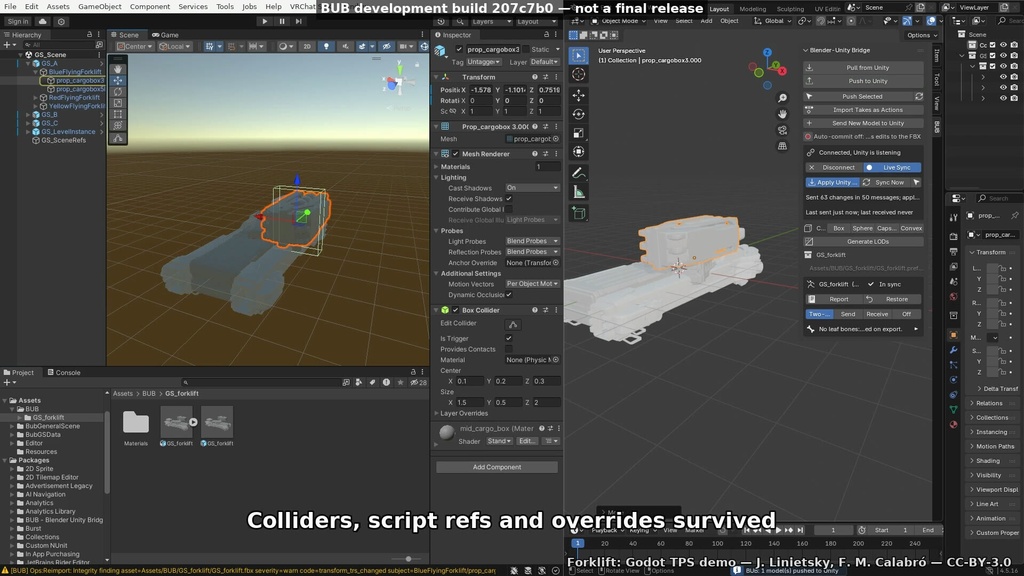

Blenderで編集したアセットを、Unityで使っている元のアセットへ戻すための開発中のツールです。小物、ワールド・シーン用アセット、マテリアル、リグ、アニメーションを扱います。BUBの開発者による配布です。 この配布物は無料のソースコードです。ダウンロードしてすぐに起動できるアプリやインストーラーではありません。必要な開発ツールの導入、ビルド、各コンポーネントの設定が必要です。まずバックアップした小さなプロジェクトでお試しください。 ■ 内容と導入 ・BUB 0.3.0のソースアーカイブ(ZIP)。ビルドスクリプト、ライセンス、導入手順を含みます。動画のモデルやモーションは同梱していません。 ・Python 3.11以上が必要です。WindowsパッケージのビルドにはGo 1.26.0も必要です。ビルド時に依存関係などを取得します。 ・手動構成ではBlenderアドオン、Unityパッケージ、Pythonハブを導入します。macOS/Linux用のデスクトップインストーラーはありません。 Windowsパッケージを作る場合は、展開したBUB-0.3.0-sourceフォルダーでPowerShellから実行します: py -3 -m venv .venv .venv\Scripts\python.exe scripts\build_installer.py 生成先はdist/BUB-Setup-0.3.0.exeです。生成されるインストーラーは未署名です。 手動導入ではPython 3.11以上でpython scripts/build_addon.pyでアドオンを作成し、dist内のZIPをBlenderに導入します。Unityにはunity/com.bub.bridgeをローカルパッケージとして追加します。展開したソース内のpythonフォルダーでpython -m bub_serverを実行し、連携中はハブを起動したままにします。ハブに追加のpip依存パッケージは不要です。操作手順は同梱のQUICKSTART.md、構成と制限はREADME.mdとdocs/CLAIMS.mdをご覧ください。 ■ ライセンス アプリ・ハブ・Blenderアドオン:GPL-3.0-or-later。Unityパッケージ:MIT。利用席数の制限はありません。改変・再配布時は各ライセンスの条件に従ってください。 ■ 確認済みの範囲と制限 Windows Server 2022とLinuxで実行・動作確認を行っていますが、Windows 10/11のデスクトップ環境での検証と、実際のVRChatへのアップロード検証は未完了です。 重いシーンでは遅延が生じます。負荷の高いWindows Server 2022のテストでは、送信側の更新は毎秒12.4回、受信側の更新の遅れ(p95)は約244msでした。送信した更新はすべて届きましたが、表示フレームの独立した検証は未完了です。 ライブプレビューだけでは変更の永続保存を保証しません。変更を確定するにはPushを使います。対応関係が曖昧な構造変更や一部のアニメーション編集には手作業が必要です。任意のシェーダー/Shader Graphの自動変換や、あらゆる編集でUnityの設定を保持することは保証しません。 ■ 実際の動作例(20秒) https://youtube.com/shorts/hyZ0kJSGW20 Blenderでタイミングを2倍に伸ばし、Unityのクリップが10.9秒から21.8秒になった1例です。元のリグをGenericとして使用し、再オープン後もクリップの識別情報、コントローラー、Prefab・シーン参照を保持。バインディング数は前後とも190でした。 元のFBXではUnityがアニメーションテイクを認識しなかったため、通常のBlender FBXインポート/エクスポートを経たデータから開始しています。Linux上のBlender 4.5.16/Unity 2022.3.22f1で録画。前後の実映像は通常速度です。タイミング編集・Push・プレビュー設定はスクリプトで実行し、設定作業・待ち時間・冒頭の空中動作は編集で省いています。 モーション提供:Ari Shapiro(StuntDouble作者)。許可を得て使用しています。BUBの推奨・保証を意味しません。 https://github.com/arishapiro/StuntDouble 音楽:iamoneabe「Gone Fishin’」(CC0)。抜粋、音量調整、フェードあり。 https://opengameart.org/content/gone-fishin-0 サムネイル:Godot TPSデモのフォークリフト(Juan Linietsky、Fernando Miguel Calabró作)、CC BY 3.0。デモでは木箱を移動しています。 https://github.com/godotengine/tps-demo/tree/a82f15448e9b015440d3bbdf5e10801b260c4e9f/level/forklift https://creativecommons.org/licenses/by/3.0/ Blender、Unity、VRChatとは提携していない独立したソフトウェアです。 ENGLISH BUB brings Blender edits back to the Unity asset you already use: props, world/scene assets, materials, rigs and animation. This listing is provided by BUB’s developer. FREE SOURCE CODE — MANUAL BUILD REQUIRED. This ZIP is not a ready-to-run app or installer. It includes build scripts, instructions and licences; demo models and motion are not included. Use a small, backed-up project first. Requires Python 3.11+; building the Windows package also requires Go 1.26.0 and downloads dependencies. Manual setup uses the Blender add-on, Unity package and Python hub. There is no packaged macOS/Linux desktop installer. For the Windows package, open PowerShell in the extracted BUB-0.3.0-source folder: py -3 -m venv .venv .venv\Scripts\python.exe scripts\build_installer.py Output: dist/BUB-Setup-0.3.0.exe (unsigned). For manual setup, use Python 3.11+ to run python scripts/build_addon.py and install the dist ZIP in Blender; add unity/com.bub.bridge as a local Unity package. Run python -m bub_server from the extracted source’s python folder and keep the hub running. The hub needs no additional pip dependencies. See the included QUICKSTART.md, README.md and docs/CLAIMS.md for operation and boundaries. Application/hub/Blender add-on: GPL-3.0-or-later. Unity package: MIT. No seat limit; modification and redistribution remain subject to those licences. Limits: native Windows Server 2022 and Linux tests do not qualify Windows 10/11 desktops. Actual VRChat uploads are unverified. One heavy Windows Server test measured 12.4 source updates/s and about 244ms p95 receiver staleness; all emitted updates arrived, but independent visual-frame proof is incomplete. Heavy scenes can lag. Push commits edits; live preview alone does not guarantee persistence. Ambiguous structural changes and some animation edits need manual work. Arbitrary shader/Shader Graph conversion and universal preservation are not promised. 20-second real example: https://youtube.com/shorts/hyZ0kJSGW20 One original-rig Generic test retimed a clip from 10.9 to 21.8 seconds, retaining its identity, controller and prefab/scene references after reopening; binding counts were 190 before and after. The supplied FBX first needed a normal Blender FBX import/export because Unity exposed no take from the original. Recorded on Linux, Blender 4.5.16 / Unity 2022.3.22f1. Actual playback stays at normal speed; retiming, Push and preview setup were scripted. Setup, waits and the airborne lead-in are omitted. Motion: Ari Shapiro, StuntDouble, used with permission, not an endorsement: https://github.com/arishapiro/StuntDouble Music: “Gone Fishin’” by iamoneabe, CC0; trimmed, level-adjusted and faded: https://opengameart.org/content/gone-fishin-0 Demo thumbnail: Godot TPS forklift, Juan Linietsky & Fernando Miguel Calabró, CC BY 3.0; crate moved. https://github.com/godotengine/tps-demo/tree/a82f15448e9b015440d3bbdf5e10801b260c4e9f/level/forklift https://creativecommons.org/licenses/by/3.0/ Independent of Blender, Unity and VRChat.
無料の拡張機能プレビュー 0.3.1 / Free extension preview
【追加:無料のインストール可能な拡張機能プレビュー 0.3.1】 追加ファイル「bub_blender-0.3.1.zip」は、そのままBlenderへインストールできるプレビューです。ソースからの手動ビルドは不要です。Pythonコア、ローカル同期ハブ、Unity Editorパッケージのソースを同梱しています。Unity本体は別途必要です。 Blenderの「Install from Disk」でZIPをインストールして有効化 → BUBパネルの「Export Unity Package」で書き出し → Unity Package Managerの「Add package from disk」で書き出したpackage.jsonを選択してください。「Start Local Hub」で同期ハブを起動します。ライブプレビューと保存は別で、変更の確定には「Push」を使います。 必要条件はBlender 4.5以降ですが、すべての4.5以降のバージョンでの動作を保証するものではありません。このZIPで確認済みなのはLinux・Blender 4.5.16 LTS・Unity 2022.3.22f1です。実際の拡張機能インストール、ハブの起動/停止、Unity連携、小規模なFBXのPush/再インポート、およびシーン再読込後の参照保持を確認しました。 追記:同一の0.3.1 ZIPについて、Windows Server 2022・Blender 4.5.16・Unity 2022.3.22f1でもインストール、ローカルハブの起動/停止、小規模アセットのPush/再インポート、再読込後の参照保持を確認しました。Windows 10/11とmacOSは引き続き未検証です。 GUI操作全体の確認ではなく、ネイティブのCLIによるインストールと小規模な連携テストです。 このプレビューのWindows 10/11およびmacOSでの動作、重いシーンの性能、任意のアセット変更、実際のVRChatアップロードは未検証です。まずバックアップした小さなプロジェクトでお試しください。 既存の0.3.0フルソース版も、別ファイルとして引き続きダウンロードできます。ソース版の手動ビルド手順と、本プレビューのインストール手順は異なります。既存のライセンス表記・クレジットはそのまま適用されます(アドオン/ハブ:GPL-3.0-or-later、Unityパッケージ:MIT)。 UnityのBUB設定でBlenderの実行ファイルを指定し、両エディターの接続先を合わせてください。BUBを有効にするだけではハブは起動しません。「Stop Owned Hub」はこのBlenderセッションが起動したハブだけを停止します。同梱INSTALL.mdの検証予定という記載は、2026年11月21日に完了した上記の検証より前のものです。 --- Additional free download: installable extension preview 0.3.1 The additional file bub_blender-0.3.1.zip installs directly into Blender; no manual source build is required. It bundles the Python core, local sync hub and Unity Editor package source. Unity itself must be installed separately. Use Blender's Install from Disk and enable BUB. Choose Export Unity Package in the BUB panel, then select the exported package.json using Unity Package Manager's Add package from disk. Start Local Hub starts the sync hub. Live preview and saved changes are separate: use Push to commit an update. The minimum is Blender 4.5; this does not establish compatibility with every newer version. This exact ZIP was checked on Linux with Blender 4.5.16 LTS and Unity 2022.3.22f1: extension installation, hub start/stop, Unity interoperability, a small FBX Push/reimport, and references after reopening the scene. Update: the identical 0.3.1 ZIP also passed installation, owned-hub start/stop and a small-asset Push/reimport/reopen reference check on Windows Server 2022 with Blender 4.5.16 and Unity 2022.3.22f1; Windows 10/11 and macOS remain unqualified. These were native CLI installation and small-asset interoperability checks; the full GUI workflow is not qualified. Windows 10/11 and macOS operation, heavy-scene performance, arbitrary asset edits and real VRChat uploads remain unqualified for this preview. Start with a backed-up small project. The existing 0.3.0 full-source download remains available. Its manual-build instructions are separate from this preview's installation steps. Existing licence notices and credits remain applicable: GPL-3.0-or-later for the add-on/hub and MIT for the Unity package. Set the Blender executable path in Unity’s BUB settings and use matching connection settings in both editors. Enabling BUB alone does not start the hub. Stop Owned Hub stops only this Blender session’s child hub. The qualification-pending note in the included INSTALL.md predates these completed 21 November 2026 checks.