
[warudo standard] MINERVA TYPEWRITER STUDY ─ キーボードを打つとキャラクターがタイプライターを打つ探偵の書斎
- Digital2,000 JPY
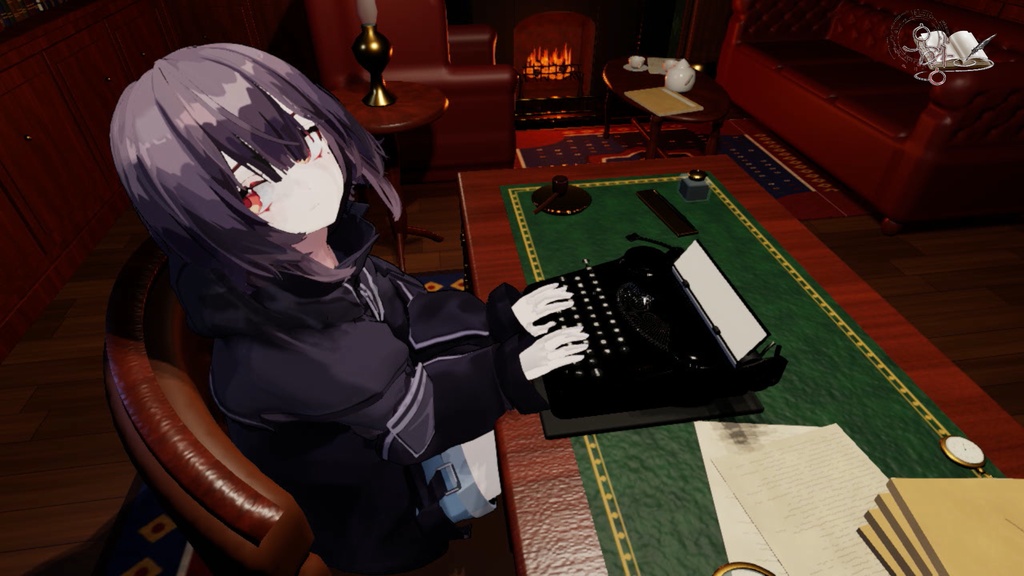


キーボードを打つと、キャラクターがそのキーを受け持つ指でタイプライターを打ちます。 シャンデリアの灯りの下、暖炉の火が揺れるヴィクトリア朝の探偵の書斎。作業・執筆・雑談配信の背景に使えるWarudoマップと専用プラグインのセットです。 ■ タイプライター ・押したキーを、キャラクターがタイプライターの同じキーで打ちます。指の割り当ては十本指タイピング(英字配列基準)です。 ・キーを押すと活字棒が跳ね上がって紙を打ち、キャリッジが1文字ずつ進みます。Enterで左手が改行レバーを引きます。 ・打った文字はEnterを押すまで紙に残ります(オフ可)。紙に印字されるのは押したキーの英字です。韓国語・日本語入力中も同じです。 ・タイプ音:活字が紙を打つ音15種類からランダムに鳴ります。オン/オフ・音量調整可。 ・手の姿勢調整:指の曲げ、手首の高さ、両手の間隔、1回の打鍵時間をアバターに合わせて変えられます。 ・「タイプライターを使う」のオン/オフ:オフにすると手とタイプライターが止まり、キャラクターは元の姿勢(トラッキング・アニメーション)で動きます。字幕と時計はそのまま使えます。 ■ タイプ字幕 ─ マイクを使いにくいときに ・Warudoエディターの「字幕の入力」欄に打った文章が配信画面に字幕として出ます。Enterで確定し、少し残ってからゆっくり消えます。 ・韓国語・日本語(漢字変換を含む)・英語に対応。フォントはPretendard JPです。 ・見た目2種類:サイレント映画の字幕カード(画面下)/タイプ用紙カード(画面右下) ・残る時間、消える時間、字幕の大きさを調整できます。 ・字幕はWarudoの画面に直接描かれるので、OBS側での設定は不要です。 ■ 書斎 ・本棚、暖炉(燃える火、石炭、フェンダー、火かき道具)、暖炉上の夕暮れの川の風景画、振り子が揺れる大きな振り子時計、窓とベルベットのカーテン ・革のソファとアームチェア、ティーセットのあるコーヒーテーブル、スタンドライト ・化学実験台(フラスコ・試験管・ビーカー・顕微鏡)と事件のメモボード、コートと鹿撃ち帽が掛かったコート掛け ・机:引き出し付きの机、革張りの天板、虫眼鏡、パイプ、インク壺とペン、紐で束ねた事件ファイル、懐中時計 ・振り子時計と懐中時計はPCの現在時刻を指します。 ・マップを読み込むとタイプライター用のアセット(タイプライター・タイピスト)が自動で追加されます。 ■ 内容 ・マップ:MinervaTypewriterStudy.warudo ・プラグイン:MinervaTypewriter.warudo ・説明書(韓国語・日本語・英語)、フォントのライセンス文書 ■ 動作環境 ・Warudo(通常版)。Warudo 0.15.1で確認済み。 ・Warudo Pro(URP)用ではありません。Warudo Proでは確認していません。 ・キャラクターモデルは含まれません。 ・設定画面はWarudoの言語設定に合わせて、日本語・韓国語・英語で表示されます。 ■ ご注意 ・キーボード入力はキャラクターとタイプライターを動かすためだけに使い、外部には送信しません。 ・Warudoが起動していると、ほかのウィンドウで打ったキーにも反応します。配信中にパスワードなどを入力するときは「紙に文字を印字」か「タイプライターを使う」をオフにしてください。紙に文字が映る可能性があります。 ■ 利用規約 ・ご本人の配信・動画・SNSで使用できます(収益化を含む)。 ・購入したご本人のみ使用できます。 ・ご自身で使うための改変は自由です。 ・再配布・再販売は禁止です。 ・クレジット表記は任意です。 ・使用によって生じた損害について責任を負いません。 ・デジタル商品のため返金はできません。 ・下記「使用素材」はそれぞれのライセンスに従います。 ■ 使用素材 ・タイプ音:アン・ヨンジン「K영화-열두번째용의자 효과음 (860)」、공유마당(韓国著作権委員会)、CC BY ─ 切り出して使用 ・字幕フォント:Pretendard JP(SIL Open Font License 1.1) ■ 制作方法 AI(Claude)を使って制作しました。 ・企画、方向性、修正指示、Warudoでの確認:制作者 ・3Dモデル、テクスチャ、プラグイン:AIが書いたプログラムコードで生成。画像生成AIは使用していません。 ■ お問い合わせ yomang616@gmail.com -------------------------- Type on your keyboard, and your character types on the typewriter with the finger that covers that key. A Victorian detective's study, lit by a chandelier, with a fire burning in the hearth. A Warudo map with its own plugin, for work, writing or chat streams. - Typewriter ・Your character presses the same key you press. Fingers follow standard touch typing (US layout). ・Each key sends a typebar up to strike the paper, and the carriage moves one space. Enter makes the left hand pull the carriage return lever. ・Typed letters stay on the paper until you press Enter (can be turned off). The paper shows the English letter of the key you pressed, even while typing in another language. ・Typing sound: one of 15 typebar strikes, chosen at random. On/off and volume. ・Hand pose: finger bend, wrist height, hand spacing and press time can be adjusted to fit your avatar. ・Typewriter on/off: when off, the hands and typewriter stop and your character moves as usual (tracking or animation). Captions and clocks still work. - Typed captions ─ for when you can't use a mic ・Text typed into the "Caption text" box in the Warudo editor appears on screen as a caption. Press Enter to confirm; it stays for a moment, then fades out. ・Korean, Japanese (with kanji conversion) and English. Font: Pretendard JP. ・Two looks: silent-film title card (bottom of the screen) / typewritten paper card (bottom right) ・Hold time, fade time and caption size are adjustable. ・Captions are drawn inside Warudo's image; no OBS setup needed. - The study ・Bookcases, a fireplace (burning fire, coal, fender, fire irons), a riverside dusk painting over the mantel, a longcase clock with a swinging pendulum, a window with velvet curtains ・Leather sofa and armchair, coffee table with a tea set, table lamp ・Chemistry bench (flask, test tubes, beakers, microscope) and a case board, a hat stand with a coat and deerstalker ・Desk: pedestal desk with drawers, leather top, magnifying glass, pipe, inkwell and pen, case files tied with string, pocket watch ・The longcase clock and pocket watch show your PC's current time. ・Loading the map adds the typewriter asset (Typewriter Typist) automatically. - Contents ・Map: MinervaTypewriterStudy.warudo ・Plugin: MinervaTypewriter.warudo ・Guide (Korean, Japanese, English), font license - Requirements ・Warudo (standard). Tested on Warudo 0.15.1. ・Not made for Warudo Pro (URP). Not tested on Warudo Pro. ・Character model not included. ・The settings follow Warudo's language setting (English, Japanese or Korean). - Please note ・Keyboard input is used only to move the character and typewriter, and is never sent anywhere. ・While Warudo is running, it reacts to keys typed in other windows too. Before typing a password on stream, turn off "Print letters on the paper" or "Use typewriter", or the letters may appear on the paper. - Terms of use ・You may use it in your own streams, videos and social media (monetized included). ・For the purchaser's own use only. ・You may modify it for your own use. ・No redistribution or resale. ・Credit is optional. ・The creator is not liable for any damage from use. ・No refunds, as this is a digital product. ・The materials below follow their own licenses. - Materials used ・Typing sound: Ahn Young-jin, "K영화-열두번째용의자 효과음 (860)", Gongu Madang (Korea Copyright Commission), CC BY ─ cut and edited ・Caption font: Pretendard JP (SIL Open Font License 1.1) - How it was made Made with an AI assistant (Claude). ・Planning, direction, revision requests and testing in Warudo: the creator. ・3D models, textures and plugin: generated by program code written by the AI. No image-generation AI was used. - Contact yomang616@gmail.com