

[VRC/Vtuber] virtual pose maker
- Pose Maker (Personal License)Digital1,800 JPY
- Pose Maker (Business License)Digital5,500 JPY
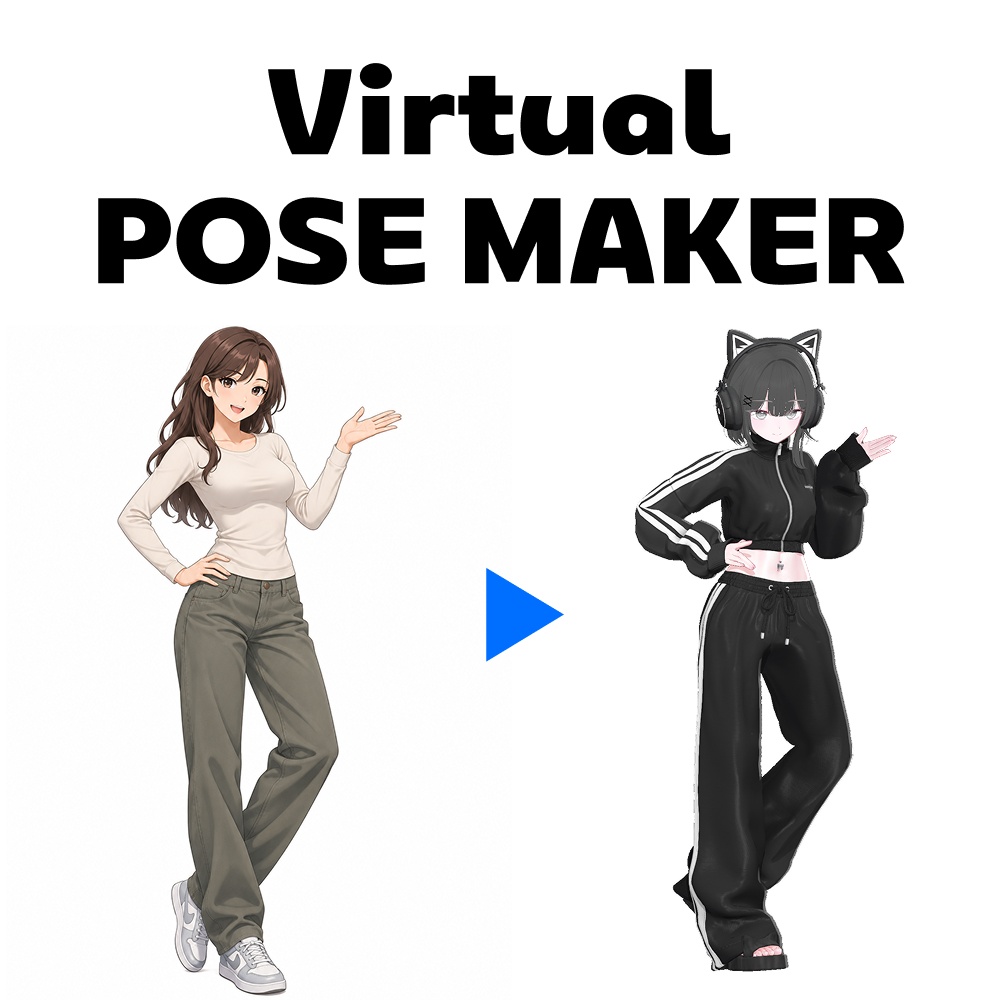


기업에서의 이용 시, Business License 구매가 필수입니다. (기업세/소속사/MCN 등) 企業でご利用の場合は、Business Licenseの購入が必須です。 (企業勢VTuber、事務所所属、MCNなど) A Business License is required for corporate use. (Including corporate VTubers, agencies, MCNs, etc.) ---------------------------------------- BOOTHのファイル容量制限により、ご購入後はご案内するGoogle Driveのリンクからダウンロードをお願いいたします。 累計販売100本突破!Xで話題のVTuberスクショ用ポーズメーカー💃 操作方法をさらにシンプルにして登場しました❤️🔥 WarudoやMeligoなどを利用するVTuberの方はもちろん、.animファイルの生成により、VRChat(VRC)ユーザーの方にもご利用いただけます! ローカルAIエンジンを使用して、追加料金なしで好きなだけポーズを作成しましょう! 写真1枚から自分のVRMアバターのポーズを生成 参考画像を読み込むだけで、そのポーズをVRMモデルに適用できます。 生成したポーズはその場で微調整してファイルとして保存したり、Warudo・Meligoへリアルタイムで送信したりできます。 1. ポーズ生成 - 体の写真1枚だけでOK。指の認識が難しい場合は、手の写真を別途読み込むことで精度を高められます。 - 手のポーズプリセット: ピースやハートなど、よく使う手の形を写真なしで選択・適用できます。 - モデルの体型に合わせて補正: 肩幅や腕の長さをモデルに合わせて再計算し、手が顔や体に埋まる現象を軽減します。 - 足の接地補正: 脚を伸ばしたポーズでは足を地面に接地させ、ジャンプなどで脚を曲げたポーズでは足が浮いた状態を維持します。 - 全身 / 上半身モード、保存ファイル名の指定、同名ファイルには自動的に (1)、(2) を付与 2. ポーズ編集 - 3D画面で関節をクリックし、回転リングを使って直接調整できます。 - 移動モード(IK): 手足をドラッグすると、腕や脚が自然に追従します。 - ミラー編集 / 左右反転で、左右対称のポーズを素早く作成できます。 3. VMCリアルタイム送信 - 作成したポーズを Warudo、Meligo など、VMCに対応したソフトへ直接送信できます。 - 編集内容は配信画面のアバターに即座に反映され、位置の移動もリアルタイムで反映されます。 4. モーション再生 - .anim、.vmd(MMD)モーションを自分のVRMモデルに適用して再生し、VMCで送信できます。 - 腕や脚の開き具合、腰や首の曲がり具合をモデルごとに補正して保存できます。 - .anim / .vrma形式に変換して保存できます。 5. ポーズライブラリ - 作成したポーズや、お持ちの .anim・.vrmaファイルを 自分のモデルのサムネイルで一覧管理できます。 - マウスを合わせて★をクリックするとお気に入りに登録でき、ダブルクリックですぐに編集画面へ読み込めます。 6. 対応形式 - 保存:VRM Animation (.vrma)、Warudo / Humanoid (.anim) - 読み込み:.vrma、.anim、.vmd - 対応言語:韓国語 / 日本語 / 英語 7. 動作環境 - Windows 10 / 11(64bit) - NVIDIA GeForce RTX 20シリーズ以降(VRAM 8GB以上推奨)、最新のグラフィックドライバー - 必要な空き容量:約8GB(ダウンロード容量:約5GB) ※ AMD・Intel製グラフィックカード、およびGTX 10シリーズ以前の環境では、ポーズ生成機能(写真 → ポーズ)をご利用いただけません。 8. 同梱内容 - CHACO Pose Maker 本体 - ローカルAIエンジン(CHACO Pose Engine) - .anim変換ツール - ユーザーガイド 9. ご購入前にご確認ください - AIが写真内の姿勢を推定する仕組みのため、写真によっては微調整が必要になる場合があります。(編集タブから簡単に調整できます) - 他の場所で購入したポーズやモーションを読み込む際は、著作権や利用規約上の問題がないことをご確認ください。 - 解凍する際は、フォルダー構成を変更せずにそのまま展開してください。プログラム本体とエンジンのフォルダーは同じ場所に配置する必要があります。 - 同梱されているライセンス関連ファイル(LICENSE、NOTICE、LICENSESフォルダー)をご確認ください。再配布・再販売は禁止されています。 - 本プログラムは生成AIを活用して制作されています。 Avatar: Chocolate Rice (sio) ----------------------------------------------- Due to BOOTH's file size limitations, please download the files via the provided Google Drive link after purchase. Over 100 Copies Sold! The Pose Maker for VTuber Selfies That's Making Waves on X 💃 Now available with an even simpler and easier-to-use workflow! ❤️🔥 Whether you're a VTuber using Warudo, Meligo, or other software, or a VRChat (VRC) user, you can now create and use poses through .anim file generation! Run the local AI engine and create as many poses as you want with no additional fees! Create Poses for Your VRM Avatar from a Single Photo Simply import a reference photo, and the program will apply the pose to your VRM model. You can fine-tune the generated pose, save it as a file, or stream it directly to Warudo or Meligo in real time. 1. Pose Generation - All you need is one body photo! If the fingers aren't detected accurately, you can import a separate hand photo to improve accuracy. - Hand Pose Presets: Choose and apply common hand gestures, such as peace signs and hearts, without needing additional photos. - Body Proportion Adjustment: Automatically recalculates shoulder width and arm length to match your model, reducing issues such as hands clipping into the face or body. - Foot Position Adjustment: Keeps feet firmly on the ground for standing poses while preserving elevated foot positions for jumping or bent-leg poses. - Full Body / Upper Body modes, custom file naming, and automatic numbering (1), (2) for duplicate filenames. 2. Pose Editing - Click joints directly in the 3D viewport and adjust them using rotation gizmos. - IK Movement Mode: Drag hands or feet to naturally reposition the arms and legs. - Mirror Editing / Left-Right Flip: Quickly create symmetrical poses or flip existing poses. 3. Real-Time VMC Streaming - Send your generated poses directly to VMC-compatible applications such as Warudo and Meligo. - Changes are instantly reflected on your avatar while editing, including position movements. 4. Motion Playback - Import and play .anim and .vmd (MMD) motions on your VRM model, and stream them through VMC. - Adjust arm and leg spread, waist bending, and neck movement to better fit each model before saving. - Convert and export motions in .anim / .vrma formats. 5. Pose Library - Organize your generated poses and existing .anim / .vrma files with thumbnails featuring your own VRM model. - Hover over a pose and click ★ to add it to Favorites, or double-click to open it directly in the pose editor. 6. Supported Formats - Export: VRM Animation (.vrma), Warudo / Humanoid (.anim) - Import: .vrma, .anim, .vmd - Languages: Korean / Japanese / English 7. System Requirements - Windows 10 / 11 (64-bit) - NVIDIA GeForce RTX 20 Series or newer (8GB VRAM or more recommended), with the latest graphics drivers - Approximately 8GB of available storage (approximately 5GB download) ※ Photo-to-pose generation is not supported on AMD or Intel graphics cards, or NVIDIA GTX 10 Series and older GPUs. 8. Included Contents - CHACO Pose Maker Application - Local AI Engine (CHACO Pose Engine) - .anim Conversion Tool - User Guide 9. Important Information Before Purchasing - Since the AI estimates poses from reference photos, some results may require minor adjustments depending on the image. (You can easily fine-tune poses in the Edit tab.) - When importing poses or motions purchased from other sources, please ensure that their use does not violate any copyrights or license terms. - Please preserve the original folder structure when extracting the files. The application and engine folders must remain in the same location. - Please review the included license files (LICENSE, NOTICE, and LICENSES folder). Redistribution and resale are prohibited. - This software was developed with the assistance of generative AI. Avatar: Chocolate Rice (sio)