
Blender Addon シェイプキーツール Shape Key Tools
- Digital400 JPY
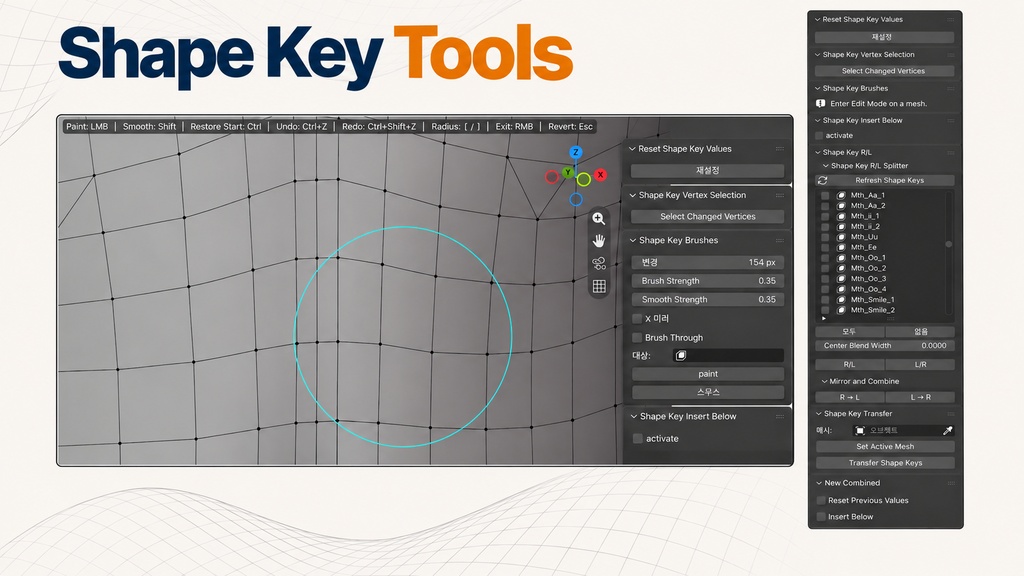

Shape Key Tools - Blender Addon Blender에서 셰이프 키 편집 및 관리를 더욱 편리하게 만들어 주는 애드온입니다. 본 애드온은 ChatGPT를 활용하여 제작했습니다. Blender 5.3에서 제작되었으며, Blender 4.3에서도 정상적으로 작동하는 것을 확인했습니다.
【日本語】
Blenderでのシェイプキー編集・管理をより便利にするためのアドオンです。 本アドオンはChatGPTを活用して制作しました。 Blender 5.3で制作し、Blender 4.3でも正常に動作することを確認しています。 【対応言語】 日本語、英語、韓国語 【主な機能】 ■ Shape Key Brushes - ブラシを使用して、シェイプキーの形状をBasisや別のシェイプキーの形状に近づけることができます。 - 変形を滑らかに整えることができます。 - ブラシサイズ、強さ、スムーズ、ミラー機能があります。 ※編集モードで使用できます。シェイプキーの値のすぐ上にある「シェイプキー編集モード」をオフにすると有効になります。画面上部にショートカットキーの案内が表示されます。 ■ Shape Key R/L Shape Key R/L Splitter - 左右両方の変形が完成しているシェイプキーをR/Lに分割できます。 - 中央部分のブレンド調整ができます。 Mirror and Combine - 片側のみ作成したシェイプキーをミラーして、1つのシェイプキーに結合できます。 ※必ずすべてのシェイプキーの値を0にしてから実行してください。 ■ Shape Key Transfer - 頂点数が一致する複数のメッシュから、指定したメッシュへシェイプキーを転送できます。 ■ Select Changed Vertices - 選択したシェイプキーをBasisと比較し、変形している頂点を選択します。 ■ Reset Shape Key Values - すべてのシェイプキーの値を0に戻します。 ■ Shape Key Insert Below - 選択中のシェイプキーのすぐ下に、新しいシェイプキーを追加します。 ■ New Combined - 「新しく統合」する際、値が設定されているシェイプキーの値を0にしてから新しいシェイプキーを生成します。 - 選択中のシェイプキーのすぐ下に追加する設定もあります。 【利用規約】 本アドオンは、ダウンロードしたご本人のみが使用できます。 制作者の許可なく、アドオンファイルを第三者へ配布・共有すること、および再販売することを禁止します。 ---
【한국어】
【지원 언어】 한국어, 일본어, 영어 【주요 기능】 ■ Shape Key Brushes - 브러시를 사용하여 셰이프 키를 Basis나 다른 셰이프 키의 형태에 가깝게 만들 수 있습니다. - 변형을 매끄럽게 다듬을 수 있습니다. - 브러시 크기 조절, 강도, 스무스, 미러 기능이 있습니다. ※ 에디트 모드에서 사용할 수 있으며, 셰이프 키 값 바로 위에 위치한 '셰이프 키 에디트 모드'를 끄면 활성화됩니다. 화면 상단에 단축키 안내가 표시됩니다. ■ Shape Key R/L Shape Key R/L Splitter - 좌우가 모두 완성된 셰이프 키를 R/L로 분리할 수 있습니다. - 중앙 부분의 블렌딩을 조절할 수 있습니다. Mirror and Combine - 한쪽만 완성한 셰이프 키를 미러하여 하나의 셰이프 키로 합칠 수 있습니다. ※반드시 모든 셰이프 키의 값을 0으로 만든 뒤 실행 해야합니다. ■ Shape Key Transfer - 버텍스 수가 일치하는 여러 메시의 셰이프 키를 지정된 메시에 전송할 수 있습니다. ■ Select Changed Vertices - 선택한 셰이프 키를 Basis와 비교하여 변형된 버텍스를 선택합니다. ■ Reset Shape Key Values - 모든 셰이프 키의 값을 0으로 되돌립니다. ■ Shape Key Insert Below - 선택한 셰이프 키 바로 아래에 새로운 셰이프 키가 추가됩니다. ■ New Combined - '새로운 결합'할 때 값이 지정된 셰이프 키의 값을 0으로 만든 뒤 새로운 셰이프 키를 생성합니다. - 선택한 셰이프 키 바로 아래에 추가하는 설정도 있습니다. 【이용약관】 본 애드온은 다운로드한 본인에 한해 사용할 수 있습니다. 제작자의 허가 없이 애드온 파일을 제3자에게 배포하거나 공유하는 행위 및 재판매를 금지합니다. ---
【English】
An add-on designed to make shape key editing and management more convenient in Blender. This add-on was developed with the assistance of ChatGPT. Developed in Blender 5.3 and confirmed to work properly in Blender 4.3 as well. 【Supported Languages】 English, Korean, Japanese 【Main Features】 ■ Shape Key Brushes - Use brushes to bring shape key deformations closer to the Basis or another shape key. - Smooth out deformations for cleaner results. - Includes adjustable brush size, strength, smoothing, and mirroring. Note: Available in Edit Mode. To activate it, turn off "Shape Key Edit Mode," located just above the shape key value controls. Shortcut instructions are displayed at the top of the screen. ■ Shape Key R/L Shape Key R/L Splitter - Split a shape key containing completed left and right deformations into separate R/L shape keys. - Adjust blending around the center. Mirror and Combine - Mirror a shape key created on one side and combine both sides into a single shape key. ※You must set the values of all shape keys to 0 before executing. ■ Shape Key Transfer - Transfer shape keys from multiple meshes with matching vertex counts to a specified target mesh. ■ Select Changed Vertices - Compare the selected shape key with the Basis and select vertices that have been modified. ■ Reset Shape Key Values - Reset all shape key values to 0. ■ Shape Key Insert Below - Add a new shape key directly below the currently selected shape key. ■ New Combined - When "New Combined", reset the values of the shape keys used in the combination to 0 after creating the new shape key. - Includes an option to insert the new shape key directly below the selected shape key. 【Terms of Use】 This add-on is intended for use only by the person who downloaded it. Redistributing, sharing, or reselling the add-on files to third parties without the creator's permission is prohibited.