

Raycast Easy Set【全アバター・全衣装対応 / VRChat ワンクリック Raycast 設定】
- 通常版 / StandardDigital700 JPY
- 応援版 / Supporter(内容は同じ・Same content)Digital1,000 JPY
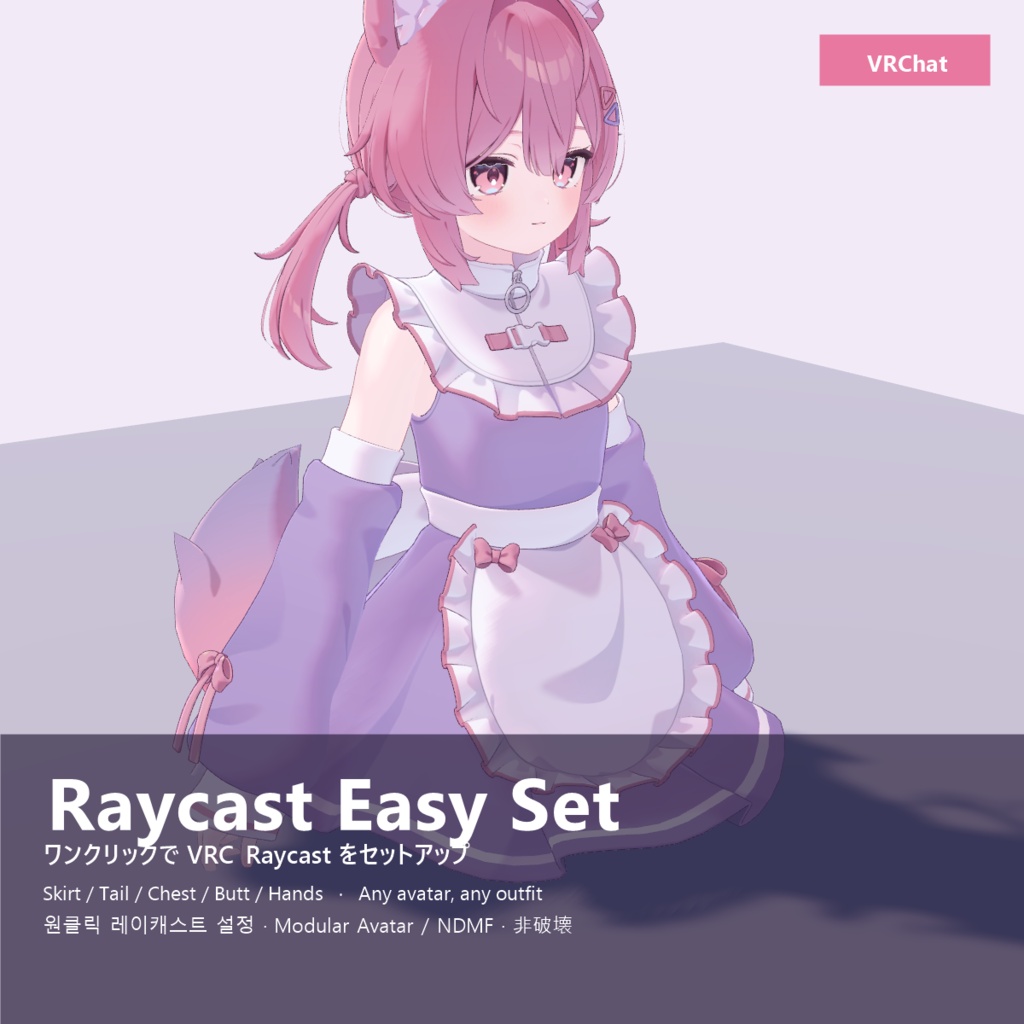
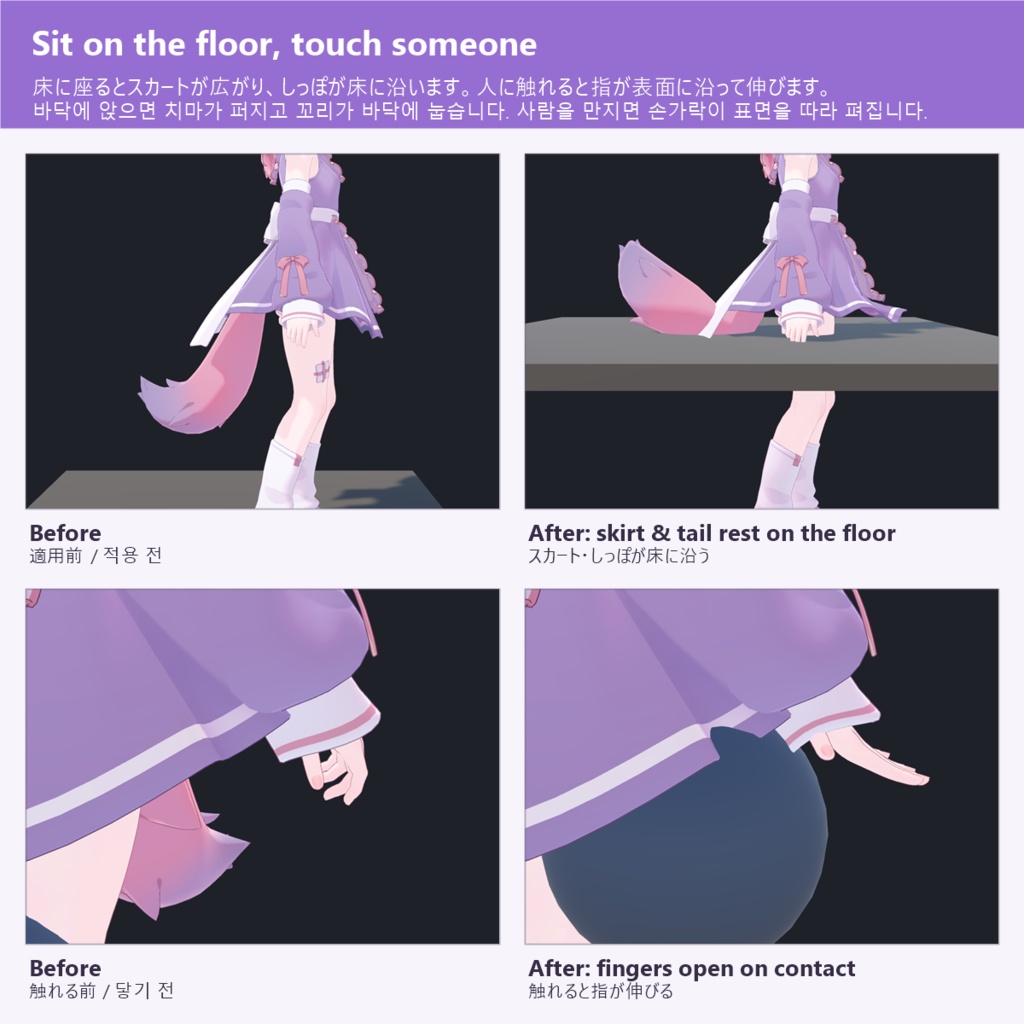
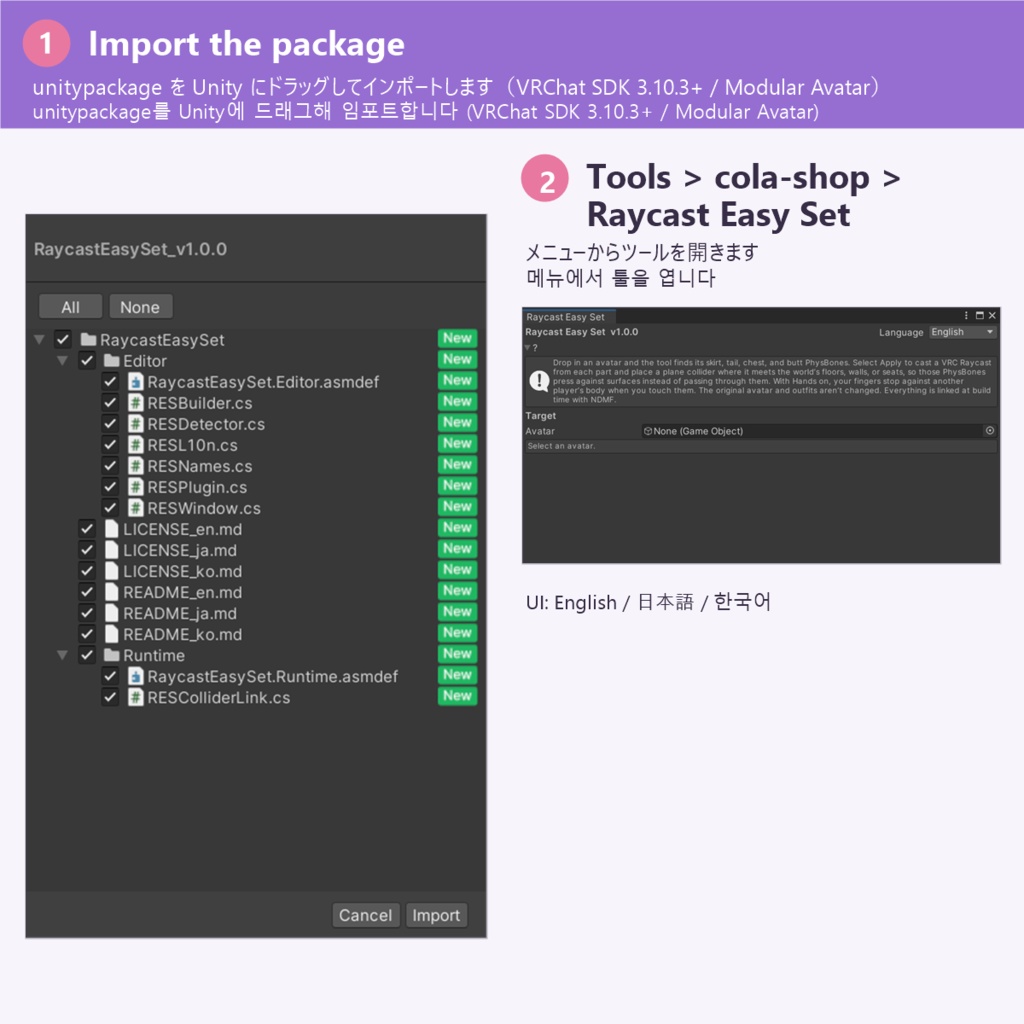
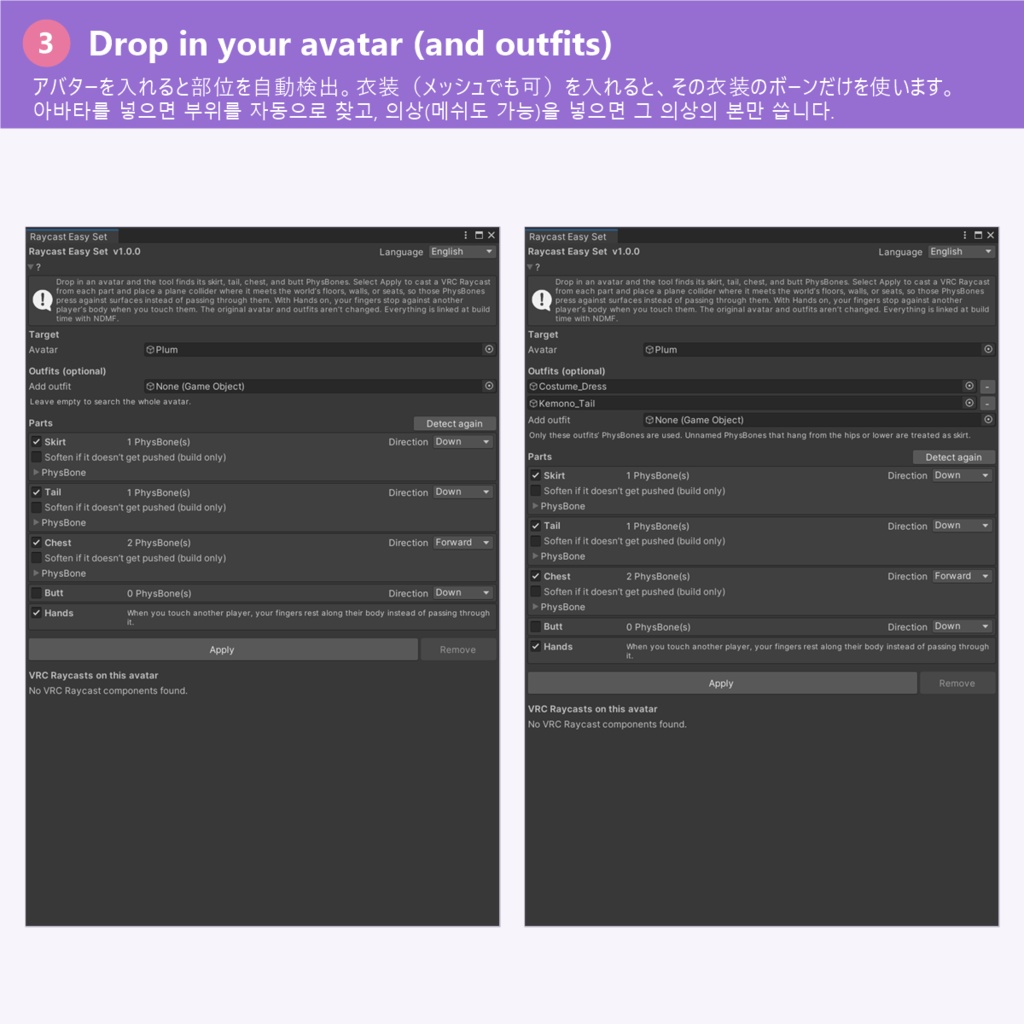
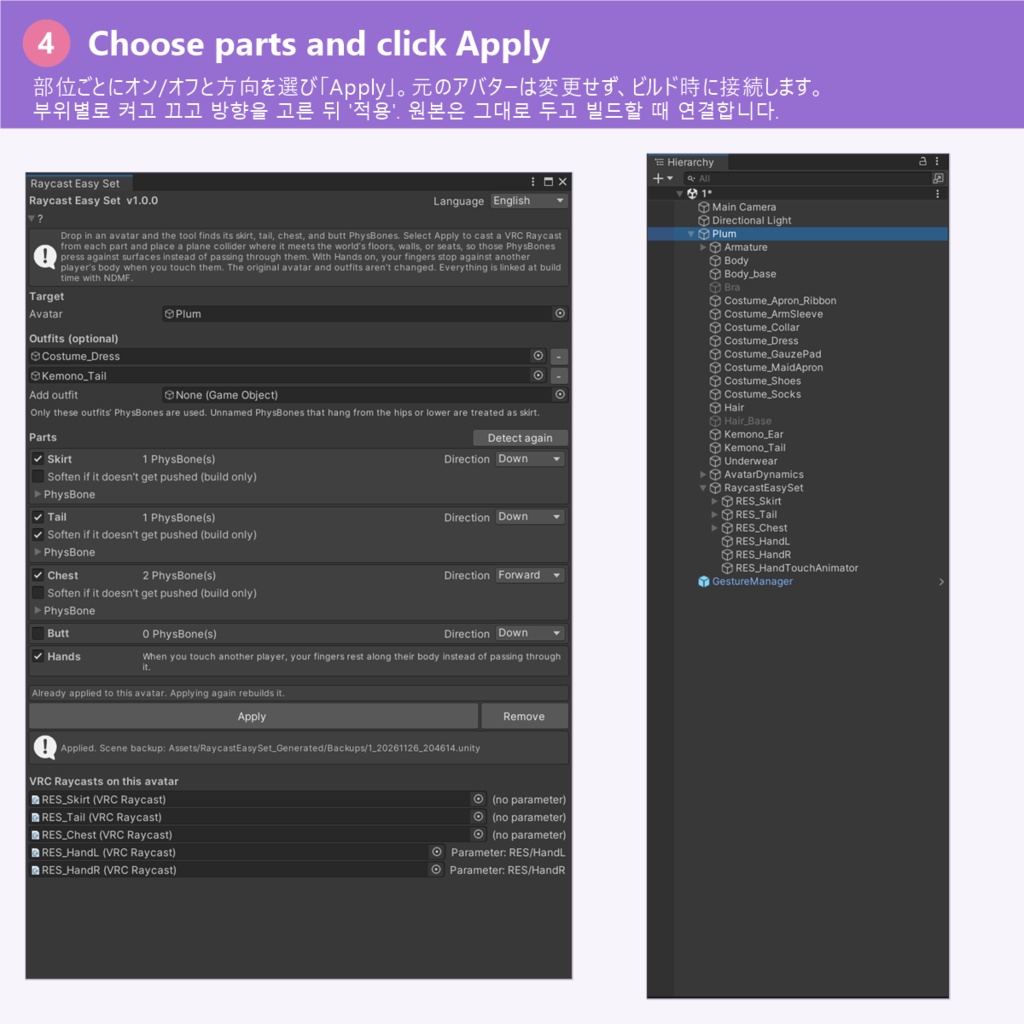
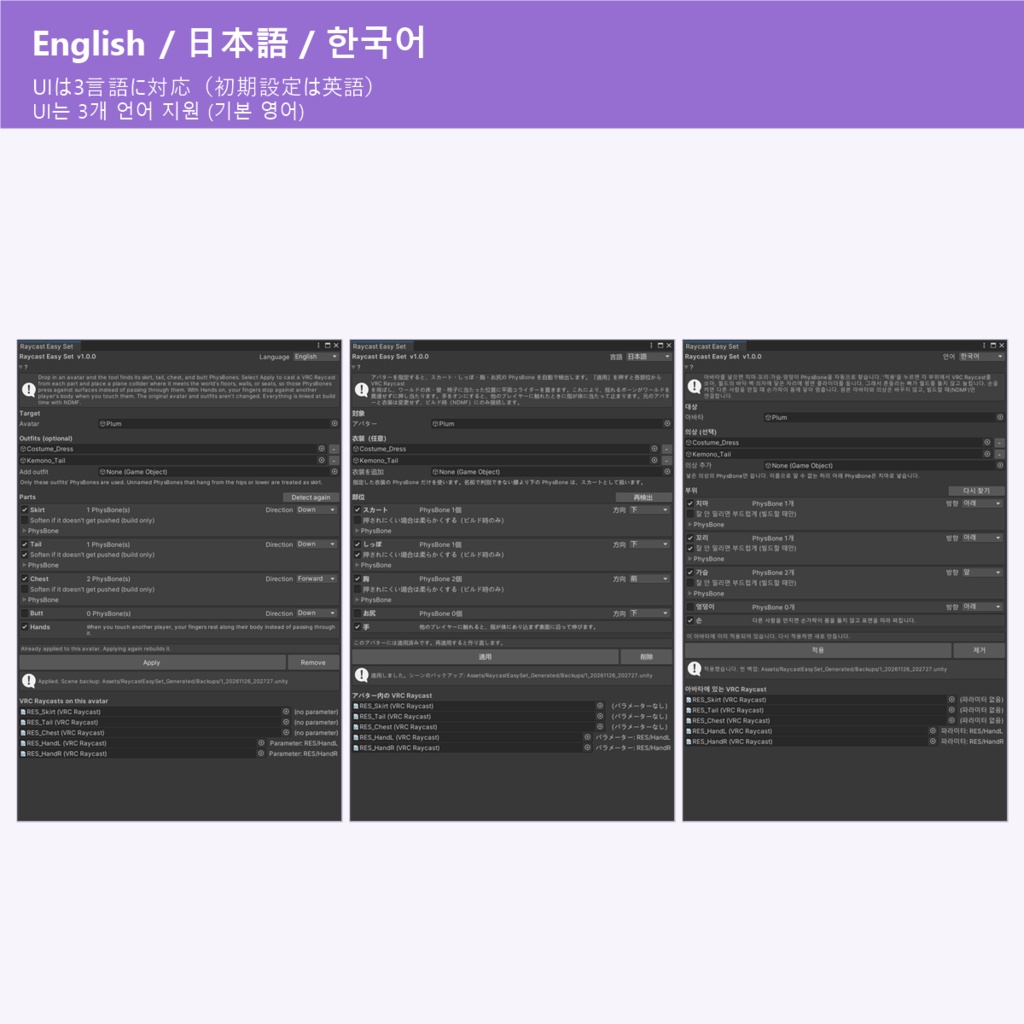


★ 全アバター・全衣装対応 ★ Supports every avatar and every outfit ★ 모든 아바타·모든 의상 지원 ★ (Humanoid アバター / Humanoid avatars / Humanoid 아바타) ※ 通常版(700円)と応援版(1,000円)の内容は同じです。応援版は今後の開発の応援用です。 ※ Standard (700 JPY) and Supporter (1,000 JPY) include the same files. The Supporter edition helps future development. ※ 통상판(700엔)과 응원판(1,000엔)의 내용은 같습니다. 응원판은 앞으로의 개발 응원용입니다. 【日本語】 Raycast Easy Set v1.1.2 VRChatの「VRC Raycast」をワンクリックでセットアップするUnityエディター拡張です。 スカート・しっぽ・胸・お尻・手に対応し、どのアバター・どの衣装にも使えます。 ■ できること ・スカート/しっぽ/お尻(下向き)、胸(前向き):レイキャストがワールドの床・壁・椅子を検出し、その位置に平面コライダーを置きます。PhysBoneが面を貫通せず押し当たります。床に座るとスカートが広がり、しっぽが床に沿って寝ます。 ・手:指ごとの短いレイキャストで他のプレイヤーを検出します。触れた指だけが、体にめり込まず表面に沿って伸びます。 ・部位ごとにオン/オフと方向(下・前・後ろ・左・右)を選べます。 ・衣装欄に衣装(メッシュでも可)を入れると、その衣装を動かすPhysBoneだけを自動で使います。 ・押されにくいしっぽ・胸には「柔らかくする(ビルド時のみ)」オプションがあります。 ■ 特長 ・非破壊:元のアバター・衣装・PhysBoneは変更しません。Modular Avatar/NDMFでビルド時にのみ接続します。 ・適用前にシーンを自動でバックアップします。「削除」ボタンまたはCtrl+Zで元に戻せます。 ・同期パラメーターは使用しません(手の判定はローカルパラメーター)。 ・UIは日本語・英語・韓国語に対応(初期設定は英語)。 ■ 動作環境 ・Unity 2022.3(VRChat Creator Companionのプロジェクト) ・VRChat SDK - Avatars 3.10.3 以上(VRC Raycast対応版) ・Modular Avatar 1.12 以上(NDMF) ・Humanoidアバター ■ 導入方法 1. VCCでプロジェクトにModular Avatarを追加します。 2. RaycastEasySet_v1.1.2.unitypackage をUnityにドラッグしてインポートします。 3. メニューから Tools > cola-shop > Raycast Easy Set を開きます。 4. アバターを入れると、スカート・しっぽ・胸・お尻のPhysBoneを自動で検出します。(任意)衣装欄に衣装を入れます。 5. 使いたい部位をオンにして「Apply」を押します。 6. VRChat SDKの Build & Test で動作を確認してからアップロードしてください。 ■ 同梱物 ・RaycastEasySet_v1.1.2.unitypackage ・README・利用規約(日本語 / 英語 / 韓国語) ■ 既知の制限 ・非常に硬いPhysBone(Pull・Spring・Immobileが高いもの)は、柔らかくするをオンにしてもほとんど動かない場合があります。 ・手の接触判定はVRChatのプレイヤー当たり判定を使うため、おおよその判定です。 ■ 利用規約 ご購入前にこのページ下部の利用規約をご確認ください。ご使用のアバター・衣装の規約も併せてお守りください。 ■ 更新履歴 v1.1.2 (2026-11-27) 修正:VRChat SDK のバージョンによって VRC Raycast の項目が異なる場合でも、ツールが読み込まれ Tools > cola-shop メニューが表示されるようにしました。 v1.1.1 (2026-11-27) 修正:必要なパッケージ(VRChat SDK 3.10.3 以上・Modular Avatar 1.12 以上・NDMF)が足りない環境でも Tools > cola-shop メニューが表示され、何を更新すればよいか案内するようにしました。 v1.1.0 (2026-11-26) 手のレイキャストを指ごとに変更し、触れた指だけが伸びるようにしました。 v1.0.1 (2026-11-26) 修正:プロジェクトを開き直すと「削除」が効かず、空のスクリプトが残る問題を修正しました。v1.0.0で適用済みの場合も、そのまま上書きインポートすれば削除・ビルドできます。 v1.0.0 (2026-11-26) 初回公開 ──────────── 【English】 Raycast Easy Set v1.1.2 A Unity Editor tool that sets up VRChat “VRC Raycast” in one click. Works for skirts, tails, chests, butts, and hands, on any avatar and any outfit. ■ What it does ・Skirt / tail / butt (cast down) and chest (cast forward): the raycast finds the world’s floors, walls, and seats and places a plane collider there, so PhysBones press against surfaces instead of passing through. Sit on the floor and the skirt spreads out while the tail lies along the floor. ・Hands: a short raycast from each finger detects other players. Only the fingers that touch someone straighten along their body instead of sinking in. ・Turn each part on or off and choose its direction (down, forward, back, left, right). ・Drop outfits (meshes work too) into the Outfits list to use only the PhysBones that move them. ・“Soften (build only)” helps tails and chests that resist being pushed. ■ Features ・Non-destructive: the original avatar, outfits, and PhysBones stay unchanged. Everything is linked at build time with Modular Avatar / NDMF. ・Backs up the scene before applying. Undo with Remove or Ctrl+Z. ・No synced parameters (hand contact uses local parameters). ・UI in English, Japanese, and Korean (English by default). ■ Requirements ・Unity 2022.3 (VRChat Creator Companion project) ・VRChat SDK - Avatars 3.10.3 or later (VRC Raycast support) ・Modular Avatar 1.12 or later (NDMF) ・A Humanoid avatar ■ Setup 1. Add Modular Avatar to your project in VCC. 2. Drag RaycastEasySet_v1.1.2.unitypackage into Unity to import it. 3. Open Tools > cola-shop > Raycast Easy Set. 4. Drop in your avatar. Skirt, tail, chest, and butt PhysBones are detected automatically. Optionally add outfits. 5. Turn on the parts you want and click Apply. 6. Check it with Build & Test in the VRChat SDK, then upload. ■ Package contents ・RaycastEasySet_v1.1.2.unitypackage ・README and Terms of Use (Japanese / English / Korean) ■ Known limitations ・Very stiff PhysBones (high Pull/Spring/Immobile) may barely move even with Soften on. ・Hand contact uses VRChat’s player collision, so it is approximate. ■ Terms of Use Please read the terms at the bottom of this page before purchasing, and follow the terms of your avatar and outfits. ──────────── 【한국어】 Raycast Easy Set v1.1.2 VRChat의 VRC Raycast를 원클릭으로 설정하는 Unity 에디터 툴입니다. 치마·꼬리·가슴·엉덩이·손에 쓸 수 있고, 모든 아바타·의상에 적용됩니다. ■ 기능 ・치마·꼬리·엉덩이(아래), 가슴(앞): 레이캐스트가 월드의 바닥·벽·의자를 찾아 그 자리에 평면 콜라이더를 둡니다. PhysBone이 뚫지 않고 눌립니다. 바닥에 앉으면 치마가 퍼지고 꼬리가 바닥에 눕습니다. ・손: 손가락마다 짧은 레이캐스트로 다른 사람을 감지합니다. 닿은 손가락만 몸을 파고들지 않고 표면을 따라 펴집니다. ・부위별로 켜고 끌 수 있고 방향(아래·앞·뒤·왼쪽·오른쪽)을 고를 수 있습니다. ・의상 칸에 의상(메쉬도 가능)을 넣으면 그 의상을 움직이는 PhysBone만 자동으로 씁니다. ・잘 안 밀리는 꼬리·가슴용 "부드럽게(빌드할 때만)" 옵션이 있습니다. ■ 특징 ・비파괴: 원본 아바타·의상·PhysBone을 바꾸지 않고 Modular Avatar/NDMF로 빌드할 때만 연결합니다. ・적용 전에 씬을 자동 백업합니다. '제거' 또는 Ctrl+Z로 되돌릴 수 있습니다. ・동기화 파라미터를 쓰지 않습니다. ・UI: 한국어·영어·일본어 (기본 영어) ■ 필요한 것 ・Unity 2022.3 (VCC 프로젝트), VRChat SDK - Avatars 3.10.3 이상, Modular Avatar 1.12 이상, Humanoid 아바타 ■ 적용 방법 1. VCC에서 Modular Avatar를 추가합니다. 2. RaycastEasySet_v1.1.2.unitypackage를 Unity에 드래그해 임포트합니다. 3. Tools > cola-shop > Raycast Easy Set을 엽니다. 4. 아바타를 넣으면 부위를 자동으로 찾습니다. (선택) 의상 칸에 의상을 넣습니다. 5. 원하는 부위를 켜고 '적용'을 누릅니다. 6. VRChat SDK의 Build & Test로 확인한 뒤 업로드하세요. ■ 알려진 한계 ・아주 단단한 PhysBone은 부드럽게를 켜도 거의 안 움직일 수 있습니다. ・손 접촉 판정은 VRChat 플레이어 충돌 판정을 써서 대략적입니다. ■ 이용 약관 구매 전에 이 페이지 아래의 이용 약관을 확인해 주세요. 사용하는 아바타·의상의 약관도 함께 지켜 주세요.
利用規約(日本語)
Raycast Easy Set 利用規約 本規約は、Raycast Easy Set(以下「本ツール」といいます)を購入または利用するすべての方に適用されます。本ツールをダウンロードまたは使用した時点で、本規約に同意したものとみなします。 - 著作権者:cola - 販売先:BOOTH(https://cola-shop.booth.pm) - 対象バージョン:v1.0.0 以降のすべてのバージョン 1. 権利の帰属 本ツールの著作権その他一切の権利は、著作権者に帰属します。購入者は、以下に定める範囲で本ツールの利用許諾を受けます。購入者に著作権が譲渡されることはありません。 2. 許可事項 - 購入者自身が所有している、または使用する権限を有するアバター・衣装に本ツールを適用すること - 本ツールで設定したアバターを、VRChatなどのプラットフォームにアップロードして使用すること(個人利用・商用利用ともに可) - 本ツールで設定したアバターを、配信・動画・スクリーンショットなどに使用すること - 購入者自身が使用する目的で、本ツールのコードを改変すること 3. 禁止事項 - 本ツール(コード・パッケージ・説明書)の全部または一部を再配布・共有・再販売・譲渡すること(無償での配布を含みます) - 本ツールを他の商品に同梱すること、または本ツールの生成物(オブジェクト・Animator Controller・設定)を単体で配布・販売すること - 本ツールの改変版を配布・販売すること - 権利者の許可なく、本ツールを使って第三者のアバター・衣装を改変し、そのアバター・衣装を配布・販売すること - 法令、利用先のプラットフォーム(VRChatなど)の規約、または公序良俗に反する目的で本ツールを使用すること 4. 元のアバター・衣装の利用規約との関係 本ツールは、アバターや衣装にコンポーネントと設定を追加します。生成物を利用・配布する際は、元のアバター・衣装の利用規約も遵守してください。元の規約で改変やアップロードが禁止されている場合、生成物についても、その規約で認められた範囲でのみ利用できます。 5. プラットフォームの規定 アップロード先のプラットフォームが定める規定(他のユーザーとの交流に関する規定など)を必ず遵守してください。規定違反によりアカウントに対して取られた措置などについて、著作権者は責任を負いません。 6. 免責事項 - 本ツールは現状有姿で提供されます。すべてのアバター・衣装・利用環境での動作を保証するものではありません。 - 本ツールを使用したこと、または使用できなかったことにより生じたデータの消失、アバターやプロジェクトの破損、その他の損害について、著作権者は責任を負いません。本ツールを適用する前に、プロジェクトのバックアップを取ってください。 - VRChat、Unity、Modular Avatarなどの外部サービスやツールの仕様変更により、本ツールが動作しなくなる場合があります。 7. サポートとアップデート - お問い合わせは、BOOTHのメッセージなど、販売ページに記載の方法で受け付けます。すべてのお問い合わせへの回答や修正対応をお約束するものではありません。 - アップデートは著作権者の判断により提供します。著作権者はアップデートを提供する義務を負いません。 8. 返金 デジタル商品の性質上、購入後の返金には原則として応じません。ただし、適用される法令に定めがある場合は、その定めに従います。 9. 規約の変更 著作権者は、事前の予告なく本規約を変更することがあります。変更後の規約は、販売ページへの掲載または最新版への同梱により公開した時点から適用されます。 10. 優先言語 本規約は、韓国語・英語・日本語で提供されます。各言語版の間で解釈に相違がある場合は、韓国語版が優先されます。 --- 制定日:2026-11-26
Terms of Use (English)
Raycast Easy Set Terms of Use These terms apply to anyone who buys or uses Raycast Easy Set (the “tool”). By downloading or using the tool, you agree to these terms. - Copyright holder: cola - Sold on: BOOTH (https://cola-shop.booth.pm) - Versions covered: v1.0.0 and later 1. Rights The copyright holder retains the copyright and all other rights to the tool. Your purchase gives you a license to use the tool as described below. It does not transfer copyright to you. 2. What you may do - Use the tool on avatars and outfits you own or have permission to use. - Upload avatars set up with the tool to platforms such as VRChat and use them there for personal or commercial purposes. - Feature those avatars in streams, videos, screenshots, and similar media. - Modify the tool’s code for your own use. 3. What you may not do - Redistribute, share, resell, or transfer any part of the tool, including its code, package, or documentation, even for free. - Include the tool in another product, or distribute or sell the objects, Animator Controllers, or settings it generates as standalone assets. - Distribute or sell a modified version of the tool. - Use the tool to modify someone else’s avatar or outfit and distribute or sell it without the rights holder’s permission. - Use the tool in ways that violate applicable laws, the rules of the platform you use (such as VRChat), or accepted standards of public order and decency. 4. Terms for the original avatar or outfit The tool adds components and settings to avatars and outfits. When using or distributing what the tool generates, you must also follow the terms for the original avatar or outfit. If those terms prohibit modifications or uploads, the same restrictions apply to what you create with the tool. 5. Platform rules Follow the rules of the platform you upload to, including its rules on how avatars may interact with other players. The copyright holder is not responsible for account penalties or other consequences of breaking those rules. 6. Disclaimer - The tool is provided “as is.” The copyright holder cannot guarantee that it will work with every avatar or outfit or in every setup. - The copyright holder is not responsible for data loss, damage to your avatar or project, or other losses caused by using the tool or being unable to use it. Please back up your project before applying the tool. - Changes to external services or tools such as VRChat, Unity, or Modular Avatar may cause the tool to stop working. 7. Support and updates - For support, use one of the contact methods listed on the product page, such as BOOTH messages. The copyright holder cannot promise a reply to every inquiry or a fix for every issue. - The copyright holder may provide updates at their discretion and has no obligation to do so. 8. Refunds Because this is a digital product, purchases are generally non-refundable. Exceptions apply where required by law. 9. Changes to these terms The copyright holder may change these terms without prior notice. Revised terms take effect when they are posted on the product page or published with the latest version of the tool. 10. Language These terms are available in Korean, English, and Japanese. If the versions differ in interpretation, the Korean version prevails. --- Issued: 2026-11-26
이용 약관 (한국어)
Raycast Easy Set 이용 약관 이 약관은 Raycast Easy Set(이하 "본 툴")을 구매하거나 이용하는 모든 분께 적용됩니다. 본 툴을 다운로드하거나 사용하면 이 약관에 동의한 것으로 봅니다. - 저작권자: cola - 판매처: BOOTH (https://cola-shop.booth.pm) - 대상 버전: v1.0.0 이후 모든 버전 1. 권리 본 툴의 저작권과 모든 권리는 저작권자에게 있습니다. 구매자는 아래 범위 안에서 본 툴을 사용할 수 있는 권리(이용 허락)를 얻으며, 저작권을 양도받는 것은 아닙니다. 2. 허용되는 것 - 본인이 소유하거나 사용 권한이 있는 아바타·의상에 본 툴을 적용하는 것 - 본 툴로 설정한 아바타를 VRChat 등 플랫폼에 업로드해 사용하는 것 (개인·상업 이용 모두 가능) - 본 툴로 설정한 아바타를 방송·영상·스크린샷 등에 사용하는 것 - 본인 사용 목적으로 본 툴의 코드를 수정하는 것 3. 금지되는 것 - 본 툴(코드·패키지·설명서)의 전부 또는 일부를 재배포, 공유, 재판매, 양도하는 것 (무료 배포 포함) - 본 툴을 다른 상품에 포함하거나, 본 툴로 만든 생성물(오브젝트·애니메이터 컨트롤러·설정)을 그 자체로 배포·판매하는 것 - 본 툴을 수정한 것을 배포·판매하는 것 - 본 툴을 이용해 다른 사람의 아바타·의상에 권리자의 허락 없이 수정해 배포·판매하는 것 - 법령, 이용하는 플랫폼(VRChat 등)의 규약, 공서양속에 어긋나는 용도로 사용하는 것 4. 아바타·의상 원본 약관과의 관계 본 툴은 아바타와 의상에 컴포넌트와 설정을 추가합니다. 생성물의 이용·배포는 원래 아바타·의상의 이용 약관도 함께 따라야 합니다. 원본 약관이 개변이나 업로드를 금지하는 경우, 본 툴로 만든 생성물도 그 범위 안에서만 사용할 수 있습니다. 5. 플랫폼 규정 업로드하는 플랫폼의 규정(다른 사용자와의 상호작용에 관한 규정 등)을 반드시 지켜 주세요. 규정 위반으로 생긴 계정 제재 등에 대해 저작권자는 책임지지 않습니다. 6. 면책 - 본 툴은 "있는 그대로" 제공됩니다. 모든 아바타·의상·환경에서의 동작을 보증하지 않습니다. - 본 툴의 사용 또는 사용할 수 없음으로 생긴 데이터 손실, 아바타·프로젝트 손상, 기타 손해에 대해 저작권자는 책임지지 않습니다. 적용 전에 프로젝트를 백업해 주세요. - VRChat, Unity, Modular Avatar 등 외부 서비스·도구의 사양 변경으로 동작하지 않게 될 수 있습니다. 7. 지원과 업데이트 - 문의는 BOOTH 메시지 등 판매 페이지에 안내된 방법으로 받습니다. 모든 문의에 답변하거나 수정을 약속하지는 않습니다. - 업데이트는 저작권자의 판단에 따라 제공되며, 제공 의무는 없습니다. 8. 환불 디지털 상품 특성상, 구매 후 환불은 원칙적으로 받지 않습니다. 단, 관련 법령에서 정한 경우는 예외로 합니다. 9. 약관 변경 저작권자는 이 약관을 사전 예고 없이 변경할 수 있습니다. 변경된 약관은 판매 페이지 또는 최신 버전에 포함된 약관을 게시한 시점부터 적용됩니다. 10. 우선 언어 이 약관은 한국어·영어·일본어로 제공됩니다. 번역본 사이에 해석 차이가 있으면 한국어판을 우선합니다. --- 제정: 2026-11-26