
Camkeys (formerly Cam-Shape-Matic)(カメラアングル x シェイプキー)
- ダウンロード商品¥ 2,999
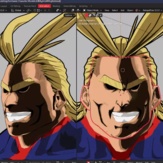
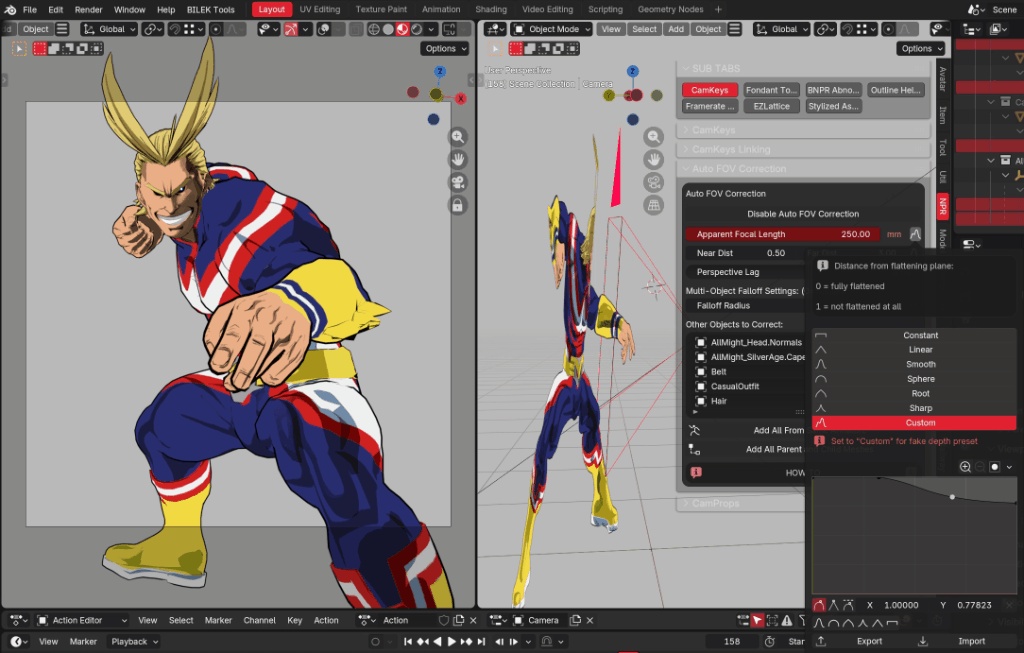
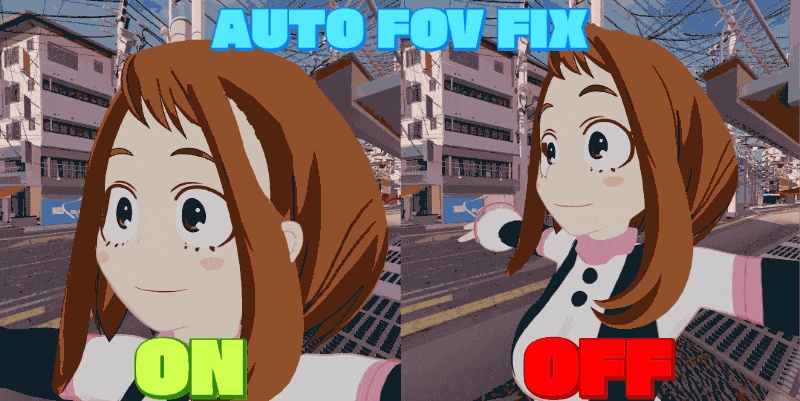


Camkeysは、リアルタイムでカメラの角度に基づいて形状変更を自動化します! Camkeys automates shape changes based on camera angle—in real-time!
CamKeys v3.4.5(旧 CamShapeMatic)
カメラに合わせて、キャラクターの見え方をコントロール。 CamKeysは、カメラや3Dビューポートの角度・距離に応じて、シェイプキーや各種プロパティをリアルタイムで変化させるBlenderアドオンです。アニメ顔の補正から、パースの演出、ドリーズームまで、見る位置に合わせた表現を作れます。 ドキュメント: https://beyond-3.gitbook.io/beyond-docs/blender-addons 紹介動画: https://www.youtube.com/watch?v=Lu3yfi9SL44 【おすすめの使い方】 ・正面・斜め・横顔で理想の形が異なる、アニメ調キャラクターの顔の補正 ・カメラの位置に合わせた表情、色、プロパティ、表示状態の切り替え ・パンチやキックを大きく見せる、迫力のあるパース表現 ・キャラクターや背景の遠近感を個別に調整する錯視・トリック表現 ・ドリーズームと表情変化を組み合わせた演出 【主な機能】 ■ CamKeys:視点に連動するシェイプキー ・ドライバーを手動で組まずに、シェイプキーをリアルタイムで制御 ・オブジェクトごとに複数のカメラ角度を登録可能。必要なだけアングルを追加できます ・角度感度と減衰カーブで、形が変わる範囲や変化の仕方を調整 ・Distance Onlyモードでは、角度の代わりに距離で制御。複数の距離ポイントに値を設定できます ・名前と角度オフセットを使って、既存の方向別シェイプキーをまとめて登録 ・登録した視点へカメラやビューポートを戻せるので、調整を繰り返しやすくなります ■ CamProps:視点に連動するプロパティ ・対応するBlenderプロパティを、カメラの角度や距離に応じて制御 ・数値、色、ベクトル、切り替え式の値などに対応 ・色やベクトルは、中間ポイントを追加して変化を細かく設定 ・オブジェクトやコレクションの表示関連設定にも対応。コレクションのレンダー表示や選択可否も制御できます ■ Forced Perspective:遠近感を自由に演出 ・オブジェクトごとの見かけの焦点距離を調整し、遠近感を弱めたり強調したりできます ・広角風の誇張から、望遠風の圧縮まで、キャラクターや背景に合わせて調整 ・フォーカスの基準にオブジェクトやボーン、選択したジオメトリを使用 ・減衰カーブで、周囲のパーツやオブジェクトへの影響を調整 ・関連オブジェクトをまとめて補正。同じアーマチュアで動くパーツや、選択中のオブジェクトなどを一括追加できます ・メッシュに加え、カーブやラティスを使う構成にも対応 ・Direction Lagで、カメラ方向への追従を遅らせる表現が可能。段階的に更新するモードも選べます ■ Camera Effect Locks:カメラに連動する演出 ・Dolly Zoom:基準をキャプチャし、前後移動に合わせて実際のカメラ/ビューポートの焦点距離を調整。被写体の見かけの倍率を保ちながら、背景の遠近感を変化させます ・Pincushion:糸巻き型の歪みを追加。視点の動きに反応させるか、一定の強さで適用するかを選択できます ・Tangential:方向性のある歪みを追加。方向の調整や、フォーカス位置への歪みを抑える設定も可能です ・歪みの影響は、頂点グループのマスクで調整できます ■ レンズ補正と表情の連動 ・Lens Compensation Stops:レンズの焦点距離ごとに見かけの焦点距離を登録し、その間を補間 ・補正ポイントの自動追加と、Dolly Zoom解除時にポイントを保持するかどうかを個別に設定可能。どちらも初期状態ではオフです ・Dolly Expressions:画角の変化に合わせて、複数のシェイプキーやVRM表情を個別のウェイト付きで制御 ・画角が広がる方向・狭まる方向のどちらに反応するか、変化量とあわせて設定できます ■ アニメーションとベイク ・カメラモードとビューポートモードを切り替えて作業 ・ボーンを基準にした角度計算で、リグのポーズに追従 ・タイムラインのスクラブ、アニメーション再生、レンダリングに対応 ・CamKeys、CamProps、Forced Perspectiveを個別に、またはまとめてベイク ・対象オブジェクトとフレーム間隔を選び、プレビューを確認しながらベイク ・Forced Perspectiveは、元のオブジェクトを残した別オブジェクトへのベイクが可能 ・元のオブジェクトとベイク結果の表示切り替え、ベイクデータのクリーンアップにも対応 ■ 使いやすさ ・複数オブジェクトに対応 ・選択したオブジェクトと参照ボーンをまとめて登録 ・英語・日本語・スペイン語のUIに対応 ・設定を.blendファイルに保存して、作業を再開できます 【使用上のポイント】 ・シェイプキーによる補正には、あらかじめ用意したシェイプキーを使用します。顔の補正形状を自動生成する機能ではありません ・アニメーションをベイクする際は、動きを再現できるカメラモードでの作業をおすすめします ・CamPropsでは、キーフレームを持てないプロパティはベイク対象から除外されます ・Forced Perspectiveのシェイプキーベイクでは、対象のトポロジーがフレーム間で変わらないことが必要です ・Camera Effect Locksは透視投影用です。Dolly Zoomはカメラ/ビューポートのレンズを制御するため、同じレンズを他のアニメーションやドライバーで同時に制御しないでください ・PincushionとTangentialはジオメトリを変形するため、影や反射にも影響します ・VRM表情との連動には、対応するVRMアドオンの有効化が必要です。通常のシェイプキー連動はCamKeys単体で使用できます ・外部ソフトへの書き出しは、使用する形式とベイクデータの対応状況によって異なります 【v3.0.6以降の主な追加・改善】 ・方向別シェイプキーと、選択オブジェクト+参照ボーンの一括登録を追加 ・コレクションのレンダー表示・選択可否のCamProps制御を追加 ・Forced Perspectiveのフォーカス指定、複数オブジェクト間の減衰、Direction Lag、カーブ/ラティス対応を拡充 ・CamKeys、CamProps、Forced Perspectiveのベイクとクリーンアップ機能を拡充 ・ボーン追従、再生時の同期、機能の有効/無効切り替えを改善 ・v3.4.5では、Dolly Zoom、Pincushion、Tangentialのロック、レンズ補正ポイント、画角に連動する表情制御を追加 ・カメラ操作への追従、更新処理の効率、レンダリング時の安定性を改善 アイデア、ご質問、不具合のご相談があれば、お気軽にご連絡ください! ──────────────────── CamKeys v3.4.5 (formerly CamShapeMatic) Control how your character looks from every angle. CamKeys is a Blender add-on that drives shape keys and properties in real time using the camera or 3D viewport angle or distance. Create anime face corrections, artistic perspective effects, optical illusions, and expressive Dolly Zoom shots. Documentation: https://beyond-3.gitbook.io/beyond-docs/blender-addons Overview video: https://www.youtube.com/watch?v=Lu3yfi9SL44 POPULAR USES • Anime face corrections for characters that need different shapes from the front, side, and three-quarter views • Expressions, colors, properties, and visibility that respond to the viewing position • Exaggerated punches, kicks, and dramatic perspective • Optical illusions with separate perspective treatment for characters and backgrounds • Dolly Zoom shots with expressions that change alongside the lens FEATURES CamKeys: View-driven shape keys • Drive shape keys in real time without manually setting up drivers • Capture as many camera angles as you need for each object • Adjust angle sensitivity and falloff curves to control where and how shapes change • Use Distance Only mode to drive values by distance instead of angle, with multiple editable distance stops • Automatically register existing directional shape keys using names and angle offsets • Snap the camera or viewport back to a captured view for easier adjustments CamProps: View-driven properties • Drive supported Blender properties using camera angle or distance • Work with numeric values, colors, vectors, and discrete settings • Add intermediate stops for finer control over color and vector transitions • Control supported object and collection visibility settings, including collection render visibility and selectability Forced Perspective: Artistic perspective control • Adjust apparent focal length per object to reduce or exaggerate perspective • Create wide-angle exaggeration or a more compressed, long-lens appearance • Set the focus using an object, bone, or selected geometry • Shape the influence on surrounding parts and objects with falloff curves • Correct related objects together, with shortcuts for adding objects driven by the same armature, selected objects, and more • Work with mesh, curve, and lattice setups • Use Direction Lag for delayed perspective response, including a stepped update mode Camera Effect Locks • Dolly Zoom: Capture a reference, then adjust the actual camera or viewport lens during forward/backward movement to preserve the subject's apparent magnification while changing background perspective • Pincushion: Add inward lens-style warping that responds to view motion or stays at a constant strength • Tangential: Add directional warping, with direction controls and an option to keep the focus anchored against that warp • Control geometry-warp influence with an optional vertex-group mask Lens compensation and expression control • Lens Compensation Stops: Set apparent focal length at different lens focal lengths and interpolate between them • Choose whether edits automatically add compensation stops and whether stops survive Dolly Zoom unlock. Both options are off by default • Dolly Expressions: Drive multiple weighted shape keys or VRM expressions from changes in field of view • Choose the response range and whether expressions build toward a wider or narrower view Animation and baking • Switch between camera-driven and viewport-driven workflows • Track a reference bone so angle-based adjustments follow rig poses • Evaluate during timeline scrubbing, animation playback, and rendering • Bake CamKeys, CamProps, and Forced Perspective separately or together • Choose the target scope and frame step, with a live preview during baking • Bake Forced Perspective into separate objects while keeping the originals • Switch between original and baked objects and clean up generated bake data Workflow • Support for multiple objects • Add selected objects and a reference bone together • English, Japanese, and Spanish UI • Save your setup in the .blend file and resume later USAGE NOTES • Shape-key correction uses shapes you create beforehand. CamKeys does not automatically sculpt face corrections • For animation baking, use Camera mode for a reproducible animated view • CamProps baking skips properties that cannot be keyframed • Forced Perspective shape-key baking requires stable topology across the sampled frames • Camera Effect Locks require perspective projection. Dolly Zoom controls the camera or viewport lens, so avoid driving the same lens with other animation or drivers at the same time • Pincushion and Tangential deform geometry and can affect shadows and reflections • VRM expression linking requires a compatible, enabled VRM add-on. Ordinary shape-key bindings work with CamKeys alone • Export to other software depends on the format and its support for the baked data UPDATE HIGHLIGHTS SINCE v3.0.6 • Added batch registration for directional shape keys and selected objects with a reference bone • Added CamProps control for collection render visibility and selectability • Expanded Forced Perspective focus targeting, shared multi-object falloff, Direction Lag, and curve/lattice support • Expanded baking and cleanup tools for CamKeys, CamProps, and Forced Perspective • Improved bone tracking, playback synchronization, and enable/disable behavior • v3.4.5 adds Dolly Zoom, Pincushion, and Tangential locks, lens compensation stops, and FOV-driven expression controls • Improved camera-navigation response, update efficiency, and rendering stability Have an idea, question, or issue to troubleshoot? Please get in touch!