

メンバーズボード(MembersBoard)
- ダウンロード商品¥ 800
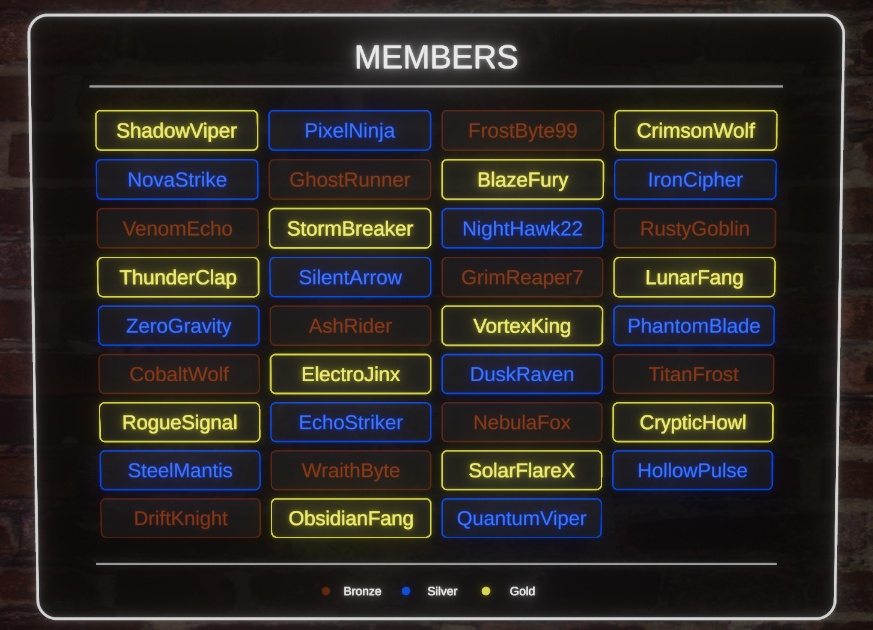
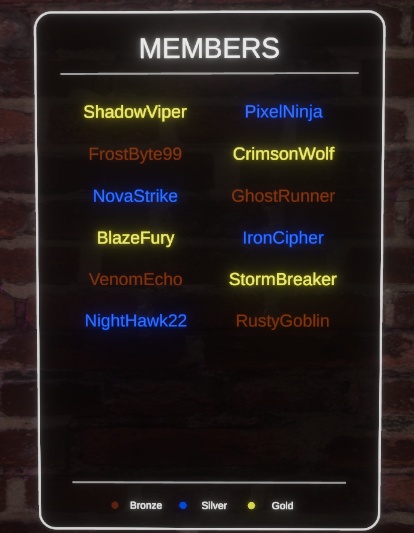
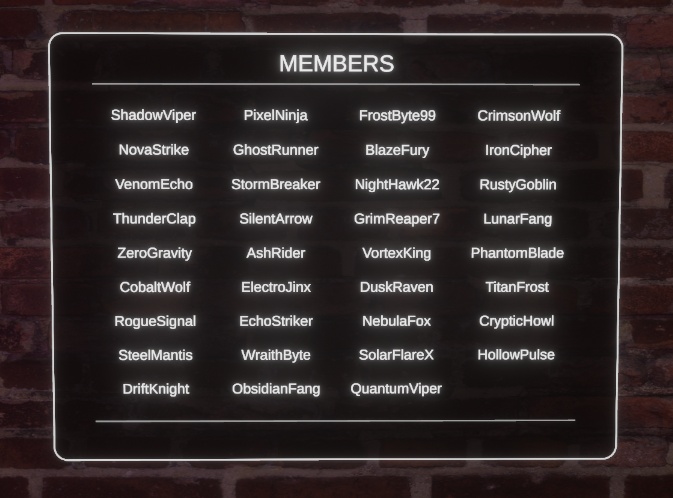


概要 (Overview) 🇯🇵 概要 VRChatワールド向けの、完全にカスタマイズ可能なメンバー表示ボードです。 MembersBoard は、ワールド内のボードに名前のリストを表示します。Patreonのサポーター、Discordメンバー、寄付者など、ワールドで称えたいあらゆるグループのクレジット表示に最適です。 ----------------------------------------------- 🇬🇧 Overview A fully customizable members display board for your VRChat world. MembersBoard shows a list of names on an in-world board — perfect for crediting Patreon supporters, Discord members, donators, or any group you want to recognize in your world.
✨ 機能 (Features)
🇯🇵 ✨ 機能 - 🔄 Pastebinからのライブ更新 — ワールドの再アップロードは不要: 名前のリストは、あなたが管理するPastebinのURLから実行時に取得されます。名前やティアの追加、削除、編集はいつでも可能で、ボードは自動的に更新されます。Unityも再アップロードも不要です - 📜 静的表示または自動スクロール表示: 名前のリストがボードの行数の上限に収まる場合は、すっきりとした静的なリストとして表示されます。リストが上限を超えると、ボードが自動的にスクロールを開始し、メンバーがどれだけ多くても、すべての名前が表示されます。スクロール速度は設定可能です - 🏅 オプションのティアシステム: ティアをオンにすると、名前をグループに分けられます。複数のサポートレベルがあるPatreon形式の運用に最適です。Pastebinのリストで名前の横にティアを追加するだけで、自動的にそのティアに合わせた色が付きます。名前にティアがない場合やティアが一致しない場合は、ボードが壊れることなく、デフォルトの名前の色にフォールバックします - 🌈 完全カスタムのティアと色: ティア名(例: Bronze、Silver、Gold)を自由に定義し、それぞれに専用の色を割り当てられます。ティアと色はすべてあなた次第で、必要な数だけ設定できます ----------------------------------------------- 🇬🇧 ✨ Features - 🔄 Live updates from Pastebin — no re-uploading your world: The list of names is fetched at runtime from a Pastebin URL you control. Add, remove, or edit names and tiers whenever you want — the board updates itself, no Unity, no re-upload. - 📜 Static or auto-scrolling display: If your name list fits within the board's row limit, it's shown as a clean static list. Once the list grows past that limit, the board automatically starts scrolling so every single name gets shown, no matter how many members you have. Scroll speed is configurable. - 🏅 Optional tier system: Turn tiers on to sort names into groups — ideal for Patreon-style setups with multiple support levels. Just add a tier next to a name in your Pastebin list, and it's automatically colored to match. If a name has no tier or the tier doesn't match, it falls back to your default name color instead of breaking the board. - 🌈 Fully custom tiers and colors: Define your own tier names (e.g. Bronze, Silver, Gold) and assign each one its own color. Tiers and colors are entirely up to you — set up as many as you need.
🎨 ビジュアルのカスタマイズ (Visual customization)
🇯🇵 🎨 ビジュアルのカスタマイズ ボードのあらゆるビジュアル要素を設定できます: - 🏷️ ボードのタイトルテキストと色 - 🖼️ 背景色と、オプションの背景画像 - 🔲 枠線の色 - 🔤 デフォルトの名前テキストの色(ティアがオフ、未設定、または一致しない場合に使用) - 🪪 メンバーカードの外観: オプションの枠線、オプションの背景塗りつぶし、そして枠線と背景それぞれ独立した色 📐 標準で、2列ボードと4列ボードの2種類のプレハブが付属しており、どちらも9行分の名前を表示できます。別のサイズが必要ですか?このボードは列数と行数を自由にカスタムできるように作られているため、付属のプレハブ以外の独自のレイアウトバリエーションも作成できます。 📡 パフォーマンスのための内蔵ProximityDetector: 両方のプレハブ、およびアセット本体にProximityDetectorスクリプトが含まれています。プレイヤーがボードの近くにいるかどうかを検知し、読める距離に誰もいない間は自動スクロールを一時停止して、ボードが視界に入っていないときのパフォーマンスを節約します。検知ボックスのサイズは調整可能で、ワールド内のボードの配置に合わせてサイズを変更してください。 ----------------------------------------------- 🇬🇧 🎨 Visual customization Every visual element of the board is configurable: - 🏷️ Board title text and color - 🖼️ Background color and optional background image - 🔲 Border color - 🔤 Default name text color (used when tiers are off, missing, or unmatched) - 🪪 Member card appearance: optional border, optional background fill, and independent border/background colors 📐 Comes with two prefab variants out of the box — a 2-column board and a 4-column board, both fitting 9 rows of names. Want a different size? The board is built to support fully custom column and row counts, so you can create your own layout variants beyond the included prefabs. 📡 Built-in ProximityDetector for performance: Both prefabs, and the asset itself, include the ProximityDetector script. It detects whether a player is near the board and pauses the auto-scroll when no one is close enough to read it, saving performance when the board isn't in view. The detection box size is adjustable, and should be resized to fit your board's placement in the world.
⚠️ 重要な購入に関する注意事項 (IMPORTANT PURCHASE WARNING)
🇯🇵 ⚠️ 重要な購入に関する注意事項 購入時にダウンロードされる .unitypackage には、アセット本体と CrZVRC License Manager の両方が含まれています。アセットはインポート後すぐにご利用いただけますが、ライセンスを認証するまでワールドをパブリッシュ(アップロード)することはできません。 Boothではライセンスキーが自動生成されないため、ライセンスを認証するには以下の手順を行っていただく必要があります。 🎫 公式Discordサーバーに参加し、サポートチケットを開いてください。 🧾 購入証明(Boothの購入履歴など)を提示してください。 🔑 確認が完了次第、あなた専用のライセンスキーを発行します。 キーを受け取った後は、Unity内のLicense Managerを使用してライセンスを認証してください。認証が完了すると、ワールドをパブリッシュできるようになります。License Managerの使用方法についての詳しい手順は、こちらをご覧ください: https://docs.crzvrc.com/docs/documentation/licence 🇬🇧 ⚠️ IMPORTANT PURCHASE WARNING Please note that the .unitypackage you download upon purchase includes both the asset itself and the CrZVRC License Manager. The asset is ready to use as soon as you import it, but you will not be able to publish your world until you validate your license. Because Booth does not automatically generate license keys, you must complete the following steps to validate your license: 🎫 Join our official Discord server and open a support ticket. 🧾 Provide your proof of purchase (such as your Booth receipt). 🔑 Once verified, you will be provided with your personal license key. After receiving your key, use the License Manager inside Unity to validate your license. Once validated, you will be able to publish your world. Detailed instructions on how to use the License Manager can be found here: https://docs.crzvrc.com/docs/documentation/licence
📚 ドキュメント&セットアップ (Documentation & Setup)
🇯🇵 📚 ドキュメント&セットアップ このアセットのセットアップおよび設定方法についての詳しい手順は、公式ドキュメントサイトに掲載されています。 https://docs.crzvrc.com ----------------------------------------------- 🇬🇧 📚 Documentation & Setup Detailed instructions for setting up and configuring this asset can be found on the official documentation website. https://docs.crzvrc.com
📜 利用規約&プライバシーポリシー (Terms of Service & Privacy Policy)
🇯🇵 📜 利用規約&プライバシーポリシー このアセットを購入・ダウンロードすることにより、当方の利用規約およびプライバシーポリシーに同意したものとみなされます。 両方の全文は以下のウェブサイトでご確認いただけます:https://docs.crzvrc.com/docs/documentation/licence ----------------------------------------------- 🇬🇧 📜 Terms of Service & Privacy Policy By purchasing and downloading this asset, you agree to our Terms of Service and Privacy Policy. You can read both full documents on the website: https://docs.crzvrc.com/docs/documentation/licence
💬 サポート&お問い合わせ (Support & Communication)
🇯🇵 💬 サポート&お問い合わせ 技術的なサポート、不具合報告、その他一般的なお問い合わせは、すべて公式Discordサーバーにて対応しております。 Discordサーバーはこちらから参加できます:https://discord.com/invite/3W7h3Bp3mH ----------------------------------------------- 🇬🇧 💬 Support & Communication All technical support, bug reports, and general communications are handled exclusively through our official Discord server. Join the Discord server here: https://discord.com/invite/3W7h3Bp3mH