

プレイヤー用ピックアップアバター・プレハブ Player Pickup Avatar Prefab V2
- ダウンロード商品¥ 1,120
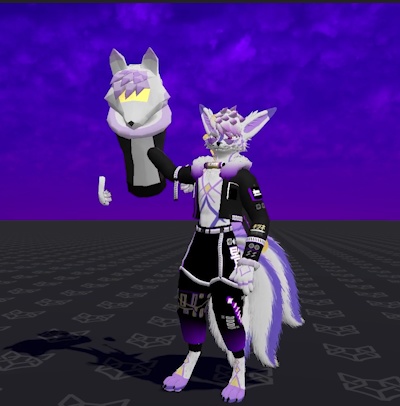
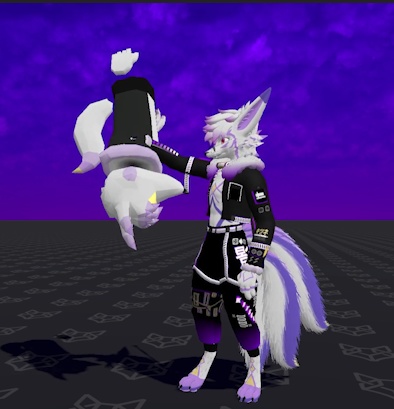


█████████ ENGLISH DESCRIPTION FURTHER DOWN! ██████████ ███████ 提供されるセットアップ ビデオは英語のみです。 █████████ 他のユーザーがあなた(プレイヤー)を掴み、回転させ、投げることができるVRChatアバター用Prefab(プレイヤーピックアップ機能) — ※OSCプログラムではありません ◤◢◤◢◤◢◤◢◤◢ 乗り物酔い注意 ◤◢◤◢◤◢◤◢◤◢ 本アセットは、乗り物酔いやめまいを引き起こす可能性があります。アセット内に症状を軽減するための設定が用意されていますが、本アセットの使用中にこれらの症状が生じないことを保証するものではありません。本アセットを購入および使用することにより、お客様はこのリスクに同意したものとみなされます。 公開テスト用アバター avtr_aba96730-b81a-411e-89d7-0ca210863cfb https://vrchat.com/home/avatar/avtr_aba96730-b81a-411e-89d7-0ca210863cfb 資産の機能: • PCおよびAndroidユーザーが、あなたを掴んで持ち上げたり、回転させたり、投げ飛ばしたりできるようになります。 • 「RockNRoll」のハンドジェスチャーを行うか、デスクトップ環境で Shift + F6 キーを押すことで、元の位置へ戻るリコール機能が利用可能です。 • OSCLeashに対応しており、Unityパッケージ内に専用のConfigファイルが含まれています。 • アバター越しに表示されるインジケーター(アイコン)を搭載。これにより、他ユーザーがあなたを掴むべき位置が視覚的に示されます。このアイコンは、距離が離れすぎた場合や、誰かがアイコンの上に手をかざした場合に暗くなります。 • 以下の設定項目が含まれます:フレンド限定モードの切り替え、回転・投擲機能の有効/無効切り替え、カメラのスムージング調整、投擲力の調整、デスクトップおよびVR環境ごとのFOV(視野角)調整、参照用インジケーターの表示切り替え、左右の手ごとの呼び戻し機能切り替え、および自分自身を掴む機能の切り替え。 重要事項およびよくある質問: • このアセットは、あなたのアバターのみを移動させ、プレイヤーカプセル(Player Capsule)は移動させません。つまり、別途「OSCLeash」を使用しない限り、あなたの「ヒットボックス(Hitbox)」の位置は移動しないことになります。また、この仕様により、他者から見たあなたの「声の発生源」や、あなた自身の「視点」の位置は、誰かに持ち上げられた際にアバターと共に移動しますが、あなたが音を聞く際の「聴取点」の位置は、移動前の元の位置に留まったままとなります。 • このアセットは、カメラを用いてあなたの視点を再現(エミュレート)します。そのため、誰かに「持ち上げられている」間は、周囲のワールド環境や他のアバターが正しく表示されない(あるいは、全く表示されなくなる)場合があります。これは、ワールド内で適用される各種の画面エフェクトやポストプロセス(後処理)についても同様です。また、このアセットは持ち上げられている間、VRChatの標準カメラの映像を上書きします。つまり、持ち上げられた瞬間に、VRChatカメラが捉えている映像が、あなたが現在実際に目にしている映像へと切り替わることになります。 • このアセットは独自の「ヘッドチョップ(頭部非表示)」システムを採用しているため、アバターが持ち上げられた際や、あるいは手放された直後に、頭部が非表示(消失)になる現象が極めて頻繁に発生します。 • 本アセットが採用している回転システムは、あなたを抱き上げる相手が「手のサイズが不均衡なアバター」を使用している場合、動作が不安定になったり、頻繁に不具合が生じたりする可能性があります。こうした問題は、特に以下のようなアバターの種類や要因において頻発します:ちびキャラ(Chibi)、非人型アバター、カートゥーン調のアバター、極端なサイズ差がある場合、あるいは手や指のコライダー(当たり判定)が設定されていない場合など。 • 本アセットをご購入後、より詳細なトラブルシューティングのヒントや解説については、Unityパッケージ内の「README」ファイル、および提供されているセットアップ動画にてご確認いただけます。 必要なものは次のとおりです: • ポイヨミシェーダー https://www.poiyomi.com • VRLabs Avatar 3.0 マネージャー (手動セットアップのみ) https://github.com/VRLabs/Avatars-3.0-Manager • VRCFury (VRCF セットアップのみ) https://vrcfury.com このアセットは以下のものを使用します: • 5 メモリ / パラメーター • 2 マテリアル • 4 Phys Bones • 29 コンストレイント • 3 カメラ • 2 コライダー & Rigidbody • 7 Contact Sender / Receiver ████████████████████████████████████████ A VRChat avatar prefab that allows other users to pick up, rotate, and throw you (player pickup) (NOT an OSC program) ◤◢◤◢◤◢◤◢◤◢ MOTION SICKNESS WARNING ◤◢◤◢◤◢◤◢◤◢ This asset can cause motion sickness and vertigo, there are settings within the asset to help, however it is not guaranteed that you will not feel these effects when using this asset; By purchasing and using this asset, you are agreeing to the this risk Public Test Avatar avtr_aba96730-b81a-411e-89d7-0ca210863cfb https://vrchat.com/home/avatar/avtr_aba96730-b81a-411e-89d7-0ca210863cfb Functions: • Allows PC and Android users to pick you up, rotate you, and throw you. • Includes a recall feature to bring you back to your original position by doing the "RockNRoll" hand gesture, or by pressing Shift + F6 on desktop. Compatible with OSCLeash and includes it's own Config file within the Unity package • Has a indicator / icon that will show through your avatar to represent where people should grab, the icon dims whenever you get too far away, or when someone is hovering their hand over the icon. • Includes the following settings: friends only toggle, toggles for rotation and throwing, adjustable camera smoothing, adjustable throwing force, adjustable FOV for Desktop and VR, Reference indicator / icon toggle, Individual hand recall toggles, and a pickup self toggle Important and FAQ: • This asset only moves your avatar, and not your player capsule, this means your "hitbox" will not move unless you use OSCLeash as well. This also means that where other people will hear you from, and where you see from will move with your avatar when being picked up, but where you hear from, will stay at your point of origin. • This asset emulates your view using cameras, this means that some parts of the world you are in, and the avatars around you may not show correctly (or at all) when being picked up. This also applies to any screen/after effects in worlds aka post processing. Also this asset will override your VRChat camera when being picked up, meaning that what your VRChat camera is seeing will swap to what you are currently seeing when you get picked up. • This asset uses it's own "head chop" system, so it is very very common to see your avatar's head go missing when being picked up, or shortly after being let go. • The rotation system that this asset uses can be unreliable or often break when the person picking you up is using a avatar with disproportionate hands. This often happens with the following avatar types or reasons: Chibi, Non-humanoid, Cartoony, Major size difference, non-existent hand/finger colliders. After purchasing this asset, more in-depth troubleshooting tips and explanations can be found in the "README" file within the Unity package, and in the setup video provided. Requires: • Poiyomi Shader https://www.poiyomi.com/ • VRLabs Avatar 3.0 manager (only for manual setup) https://github.com/VRLabs/Avatars-3.0-Manager • VRCFury (only for VRCF setup) https://vrcfury.com/ Uses: • 5 Total Memory / Parameters • 2 Materials • 4 Phys Bones • 29 Constraints • 3 Cameras • 2 Colliders & Rigidbody's • 7 Contact Sender's / Receiver's
Terms of Service
You are allowed to use this asset on any avatar, public or private. You are not allowed to re-distribute any of the files that come with this asset. Updates will be posted to all stores, and will be announced upon release. Feel free to contact me via Booth or through the link on my profile regarding any questions or concerns.
利用規約
このアセットは、公開・非公開を問わず、どのアバターでも使用できます。 このアセットに含まれるファイルの再配布は禁止されています。 アップデートは全ストアに掲載され、リリース時に改めてお知らせいたします。 ご質問やご不明な点がございましたら、Boothまたはプロフィールのリンクからお気軽にお問い合わせください。