
AEscript_CompExtendor
- ダウンロード商品¥ 0


CompExtendor - User Guide / 取扱説明書 CompExtendor is a powerful utility for After Effects that allows you to adjust composition durations and boundaries directly from a floating panel, eliminating the need to open the Composition Settings dialog every time. CompExtendor は、コンポジション設定ダイアログを毎回開くことなく、パネル上から直感的にコンポのデュレーション(尺)や開始・終了時間を調整できるAfter Effects用スクリプトです。
HOW TO USE
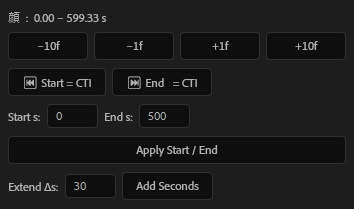
How to Install / インストール方法 Copy the .jsx file to the following folder: .jsxファイルを以下のフォルダにコピーします。 Windows: Program Files\Adobe\Adobe After Effects <version>\Support Files\Scripts\ScriptUI Panels macOS: Applications/Adobe After Effects <version>/Scripts/ScriptUI Panels Restart After Effects. After Effectsを再起動します。 Go to the Window menu and select CompExtendor.jsx. ウィンドウ メニューから CompExtendor.jsx を選択して開きます。 ______________________________ ______________________________ Key Features / 主な機能 1. Quick Frame Adjustments / フレーム単位のクイック調整 Increase or decrease the composition duration by specific frame increments with a single click. ボタンひとつで、コンポジションの長さを指定したフレーム数分だけ増減させることができます。 -10f / -1f: Shorten the duration. (デュレーションを短くする) +1f / +10f: Extend the duration. (デュレーションを長くする) 2. CTI Integration / CTI(現在の時間)への吸着 Set the start or end point of your composition precisely to your current time indicator (CTI) position. 現在の再生ヘッド(CTI)の位置に合わせて、コンポの開始点・終了点を瞬時に設定できます。 3. Manual Time Entry / 数値による時間指定 Manually input the exact start and end times in seconds. 秒単位で開始時間と終了時間を直接入力して調整できます。 Start s / End s: Input fields for specific timing. (開始・終了秒数の入力) Apply Start / End: Click to commit the changes. (設定を反映) 4. Bulk Extension / 秒単位の延長 Extend the composition length by a specific number of seconds relative to its current duration. 現在の長さに、指定した秒数をプラスして延長します。 Extend As: Enter the number of seconds to add. (延長したい秒数を入力) Add Seconds: Executes the extension. (秒数を追加実行)