
Sandwitch
- ダウンロード商品¥ 300
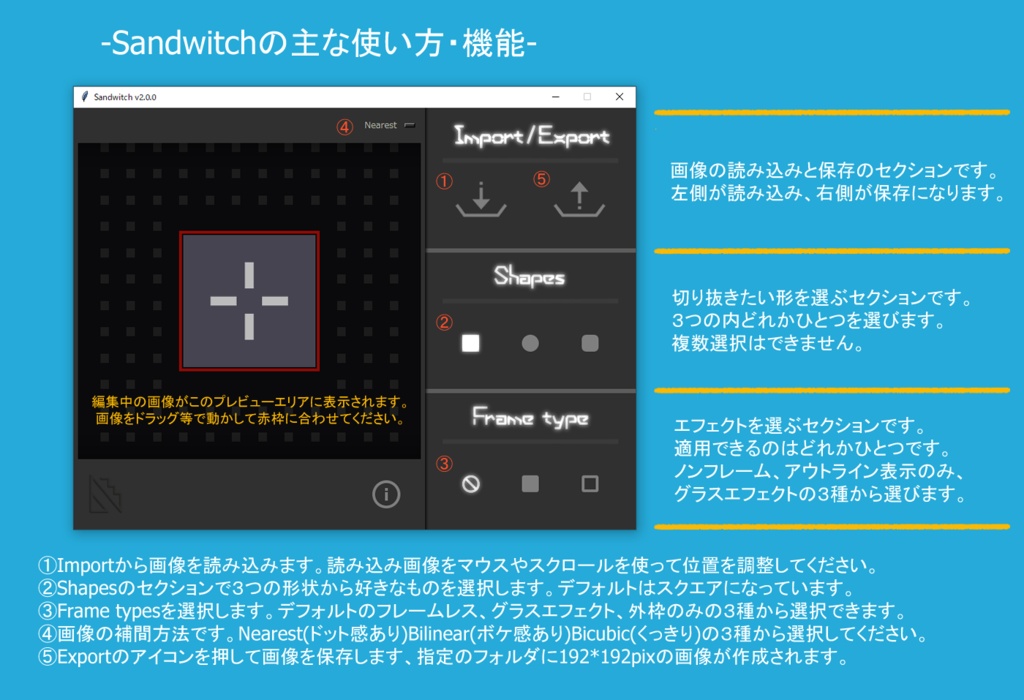
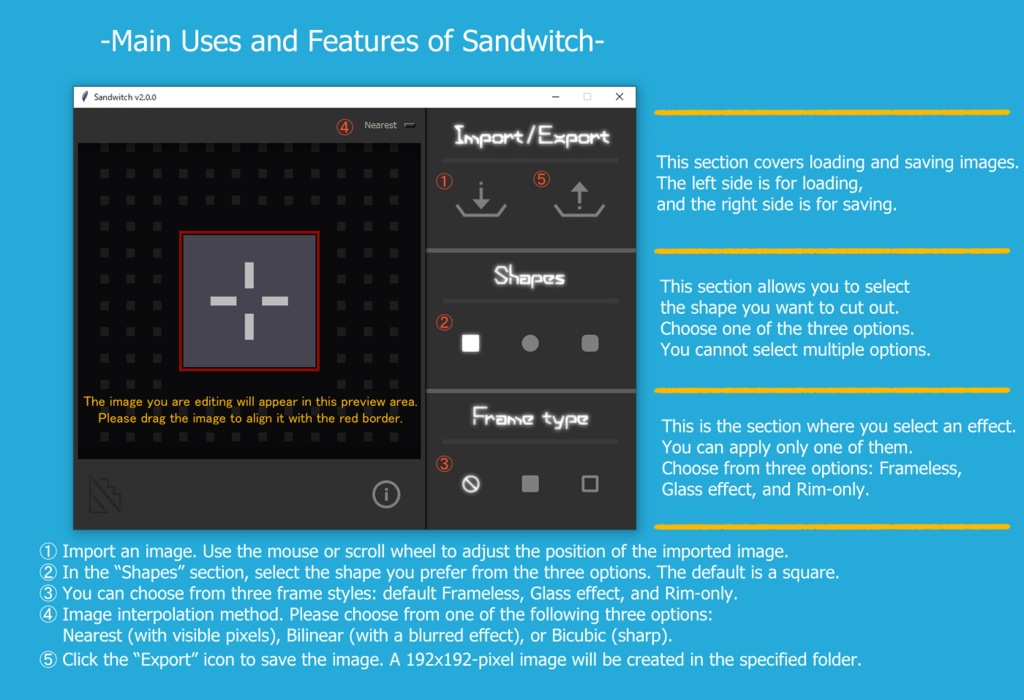


---------------------------------------------------------------- ◇ご利用前の注意事項◇ ファイルをDL後のZipファイルにはパスワードが設定されています。 パスワードは"8888"です。(""は含みません) パスワードを入力して解凍後、ご利用ください。 ---------------------------------------------------------------- ◇このソフトウェアについて 自分で使うポートレイト用画像を用意するために作成したインストール不要のWindows用の画像切抜き用のアプリです。 Windows10、11で動作確認をしています。 機能はImportで読み込んだ画像をドラッグ&ドロップで位置を、スクロールで大きさを決め、指定したシェイプ(型)で切り抜いて出力するシンプルなものです。 出力形式とサイズは192x192pixのPNG形式です。 ガラスのような反射効果を付けるものとフチ取りのみのエフェクト、 そしてエフェクトを掛けない、の3種類で出力できます。 ---------------------------------------------------------------- ◇使い方 DLしたzipを解凍後、"Sandwitch"フォルダ内にある"Sandwitch.exe"を起動してお使いください。 ---------------------------------------------------------------- ◇免責条項 本ソフトウェアの商用利用、再配布、および改変を禁止します。 同梱されている画像、音声、その他の素材の著作権は、作者に帰属します。 これらの素材のプログラム外での利用、改変、再配布を禁止します。 画像を読み込み加工する際は、画像の著作権および利用先ソフトウェアのガイドライン等をご確認の上、ご利用ください。 本ソフトウェアを用いて加工した画像の利用については、 使用した画像素材および利用先コンテンツの利用規約・ガイドラインに従ってください。 本ソフトウェアの利用により生じたいかなる損害についても、作者は一切の責任を負いません。 ご利用は自己責任にてお願いいたします。 詳細は同梱のREADME.txtをご覧ください。 ---------------------------------------------------------------- 本ソフトウェアはPythonおよび各種オープンソースライブラリを利用して作成しています。 Nuitkaは配布物に含まれず、ビルド時のみ使用されています。 ライセンスに関しての詳細は別途同梱のLICENSE_JPN.txt またはLICENSE_EN.txt をご確認ください。 ---------------------------------------------------------------- ◇Important Notes Before Use◇ The ZIP file you download is password-protected. The password is “8888” (do not include the quotation marks). Please enter the password to unzip the file before use. ---------------------------------------------------------------- ◇About This Software This is a Windows image cropping app that requires no installation, which I created to prepare portrait images for my own use. It has been tested on Windows 10 and 11. The functionality is simple: import an image, use drag-and-drop to position it, scroll to adjust its size, and crop it using a specified shape before exporting. The output format and size are 192x192 pixels in PNG format. You can choose from three output options: an effect that adds a glass-like reflection, an effect that adds only a border, or no effect at all. ---------------------------------------------------------------- ◇How to Use After extracting the downloaded ZIP file, launch "Sandwich.exe" located in the "Sandwitch" folder to use the program. ---------------------------------------------------------------- ◇Disclaimer Commercial use, redistribution, and modification of this software are prohibited. The copyrights to the included images, audio, and other materials belong to the author. Use, modification, or redistribution of these materials outside of this program is prohibited. When loading and editing images, please verify the image copyrights and the guidelines of the software in which you are using them. Regarding the use of images edited using this software, please comply with the terms of use and guidelines of the image materials and content used. The author assumes no liability whatsoever for any damages arising from the use of this software. Please use this software at your own risk. ---------------------------------------------------------------- This software was created using Python and various open-source libraries. Nuitka is not included in the distribution and is only used during the build process. For details regarding the license, please refer to the separately included LICENSE_JPN.txt or LICENSE_EN.txt.