

Missing Script Remover
- ダウンロード商品¥ 0

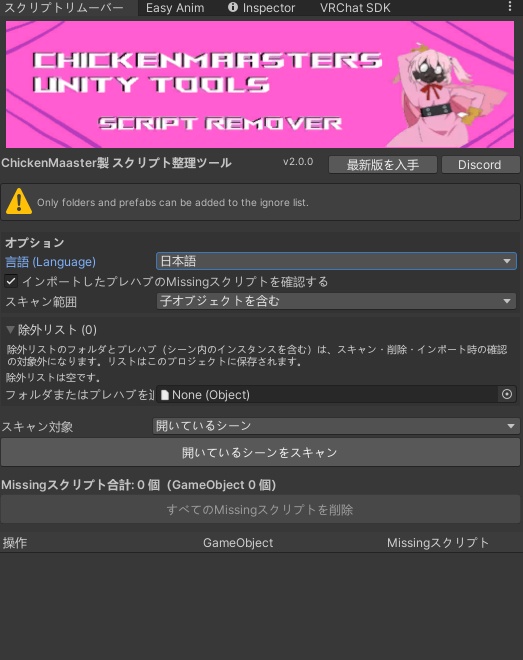


━━━━━━━━━━━━━━━━━━━━ Chicken Script Remover v2.0.0 Missingスクリプト削除ツール ━━━━━━━━━━━━━━━━━━━━ ※English description below ■ どんなツール? アバターや衣装をインポートしたときに出る 「The referenced script on this Behaviour is missing」 というエラーの原因、Missingスクリプトを見つけて安全に削除するUnityエディタ拡張です。 Missingスクリプトは不要なゴミとは限りません。 VRChat SDKやVRCFury、Modular Avatarなど、必要なパッケージがまだ導入されていないだけの場合もよくあります。 そのまま削除すると、PhysBoneなどのコンポーネントが失われてしまいます。 このツールは削除する前に必ず確認し、元に戻せない変更がある場合ははっきり警告します。 ■ 主な機能 【スキャン】 ・選択したオブジェクト/開いているシーン/プロジェクト内のすべてのプレハブを検索 ・フォルダを指定してスキャン範囲を絞り込み可能 ・子オブジェクトを含めるか、ルートのみかを選択可能 ・スキャンはいつでも中止できます 【何がMissingなのか表示】 ・該当するGameObjectとその場所を一覧表示 ・Missingスクリプトの識別ID(GUID)を表示 ・スクリプトファイルは存在するがクラスを読み込めない場合は、スクリプト名を表示 ・ワンクリックでオブジェクトを選択 【安全な削除】 ・1つずつ削除、またはまとめて削除 ・削除前に、上書きされるプレハブファイルを一覧で確認 ・シーン内の変更はCtrl+Zで元に戻せます ・ネストしたプレハブやPrefab Variantにも対応 ・読み取り専用パッケージ内のファイルは自動でスキップ ・コンパイルエラー中、コンパイル中、再生モード中は削除をロック (エラーがあると正常なコンポーネントもMissingに見えることがあるため) 【右クリックメニュー】 ・ヒエラルキー:選択したオブジェクトから削除(子オブジェクトを含めることも可能)、スキャン画面で開く ・プロジェクトウィンドウ:フォルダやプレハブをまとめてスキャン・削除、除外リストへの追加・解除 【除外リスト】 ・触れたくないフォルダやプレハブを登録してスキップ ・除外したプレハブは、シーン内に配置したものもスキップされます ・設定はプロジェクトごとに保存 【インポート時チェック(任意)】 ・パッケージをインポートしたとき、Missingスクリプトを含むプレハブがあればお知らせ ・「確認する」「今はしない」「常に除外」から選択でき、勝手に削除することはありません 【日本語/英語対応】 ・表示言語を日本語と英語で切り替え可能 ・「自動」にするとPCの言語設定に合わせます ■ 使い方 1. unitypackageをプロジェクトにインポート 2. 上部メニュー「ChickenMaaster > Chicken Script Remover」を開く (またはオブジェクトやフォルダを右クリック) 3. スキャン対象を選んでスキャン 4. 結果を確認して、個別に削除するか「すべてのMissingスクリプトを削除」を押す ■ 動作環境 ・Unity 2022.3(VRChat推奨バージョン) ・エディタ専用ツールです。アバターに何かが追加されたり、アップロードに含まれたりすることはありません。 ■ ご注意 ・プレハブファイルへの変更はCtrl+Zで元に戻せません。作業前にプロジェクトのバックアップをおすすめします。 ・Missingの原因が未導入のパッケージの場合は、先にそのパッケージを導入してください。多くの場合、自動的に元に戻ります。 ・右クリックメニューの項目名は、Unityの仕様により英語表記のみです。 ■ What is it? A Unity editor tool that finds and safely removes missing scripts, the cause of the "The referenced script on this Behaviour is missing" error you often see after importing avatars or outfits. Missing scripts aren't always junk. Often a package like the VRChat SDK, VRCFury or Modular Avatar just isn't installed yet. Deleting them too early can permanently remove PhysBones and other components. This tool always asks before removing anything, and clearly warns you when a change can't be undone. ■ Features [Scan] - Scan a selected object, all open scenes, or every prefab in your project - Limit project scans to one folder - Choose full hierarchy or root objects only - Cancel a scan at any time [See what's missing] - Lists every affected GameObject and where it is - Shows each missing script's ID (GUID) - If the script file exists but its class can't load, shows the script name - Select any object with one click [Safe removal] - Remove one at a time or fix everything at once - Confirmation lists every prefab file that will be overwritten - Scene changes can be undone with Ctrl+Z - Works with nested prefabs and prefab variants - Read-only package files are skipped automatically - Removal is locked during compile errors, compiling and Play Mode (compile errors can make healthy components look missing) [Right-click menus] - Hierarchy: remove from selected objects (optionally including children), or open them in the scanner - Project window: scan or clean folders and prefabs, add or remove them from the ignore list [Ignore list] - Skip folders and prefabs you never want touched - Ignored prefabs are also skipped wherever they're placed in your scenes - Saved per project [Import check (optional)] - After importing a package, lets you know if any new prefabs contain missing scripts - Choose Review, Not Now or Always Ignore. Nothing is deleted automatically. [English / Japanese] - Switch the interface between English and Japanese - "Auto" follows your computer's language ■ How to use 1. Import the unitypackage into your project 2. Open "ChickenMaaster > Chicken Script Remover" from the top menu (or right-click any object or folder) 3. Choose what to scan and press Scan 4. Review the results, then remove individually or press "Fix All Missing Scripts" ■ Requirements - Unity 2022.3 (the version VRChat uses) - Editor-only. Nothing is added to your avatar or included in uploads. ■ Notes - Changes to prefab files can't be undone with Ctrl+Z. Back up your project first. - If a missing script belongs to a package you haven't installed, install it first. The scripts will usually reconnect on their own.