
【漫画ファイル整理機】 BookShelf
- ダウンロード商品¥ 550


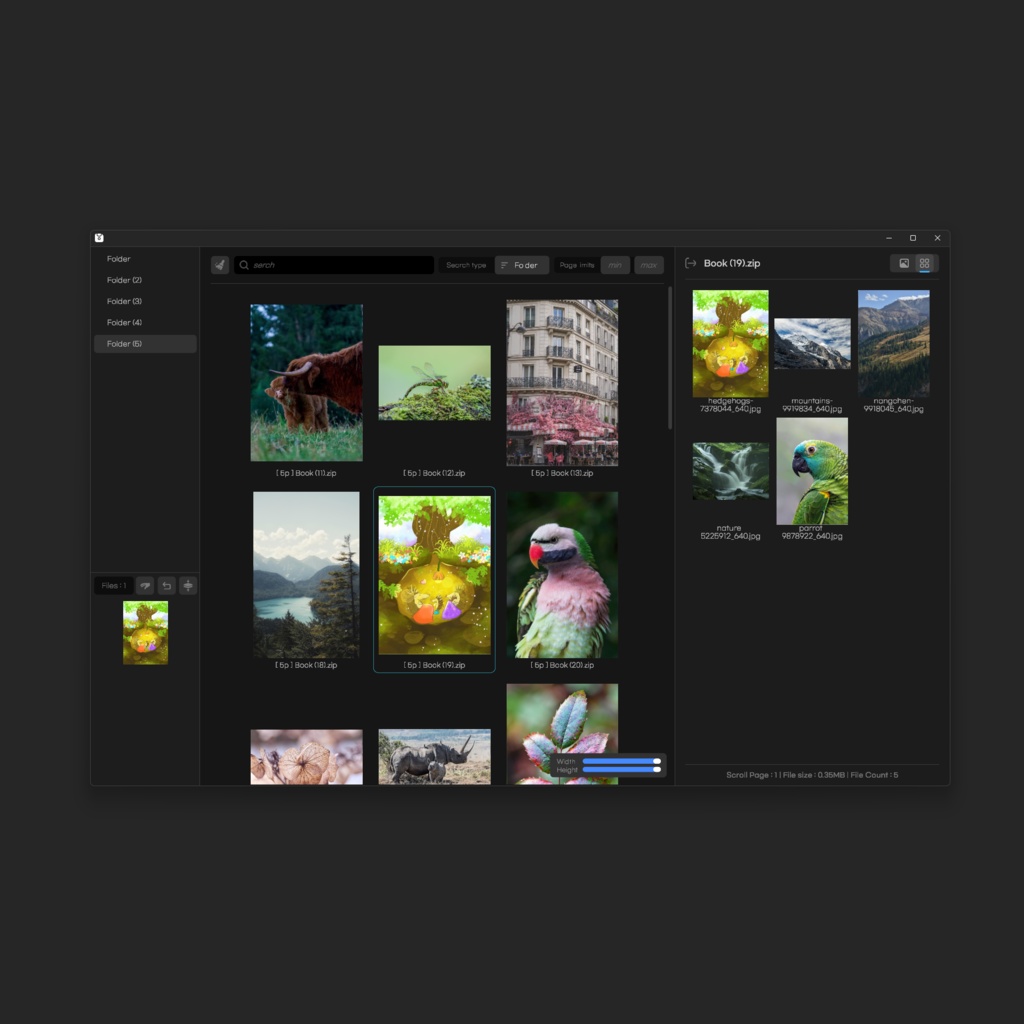
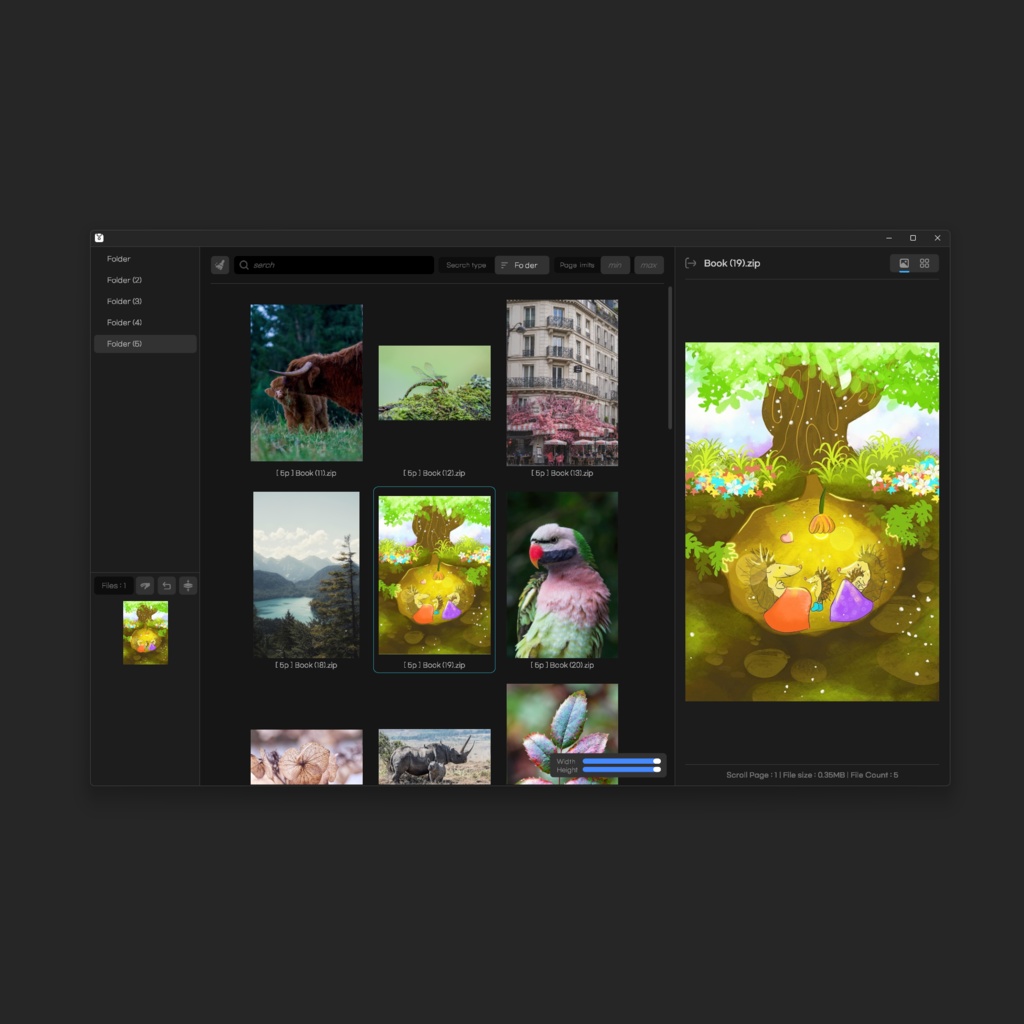


zipの漫画ファイルを簡単に見て整理できるように制作されたプログラムです! 漫画以外にも写真集、雑誌などイメージファイルなら全て可能です JPEG、JPG、PNG、Webp、GIF ファイルを認識することができます。
主要機能 / Features / 주요 기능
- 漫画ビューアー - サムネイルベースのファイルリストビューア - 漫画ファイルをまとめる機能 - マンガ ページ数 検索 フィルター - 指定フォルダ内の検索フィルター - 漫画ファイルの移動機能 - 移動キャンセル機能 - a cartoon viewer - Thumbnail-based File List Viewer - Combining Cartoon Files - Cartoon Page Count Search Filter - Search Filters in Specified Folder - Cartoon File Move feature - Move cancel function - 만화 뷰어 - 썸네일 기반 파일 목록 뷰어 - 만화 파일 합치기 기능 - 만화 페이지수 검색 필터 - 지정폴더 내 검색 필터 - 만화 파일 이동 기능 - 이동 취소 기능
文書 / Document / 문서
このプログラムは、基本的に漫画を読むためではなく、簡単に整理するためのプログラムとして設計されています。 - 画面: 基本的にすべての画面サイズを増減させることができます - フォルダ選択 プログラムを起動すると、中央のボタンからフォルダを選択します。 その後、デフォルトでは、フォルダ内にあるファイルを検索します。 また、左上のリストを選択して、該当フォルダ内の漫画リストを見ることができます。 - 検索フィルタ 左上のボタン: 設定された検索語を含む検索フィルターを初期化します。 検索: 検索語を入力すると、デフォルトで選択されたフォルダー内のファイルを検索します。 検索タイプ: 全体にすると、指定したフォルダー内のすべてのファイルを収集します。 ページ制限: 最小、最大画像数の制限をかけることができます。 漫画プレビュー: 漫画のサムネイルを右クリックすると、プレビュー画面が表示されます。 マウス親指ボタンまたはキーボード方向キーでページをめくることができます。 右上のボタンで一覧表示/単一表示を選択できます。 ファイルの移動: 表示されるリストのファイルをクリックして選択すると、左下に選択されたリストが表示されます。 左下の「手のボタン」をドラッグして、上部のフォルダのリストにドラッグして移動します。 ファイル移動キャンセル: ファイルの移動をキャンセルするには、左下の戻るボタンでキャンセルできます。 ファイルをまとめる: 左下の3番目のボタンをクリックすると、選択した順にファイルが統合されます。 【注意】 : 最初に選択されたファイルが 1 冊になります。 This program is designed not to watch cartoons, but to organize them simply. - Screen: By default, you can increase or decrease all screen sizes - Select a folder When you start the program, you select a folder through a button in the center. After that, you will search for files in the folder by default. You can also select the list at the top left to view the cartoon list within that folder. - Search Filter Top left button : Initializes the search filter including the set search term. Search : By default, when you enter a search term, you search for files within the selected folder. Search Type: Collects all files in the specified folder when done in full. Page limit: Minimum and maximum number of images can be limited. Cartoon Preview: If you right-click the cartoon thumbnail, a preview screen will appear. You can turn the page with a mouse thumb button or keyboard arrow key. You can select List View/Single View with the button at the top right. Move files: Click to select the files in the list shown to display the selected lists in the bottom left. Drag the "hand button" at the bottom left to move to the folder list at the top. Cancel file movement: If you want to cancel the file movement, you can cancel it with the undo button at the bottom left. To merge files: When you click the third button in the bottom left, the files are combined in the order you choose. [Caution]: First, the selected file becomes one volume. 이 프로그램은 기본적으로 만화를 보기 위함이 아닌 간단하게 정리 하기 위한 프로그램으로 설계 되었습니다. - 화면 : 기본적으로 모든 화면 크기를 늘리거나 줄일 수 있습니다 - 폴더 선택 프로그램을 시작하게 되면 중앙의 버튼을 통해 폴더를 선택하게 됩니다. 이후 기본적으로 폴더내에 있는 파일들을 검색하게 됩니다. 또한 왼쪽 상단의 목록을 선택하여 해당 폴더 내의 만화목록을 볼수 있습니다. - 검색 필터 왼쪽 상단 버튼 : 설정된 검색어를 포함한 검색 필터를 초기화 합니다. 검색 : 검색어를 입력하면 기본적으로 선택된 폴더내의 파일을 검색합니다. 검색 타입 : 전체로 하게 되면 지정한 폴더내 전체 파일을 수집합니다. 페이지 제한 : 최소, 최대 이미지 수 제한을 걸 수 있습니다. 만화 미리보기 : 만화 썸네일을 오른쪽 클릭을 하게 되면 미리 보기 화면이 띄워집니다. 마우스 엄지 버튼 혹은 키보드 방향키로 페이지를 넘길 수 있습니다. 오른쪽 상단의 버튼으로 목록보기/단일 보기를 선택 할 수 있습니다. 파일 이동 : 보여지는 목록의 파일들을 클릭하여 선택하면 왼쪽 하단에 선택된 목록들이 보여집니다. 왼쪽 하단의 "손 버튼"을 드래그 하여 상단의 폴더 목록으로 드래그하여 이동합니다. 파일 이동 취소 : 파일 이동을 취소 하려면 왼쪽 하단의 되돌리기 버튼으로 취소 할 수 있습니다. 파일 합치기 : 왼쪽 하단의 세번째 버튼을 클릭하게 되면 선택한 순서대로 파일이 합쳐집니다. [주의] : 먼저 선택된 파일이 1권이 됩니다.
Term of License
無断再配布及び再加工を禁じます。 Unauthorized redistribution and reprocessing are prohibited. 무단 재배포 및 재가공을 금합니다.
Next Update
アイデアがないので、ご希望の機能があればメッセージやツイッターで機能のお問い合わせをお願いします! I don't have any ideas, so if you have any features you want, please message me or ask me about the features on Twitter! 아이디어가 없기때문에 원하시는 기능이 있다면 메세지나 트위터로 기능 문의 부탁드립니다!
