

【販売終了】ELeFitBone ~非対応衣装合わせ補助ツール~【Unity拡張】
- 通常版[Standard Version]ダウンロード商品¥ 9,999,999
- 支援版[Support Version]ダウンロード商品¥ 9,999,999


上位互換ツールがこちらよりも安い値段で登場したようなので開発を終了すると同時に購入できないようにいたします。 お手にとっていただいた方、誠に申し訳ございません。 再ダウンロードやお問い合わせはまだまだ受け付けています。 ありがとうございました。 ワンクリックで非対応衣装のボーンの位置を自動で合わせるツール「ELeFitBone」 "ELeFitBone" - A One-Click Tool to Automatically Align Bones for Non-Supported Outfits
1. ツールについて
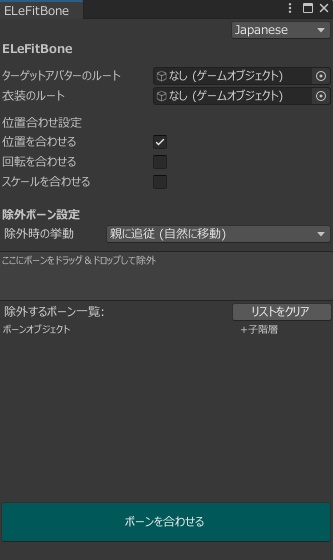
VRChatアバター改変補助ツールです。 「あのアバターの服を、このアバターに着せたい!」 でも、ボーンの位置合わせやサイズ調整を手動でやるのは大変ではありませんか? ELeFitBoneは、非対応衣装のボーンをアバター(素体)のボーンに合わせて、 位置・回転・スケールを自動でフィットさせるUnityエディタ拡張ツールです。 ボーン名に基づく自動マッチングにより、Humanoid/Genericを問わず動作します。 【主な機能】 簡単セットアップ: ターゲット(素体)と衣装(ソース)をドラッグ&ドロップするだけ。 高速処理: ボーン名を自動検索し、位置を合わせるだけなので処理がとても早いです。 スケール調整にも対応 除外設定: 動かしたくないボーンを選択して除外できます。 除外モード選択: 除外したボーンを「親に追従させる」か「その場に固定するか」を選べます。 日英対応: UIは日本語と英語を即座に切り替え可能。
2. 使い方
パッケージのインストール後、Toolsタブに「ELeTools」が追加されるので、そこにある「ELeFitBone」を選択。 タブが開いたら、アバタールートと衣装ルートのそれぞれに適したオブジェクトをドラック&ドロップ。 あとはお好みのオプションでボーンを合わせるだけです。 Ctrl + Zで合わせる前に戻すこともできます。 ※位置合わせ後は、Modular Avatarなどでボーンの結合処理を行ってください。 ※本ツールは「ボーンのトランスフォーム(Transform)」を合わせることをメインとしたツールです。ウェイトの塗り直しやメッシュを細かく調整する機能はありません。
3. バリエーションについて
【通常版】 ツールをダウンロードできます。 【支援版】 中身は通常版と同じです。
4. 内容物
* ELeFitBone.unitypackage Unityにインポートするだけで使えます。 アバターや衣装は含まれません。
5. 動作環境
2022.3.22f1 にて動作確認済み VRChat SDKの有無に関わらず動作します
----------[利用規約]----------
本ツールを購入された時点で、本利用規約に同意したものとみなします。 利用規約の内容は変更される場合があり、最新のものが適用されます。 ◆ 許可事項 ・動画、配信などへの利用(収益化を含む) ・本ツールを使用したアバター、衣装の改変、VRChat等へのアップロード ・本ツールを使用したアバター、衣装の販売(ツール自体の同梱は不可) ・本ツールの改変(機能追加やUI変更など) ◆ 禁止事項 ・本ツール及びデータの再配布、販売 ・自作発言 ・特定個人や団体への誹謗中傷、政治、宗教活動を目的とした利用 ・常識の範囲を超えた行為 ◆ 著作権 ・本ツールの著作権は制作者(ELees)に帰属します。 ◆ 免責事項 ・予告なく商品や値段の更新が行われる可能性があります。 ・本ツールの使用によって生じたいかなる損害やトラブルについて、当方は一切の責任を負いません。 ・Boothの特性上、返金対応などができません。ご了承ください。 英語版と日本語版の利用規約の間に齟齬があった場合、日本語版が優先されます。 制定日: 2026年01月20日 ご不明な点がありましたら、BOOTH、もしくはSNSのDMまでお問い合わせください。
1. About the Tool
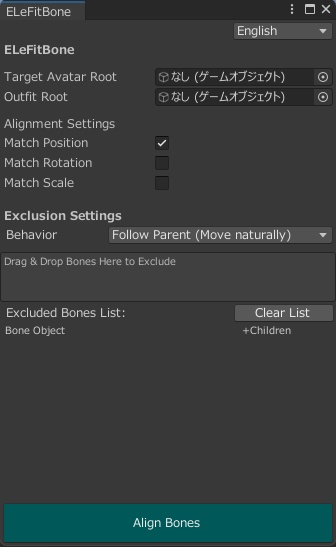
This is a support tool for VRChat avatar modification. "I want to dress my avatar in that outfit!" But isn't it a hassle to manually align bone positions and adjust sizes? ELeFitBone is a Unity Editor extension that automatically fits the position, rotation, and scale of non-supported outfit bones to match your Avatar's (Base Body) bones. It uses automatic matching based on bone names, so it works with both Humanoid and Generic rigs. [Main Features] Easy Setup: Simply drag and drop the Target (Base Body) and the Outfit (Source). High Speed: Processing is very fast as it simply searches for bone names and aligns their positions. Scale Adjustment Supported: It also handles scale matching. Exclusion Settings: You can select specific bones to exclude from the movement. Exclusion Mode Selection: Choose whether excluded bones "follow the parent" or "stay fixed in place." English/Japanese Support: The UI language can be switched instantly.
2. How to Use
After installing the package, "ELeTools" will be added to the Tools tab. Select "ELeFitBone" from there. Once the tab opens, drag and drop the appropriate objects into the Avatar Root and Outfit Root fields. Simply align the bones using your preferred options. You can undo changes with Ctrl + Z. Note: After aligning the positions, please use tools like Modular Avatar to merge the bones. Note: This tool focuses on aligning "Bone Transforms." It does not have functions for repainting weights or fine-tuning meshes.
3. Variations
[Standard Version] You can download the tool. [Support Version] The contents are the same as the Standard Version.
4. Contents
*ELeFitBone.unitypackage Ready to use immediately after importing into Unity. Avatars and costumes are not included.
5. System Requirements
Confirmed working on Unity 2022.3.22f1. Works with or without the VRChat SDK.
----------[Terms of Use]----------
By purchasing this tool, you are deemed to have agreed to these Terms of Use. The contents of the Terms of Use are subject to change, and the latest version shall apply. ◆ Permissions Use in videos, live streams, etc. (including monetization). Modification of avatars and outfits using this tool, and uploading them to VRChat, etc. Sale of avatars and outfits created using this tool (The tool itself cannot be included). Modification of this tool (adding functions, changing UI, etc.). ◆ Prohibitions Redistribution or resale of this tool and its data. Claiming authorship (claiming you made it). Use for the purpose of defamation against specific individuals or groups, or for political/religious activities. Acts that go beyond the scope of common sense. ◆ Copyright The copyright of this tool belongs to the creator (ELees). ◆ Disclaimer Product details and prices are subject to change without notice. We represent no liability for any damages or troubles caused by the use of this tool. Due to the nature of Booth, refunds are not possible. Thank you for your understanding. In the event of any discrepancy between the Japanese and English versions of the Terms of Use, the Japanese version shall prevail. Date of Enactment: January 20, 2026 If you have any questions, please contact us via BOOTH or DM on SNS.
[Credit]
動画内で使用させていただいたもの [アバター] Chocolate rice様 Sio https://booth.pm/ja/items/5650156 リュクらぼ様 フェリス https://booth.pm/ja/items/5385176 [衣装] みみハウス様 ゆるもこウェア https://booth.pm/ja/items/7630274 Chocolate rice様 Classical chic https://booth.pm/ja/items/5642995
[Release]
2026/01/19_ver.1.0.0 2026/01/20_ver.1.0.1 2026/01/24_ver.1.0.4