

アンワル2-Anwar2- FaceTrackingAddon | フェイストラッキングアドオン
- ダウンロード商品¥ 1,800
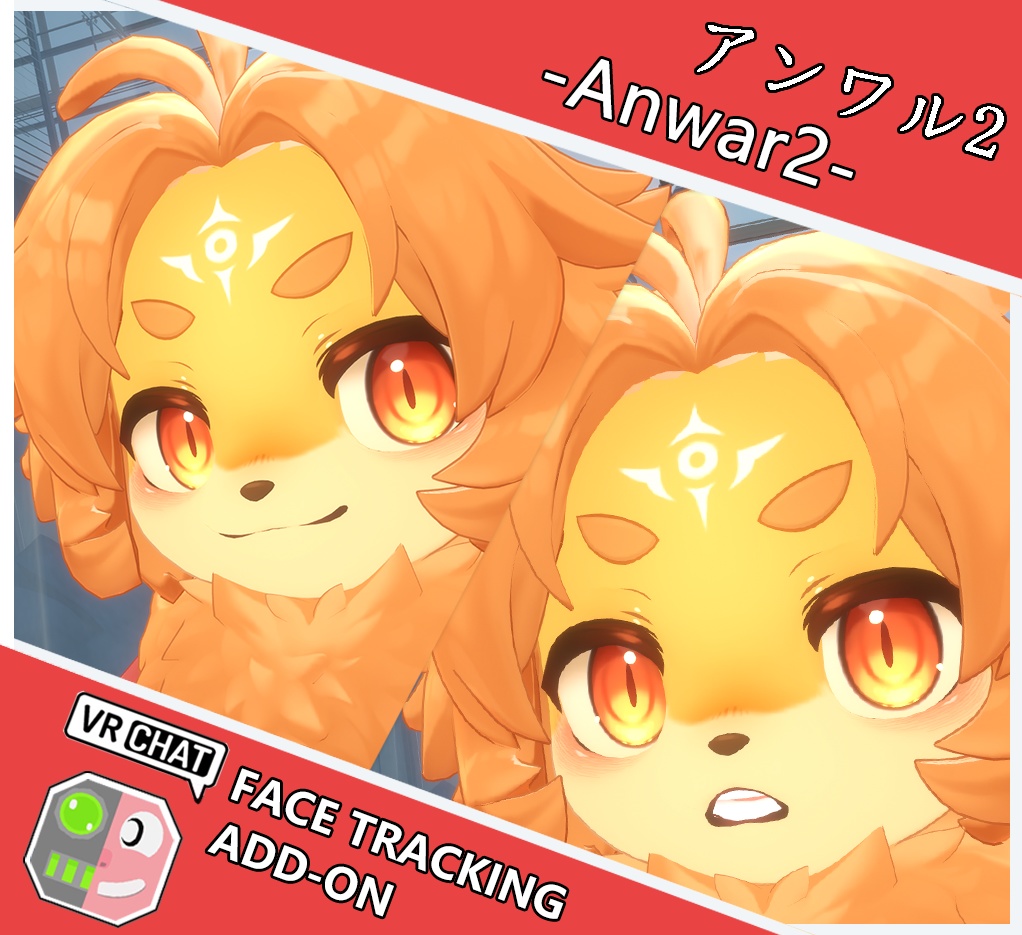

- オリジナルアバター anwar2_1.4 https://mofumofumotimoti.booth.pm/items/7918726 Sample Avatar: https://vrchat.com/home/avatar/avtr_74cebf11-90d5-4223-8372-caab3cadca77
🇯🇵 日本語 / Japanese 🎯 概要 これは汎用フェイストラッキングアドオンです。Quest Pro、Pico 4 Pro、HTC VIVE XR Eliteなどのデバイスに対応しています(これらに限定されません)。 このアドオンは、ARKit標準のフェイストラッキングに対応しています。 Unified Expressions形式のシェイプキーをARKit形式へ変換する無料ツール「UE to ARKit Shape Key Converter」を公開しています。 👉 https://moewhite.booth.pm/items/8746507 「Unified Expressions」規格に対応し、目、眉、顎、唇、舌をカバー! アバターの表情は、VRChat SDK Native Face Tracking で直接動かします。 VRCFT 6.0 以上のデスクトップカメラフェイストラッキングにも対応しています。 専用スクリプトを使用することで、すでに修正済みの完成アバターに直接インストール可能。プレハブを使って最初から作り直す必要はありません。 スイッチは全自動化されており、顔トラッキング対応のHMDを使用すると自動的に顔トラッキングが有効になり、ジェスチャー表情が無効になります。また、MMDダンスワールドで踊る際には、自動的に顔トラッキングが無効になり、ジェスチャー表情も無効になります(一部のワールドでは無効化されない場合があります)。 🛠 動作環境 VRChat Avatar SDK 3.10.6 以上 VRCFT 6.0 以上 ModularAvatar: https://modular-avatar.nadena.dev/ja VRCFury: https://vrcfury.com 📝 使い方 前提条件:VRCFury と ModularAvatar がプロジェクトにインストールされていることを確認してください。 インポート:この UnityPackage ファイルを Unity にインポートします。 FBX パッチ メニューから Tools → MoeWhite19 → FaceTracking Patcher を開きます。 「PatchFBX」ボタンをクリックしてモデルをパッチします。 注意:モデルのバージョンとフェイストラッキングがサポートするモデルのバージョンが異なる場合、Patcher は使用できません。ただし、BlendShare を使用したインストールが可能です(提供されている場合)。 ※ パッチボタンや各スイッチの表示は、エディタの言語設定に応じて 日本語・English・中文・한국어 に自動で切り替わります。 フェイストラッキングインストール パッチ完了後、「Select your Avatar」にシーン内のアバターが自動的に選択されます。目的のアバターが選択されているか確認してください。 「Install」ボタンをクリックしてインストールします。 ※ 一部のモデルでは複数の ProfileAsset が提供されている場合があります。必要に応じて選択してください。 BlendShare を使用する場合(オプション) ※ このファイルは常に提供されるとは限りません。存在する場合のみ使用してください。 BlendShare.unitypackage をインポートした後、別のウィンドウ Tools → MoeWhite19 → FaceTracking Installer(BlendShare) を開いてインストールします。 BlendShare がプロジェクトにインストールされていない場合、このメニューを開くことはできません。 🇺🇸 English / English 🎯 Overview This is a universal facial tracking addon. It supports but is not limited to devices such as Quest Pro, Pico 4 Pro, HTC VIVE XR Elite, etc. This addon supports ARKit-standard facial tracking. We have released a free tool, “UE to ARKit Shape Key Converter,” for converting Unified Expressions shape keys to the ARKit format. 👉 https://moewhite.booth.pm/items/8746507 Compatible with the "Unified Expressions" standard, covering eyes, eyebrows, jaw, lips, and tongue! Your avatar's expressions are driven directly by VRChat SDK Native Face Tracking. It also works with VRCFT 6.0+ desktop camera face tracking. Using a dedicated script, it can be installed directly onto already modified, finished avatars—no need to start from scratch with prefabs. Fully automated switching: When using a headset with facial tracking capability, facial tracking will be automatically enabled and gesture expressions will be disabled. It will also automatically disable facial tracking and gesture expressions when dancing in MMD dance worlds (may not work in some worlds). 🛠 Requirements VRChat Avatar SDK 3.10.6 or higher VRCFT 6.0 or higher ModularAvatar: https://modular-avatar.nadena.dev VRCFury: https://vrcfury.com 📝 How to Use Prerequisites: Ensure that VRCFury and ModularAvatar are installed in your project. Import Package: Import this UnityPackage file into Unity. Patch FBX Open the menu: Tools → MoeWhite19 → FaceTracking Patcher Click the "PatchFBX" button to patch the model. Note: If your model version differs from the version supported by the face tracking system, Patcher cannot be used. However, you may optionally install using BlendShare (if provided). ※ The Patch button and all option labels automatically switch between Japanese, English, Chinese, and Korean based on your editor language. Install Face Tracking After patching, your avatar in the scene will be auto-selected in "Select your Avatar". Please verify it is the correct avatar. Click the "Install" button to install. Note: Some models may provide multiple ProfileAssets; choose according to your needs. Using BlendShare (Optional) ※ This file is not always provided. Only use it if it exists in your package. After importing the BlendShare.unitypackage, open the separate window Tools → MoeWhite19 → FaceTracking Installer(BlendShare) to install. If BlendShare is not installed in your project, this menu cannot be opened.
🙌 Credit
Hash https://github.com/HashEdits/EditDistributionTools VRCFaceTracking https://github.com/benaclejames/VRCFaceTracking Adjerry91 https://github.com/Adjerry91 OSCmooth https://github.com/regzo2/OSCmooth
☕ 利用規約 / Terms of Use / 使用条款 ☕
VN3ライセンス( https://www.vn3.org/ )を採用しています。 規約の内容は下記参照してください JP / 日本語 https://drive.google.com/file/d/1wdUisN5cBuYv43nDIcOUkuAgbCxqAdmh/view?usp=sharing KO / 한국어 https://drive.google.com/file/d/1oAwaOVJgoUtEz13-lQoQvUFHY_8HEFO3/view?usp=sharing CN / 中文 https://drive.google.com/file/d/16As0UcwdRQi6cLAb0dg8_cmyZL9qXBrN/view?usp=sharing EN / English https://drive.google.com/file/d/1efka6u9EwhziUbr_Yt5-7eBaJtaMr3Th/view?usp=sharing
🔧 更新内容 / Update Notes / 更新内容
🇯🇵 日本語 (Japanese) 🚩 2026.2.2 — v1.71-1.4 初回リリース 🚩 2026.2.8 — v1.74-1.4 以下のシェイプキーの表現を最適化 NoseSneer JawForward MouthRaiser MouthClosed MouthStretch MouthSmile 🚩 2026.2.21 — v1.80-1.4 鼻と頬にPhysBoneを追加 BlendShareによるシェイプキーのインストールに対応 (PhysBoneは追加できません) 🚩 2026.3.9 — v1.83-1.4 MixExpressions(ミックス表情)システムをリネームし、使用シーンにより適合するように改善 瞳孔収縮効果を最適化 2026.08.30 — v1.94-1.7 ・フェイストラッキングインストーラーを v1.94 に同期 2026.09.30 — v1.95-1.4 ・Patcher の一部の通知エラーを修正 ・フェイストラッキングの Limit を改善 🚩 2026.11.2 — v1.98-1.4 ・VRChat SDK の Face Tracking(SDKフェイストラッキング)に対応 ・VRChat SDK 3.10.6 以上が必要 ・旧バージョンからアップデートする際、Unity でエラーが発生する場合は、プロジェクト内の「Assets/MoeWhite/VRCFT」フォルダを削除してから再インストールしてください 2026.11.10 — v1.99-1.4 ・SDK ネイティブのフェイストラッキングに完全移行しました。使用するパラメータはわずか 6bit です ・VRCFT 6.0 以上が必要です 2026.11.12 — v2.00-1.4 ・SDK FaceTracking のセットアップを NDMF(Non-Destructive Modular Framework)経由で行うように変更(インストール時のセットアップを廃止) ・Forwarded Parameters を 39 から 30 に削減 2026.11.14 — v2.00b-1.4 ・前回のアップデート後、Cheek PhysBone が機能しなくなっていた問題を修正 2026.11.15 — v2.00c-1.4 ・Cheek トラッキングが機能しない、またはオン/オフの切り替えができない問題を修正 2026.11.19 — v2.01-1.4 ・MMD ワールドでダンス中に表情が出なくなる問題を修正 🇬🇧 English 🚩 2026.2.2 — v1.71-1.4 Initial release 🚩 2026.2.8 — v1.74-1.4 Optimized the performance of the following shape keys NoseSneer JawForward MouthRaiser MouthClosed MouthStretch MouthSmile 🚩 2026.2.21 — v1.80-1.4 Added PhysBones to the nose and cheeks Support for installing shape keys via BlendShare (cannot add PhysBones) 🚩 2026.3.9 — v1.83-1.4 Renamed the MixExpressions system to better suit usage scenarios Optimized pupil constriction effects 2026.08.30 — v1.94-1.4 ・Synced Face Tracking Installer to v1.94 2026.09.30 — v1.95-1.4 ・Fixed some Patcher notification errors ・Improved facial tracking Limit 🚩 2026.11.2 — v1.98-1.4 ・Added support for VRChat SDK Face Tracking ・Requires VRChat SDK 3.10.6 or higher ・When upgrading from an older version, if Unity errors occur, please delete the "Assets/MoeWhite/VRCFT" folder in your project and reinstall 2026.11.10 — v1.99-1.4 ・Fully migrated to SDK native face tracking; uses only 6 bits of parameters ・VRCFT 6.0 or higher is required 2026.11.12 — v2.00-1.4 ・SDK Face Tracking is now set up via NDMF (Non-Destructive Modular Framework) instead of at install time ・Reduced forwarded parameters from 39 to 30 2026.11.14 — v2.00b-1.4 ・Fixed an issue where the Cheek PhysBone stopped working after the previous update 2026.11.15 — v2.00c-1.4 ・Fixed an issue where Cheek tracking did not work or the on/off toggle could not be controlled 2026.11.19 — v2.01-1.4 ・Fixed an issue where facial expressions were not displayed while dancing in MMD worlds