
【Warudo Plugin】ShapeKey Animator - 表情連動アニメーション
- ダウンロード商品¥ 1,100
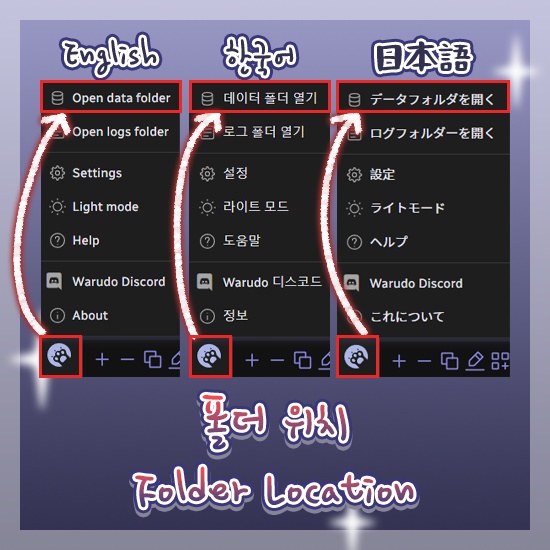


===================================== 한국어 ===================================== ShapeKey Animator — Warudo 플러그인 「표정에 반응하는 애니메이션, 자동으로.」 ShapeKey(BlendShape) 값을 실시간으로 감지하여, 설정한 임계치를 넘는 순간 지정된 애니메이션을 자동 재생하는 Warudo 플러그인입니다. 윙크하면 손을 흔들고, 입을 벌리면 리액션을 취하는 등 — 표정 하나로 다양한 퍼포먼스를 연출할 수 있습니다. ◆ 주요 기능 ● 임계치 기반 자동 트리거 지정한 ShapeKey 값이 임계치를 넘으면 애니메이션을 자동 재생합니다. ● 단순 모드 & 고급 모드 빠른 설정을 위한 단순 모드와, 복수 그룹을 독립 관리하는 고급 모드를 지원합니다. ● 계층적 애니메이션 설정 개별 ShapeKey → 그룹 → 기본 순서로 애니메이션이 폴백됩니다. 전체 공통 애니메이션을 설정해두고, 특정 ShapeKey만 별도 애니메이션을 지정할 수 있습니다. ● 반복 재생 임계치를 유지하는 동안 애니메이션을 반복 재생합니다. ● 재트리거 시 즉시 재시작 재생 중 다시 트리거되면 기존 애니메이션을 중단하고 처음부터 즉시 다시 재생합니다. ● 세부 조절 가중치, 재생 속도, 전환 시간을 개별적으로 설정할 수 있습니다. ● 대상 메시 지정 특정 SkinnedMeshRenderer만 모니터링할 수 있습니다. 비워두면 캐릭터의 모든 메시에서 검색합니다. ◆ 사용 예시 표정 (ShapeKey) → 애니메이션 ───────────────────────────────────── 윙크 (Blink_L) → 손 흔들기 입 벌리기 (A) → 놀란 리액션 미소 (Joy) → 하트 제스처 혀 내밀기 (Tongue) → 피스 포즈 ◆ 설치 방법 1. .warudo 파일을 다운로드합니다. 2. Warudo 데이터 폴더 → Plugins 폴더에 파일을 넣습니다. 3. Warudo를 재시작합니다. 4. 에셋 추가 목록에서 「ShapeKey Animator」 카테고리가 나타나면 설치 완료입니다. ◆ 설정 방법 1. Warudo에서 에셋 추가 → 「ShapeKey Animator」 카테고리 → 「ShapeKey Animation Trigger」 선택 2. 대상 캐릭터 지정 3. 모니터링할 ShapeKey 이름 선택 (자동완성 지원) 4. 재생할 애니메이션 선택 5. 임계치, 가중치, 재생 속도 등 원하는 대로 조절 ◆ 라이선스 안내 본 플러그인은 1인 1라이선스입니다. 커미션 작업 시, 세팅하는 작가와 실제 사용하는 스트리머 양쪽 모두 각각 라이선스를 구매해야 합니다. 하나의 라이선스를 여러 명이 공유하거나 재배포하는 것은 금지됩니다. 기업 사용은 별도 문의 부탁드립니다. ===================================== English ===================================== ShapeKey Animator — Warudo Plugin "Facial expressions that trigger animations, automatically." A Warudo plugin that monitors ShapeKey (BlendShape) values in real time and automatically plays designated animations the moment they exceed a set threshold. Wink to wave, open your mouth to react — create dynamic performances with just your facial expressions. ◆ Key Features ● Threshold-Based Auto Trigger Automatically plays animations when specified ShapeKey values exceed the threshold. ● Simple & Advanced Modes Quick-setup Simple Mode for basic use, and Advanced Mode for managing multiple independent groups. ● Hierarchical Animation Fallback Per-ShapeKey → Group → Default animation priority. Set a common default animation, then override specific ShapeKeys with their own animations. ● Loop While Active Repeats the animation while the ShapeKey stays above the threshold. ● Instant Restart on Retrigger If triggered again during playback, stops the current animation and restarts from the beginning immediately. ● Fine-Tuned Control Individually adjustable weight, playback speed, and transition time. ● Target Mesh Selection Monitor only specific SkinnedMeshRenderers. Leave empty to search across all meshes on the character. ◆ Usage Examples Expression (ShapeKey) → Animation ───────────────────────────────────── Wink (Blink_L) → Hand wave Mouth open (A) → Surprised reaction Smile (Joy) → Heart gesture Tongue out (Tongue) → Peace pose ◆ Installation 1. Download the .warudo file. 2. Place the file in Warudo data folder → Plugins folder. 3. Restart Warudo. 4. If the "ShapeKey Animator" category appears in the Add Asset list, installation is complete. ◆ Setup 1. In Warudo, Add Asset → "ShapeKey Animator" category → select "ShapeKey Animation Trigger" 2. Assign the target character 3. Select ShapeKey names to monitor (autocomplete supported) 4. Choose the animation to play 5. Adjust threshold, weight, playback speed, etc. as desired ◆ License This plugin is licensed per individual user. For commission work, both the creator who sets it up and the streamer who uses it must each purchase their own license. Sharing a single license between multiple people or redistributing it is prohibited. For corporate or business use, please contact us separately. ===================================== 日本語 ===================================== ShapeKey Animator — Warudo プラグイン 「表情に連動するアニメーション、自動で。」 ShapeKey(BlendShape)の値をリアルタイムで監視し、設定したしきい値を超えた瞬間に指定したアニメーションを自動再生するWarudoプラグインです。 ウインクで手を振る、口を開けてリアクションする — 表情ひとつで多彩なパフォーマンスを演出できます。 ◆ 主な機能 ● しきい値ベースの自動トリガー 指定したShapeKeyの値がしきい値を超えるとアニメーションを自動再生します。 ● シンプルモード&アドバンスモード 素早い設定のシンプルモードと、複数グループを独立管理するアドバンスモードに対応しています。 ● 階層的アニメーション設定 個別ShapeKey → グループ → デフォルトの優先順位でフォールバックします。 共通のデフォルトアニメーションを設定し、特定のShapeKeyだけ別のアニメーションを指定できます。 ● ループ再生 しきい値を超えている間、アニメーションをリピート再生します。 ● リトリガー時の即時リスタート 再生中に再度トリガーされると、現在のアニメーションを中断して最初から即座に再生します。 ● 細かな調整 ウェイト、再生速度、トランジション時間を個別に設定可能です。 ● 対象メッシュ指定 特定のSkinnedMeshRendererのみを監視できます。 空欄にするとキャラクターの全メッシュから検索します。 ◆ 使用例 表情(ShapeKey) → アニメーション ───────────────────────────────────── ウインク (Blink_L) → 手を振る 口を開ける (A) → 驚きリアクション 笑顔 (Joy) → ハートジェスチャー 舌を出す (Tongue) → ピースポーズ ◆ インストール方法 1. .warudoファイルをダウンロードします。 2. Warudoデータフォルダ → Pluginsフォルダにファイルを配置します。 3. Warudoを再起動します。 4. アセット追加リストに「ShapeKey Animator」カテゴリが表示されればインストール完了です。 ◆ 設定方法 1. Warudoでアセット追加 →「ShapeKey Animator」カテゴリ →「ShapeKey Animation Trigger」を選択 2. 対象キャラクターを指定 3. 監視するShapeKey名を選択(オートコンプリート対応) 4. 再生するアニメーションを選択 5. しきい値、ウェイト、再生速度などをお好みで調整 ◆ ライセンスについて 本プラグインは1人1ライセンスです。 コミッション作業の場合、セットアップを行う作家と実際に使用するストリーマーの双方がそれぞれライセンスを購入する必要があります。 1つのライセンスを複数人で共有したり、再配布することは禁止されています。 法人・企業でのご利用については、別途お問い合わせください。
Changelog
v1.0.0 ShapeKey 값이 설정한 임계치를 넘으면 지정된 애니메이션을 자동으로 재생합니다. - 단순 모드 / 고급 모드: 단순 모드로 간편하게 설정하거나, 고급 모드로 여러 트리거 그룹을 구성할 수 있습니다 - 애니메이션 설정: 가중치, 재생 속도, 전환 시간을 조절할 수 있습니다 - 반복 재생: 조건이 유지되는 동안 애니메이션을 반복 재생합니다 - 재트리거 시 재시작: 새로운 트리거 발생 시 애니메이션을 처음부터 다시 재생합니다 - 개별 설정: ShapeKey별로 설정을 개별 지정할 수 있습니다 - 대상 메시 선택: 특정 메시를 선택하거나 전체에서 검색할 수 있습니다 - 글로벌 기본값 (고급 모드): 모든 그룹에 공통으로 적용되는 기본 애니메이션과 설정을 지정할 수 있습니다 - 지원 언어: 영어, 한국어, 일본어 Automatically plays animations when ShapeKey values exceed a set threshold. - Simple Mode / Advanced Mode: Use Simple Mode for quick setup, or Advanced Mode to organize multiple trigger groups - Animation Controls: Adjust weight, playback speed, and transition time - Loop Playback: Keep the animation looping while the condition is active - Restart on Retrigger: Restart the animation from the beginning on a new trigger - Per-Entry Overrides: Customize settings for each individual ShapeKey - Target Mesh Selection: Choose a specific mesh to monitor, or search all - Global Defaults (Advanced Mode): Set default animation and parameters shared across all groups - Supported languages: English, Korean, Japanese ShapeKeyの値が設定したしきい値を超えると、指定されたアニメーションを自動的に再生します。 - シンプルモード / アドバンスモード: シンプルモードで簡単に設定、またはアドバンスモードで複数のトリガーグループを構成できます - アニメーション設定: ウェイト、再生速度、トランジション時間を調整できます - ループ再生: 条件が維持されている間、アニメーションを繰り返し再生します - リトリガー時リスタート: 新しいトリガー発生時にアニメーションを最初から再生します - 個別設定: ShapeKeyごとに設定を個別に指定できます - 対象メッシュ選択: 特定のメッシュを選択、または全体から検索できます - グローバルデフォルト(アドバンスモード): 全グループに共通で適用されるデフォルトアニメーションと設定を指定できます - 対応言語: 英語、韓国語、日本語 --- v1.1.0 새로운 기능: - 트리거 방향: Rising, Falling, Both 중 선택하여 트리거 조건을 지정할 수 있습니다 개선: 플러그인 리로드 시 안정성 향상 What's New: - Trigger Direction: Choose between Rising, Falling, or Both to specify trigger conditions Improvements: Improved stability when reloading the plugin 新機能: - トリガー方向: Rising、Falling、Bothから選択してトリガー条件を指定できます 改善: プラグインのリロード時の安定性を向上