

【無料】Minecraft Ghastling Pet
- 無料版ダウンロード商品¥ 0
- Buy Me A Coffeeダウンロード商品¥ 500
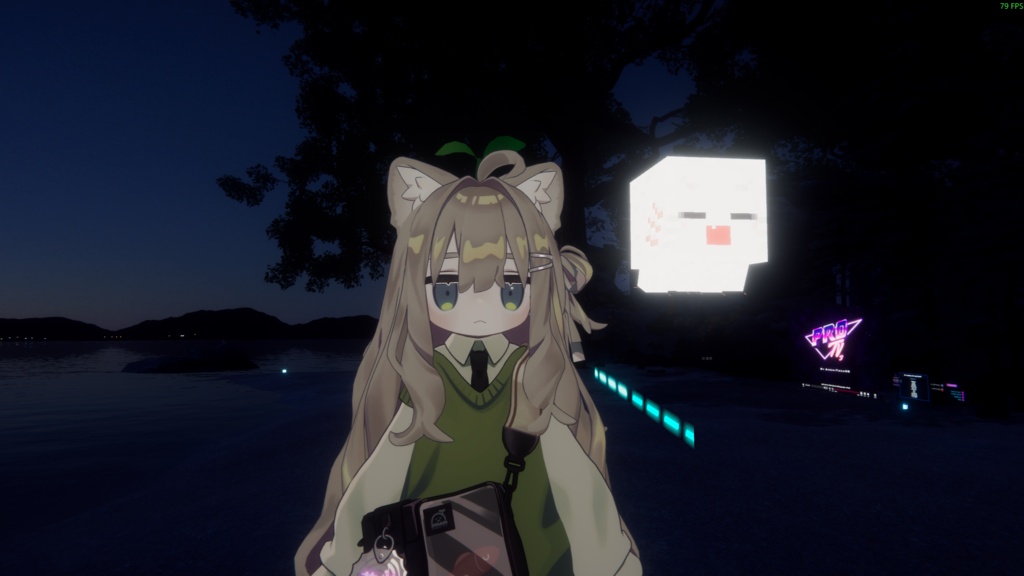

Minecraft Ghastling Pet
JP
無料版と「Buy Me A Coffee」版は同じ内容です。 君に付き添える小乐魂~ インポート方法: 1.プリフォームをモデルルートノードに配置し、Rootオブジェクトを開くと位置調整が容易になる HeadボーンをSource Transformにドラッグし、Activateボタンをクリックします,Is Activeが自動的にチェックされます。 3.Rootオブジェクトを非表示にする インポート後にバグが発生した場合は、ご連絡ください 2026/9/19 更新: FXレイヤーを最適化し、楽魂のタッチアニメーションを追加、楽魂の歌の音楽を追加しました。
EN
The free version and the "Buy Me A Coffe" version have the same content. A Ghastling that can follow you~ Import method: 1. Place the prefabricated components into the model's root node and enable the Root object for easy position adjustment 2. Ensure that the "Is Active" checkbox of the VRC Parent Constraint component for FollowTarget is unchecked. Drag the Head skeleton into the Source Transform, then click the Activate button ,At this point, Is Active will be automatically checked. 3. Hide Root Object Extra feature: Touching Ghastling will randomly trigger sound effects~ The model and following logic are sourced from this author: https://9livewolf.booth.pm/ If any bugs occur after importing, please contact me Updated on 2026/9/19: The FX layer has been optimized, with the addition of LeHun touch animations and the inclusion of Ghastling singing music.
CN
免费版和Buy Me A Coffe版是相同的内容。 一只可以跟随你的小乐魂~ 导入方法: 1.将预制件放入模型根节点,打开 Root 对象方便调整位置 2.确保 FollowTarget 的VRC Parent Constraint组件的 Is Active 为取消勾选。将 Head 骨骼拖入 Source Transform,然后点击 Activate 按钮,此时 Is Active 会自动勾选。 3.隐藏 Root 对象 额外功能:触摸小乐魂会随机触发音效哦~ 模型和跟随逻辑来源于此作者:https://9livewolf.booth.pm/ 如导入后出现Bug请与我联系 2026/9/19 更新: 优化了FX层,添加乐魂触摸动画,增加了乐魂唱歌音乐。