
運賃箱(TYPE1)
- ダウンロード商品¥ 650
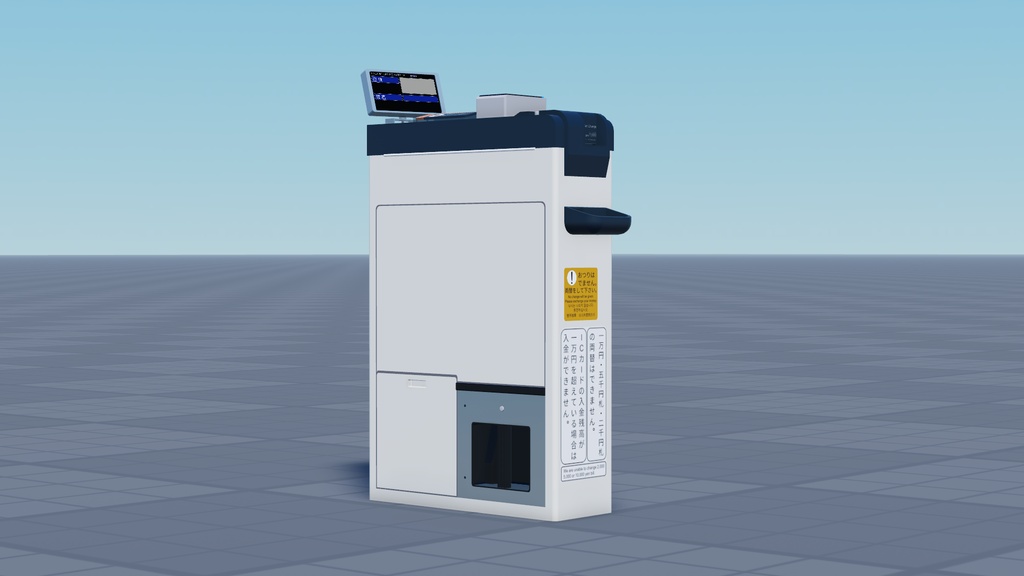
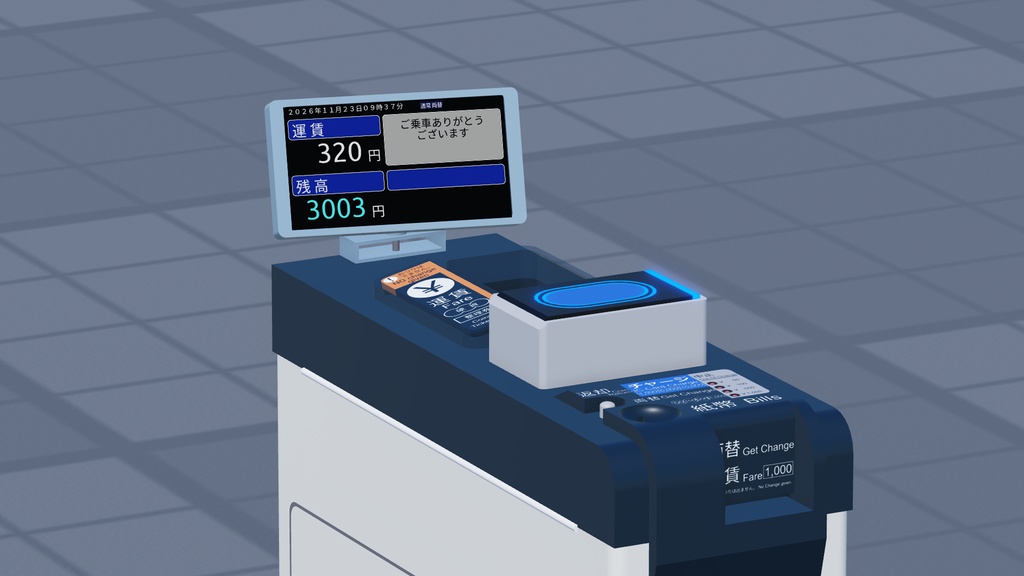
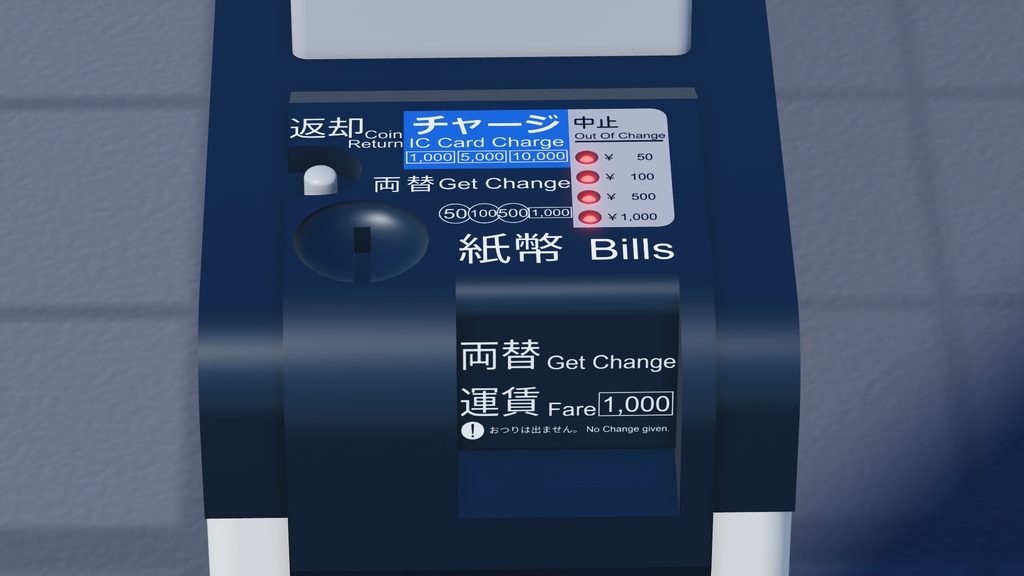
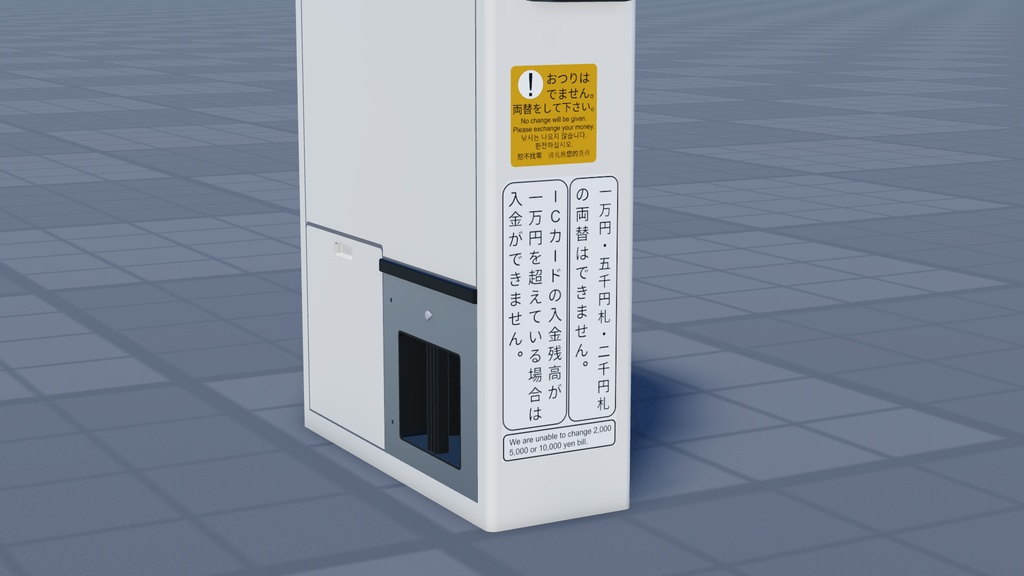


【Roblox Studio専用】『運賃箱(TYPE1)』(.rbxm) 天ケ瀬鉄道株式会社(Amagase Railway Co.)のBOOTHにお越しいただきありがとうございます。 Roblox Studioでそのまま使える、高精度な3Dモデル(.rbxm形式)です。 回収箱の抜き差し、ICカードのタッチ、前ドア連動、モニターのエラー表示まで、スクリプトで動く状態で同梱しています。 あなたの制作するバスゲームや街作りゲームのクオリティアップにぜひご活用ください! Thank you for visiting Amagase Railway Co. This is a high-quality 3D model (.rbxm format) ready to use in Roblox Studio. It comes with working scripts for removing and inserting the cash box, IC card touch, front door link, and error display on the monitor. Perfect for enhancing your bus or city-building games! ⚠️【重要なお知らせ / Important Notice】 ・この商品はRoblox用に制作された3Dモデルです。UnityやBlender等にインポートすることは想定されていません。他ソフトで使用したい場合は、ご自身でコンバート(形式変換)していただきますようお願いいたします。 - This product is a 3D model designed specifically for Roblox. It is not intended to be imported directly into Unity, Blender, or other 3D software. If you wish to use it in other applications, please convert the file format at your own discretion. ・本商品はダウンロード商品(デジタルデータ)という特性上、購入後の返品、返金、交換には一切応じられません。あらかじめ仕様や利用規約をご確認の上、ご購入ください。 - Due to the nature of digital download products, all sales are final. No refunds, returns, or exchanges will be accepted after purchase. Please confirm the specifications and Terms of Use before your purchase.
商品内容 / Product Contents
・Amagase-Farebox(Type1).zip ┗ Farebox(Type1).rbxm(モデル本体データ / Model Data) ┗ README.txt(導入方法・設定項目・属性一覧 / Installation, Settings & Attribute Reference) ┗ 利用規約.txt / Terms_of_Use.txt ※Zipファイルを解凍後、中の .rbxm ファイルをRoblox Studioにドラッグ&ドロップしてご使用ください。 *After extracting the Zip file, drag and drop the .rbxm file into Roblox Studio.
モデルの仕様 / Specifications
・形式(Format):Roblox Model (.rbxm) ・モデル構造(Structure):1Model 本体・回収箱・IC読み取り部・硬貨投入口・モニター・設定用ModuleScript・動作スクリプトを内蔵しています。共通スクリプトはゲーム開始時に ServerStorage へ自動で導入されます。 Contains 1 main Model with the body, cash box, IC reader, coin slot, monitor, settings and operation scripts. Shared scripts are installed into ServerStorage automatically when the game starts. ※車両への固定用パーツは付属していません / Vehicle-mounting parts are not included. ・マテリアル(Material):Roblox標準マテリアル / Roblox Standard Materials ・設置場所(Placement):バス車内(走行する車両に溶接して使用可)・営業所などの固定設置のどちらにも対応 Works both inside a moving bus (welded to the vehicle) and as a fixed installation (e.g. at a depot). ・改造・改変(Modification):可能 / Permitted
機能 / Features
【スクリプト動作対応 / Fully Scripted Functions】 - 回収箱の抜き差し:Eキー長押しで回収箱が引き出され、手元に移ってアイテム(Tool)としてインベントリーに入ります。アイテムを持ってEキー長押しで差し込みます(引き出し・差し込みアニメーション付き)。 Cash box removal/insertion: Hold E to slide the cash box out; it moves to your hand and enters your inventory as a Tool. Hold E while carrying it to insert it back (with slide animation). - 回収箱アイテムへの情報付与:車番・運賃箱名・取り出した日時・取り出した人を、アイテムと回収箱に属性として記録します(アイテム名にも車番を表示)。 The vehicle number, farebox name, time taken and player are saved as attributes on the item and the cash box (the item name also shows the vehicle number). - 回収箱の紛失防止:回収箱を持ったまま倒れた・退出した場合は自動で運賃箱に戻ります(設定で「その場に置く」にも変更可)。床に置かれた回収箱は拾うことができ、一定時間後に自動で運賃箱に戻ります。 Loss prevention: If the carrier dies or leaves, the cash box returns to the farebox automatically (can be changed to "drop on the spot"). Dropped cash boxes can be picked up and return automatically after a set time. - 回収箱の金額データ:回収箱ごとに金種別の枚数(10円・50円・100円・500円・1000円)と合計金額を保持します。 Each cash box holds counts per denomination (10/50/100/500/1000 yen) and the total amount. - ICカード読み取り:IC読み取り部をクリックすると、設定した範囲のランダムな運賃(10円単位)と、ランダムなICカードの残高をモニターに表示します。設定で「プレイヤーごとの残高から運賃を引く」方式にも変更でき、その場合は残高が足りないと「残高不足です」を表示します。 IC card reader: Click the IC reader to show a random fare (in 10-yen steps) within the set range and a random IC card balance on the monitor. It can also be set to deduct the fare from each player's balance, showing "Insufficient balance" when it is not enough. - 前ドア連動:前ドアが開いている間だけ、モニターに運賃・残高・案内を表示し、IC読み取り部を青く光らせます。ドアが閉まってから10秒たつと表示を消します。ドアの仕組みが違うバスでも、スクリプトを書かずにつなげます。 Front door link: The fare, balance and messages are shown and the IC reader glows blue only while the front door is open. The display turns off 10 seconds after the door closes. Can be connected to any door system without scripting. - エラー時の動作:エラー中はIC読み取り部が赤く光ります。エラー中にタッチするとエラー音を鳴らします。 Error behavior: The IC reader glows red during an error, and an error sound plays when touched during an error. - 硬貨投入口:硬貨投入口をクリックすると、硬貨を入れる音が鳴ります(音は属性で設定)。 Coin slot: Clicking the coin slot plays a coin-insert sound (set via attribute). - エラー表示:エラーコード表(Errcodeset)に登録した内容をモニターに表示します。回収箱を抜いている間は「回収箱がセットされていません(Err-090)」を表示します。 Error display: Shows entries from the error code table on the monitor. While the cash box is removed, "Cash box not set (Err-090)" is displayed. - リアルタイム日本時間(JST)の自動表示機能 / Real-time JST clock display. 【画面表示・UI枠(手動書き換え・独自連動用) / GUI Layout & Templates】 - 運賃表示枠・残高表示枠 / Fare and balance layout. - 「SF」「GP」「学F」表示枠 / "SF", "GP", "Student Free" indicator layout. - 「通常」「両替」表示枠 / "Normal" and "Change" mode layout. - 案内・エラー表示枠(2段表示+エラー番号) / Information & error layout (2 lines + error code). 【他のスクリプトとの連携用(上級者向け) / For Script Integration (Advanced)】 - 回収箱への入金・状態取得用の BindableFunction / BindableEvent(CashboxAPI)を同梱。 Includes BindableFunction / BindableEvent (CashboxAPI) for depositing money and checking the cash box state. - 回収箱を扱う別の装置(集計機など)を自作するための共通エンジン(CashboxCore)を同梱。 Includes a shared engine (CashboxCore) for building other devices that handle the cash box (e.g. a counting machine).
設置方法・操作方法 / Installation & Controls
【基本的な設置方法】 1. インポートした本モデルを、ご自身の車両(バス)の車内や、営業所などに配置します。 2. バスに載せる場合は、本モデルをバスのモデルの中に入れ、車体に溶接してください。回収箱は自動で運賃箱に固定されるため、回収箱を溶接する必要はありません。 ※共通スクリプト(CashboxCore・Errcodeset)は、ゲーム開始時に ServerStorage へ自動で導入されます。ご自身で移動する必要はありません。 【操作方法】 ・回収箱を抜く:運賃箱の回収箱の前で E キーを長押しします。 ・回収箱を差し込む:回収箱(アイテム)を持った状態で、運賃箱の回収箱の位置で E キーを長押しします。 ・ICカードをタッチする:IC読み取り部をクリックします。 ・硬貨を入れる:硬貨投入口をクリックします(音が鳴ります)。 *Place the model in your bus or depot. When mounting it on a bus, put it inside the bus model and weld it to the body. Shared scripts are installed automatically. *Hold E to remove/insert the cash box. Click the IC reader to touch an IC card. Click the coin slot to insert coins.
回収箱の設定(CashboxConfig) / Cash Box Settings
運賃箱本体の中にある [CashboxConfig](ModuleScript)を開き、「=」の右側の値を書き換えるだけで設定を変更できます。各項目には日本語の説明が付いています。 主な設定項目: ・[HoldDuration]:Eキーを長押しする秒数を変更できます。 ・[RemoveText] / [InsertText]:「回収箱を抜く」「回収箱を差し込む」の表示文字を変更できます。 ・[Permission]:回収箱を抜き差しできる人を設定できます(全員/チーム名/グループとランク/ユーザーID/指定したツールを持っている人)。 ・[PullDirection] / [PullDistance] / [PullTime]:回収箱を引き出す方向・長さ・速さを変更できます。 ・[ToolName] / [ToolTip] / [ToolIcon]:アイテムの名前・説明・アイコンを変更できます。 {車番} {運賃箱} {日時} {取り出した人} と書くと、自動で置き換わります(例:「回収箱 {車番}」→「回収箱 2901」)。 ・[VehicleNumber]:車番を指定できます。空欄の場合は、運賃箱本体の属性 VehicleNumber → バスのモデル名(例:2901)の順に自動で決まります。 ・[ItemAttributes]:アイテムと回収箱に付ける属性を追加・変更できます(属性名は半角英数字と _ のみ)。 ・[GripMode] / [HoldOffset]:回収箱の持ち方(取っ手を握って立てたまま持つ/取っ手を上にしてぶら下げる/中心を持つ)と、持つ位置を調整できます。 ・[CarryAnimationId]:回収箱を持っている間のアニメーションを指定できます(空欄の場合はRoblox標準の持ち方)。 ・[WalkSpeed] / [AllowJump]:回収箱を持っている間の歩く速さ・ジャンプの可否を設定できます。 ・[OnCarrierLost]:回収箱を持ったまま倒れた・退出したときの動作(運賃箱に戻す/その場に置く)を選べます。 ・[ShowErrorWhenRemoved] / [ErrorCode]:回収箱を抜いている間のエラー表示の有無と、表示するエラー番号を変更できます。 ・[RemoveSoundId] / [InsertSoundId]:抜き差しの効果音を設定できます。 *Edit the values in CashboxConfig (ModuleScript) to change key, text, permissions, pull direction, item name, grip, sounds and more. Each item has a Japanese comment.
前ドアとのつなぎ方 / Front Door Link
本モデルの中にある [DoorSource](ObjectValue)の Value に、ご自身のバスのドアの状態を表す値(BoolValue / NumberValue / StringValue など)を指定するだけでつながります。スクリプトを書く必要はありません。 ・BoolValue の場合:true のとき「開いている」になります。 ・NumberValue / StringValue の場合:「開いている」ときの値を、本モデルの属性 [DoorOpenValue] に入力してください(例:1、open)。 ・ドアの状態を属性で管理している場合:その属性を持つインスタンスを DoorSource に指定し、属性名を [DoorSourceAttribute] に入力してください。 ・自作スクリプトから直接切り替える場合:farebox:SetAttribute("DoorOpen", true) / false で切り替えられます。 ドアが開いている間:モニターに運賃・残高・案内が表示され、IC読み取り部が青く光ります。 ドアが閉まったとき:IC読み取り部は元の色に戻り、ICカードのタッチは受け付けなくなります。10秒たってもドアがもう一度開かなければ、モニターは上部の表示だけになります。 ※何もつながない場合は、常にドアが開いている扱いになります。 ※回収箱の抜き差しは、ドアの状態に関係なく行えます。 *Set your bus's door value (BoolValue / NumberValue / StringValue, etc.) to the Value of DoorSource (ObjectValue). No scripting required. If nothing is connected, the door is treated as always open.
ICカード・運賃・音の設定(属性) / IC Card, Fare & Sound Settings
運賃箱本体を選択し、プロパティ(Properties)ウィンドウの「属性(Attributes)」を書き換えます。プレイ中に変更してもすぐ反映されます。 <運賃・残高> ・[FareMin]:運賃の最低額(初期値:180) ・[FareMax]:運賃の最高額(初期値:460) ・[FareStep]:運賃の単位(初期値:10=10円単位) ・[ICBalanceMode]:「Random」=毎回ランダムな残高を表示(初期値)/「Deduct」=プレイヤーごとの残高から運賃を引く ・[ICBalanceMin] / [ICBalanceMax]:残高の範囲(初期値:0〜5000) ・[ICBalanceStep]:残高の単位(初期値:1=1円単位) ・[ICCooldown]:連続でタッチできない秒数(初期値:1) ・[ICDisplayTime]:タッチ後に表示しておく秒数(初期値:0=次のタッチまで表示したまま) ・[ICThanksUpper] / [ICThanksLower]:タッチしたときの案内(初期値:ご乗車ありがとう/ございます) <IC読み取り部の光> ・[ICLightOpenColor]:ドアが開いているときの色(初期値:13, 105, 172) ・[ICLightErrorColor]:エラーのときの色(初期値:255, 89, 89) ・[ICLightMaterial]:光っているときのマテリアル(初期値:Neon) <前ドア> ・[DoorCloseHideDelay]:ドアが閉まってから表示を消すまでの秒数(初期値:10) <音> ・[ICSoundId]:ICカードのタッチ音(空欄で鳴らさない) ・[ICErrorSoundId]:エラー中にタッチしたときのエラー音(空欄で鳴らさない) ・[CoinSoundId]:硬貨投入口をクリックしたときの音(空欄で鳴らさない) ・[CoinSoundVolume]:硬貨を入れる音の大きさ(初期値:0.6) ※起動したときは、運賃・残高・SF / GP / 学F・案内・エラーコードは表示されません。ICカードをタッチすると運賃・残高・案内が表示されます。 ※ドアが閉まっている間は、ICカードのタッチを受け付けません。 ※「Deduct」のとき、プレイヤーの残高はプレイヤーの属性 [ICBalance] に記録されます。チャージ機能などを自作する場合は、この値を書き換えてください。 ※属性・API(連動用の関数など)の一覧は、同梱の README.txt に記載しています。 *Select the model and edit its Attributes in the Properties window. See the enclosed README.txt for the full list of attributes and API.
エラーコード・エラー表示 / Error Codes & Display
【エラーコードの追加・変更(Errcodeset の編集)】 本モデルの中の [Modules] フォルダにある [Errcodeset](ModuleScript)に、エラーの番号と表示文字を登録できます。 スクリプト内にあるテンプレートをコピーして貼り付け、値を書き換えるだけで追加できます。 ・[errcode]:表示するエラー番号(例:Err-090) ・[upertext] / [lowertext]:1段目・2段目の表示文字 ・[upertextsize] / [lowertextsize]:文字の大きさ(0 または未入力の場合は 40) 登録済みのエラー:Err-000(読み取り失敗)/Err-010(カード読み取りエラー)/Err-020(残高不足)/Err-046(乗車処理なし)/Err-090(回収箱未装着) 【エラー表示の色の変更】 モニター(monitorangle > maneycasher > SurfaceGui > Errsetting > option)の中にある ・[backcolor]:エラー表示中の背景色 ・[textcolor]:エラー表示中の文字色 の Value を変更することで、お好みの色に変更できます。 *Add or edit error codes in Modules > Errcodeset. Error colors can be changed in Errsetting > option.
⚠️ 車両やギミックと連動させる際の注意点 / Important Technical Note
本製品に最初から組み込まれている自動動作スクリプトは「回収箱の抜き差し」「ICカードのタッチ(ランダム運賃・残高表示)」「硬貨投入口の音」「前ドア連動」「エラー表示」「日本時間表示」のみです。 「現金を投入したら回収箱の金額を増やす」「SF・GP・学Fや両替の表示を切り替える」「整理券や運賃表と連動させて正しい運賃を出す」など、実際の車両やシステムと連携して動作させるには、購入者様側で個別にスクリプト(プログラム)を記述する必要があります。あらかじめご了承ください。 ※回収箱への入金は、運賃箱本体の中に作られる [CashboxAPI] > [Deposit] を他のスクリプトから呼び出すことで行えます(例:Deposit:Invoke(100, 2) で100円玉を2枚追加)。 *Only cash box removal/insertion, IC card touch (random fare and balance display), the coin slot sound, front door link, error display and the JST clock function automatically. Interlocking cash payment, indicator switching or real fare calculation with your vehicle's systems requires custom scripting on your part. Money can be added to the cash box by calling CashboxAPI > Deposit from your own scripts.
利用規約(要約) / Terms of Use (Summary)
【許可事項 / Permitted Uses】 ・購入者、または購入した1つの開発グループ内での使用・共同開発(Team Create)。 ・モデル・スクリプトの改造、改変、テクスチャの変更。 ・組み込んだゲームの公開・収益化。 【禁止事項 / Prohibited Actions】 ・本データ(改変後含む)の二次配布、転売。 ・Creator Marketplace(ツールボックス)へのアップロード。 ・プレースからの無断書き出し・抽出・持ち出し行為。 ・同梱スクリプトのみを取り出しての配布・販売。 ※詳細な利用規約は同梱のテキストファイルをご確認ください。 *Please check the enclosed text file for the full Terms of Use.
製作者・更新履歴 / Creator & Update History
天ケ瀬鉄道株式会社(Amagase Railway Co.) 製作者:tomotarako787 ご不明な点や不具合の報告などがございましたら、BOOTHのメッセージ機能までお気軽にご連絡ください。 If you have any questions or bug reports, please feel free to contact us via BOOTH message. 【更新履歴 / Update History】 2026/11/23-販売開始