
【Photoshop時短】テキスト一括分割スクリプト(行/スペース/1文字対応)Photoshop text split
- ダウンロード商品¥ 300
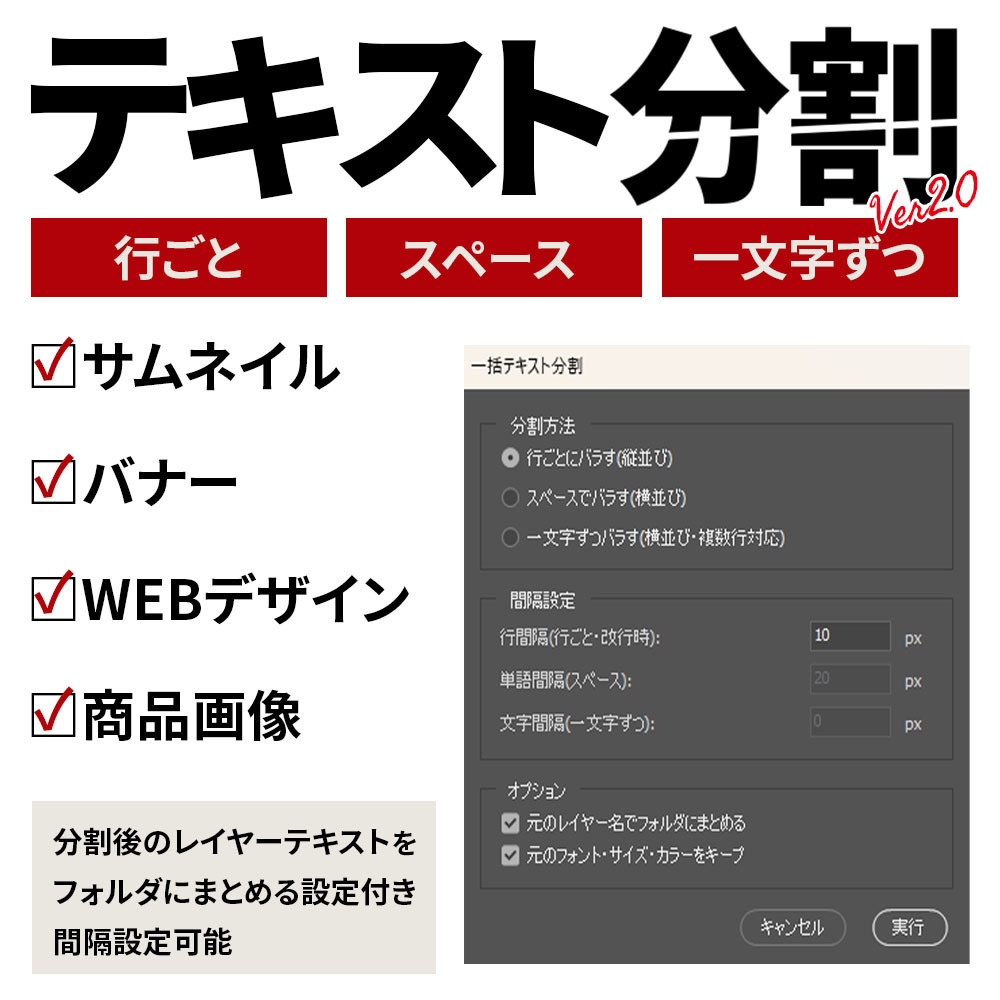


EC商品画像・LP・バナー・サムネイル制作のための時短スクリプトです。
こんなお悩み、ありませんか?
「LOOK BOOK 2025」みたいな1つのテキストレイヤーを、デザイン上の都合で1文字ずつ・1単語ずつバラしたい——でも手作業だと、レイヤーを複製してテキストを書き換えて、位置を揃えて……の繰り返しで地味に時間が溶ける。 複数行のキャッチコピーを行ごとに分けたいときも同じ。レイヤーが10個20個になると、整理だけで一苦労。 そのルーティン、スクリプト1本で解決します。
数十秒の作業 → 一瞬。
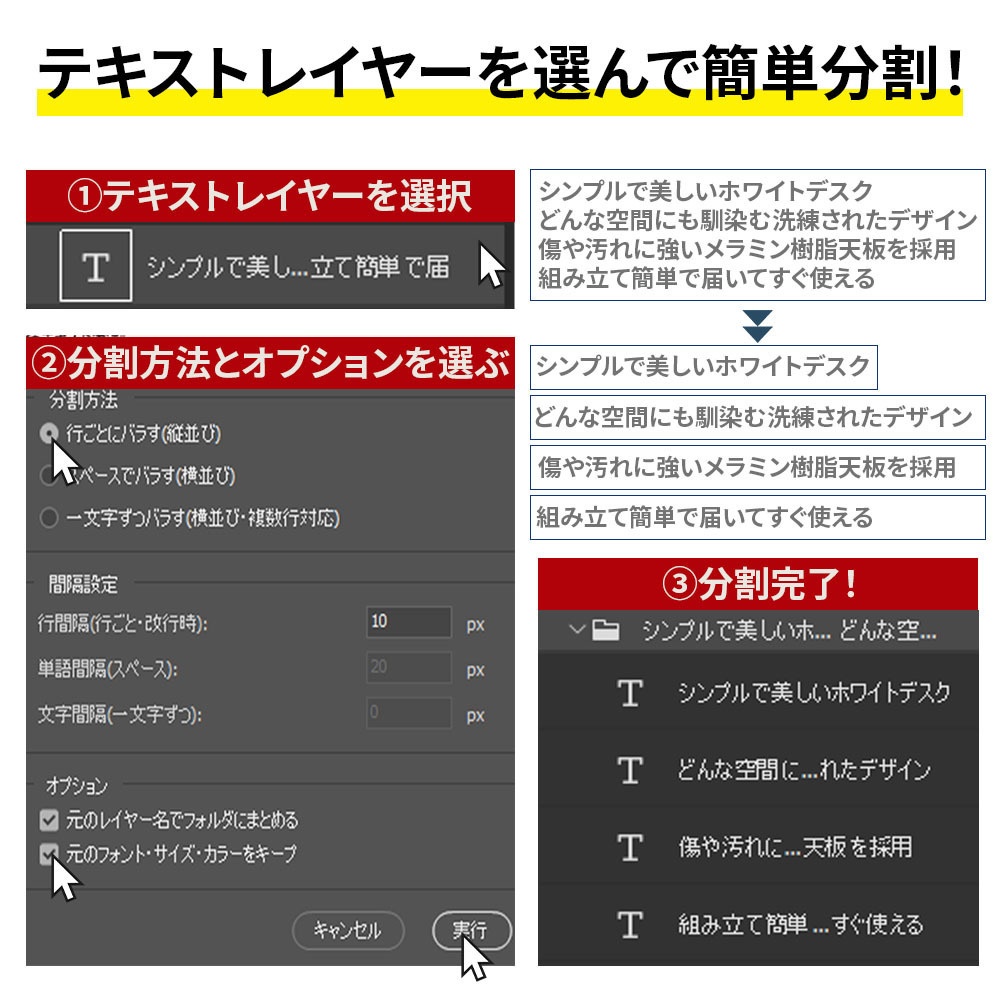
テキストレイヤーを選択 → スクリプト実行 → 分割方法を選ぶだけ。 ▼ 作業時間の比較 ・10文字を1文字ずつ分割:約2分 → 一瞬 ・5行のコピーを行ごとに分割:約1分 → 一瞬 ・複数バナーで毎日繰り返す作業:月数時間 → ほぼゼロ クリック数で見ると、手作業30〜50回が3クリックに圧縮されるイメージです。
主な機能
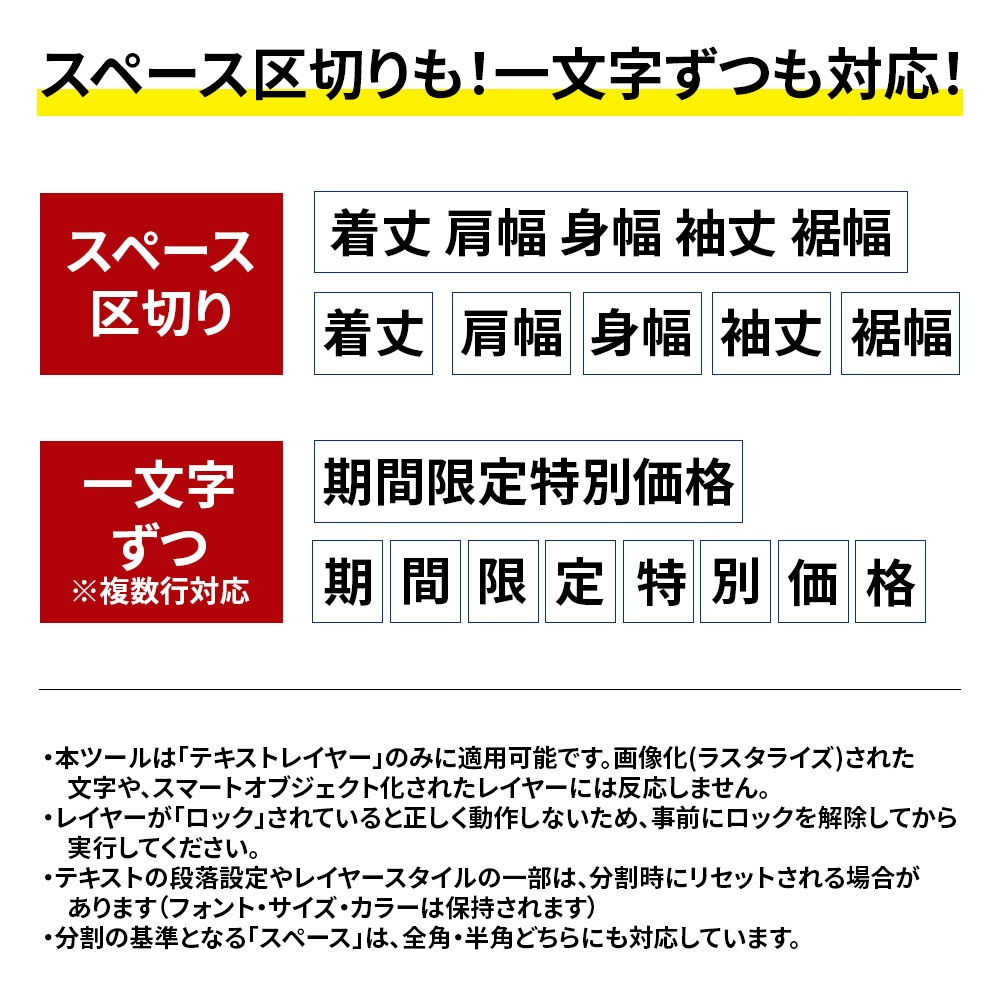
■ 3パターンの分割方式に対応 選択したテキストレイヤーを、用途に応じて以下の方法で一括分割できます。 ・行ごとにバラす(縦に等間隔配置) ・スペースでバラす(横に等間隔配置) ・一文字ずつバラす(隙間なく横に配置) ■ 自動整理機能 分割後のテキストレイヤーは、元のレイヤー名でフォルダ(グループ)にまとめて自動収納。レイヤーパネルが散らかりません。 ■ 誤操作防止 複数のテキストレイヤーを誤って選択した場合は確認メッセージを表示。意図しない分割を防ぎます。 ■ シンプルな操作 ダイアログは選択肢を選ぶだけ。マニュアル要らずで直感的に使えます。
動作環境
・Adobe Photoshop CC 以降 ・macOS / Windows 両対応
ご使用方法
①ZIPファイルを解凍します。 ②Photoshopで対象のテキストレイヤーを「1つ」選択します。 ③メニューの「ファイル」>「スクリプト」>「参照」から本スクリプト(.jsx)を選択して実行します。
こんな方におすすめ
・各種ECモール・自社ECで商品画像を量産する方 ・アパレル・食品・雑貨ブランドのバナー / LP制作担当者 ・サムネイル制作の効率化を図りたい動画クリエイター ・タイポグラフィを多用するグラフィックデザイナー ・手作業の繰り返しから解放されたいすべてのPhotoshopユーザー
ご注意
■ ご注意 ・本スクリプトは選択した1つのテキストレイヤーを分割します。 複数選択時は確認ダイアログが表示され、最初のレイヤーのみ処理されます。 ・分割処理は1文字(1要素)ずつ行うため、長文(50文字以上)の1文字モード分割では処理に時間がかかる場合があります。 目安:30文字で約30秒、100文字で約2〜3分。 処理中はキャンセルボタンで途中停止が可能です。 ・処理速度はPhotoshopのバージョン・環境・他に開いているドキュメントの 数や複雑さに影響を受けます。重い作業時は対象ドキュメントのみを 開いた状態でご利用いただくと快適です。 ・生成された各テキストは通常のPhotoshopレイヤーとして出力されるため、フォントサイズ・色・配置などの微調整は自由に行えます。 ・1文字モードで色・サイズが大きく異なる文字を混在させた場合、ベースラインが数ピクセルずれる場合があります。 Photoshop上で個別に微調整してご利用ください。 ・縦書きテキストは縦書きのまま分割されます。横書きに変換したい場合は、分割前に文字パネルで方向を変更してください。 ・ご質問・不具合報告は BOOTH のメッセージ機能からお気軽にどうぞ。可能な範囲でアップデート対応いたします。
アップデート履歴
═══════════════════════════════════ 【アップデート情報 2026.05.03】 ═══════════════════════════════════ ご購入いただいた皆様には、無料で最新版をご利用いただけます。 BOOTHの「ライブラリ」から再ダウンロードしてください。 ▼新機能 ・縦書きテキストへの対応(縦のまま分割可能) ・絵文字(サロゲートペア)への対応 ・処理中のキャンセルボタン追加(途中でやめても元に戻ります) ・列ごとの間隔を個別指定可能(行間隔・単語間隔・文字間隔) ・1文字モードでの複数行レイアウト対応 ・空行(連続改行)の保持 ・元テキストのフォント・サイズ・カラーをキープ可能に ▼改善 ・分割中にプログレスバーと現在の処理状況を表示 ・誤操作防止機能の強化 ═══════════════════════════════════