

【無料/投げ銭】Mollusk Voice Changer(イカタコボイスチェンジャー)【Free/Donate】
- 【Win】無料版(Free)ダウンロード商品¥ 0
- 【Mac】無料版(Free)ダウンロード商品¥ 0
- 【Win】投げ銭用(Donate)ダウンロード商品¥ 100
- 【Mac】投げ銭用(Donate)ダウンロード商品¥ 100
- 【Linux】無料版(Free)ダウンロード商品¥ 0
- 【Linux】投げ銭用(Donate)ダウンロード商品¥ 100


『Mollusk Voice Changer』は、リアルタイムであなたの声をイカやタコのような、独特な質感を持つ「軟体生物ボイス」へと加工する、通話・配信向けボイスチェンジャーです。 配信のネタにするもよし、あるいはフレンドとDisccordで通話しながらゲームするもよし。独特なぶくぶくぬるぬる水中ボイスで楽しもう! VST3プラグイン版も同梱。 ---------------- Mollusk Voice Changer is a voice changer for calls and streaming that transforms your voice in real-time into a unique "mollusk voice" with the texture of a squid or octopus. Use it as a gag for your stream, or have fun while gaming with friends on Discord. Enjoy that signature bubbly, slimy underwater sound! VST3 version included.
初回セットアップ / Initial Setup
1. 仮想オーディオデバイス をインストールし、PC を再起動する。 2. Mollusk Voice Changer を起動し、 「AUDIO SETTINGS」から以下を設定する。 入力デバイス : お使いのマイク 出力デバイス : 仮想オーディオデバイスの入力 (例)CABLE Input (VB-Audio Virtual Cable) 3. お使いの通話・配信アプリの設定で、 マイク(入力)デバイスを仮想オーディオデバイスの出力に変更する (例)CABLE Output (VB-Audio Virtual Cable) [!Tips] Disccord等の通話アプリケーションを使用の際は、 通話アプリケーション側のノイズキャンセルによって、 加工された声がキャンセリングされることがあります。 通話アプリケーション側のノイズキャンセル機能をOFFにすることをおすすめします。 Windows版の詳しいセットアップの説明はこちら https://github.com/hyakkei/MolluskVoiceChanger/blob/main/docs/guide_windows.md ---------------- 1. Install the virtual audio device and restart your PC. 2. Launch Mollusk Voice Changer and open "AUDIO SETTINGS". Configure as follows: Input device : Your microphone Output device : Virtual audio device input (e.g.) CABLE Input (VB-Audio Virtual Cable) 3. In your call or streaming application, change the microphone (input) device to the virtual audio device output. (e.g.) CABLE Output (VB-Audio Virtual Cable) [!Tips] Some communication apps (e.g. Discord) may use noise cancellation that filters out the processed voice. It is recommended to disable noise cancellation in the app.
基本的な使い方 / Basic Usage
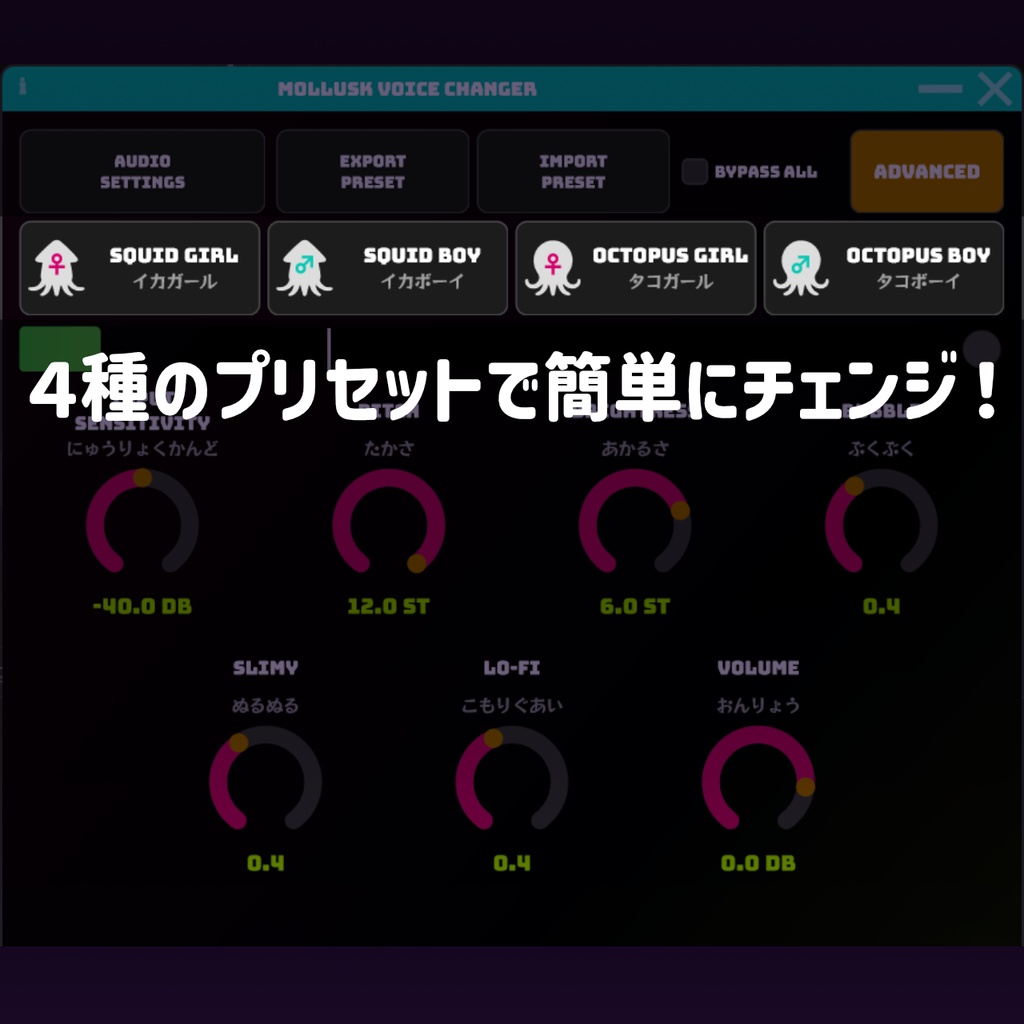
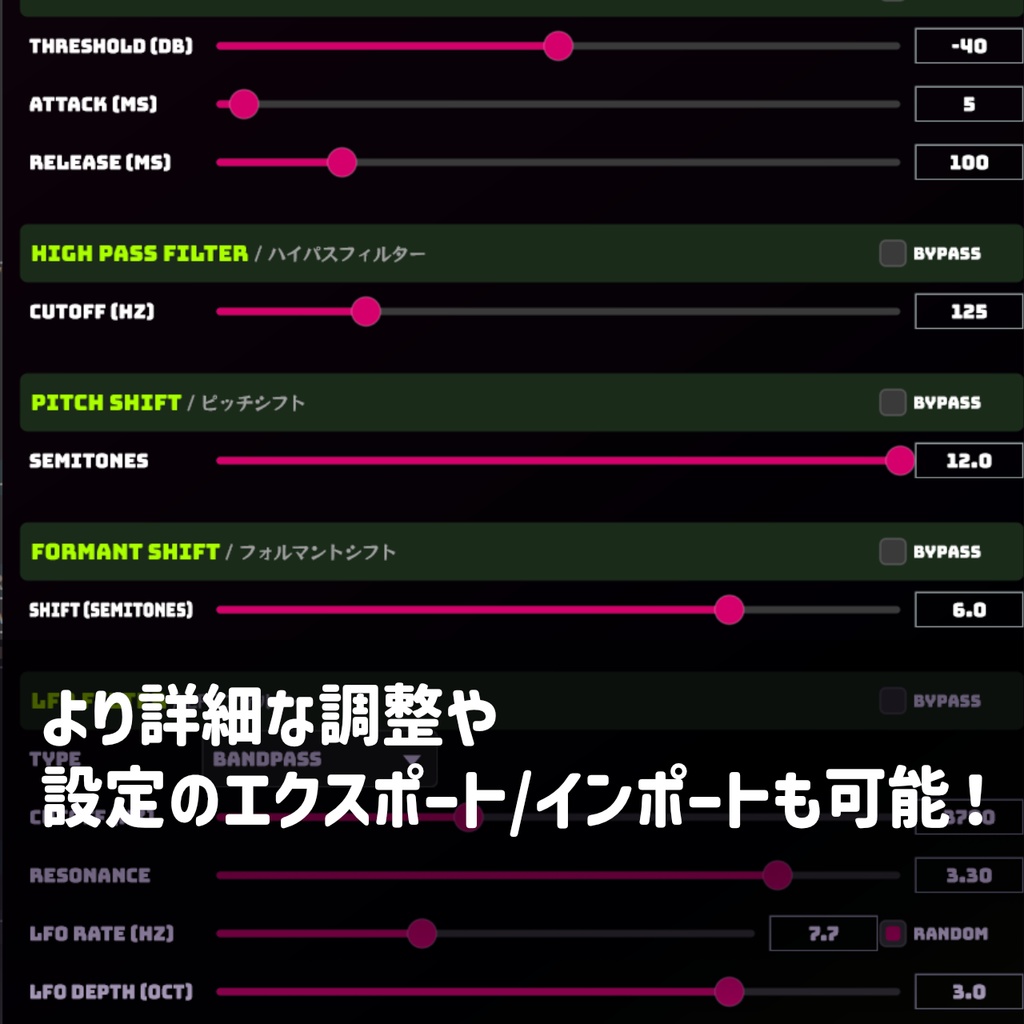
■ プリセットを選ぶ 画面上部の 4 つのボタン(Squid Girl / Boy、Octopus Girl / Boy) から好みのキャラクターを選択する。 ■ Basic モード(デフォルト) 7 つのノブで音声を調整する。 INPUT SENSITIVITY マイクの感度(ノイズゲート) PITCH 声の高さ BRIGHTNESS 声の明るさ(フォルマント) BUBBLE 揺らぎ(LFO フィルター) SLIMY ぬめり感(フェイザー) LO-FI こもり感(バンドパスフィルター) VOLUME 出力音量 ■ Advanced モード 「ADVANCED」ボタンで切り替え。 各エフェクトを個別に細かく調整できる。 ■ プリセットの保存・読み込み 「EXPORT PRESET」/ 「IMPORT PRESET」で 現在の設定を XML ファイルとして保存・読み込みできる。 ■ 終了と次回起動 終了時に設定が自動保存され、次回起動時に復元される。 ---------------- ■ Select a Preset Choose from the four buttons at the top of the screen: Squid Girl / Squid Boy / Octopus Girl / Octopus Boy. ■ Basic Mode (default) Adjust your voice with 7 knobs: INPUT SENSITIVITY Microphone sensitivity (noise gate) PITCH Voice pitch BRIGHTNESS Voice brightness (formant) BUBBLE Wobble (LFO filter) SLIMY Sliminess (phaser) LO-FI Muffled tone (band-pass filter) VOLUME Output volume ■ Advanced Mode Click "ADVANCED" to access per-effect fine-tuning. ■ Preset Export / Import Save and load your settings as XML files via "EXPORT PRESET" / "IMPORT PRESET". ■ Session Restore Settings are saved automatically on exit and restored on next launch.
動作環境 / System Requirements
OS : Windows 10 / 11(64bit)/ MacOS / Linux 必須(Required) : 仮想オーディオデバイス(Virtual audio device) ■Win VB-CABLE Virtual Audio Device(Donate/Free) https://vb-audio.com/Cable/ ■Mac BlackHole (Donate/Free) https://existential.audio/blackhole/ ■Linux JACK / PipeWire
配布条件 / Distribution Terms
・個人・商用を問わず、無償で使用できます。 ・ソースコードの複製・改変・再配布は、GNU AGPLv3 の条件に従う限り自由に行えます。 ・改変して再配布する場合は、同ライセンス(AGPLv3)のもとでソースコードを公開してください。 ・ネットワーク経由でサービスとして提供する場合も、ソースコードの開示義務が生じます。 ---------------- - Free to use for both personal and commercial purposes. - Copying, modifying, and redistributing the source code is permitted under the GNU AGPLv3. - Modified versions must be released under the same license (AGPLv3) with source code made available. - If you run a modified version over a network (e.g. as a service), you must also provide the source code.
使用しているライブラリ・フォント / Credits
JUCE Framework © Raw Material Software Limited https://juce.com/ Bungee / RocknRoll One / Alfa Slab One / Rubik Glitch Google Fonts(SIL Open Font License 1.1)
免責事項 / Disclaimer
本ソフトウェアは現状のまま提供されます。 使用によって生じたいかなる損害についても、 作者は一切の責任を負いません。 ---------------- This software is provided "as is", without warranty of any kind. The author shall not be liable for any damages arising from the use of this software.
アップデート履歴
[2026-05-16: v1.1.0] OUTPUT レベルメーターを追加 PITCH / BRIGHTNESS が 0 のときパススルーするよう変更 [2026-05-06: v1.0.0] 公開
Github
https://github.com/hyakkei/MolluskVoiceChanger
連絡先 / Contact
Mail : ito.7474@gmail.com X : @ito_74