

Angel Hierarchy -見える副Hierarchy
- ダウンロード商品¥ 1,000
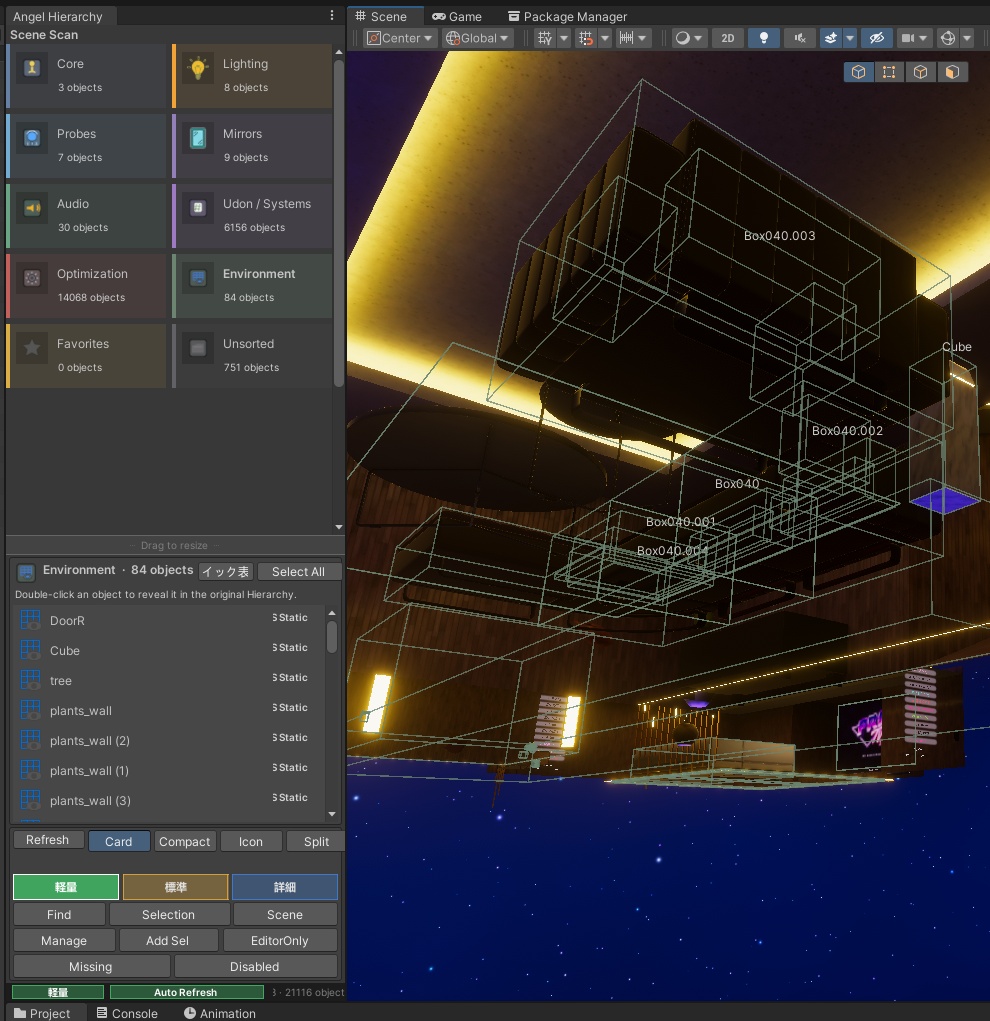


長すぎる Unity Hierarchy を、もう探し続けない。 VRChat ワールドを作っていると、Hierarchy はすぐに長くなります。ライト、Probe、Mirror、Udon、Audio、Post Processing、EditorOnly……必要なものは確かにシーン内にあるのに、毎回スクロールして探すことになります。Angel Hierarchy は、その時間を減らすための「見える副Hierarchy」です。 Stop digging through an endless Unity Hierarchy. When building VRChat worlds, the Unity Hierarchy quickly becomes too long. Lights, probes, mirrors, Udon objects, audio sources, post processing, EditorOnly objects… everything is there, but finding it still takes time. Angel Hierarchy gives you a visual secondary Hierarchy so you can spend less time searching and more time building.
シーンをカードで見る
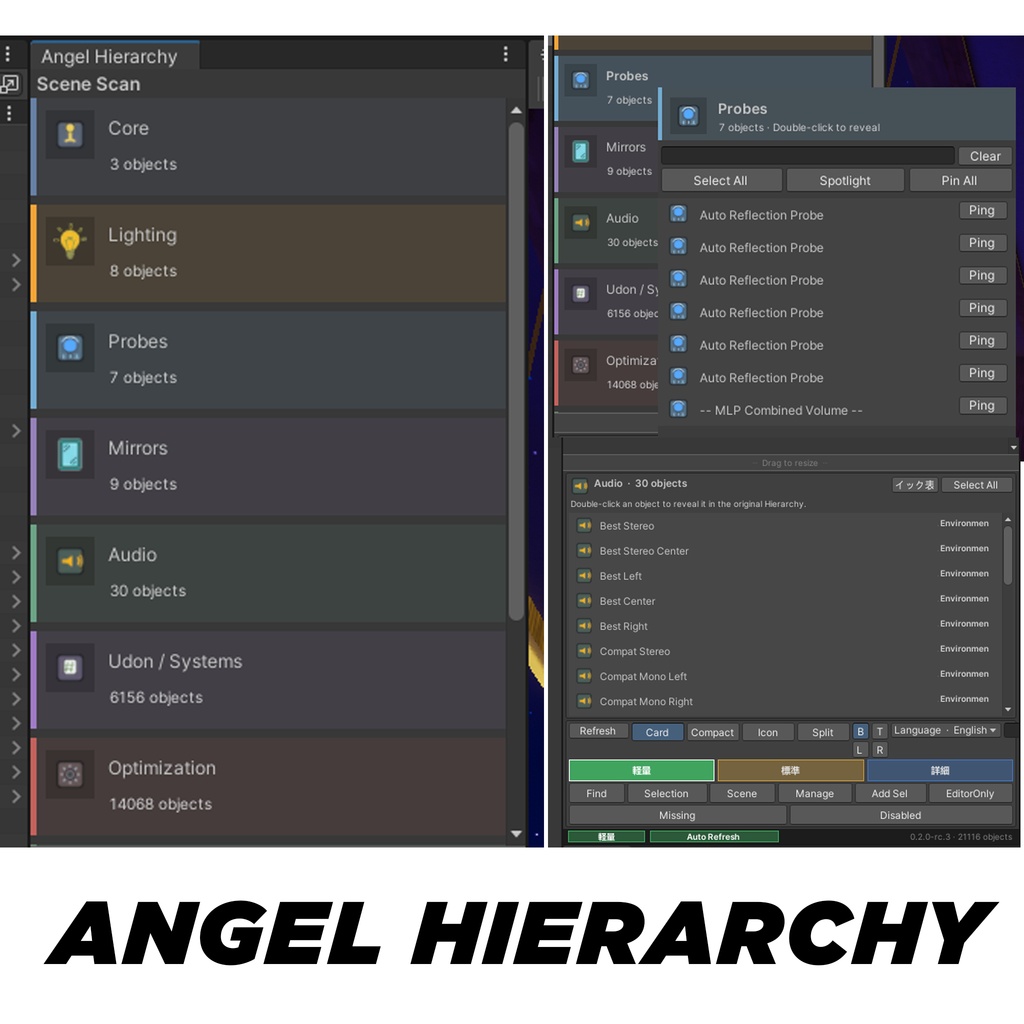
Angel Hierarchy は、Unity の本来の Hierarchy を置き換えるものではありません。 もう一枚の「見やすいシーンマップ」として、オブジェクトをカード、色、アイコン、カテゴリで整理して表示します。実際の Unity Hierarchy を壊さずに、作業用の見取り図を作るイメージです。 Angel Hierarchy does not replace Unity’s original Hierarchy. It works as a cleaner visual scene map, showing your objects as cards with colors, icons, and categories. Your real Unity Hierarchy stays untouched while Angel Hierarchy gives you a more readable workspace.
VRChat制作向けの自動分類
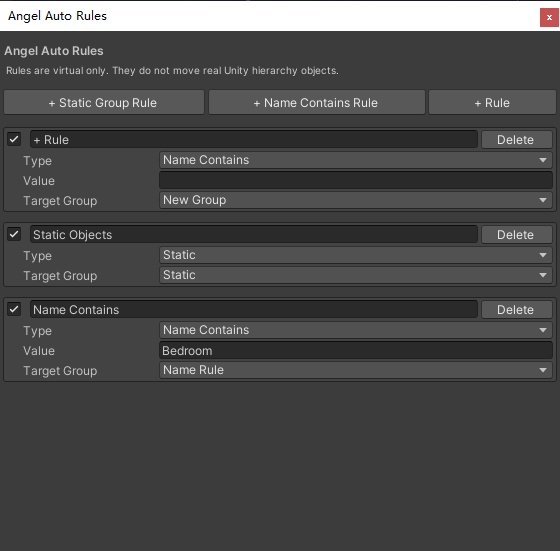
VRChat ワールド制作でよく触る要素を、自動でグループ化します。 VRCWorld、Main Camera、Post Processing、ライト、Bakeryライト、Reflection Probe、Light Probe Group、Mirror、Audio Source、Udon、Pickup、Station、Video Player、EditorOnly、Missing Script、Disabled、Static などを見つけやすくします。 Angel Hierarchy automatically groups objects commonly used in VRChat world creation. It helps you find VRCWorld, Main Camera, Post Processing, Unity lights, Bakery lights, Reflection Probes, Light Probe Groups, mirrors, Audio Sources, Udon objects, pickups, stations, video players, EditorOnly objects, missing scripts, disabled objects, static objects, and more.
探す時間を減らすためのグループ
Core、Lighting、Probes、Mirrors、Audio、Udon / Systems、Optimization、Environment など、ワールド制作中に見たい単位でシーンを整理できます。 「Mirror どこだっけ?」「Probe どこに置いた?」「この Udon 何に使ってた?」という場面を減らすための構造です。 Groups such as Core, Lighting, Probes, Mirrors, Audio, Udon / Systems, Optimization, and Environment help you read the scene in the way VRChat creators actually work. It is designed for moments like “Where was that mirror?”, “Where did I place the probes?”, or “What was this Udon object for?”
自分用のワールドマップを作る
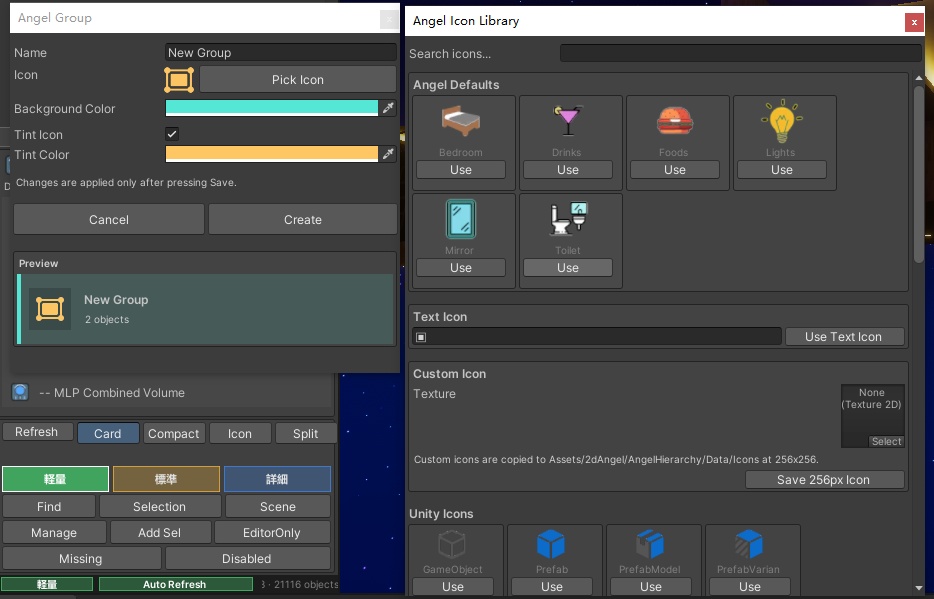
自動分類だけでなく、自分でグループを作ることもできます。 Bedroom、Toilet、Bar、Dance Floor、VIP、Photo Spot など、ワールドの構造に合わせて名前、色、アイコンを設定できます。グループは基本的に仮想整理なので、実際の Hierarchy を無理に移動する必要はありません。 You can also create your own groups. For example, Bedroom, Toilet, Bar, Dance Floor, VIP, Photo Spot, or anything that matches your world. You can set names, colors, and icons. The grouping is mainly virtual, so you do not need to physically rearrange your real Unity Hierarchy.
ドラッグで簡単に整理
Unity Hierarchy や Scene で選んだ GameObject を、Angel Hierarchy の好きなグループへドラッグして追加できます。 「この Mirror はあとで確認したい」「このライトは Lighting に入れておきたい」「この家具は Bedroom 側で見たい」というような整理を、作業中にそのまま行えます。 You can drag GameObjects from Unity Hierarchy or Scene selection into any Angel group. Use it while working: keep a mirror easy to find, add a light to Lighting, or place furniture into Bedroom. It helps you organize your scene without interrupting your workflow.
選択中のオブジェクトをすぐ追加
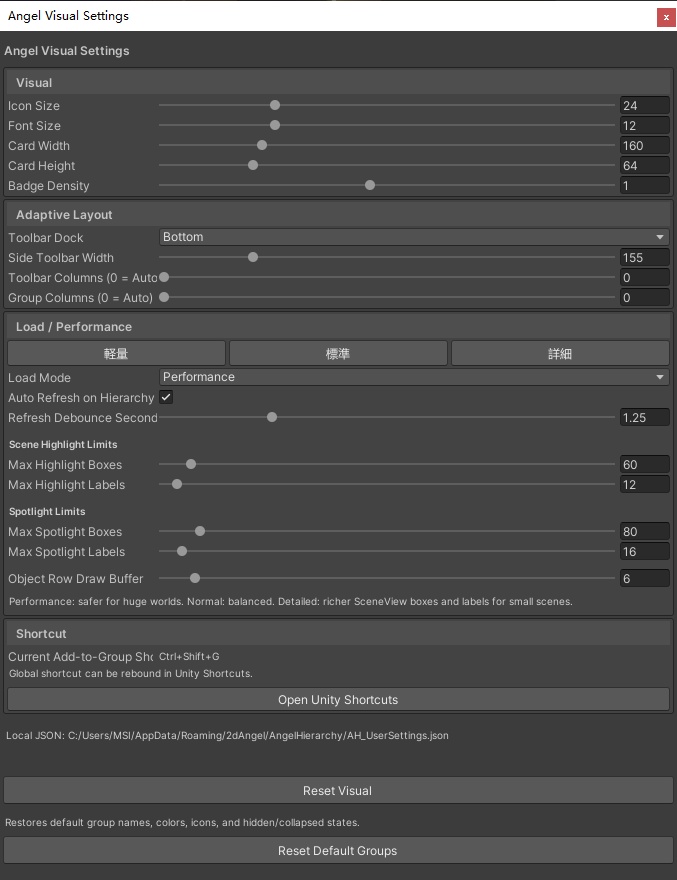
現在選択しているオブジェクトを、ショートカットから任意のグループへ追加できます。 ショートカットは Unity の Shortcuts 設定から変更できます。自分の作業環境に合わせて使えるようにしています。 You can add the currently selected objects to any group through a shortcut. The shortcut can be changed in Unity Shortcuts, so you can adapt it to your own workflow.
Peekで中身をすぐ確認
グループをダブルクリックすると、マウス付近に小さな Peek ウィンドウが開きます。 そのグループ内のオブジェクトをすぐ確認でき、検索、選択、Ping、Spotlight、Pin All などの操作ができます。毎回大きく視線を動かさずに、必要なものへすぐ触れるための機能です。 Double-click a group to open a small Peek window near your cursor. You can quickly check the objects inside the group, search them, select them, ping them, use Spotlight, or pin them. It is made for fast checking without breaking your focus.
SceneView Spotlight
Hierarchy 上で見つけても、Scene 上でどこにあるか分からないことがあります。 Spotlight を使うと、選択中のグループ内のオブジェクトを SceneView 上で強調表示できます。Mirror、Probe、ライト、Udon オブジェクトなど、広いシーン内で見失いやすいものを探す時に便利です。 Finding an object in the Hierarchy is only half the job. Spotlight highlights objects from the selected group directly in SceneView. It is useful for locating mirrors, probes, lights, Udon objects, and other items that are easy to lose in large scenes.
よくあるワールド構成のプリセット
Club World、Sleep Room、Photo World など、よくあるワールド構成向けのプリセットを用意しています。 Dance Floor、DJ Booth、Bar、Bedroom、Toilet、Photo Spots などのグループを素早く作れます。プリセットは実際の Hierarchy を勝手に動かすものではなく、整理を始めるための入口です。 Presets are included for common world types such as Club World, Sleep Room, and Photo World. They can quickly create groups like Dance Floor, DJ Booth, Bar, Bedroom, Toilet, and Photo Spots. Presets do not move your real Hierarchy; they only help you start organizing visually.
大規模ワールドでも使いやすく
Angel Hierarchy は、毎回すべてを力任せに再スキャンして描画する作りにはしていません。 スキャン結果のキャッシュ、Hierarchy 変更時の遅延更新、連続変更時の更新まとめ、オブジェクト一覧の仮想描画、SceneView 表示数の上限などを入れています。大きいワールドでも、必要以上に Editor を重くしないための設計です。 Angel Hierarchy is not designed to aggressively rescan and redraw everything all the time. It uses cached scan results, delayed refresh after Hierarchy changes, merged refreshes during repeated changes, virtualized object list drawing, and SceneView display limits. These choices help reduce unnecessary editor load in large worlds.
重い処理を避ける設計
全スキャン時に重い参照処理を毎回走らせると、大きいシーンでは Editor が重くなります。 そのため Angel Hierarchy では、通常のスキャンでは軽い参照を使い、ユーザーが実際にグループへ保存した時だけ永続参照を扱うようにしています。必要な時だけ重い処理を行うことで、普段の操作を軽く保つ方針です。 Heavy reference operations during every full scan can slow down large scenes. Angel Hierarchy avoids doing that during normal scanning. It uses lightweight references while scanning, and only saves persistent references when the user actually adds objects to groups. The goal is to keep everyday interaction responsive.
負荷モード
Performance、Normal、Detailed の3つの負荷モードがあります。 Performance は大規模ワールド向けに更新頻度や SceneView 表示数を抑えます。Normal は通常作業向けのバランス設定です。Detailed は小規模シーンや確認作業向けに、より多くの情報を表示します。 There are three load modes: Performance, Normal, and Detailed. Performance reduces refresh pressure and SceneView draw counts for large worlds. Normal is the balanced default. Detailed shows more information for smaller scenes or inspection work.
ローカルJSON設定
表示サイズ、アイコンサイズ、フォントサイズ、負荷モード、ツールバー配置などの設定はローカル JSON に保存されます。 プロジェクトごとに毎回設定し直すストレスを減らし、別の Unity プロジェクトでも近い感覚で使えるようにしています。 Layout, icon size, font size, load mode, toolbar position, and other preferences are saved to a local JSON file. This helps Angel Hierarchy feel consistent across different Unity projects.
Editor専用の制作補助ツール
Angel Hierarchy は Unity Editor 上で使う制作補助ツールです。 基本的にはワールド内にランタイムシステムを追加するものではありません。グループ分けも主に仮想整理なので、実際の Unity Hierarchy を勝手に並び替えることは目的にしていません。 Angel Hierarchy is an editor tool. It is not meant to add runtime systems to your world. Its grouping workflow is mainly virtual, and it does not aim to automatically rearrange your real Unity Hierarchy.
こんな人向け
VRChat ワールド制作で Hierarchy が長くなりすぎる人。 Mirror、Probe、ライト、Udon を探す時間が多い人。 Club World、Sleep Room、Photo World などを作っている人。 Unity Hierarchy を壊さずに、見た目だけ整理したい人。 制作中に「どこに置いたっけ?」が多い人。 Recommended for VRChat world creators with long Unity Hierarchies. For people who often lose track of mirrors, probes, lights, or Udon objects. For Club World, Sleep Room, and Photo World creators. For anyone who wants a cleaner visual organization layer without moving the real Hierarchy. For creators who often ask, “Where did I put that?”
開き方
Unity 上部メニューから開けます。 2dAngel → Angel Hierarchy → Open Open it from the Unity top menu. 2dAngel → Angel Hierarchy → Open
対応環境
Unity 2022.3 系を想定しています。 VRChat Creator Companion / VCC 環境での利用を前提にしています。 Designed for Unity 2022.3 projects. Built with VRChat Creator Companion / VCC workflows in mind.
作者
Author: E-Mommy Brand: 2d Angel / 2d Angel VRC
最後に
Angel Hierarchy は、Hierarchy を派手に飾るためだけのツールではありません。 長くなりすぎたワールド制作画面を、もう少し見やすく、探しやすく、触りやすくするためのツールです。 Angel Hierarchy is not just decoration for the Hierarchy. It is a tool for making large VRChat scenes easier to read, easier to search, and easier to work with.