

VR Tracker Manager — フルトラ環境診断ダッシュボード
- ダウンロード商品¥ 1,500
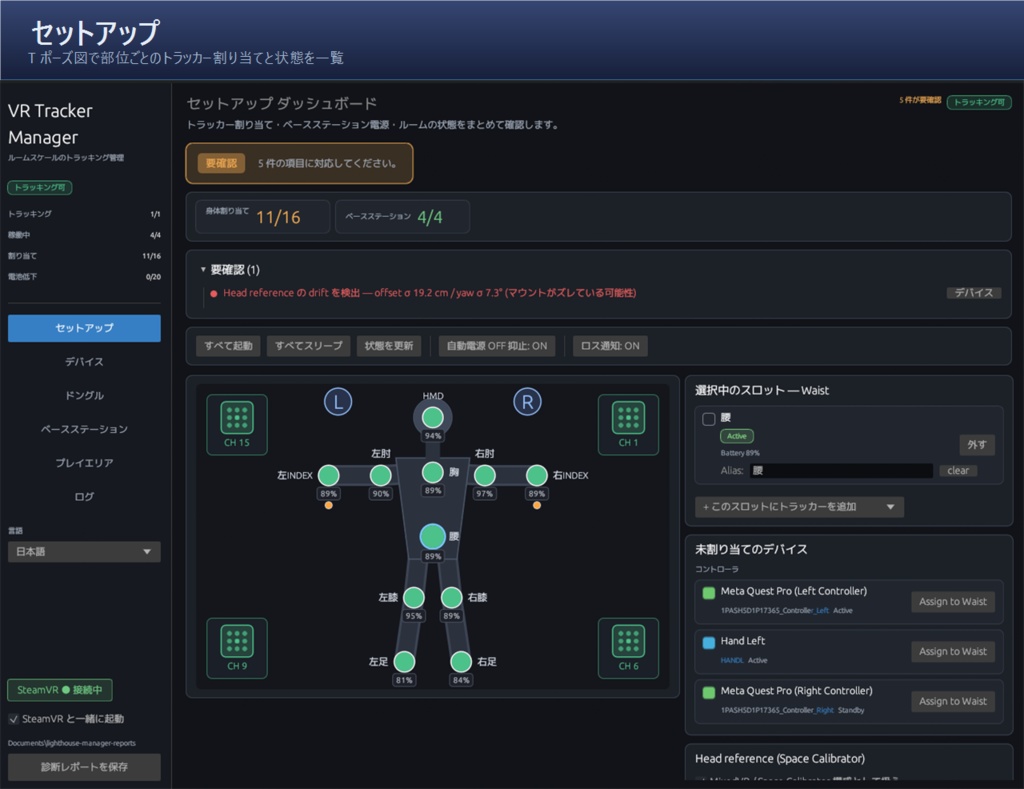
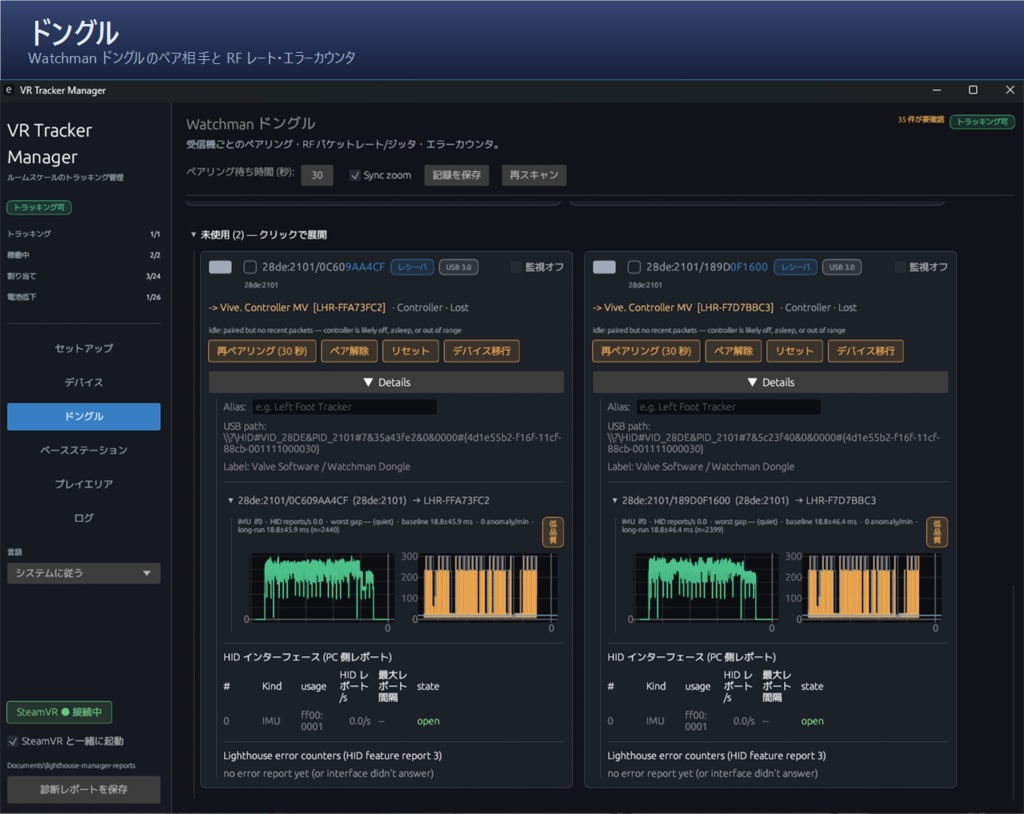
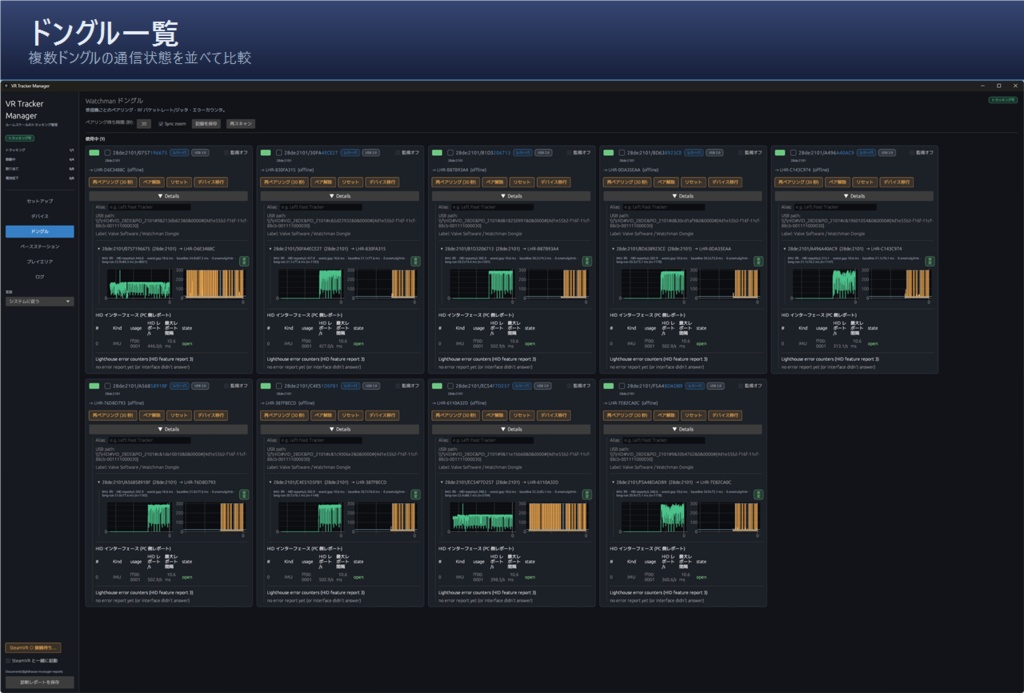
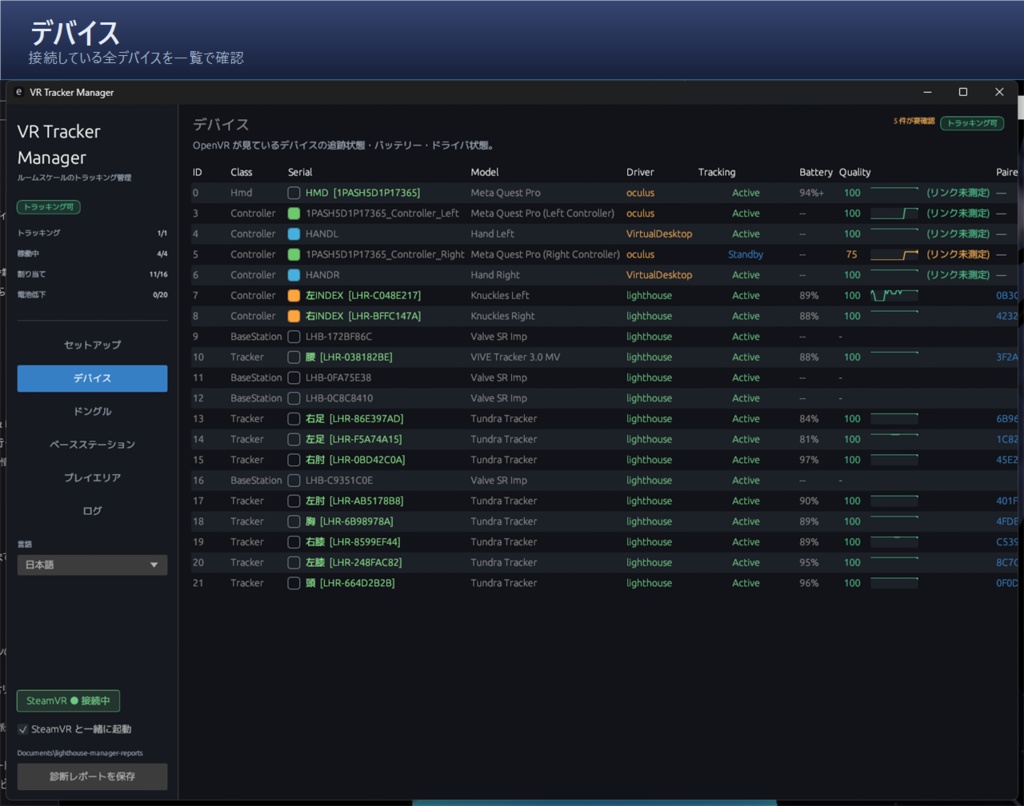
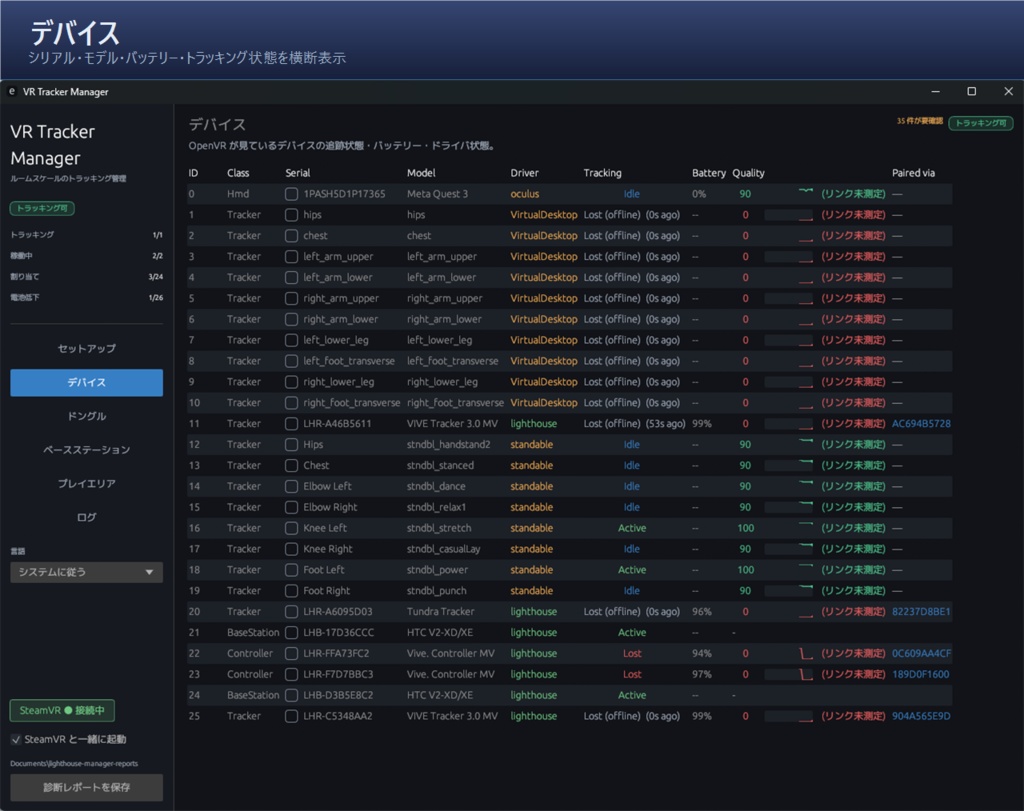
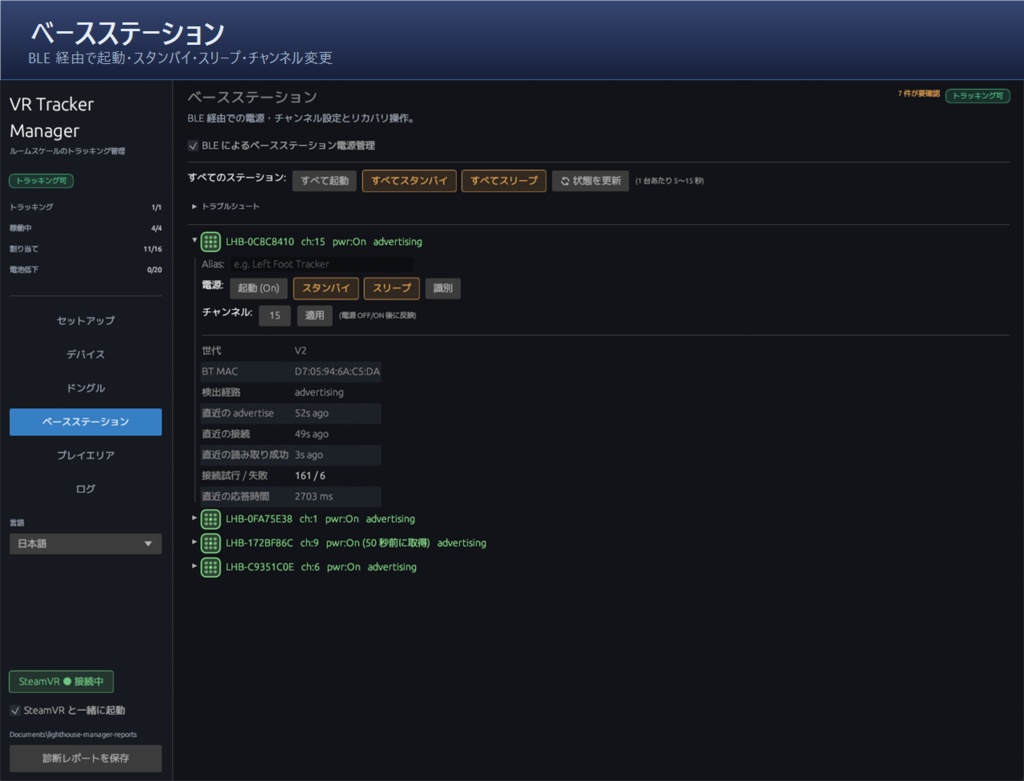
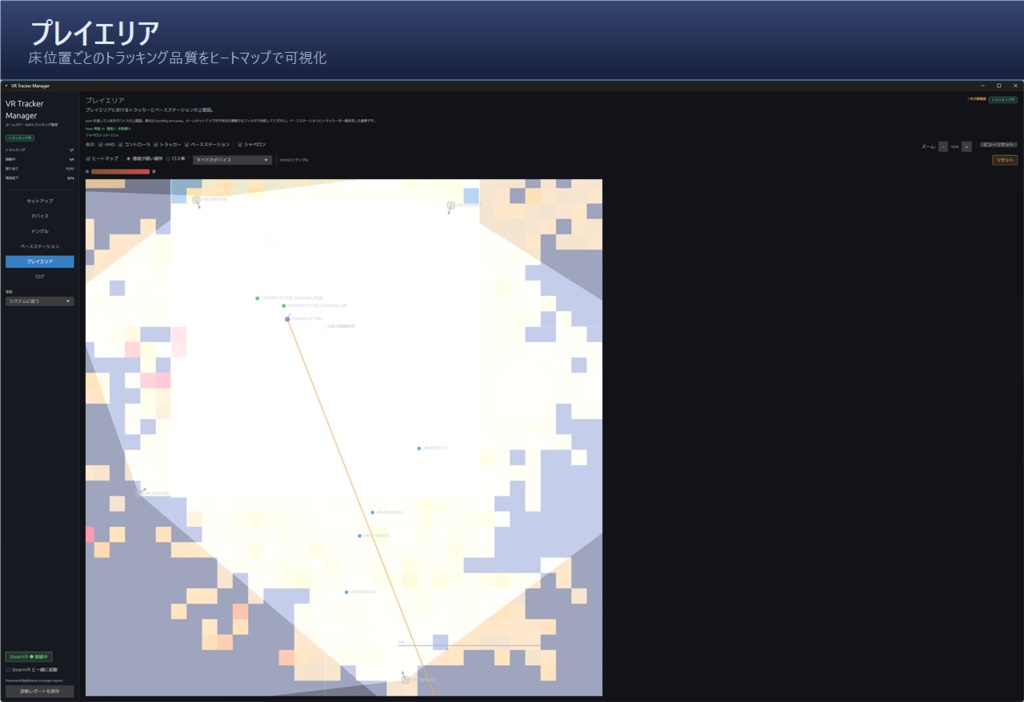


================================================== VR Tracker Manager フルトラ環境診断ダッシュボード ================================================== SteamVR / Lighthouse 環境でフルトラを使う人向けの、Windows 用管理ツールです。 トラッカー、ベースステーション、Watchman ドングルの状態を 1 画面で確認できます。 「どのトラッカーが怪しいのか」「ドングルが悪いのか」「ベースステーション配置なのか」「チャンネル衝突なのか」といった、フルトラ不調時の切り分けをしやすくするために作りました。 ## 主な機能 ### トラッカー状態の確認 Tポーズ図で、体の部位ごとのトラッカー状態や割り当てを確認できます。 バッテリー残量や状態を色で見やすく表示し、問題がある場合は確認ポイントや対処のヒントも表示できます。 ### ベースステーション操作 Bluetooth 経由で、Lighthouse ベースステーションの起動 / スリープ / スタンバイを切り替えられます。 チャンネル変更や、同じチャンネルに 2 台割り当てられているようなチャンネル衝突の自動検出にも対応しています。 ### プレイエリアヒートマップ 床マップにトラッキング品質を重ねて表示できます。 ロス率、ドングル通信量、安定性が落ちた割合などを色で表示し、「この位置に立つとジッターが出やすい」「この向きだと通信が弱い」といった問題を場所として確認できます。 表示はトラッカーごとに切り替え可能です。 ### Watchman ドングル管理 どの Watchman ドングルがどのトラッカーとペアになっているかを一覧で確認できます。 ドングル単位の通信量、グラフ、ファームウェア側のエラーも表示できるため、調子の悪いドングルの切り分けに使えます。 ### 色ラベル トラッカー / ドングルに RGB の色タグを付けられます。 実物に色シールやテープを貼って、アプリ側の色ラベルと合わせると識別しやすくなります。 ### SteamVR ダッシュボード対応 SteamVR ダッシュボード内に画面を表示できます。 ヘッドセットを外さずに、トラッカー状態の確認やベースステーション操作ができます。 ### 日本語 / 英語対応 アプリは日本語と英語に対応しています。 ## 動作環境 - Windows 10 / 11 - SteamVR - SteamVR / Lighthouse tracking environment 対応 HMD 例: Meta Quest / Pico / Valve Index / Vive / Pimax / Varjo / MeganeX 一部の HMD や SteamVR 構成では、機能に制限が出る場合があります。 ## 使い方 zip を解凍し、同梱のインストーラーを実行してください。 アプリはユーザーフォルダ内にインストールされ、スタートメニューに登録されます。 管理者権限は不要です。 SteamVR が起動していれば、アプリ起動後に自動で接続します。 SteamVR が起動していない場合は、先に SteamVR を起動してください。 詳しい手順やトラブルシュートは、同梱の README.txt を確認してください。 ## アップデート / サポート アップデート通知は Discord と BOOTH メッセージで流します。 質問や不具合報告は Discord が一番早いです。 Discord: https://discord.gg/wvmKNjbeTc 不具合報告のときは、アプリ内の「レポート保存」ボタンで出力される zip を添付してもらえると助かります。 このレポートには、デバイスのシリアル番号や一部のファイルパスが含まれる場合があります。 サポート以外の場所には貼らないようにしてください。 ## ライセンス 購入者が自分の持っている複数台の PC にインストールするのは OK です。 配信、録画、動画アップロード、収益化済みコンテンツ、VRChat のオフ会やワールド内イベントでの使用も OK です。 ただし、zip ファイル自体や exe を第三者に再配布するのは禁止です。 有償・無償を問わず、再配布はできません。 詳しくは zip 内の LICENSE.txt を読んでください。 ## 更新履歴 ### 1.0.3 リリース後にいただいた報告への対応をまとめたメンテナンスアップデートです。長時間のプレイでメモリ使用量が増え続ける問題の修正を含むため、今回は全員へのアップデートを推奨します。 ### 1.0.2 環境差まわりの堅牢化を中心としたメンテナンス更新です。 Steam / SteamVR を複数ドライブに分けている環境での参照先ズレ、Watchman ドングル受信が 0 のまま戻らない問題、LHB-00000000によるチャンネル衝突の誤検知などを修正しました。 また、実際に読み込んだ openvr_api.dll / SteamVR 設定 / ログのパス表示を追加し、「SteamVR を起動」ボタンを廃止しました。 ### 1.0.1 SteamVR 起動直後に一部環境でクラッシュする問題と、PC 起動直後に Watchman ドングルが USB で認識されないことがある問題を修正しました。 ## クレジット 開発: challenger0303 β テストに協力してくれた皆さんに感謝します。 使用 OSS のライセンス情報は zip 内の THIRD_PARTY_NOTICES.txt にまとめてあります。 ================================================== English ================================================== VR Tracker Manager is a Windows tool for SteamVR / Lighthouse full-body tracking users. It lets you check trackers, base stations, and Watchman dongles in one place. It is made to help troubleshoot full-body tracking issues, such as unstable trackers, bad dongles, base station placement problems, Lighthouse channel conflicts, and weak spots in your play area. ## Main Features ### Tracker status overview Check tracker status, battery level, and body assignments using a simple T-pose view. The app can also show hints when something looks wrong. ### Base station control Turn Lighthouse base stations on, sleep, or standby via Bluetooth. You can also change channels and automatically detect Lighthouse channel conflicts. ### Play area heatmap View tracking quality as a heatmap over your play area. This helps you see where tracking loss, jitter, or wireless instability is more likely to happen. The view can be switched per tracker. ### Watchman dongle management Check which Watchman dongle is paired with which tracker. You can also view dongle-level traffic, graphs, and firmware-side errors to help find unstable dongles. ### Color labels Assign color labels to trackers and dongles. Using matching colored stickers or tape on the real devices makes them easier to identify. ### SteamVR Dashboard support Use VR Tracker Manager from inside the SteamVR Dashboard. You can check tracker status or control base stations without taking off your headset. ### Japanese / English support The app supports both Japanese and English. ## Requirements - Windows 10 / 11 - SteamVR - SteamVR / Lighthouse tracking environment Supported headset examples: Meta Quest / Pico / Valve Index / Vive / Pimax / Varjo / MeganeX Some features may be limited depending on your headset or SteamVR setup. ## How to Use Extract the zip file and run the included installer. The app installs into your user folder and is added to the Start Menu. Administrator privileges are not required. If SteamVR is already running, the app will connect automatically after launch. If SteamVR is not running, please start SteamVR first. For more details and troubleshooting, please check the included README.txt. ## Support Update notices will be posted on Discord and via BOOTH messages. For questions or bug reports, Discord is the fastest place to contact me. Discord: https://discord.gg/wvmKNjbeTc When reporting a bug, please attach the zip file created by the app’s “Save Report” button. This report may contain device serial numbers and some file paths, so please do not post it publicly. ## License You may install the tool on multiple PCs that you personally own. Streaming, recording, video uploads, monetized content, VRChat meetups, and in-world events are allowed. Redistributing the zip file or exe to others is not allowed, whether paid or free. Please read LICENSE.txt for details. ## Credits Development: challenger0303 Special thanks to everyone who helped with beta testing. OSS license information is included in THIRD_PARTY_NOTICES.txt.