
3D昭和 鉱石ラジオのヘッドフォン [.obj] [.csmo] [.clip]
- ダウンロード商品¥ 3,975
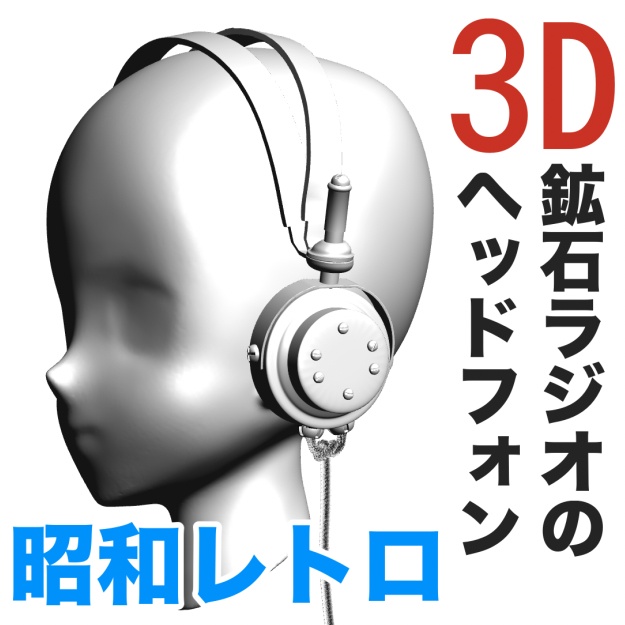


江戸東京博物館で展示されている昭和時代の「鉱石ラジオ」に 付属する、無骨な昭和レトロのヘッドフォンを忠実に 再現した3Dモデルです。 マネキンヘッド、ヘッドフォン本体、ケーブルの3パーツに分かれており、マネキンヘッドは非表示にすることも可能です。また、作画時のアタリ用としても活用できます。 ラジオ放送が始まった1925年(大正14年)頃から親しまれた、 当時の家庭用音響機器をモチーフにしています。 昭和時代の漫画を描く際の時代考証済みアイテムとしてはもちろん、 スチームパンク風の小道具として、現代漫画にも十分活用できる、 雰囲気抜群のかっこいいアイテムです。 *スライド操作でケーブルを前後左右に動かすことができ、 さらに支点を中心に360度無段階で回転可能。 あらゆるシーンに柔軟に対応できます。 ■Clip Studioでの使用について なるべく同封の .csmo データをClip Studio Modeler https://www.clipstudio.net/en/modeler/ (セルシス公式サイトより無料ダウンロード可能)で 「新規素材として登録」してください。 素材登録を行うことで、各パーツ名称が正しく表示され、 スライド操作による可動が可能になります。 なお、.obj データを直接 Clip Studio Paint に読み込むことも可能ですが、 ・パーツ名称が表示されない ・スライド操作が使用できない といった制限があります。 そのため、Clip Studio Modelerでの素材登録を推奨します。 [.obj]データ同封。漫画以外、ゲーム・アニメの制作、3Dプリントの 3D素材としても活用可能です。 ■ 利用規約・注意事項 • 本素材の二次配布・再販売は禁止します。 • 個人制作・商業制作を問わず使用可能です。 • クレジット表記は不要です。 This is a highly detailed 3D model faithfully recreating the rugged, retro-style headphones that accompany a crystal radio from the Showa era, currently exhibited at the Edo-Tokyo Museum in Japan. The model consists of three parts: a mannequin head, the headphones, and the cable. The mannequin head can be hidden when not needed. It can also be used as a visual guide for positioning and drawing. The design is based on the home audio equipment that became popular around 1925 (Taisho 14), when radio broadcasting first began in Japan. This is an excellent historically researched prop for manga set in the Showa era. It can also be used as a distinctive steampunk-style prop, making it suitable for modern manga and other creative projects as well. The cable can be moved forward, backward, left, and right using slider controls. It can also be rotated continuously through 360 degrees around its pivot point, allowing it to be easily adapted to a wide variety of scenes. ■ Using the Model in Clip Studio Paint For the best results, we recommend registering the included .csmo file as a new material using Clip Studio Modeler, which is available as a free download from the official Clip Studio website: Clip Studio Modeler — Official Website Registering the material allows the individual parts to be displayed with their proper names and enables you to adjust movable parts using sliders. You can also import the .obj file directly into Clip Studio Paint. However, there are some limitations: * Part names will not be displayed. * Slider controls cannot be used. For this reason, we recommend registering the material through Clip Studio Modeler. The .obj data is also included. The model can be used not only for manga production, but also for games, animation, 3D printing, and other 3D-related projects. ■ Terms of Use & Notes * Redistribution or resale of this material is prohibited. * Commercial and non-commercial use are both permitted. * Credit is not required.