

【VRChat想定】メッセージ付き吹き矢ギミック(おまけ付き)
- 通常品ダウンロード商品¥ 300
- おやつ代付き(通常品と同じです)ダウンロード商品¥ 500
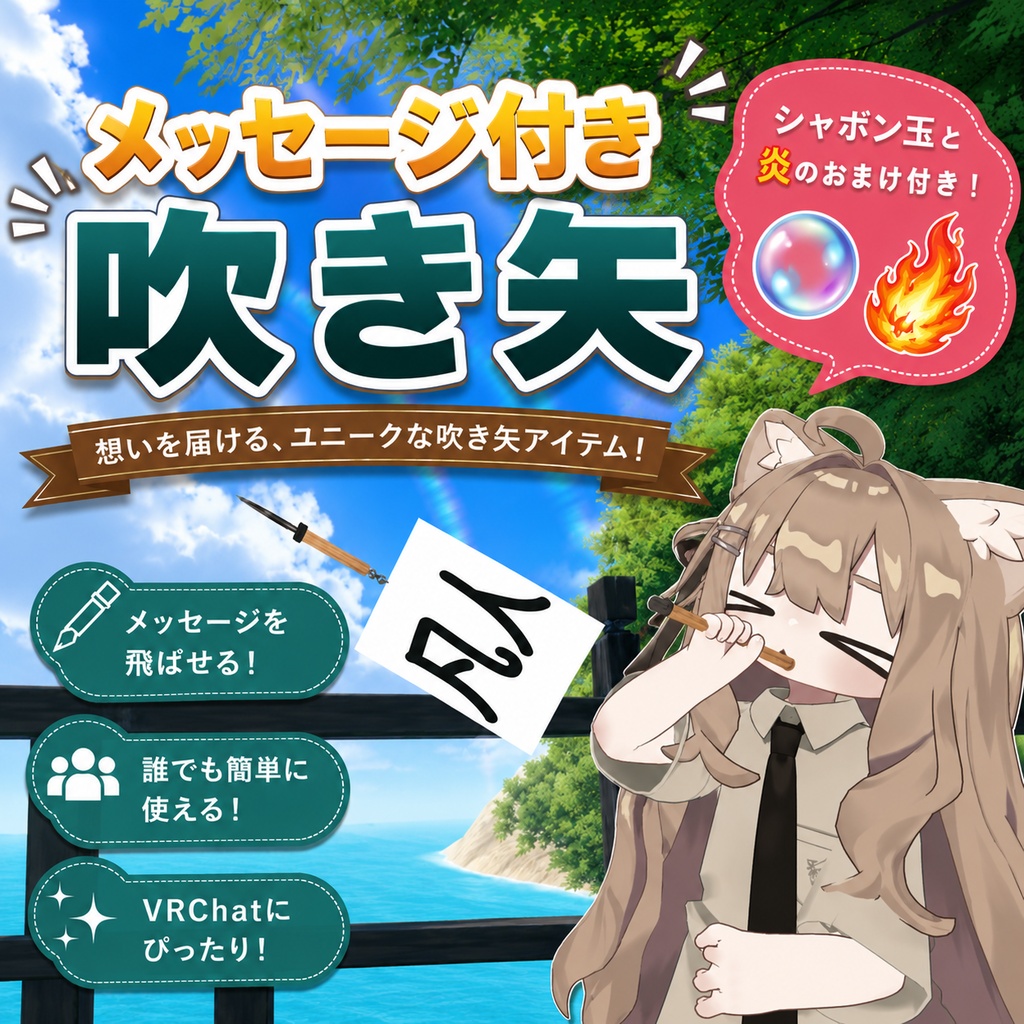
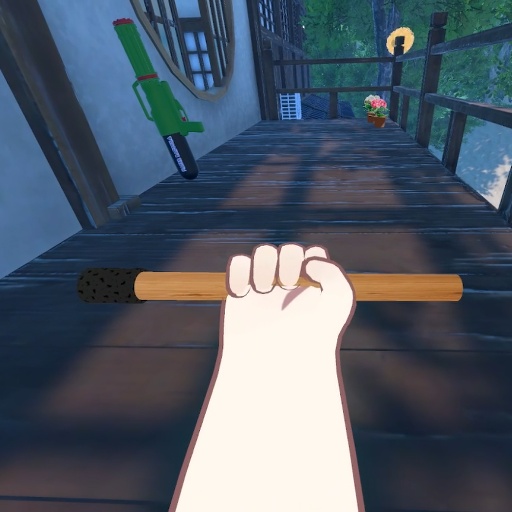
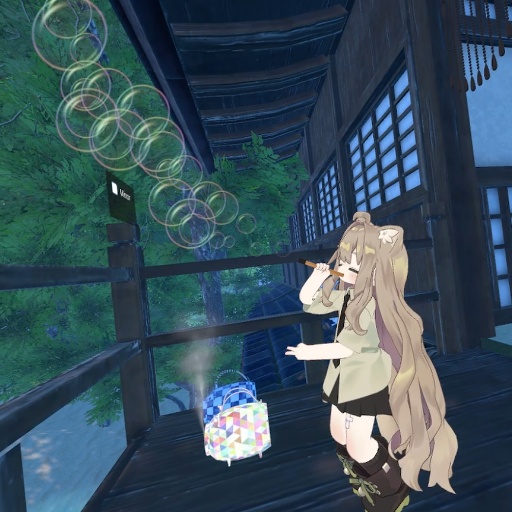
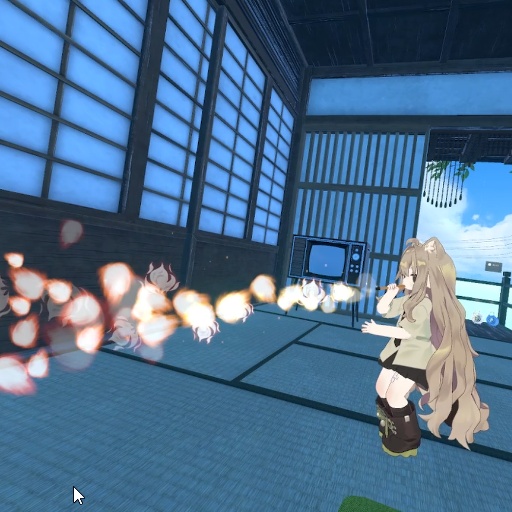
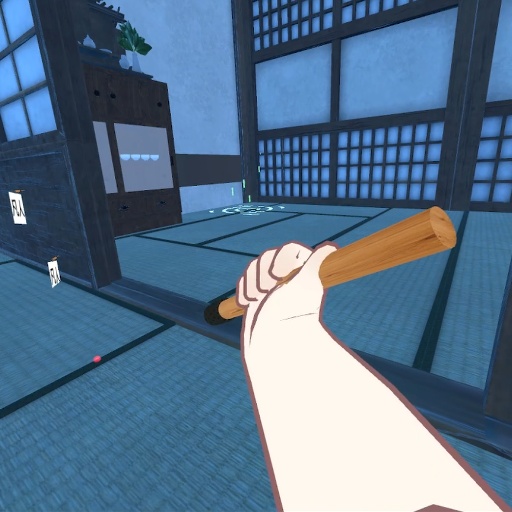
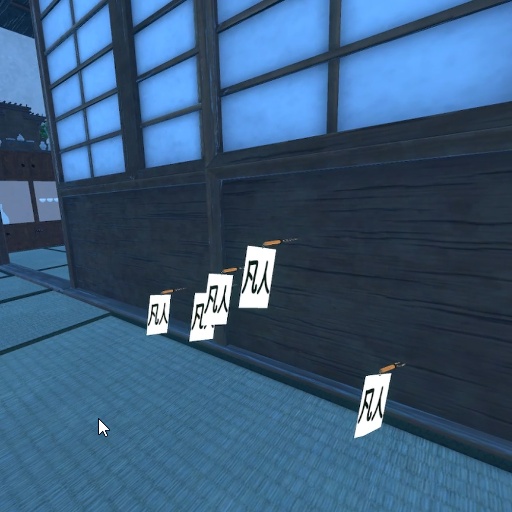
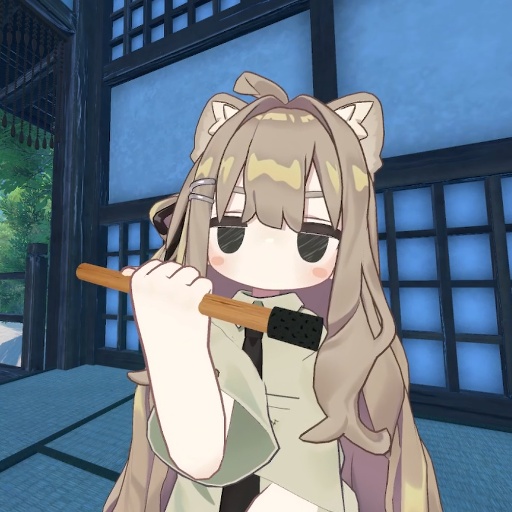


本商品はVRChat用の「メッセージ付き吹き矢」ギミックです。 口元にかまえて、メッセージ札のついたクナイを発射。壁や床に刺さって、メッセージがその場に残ります。 『好きな言葉を撃ち込んで、最大5枚まで画面に残せる!』 サンプルの札は「凡人」。画像を差し替えれば、煽り文句・あいさつ・ネタ文字…どんなメッセージにもできます。 Modular Avatar対応だから、プレハブを1つドラッグするだけで導入完了。Unity初心者でもカンタンに使えます。
できること
・口元にかまえてメッセージ札つきのクナイを発射。VRC Raycastで狙った場所を判定し、当たった壁・床にクナイが「刺さって残ります」。 ・札のメッセージは画像差し替えで自由に変更OK(サンプルは「凡人」)。煽り・あいさつ・ネタ文字など、好きな言葉を壁に撃ち込めます。 ・刺さった矢は最大5本まで画面に残ります(6発目で一番古い矢を上書き)。自分が動いても矢はワールドに固定されたまま。他人からもちゃんと5本見えます。 ・矢のスピードはメニューのスライダーで自由に調整。 ・レーザーサイトのON/OFF切り替えで狙いをつけやすく。 ・着弾時には効果音が鳴ります。 ・刺さった矢のメッセージ札はPhysBoneでゆらゆら揺れます。
メッセージの変え方(カンタン)
1. `Assets/のらねこ商店街/吹き矢/material/mozi.mat` を選択 2. Albedo(メインテクスチャ)に好きな文字画像を差し替えるだけ ※ 透過PNG推奨。差し替えれば飛ぶ矢・刺さった矢すべてに反映されます。 ▼ 3モード切替(おまけギミック同梱) ・吹き矢モード … クナイを発射(メイン) ・シャボン玉モード … ふわふわ飛ぶシャボン玉 ・炎モード … 口から炎(専用SE付き) メニューからワンタップで切り替えできます。
別アバターで使うとき(位置調整)
本体はModular Avatarで右手ボーンに、口元の判定(MouthReceiver)は頭ボーンに自動装着されます。手や頭の大きさが違うアバターでは、シーン上で2か所を合わせるだけでOKです。 1. アバターにプレハブを入れた状態で、`Fukiya_Item` の中の `Offset`(筒・先端・発射点をまとめた子オブジェクト)の Position / Rotation / Scale を動かし、筒が右手に自然に収まるよう合わせる。 ※ルートの `Fukiya_Item` ではなく `Offset` を動かしてください(ルートは装着・パラメータ用のアンカーです)。 2. `MouthReceiver` を、アバターの口の位置へ移動する。 ※発射は「口にくわえて右手グー」で行うため、ここがズレると発射判定が出ません。口元にぴったり合わせてください。
導入方法
1. UnityにVRCSDK3 Avatars・Modular Avatar・lilToon を先に入れておく 2. 同梱のUnityPackageをインポート 3. プレハブをアバター直下にドラッグ&ドロップ 4. アップロードするだけ。アーマチュアの手動マージ不要。 位置・サイズは「キプフェル」に合わせてありますが、設定の調整で他のアバターにも対応できます。 ※詳しい説明は付属のマニュアルを参照してください。
前提・スペック
・対応Unity: 2022.3.22f1 ・必須: VRCSDK3 Avatars / Modular Avatar(NDMF)/ lilToon ・想定: PC(Quest未検証) ・Expression Parameters 消費: 21bit ・ロジックはFXレイヤー+アニメーション+VRCコンポーネント(Raycast / Constraint / Contact / PhysBone)で構成。カスタムスクリプト不使用。
【利用規約】 ・モデルデータに含まれるファイルの再配布、再販売は禁止です。 ・改変は自由に行ってください。 ・R18、R18Gの利用を許可します。 ・誹謗中傷、政治、民族問題に関わる利用、宗教活動を目的とした利用は禁止します。 【免責事項】 ・本モデルを利用、改変したものによって生じるいかなる損害、トラブルに対して当方は一切の責任を負いません。 ・自己責任でご利用ください。
【更新履歴】
・2026-06-13 公開
Description This is a "Message Blowgun" gimmick for VRChat. Hold it to your mouth and fire kunai darts that carry a message tag - they stick into walls and floors, leaving your message right where it lands. "Pin your own words to the wall - up to 5 stay on screen at once!" The sample tag reads "凡人" (mediocre). Swap the image and the tag can say anything - taunts, greetings, memes, you name it. Modular Avatar ready: just drag one prefab onto your avatar and you're done. Easy even for Unity beginners. ────────────── ▼ Features - Hold to your mouth and fire a kunai with a message tag. VRC Raycast detects where you aim, and the kunai "sticks and stays" on the wall or floor it hits. - The message on the tag is fully changeable by swapping the image (sample reads "凡人"). Pin taunts, greetings, memes - any words you like - to the wall. - Up to 5 darts stay on screen (the 6th overwrites the oldest). The darts stay fixed in world space even when you move, and other players can see all 5 too. - Freely adjust dart speed with the menu slider. - Toggle the laser sight on/off to aim more easily. - A sound effect plays on impact. - The message tag on the stuck darts sways with PhysBone. ▼ How to change the message (easy) 1. Select `Assets/のらねこ商店街/吹き矢/material/mozi.mat` 2. Replace the Albedo (main texture) with your own text image. * Transparent or non-transparent PNG both work. The change applies to both the flying dart and all stuck darts. * Extra text images (天才 / 虚無 / バカ) besides "凡人" are also included in `Assets/のらねこ商店街/吹き矢/texture`. * To change the text size/position, adjust the Scale / Position of the tag mesh `ita` (under アーマチュア → ボーン.004) inside `prefab/KunaiVisual.prefab` (shared by all darts, so one edit covers everything). * To change the tag's sway (motion), adjust the VRC PhysBone (Pull / Spring / Gravity, etc.) on `ボーン.002` inside `KunaiVisual.prefab`. ▼ 3 Modes (bonus gimmicks included) - Blowgun mode ... fires kunai (main) - Bubble mode ... soft floating bubbles - Flame mode ... breathe fire from your mouth (with dedicated SE) Switch between them with a single tap from the menu. ▼ How to set up 1. Have VRCSDK3 Avatars, Modular Avatar, and lilToon installed in Unity first 2. Import the included UnityPackage 3. Drag the prefab directly onto your avatar 4. Just upload. No manual armature merging needed. * Position and size are tuned for "Kipfel," but it can be adapted to other avatars by adjusting the settings. * See the included manual for detailed instructions. ────────────── ▼ Using on another avatar (position adjustment) With Modular Avatar, the body attaches to the right-hand bone and the mouth detector (MouthReceiver) attaches to the head bone automatically. For avatars with different hand/head sizes, just align these two spots in the Scene view. 1. With the prefab added to your avatar, adjust the Position / Rotation / Scale of `Offset` (the child object that holds the tube, tip, and spawn point) so the blowgun sits naturally in the right hand. * Move `Offset`, not the root `Fukiya_Item` (the root is the anchor for attachment and parameters). 2. Move `MouthReceiver` to your avatar's mouth. * Firing is triggered by "hold to mouth + right-hand fist," so if this is off, the fire won't trigger. Align it right at the mouth. 3. Test with Av3Emulator or in VRChat: hold to mouth + right fist -> fires. * Exact values for alignment are described in the included manual. ────────────── ▼ Requirements / Specs - Unity: 2022.3.22f1 - Required: VRCSDK3 Avatars / Modular Avatar (NDMF) / lilToon - Target: PC (not tested on Quest) - Expression Parameters used: 20 bits - Logic built with FX layers + animations + VRC components (Raycast / Constraint / Contact / PhysBone). No custom scripts. ────────────── [Terms of Use] - Redistribution and resale of the files included in the model data is prohibited. - You are free to modify it. - R18 and R18G use is permitted. - Use for slander, politics, ethnic issues, or religious activities is prohibited. [Disclaimer] - We accept no responsibility for any damage or trouble caused by using or modifying this model. - Use at your own risk. [Credit] - Avatar used in the promo images: (add the creator name / Twitter / BOOTH link after shooting) [Update history] - 2026-06-13 Released
소개문 본 상품은 VRChat용 "메시지 부착 취관(吹き矢)" 기믹입니다. 입가에 갖다 대고, 메시지 팻말이 달린 쿠나이를 발사. 벽이나 바닥에 박혀서, 메시지가 그 자리에 남습니다. "원하는 말을 박아 넣어, 최대 5개까지 화면에 남길 수 있다!" 샘플 팻말은 "凡人(범인)". 이미지를 교체하면 도발 문구・인사・드립 글자… 어떤 메시지로도 만들 수 있습니다. Modular Avatar 대응이라, 프리팹 하나를 드래그하기만 하면 도입 완료. Unity 초보자도 간단하게 사용할 수 있습니다. ────────────── ▼ 기능 ・입가에 갖다 대고 메시지 팻말이 달린 쿠나이를 발사. VRC Raycast로 조준한 위치를 판정해, 맞은 벽・바닥에 쿠나이가 "박혀서 남습니다". ・팻말 메시지는 이미지 교체만으로 자유롭게 변경 OK(샘플은 "凡人"). 도발・인사・드립 글자 등, 원하는 말을 벽에 박아 넣을 수 있습니다. ・박힌 화살은 최대 5개까지 화면에 남습니다(6발째에 가장 오래된 화살을 덮어씀). 본인이 움직여도 화살은 월드에 고정된 채. 타인에게도 제대로 5개 보입니다. ・화살 속도는 메뉴 슬라이더로 자유롭게 조정. ・레이저 사이트 ON/OFF 전환으로 조준이 쉬워집니다. ・착탄 시 효과음이 재생됩니다. ・박힌 화살의 메시지 팻말은 PhysBone으로 흔들거립니다. ▼ 메시지 변경 방법(간단) 1. `Assets/のらねこ商店街/吹き矢/material/mozi.mat` 선택 2. Albedo(메인 텍스처)에 원하는 글자 이미지를 교체하기만 하면 됩니다 ※ 투명 PNG도 배경 있는 이미지도 OK. 교체하면 나는 화살・박힌 화살 모두에 반영됩니다. ・"凡人" 이외의 글자 이미지(天才・虚無・バカ)도 `Assets/のらねこ商店街/吹き矢/texture` 에 동봉되어 있습니다. ・글자 크기・위치를 바꾸려면, `prefab/KunaiVisual.prefab` 안의 팻말 메시 `ita`(アーマチュア → ボーン.004 아래)의 Scale / Position 조정(6개 공통이라 1번이면 OK). ・팻말의 흔들림(움직임)을 바꾸려면, `KunaiVisual.prefab` 의 `ボーン.002` 에 달린 VRC PhysBone(Pull / Spring / Gravity 등)을 조정. ▼ 3가지 모드 전환(보너스 기믹 동봉) ・취관 모드 … 쿠나이를 발사(메인) ・비눗방울 모드 … 둥실둥실 나는 비눗방울 ・불꽃 모드 … 입에서 불꽃(전용 SE 포함) 메뉴에서 원터치로 전환할 수 있습니다. ▼ 도입 방법 1. Unity에 VRCSDK3 Avatars・Modular Avatar・lilToon 을 먼저 설치해 둔다 2. 동봉된 UnityPackage를 임포트 3. 프리팹을 아바타 바로 아래에 드래그 & 드롭 4. 업로드만 하면 됩니다. 아마추어 수동 머지 불필요. ※위치・크기는 "키프펠(Kipfel)"에 맞춰져 있지만, 설정 조정으로 다른 아바타에도 대응할 수 있습니다. ※자세한 설명은 동봉된 매뉴얼을 참조해 주세요. ────────────── ▼ 다른 아바타에서 사용할 때(위치 조정) 본체는 Modular Avatar로 오른손 본에, 입가 판정(MouthReceiver)은 머리 본에 자동 장착됩니다. 손이나 머리 크기가 다른 아바타에서는, 씬에서 2군데를 맞추기만 하면 OK입니다. 1. 아바타에 프리팹을 넣은 상태에서, `Fukiya_Item` 안의 `Offset`(통・끝・발사점을 모은 자식 오브젝트)의 Position / Rotation / Scale 을 움직여, 통이 오른손에 자연스럽게 들어가도록 맞춘다. ※루트의 `Fukiya_Item` 이 아니라 `Offset` 을 움직여 주세요(루트는 장착・파라미터용 앵커입니다). 2. `MouthReceiver` 를 아바타의 입 위치로 이동한다. ※발사는 "입에 물고 오른손 주먹"으로 하기 때문에, 여기가 어긋나면 발사 판정이 나오지 않습니다. 입가에 딱 맞춰 주세요. 3. Av3Emulator 또는 실기에서, 입에 물고 오른손 주먹 → 발사되는지 확인. ※구체적인 수치 맞추는 법은 동봉된 매뉴얼에 기재되어 있습니다. ────────────── ▼ 전제・사양 ・대응 Unity: 2022.3.22f1 ・필수: VRCSDK3 Avatars / Modular Avatar(NDMF) / lilToon ・상정: PC(Quest 미검증) ・Expression Parameters 소비: 20bit ・로직은 FX 레이어+애니메이션+VRC 컴포넌트(Raycast / Constraint / Contact / PhysBone)로 구성. 커스텀 스크립트 미사용. ────────────── 【이용약관】 ・모델 데이터에 포함된 파일의 재배포, 재판매는 금지입니다. ・개조는 자유롭게 하셔도 됩니다. ・R18, R18G 이용을 허가합니다. ・비방 중상, 정치, 민족 문제에 관련된 이용, 종교 활동을 목적으로 한 이용은 금지합니다. 【면책사항】 ・본 모델을 이용, 개조한 것에 의해 발생하는 어떠한 손해, 문제에 대해서도 당사는 일절 책임을 지지 않습니다. ・자기 책임으로 이용해 주세요. 【크레딧】 ・소개 사진에 사용한 아바타: (촬영 후 제작자명・Twitter・BOOTH 링크 기재) 【업데이트 이력】 ・2026-06-13 공개