
【AfterEffects Script】CTI Jump
- ダウンロード商品¥ 0
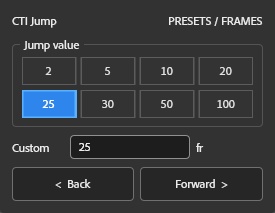

Quickly move the Current Time Indicator (CTI) by preset frame values.
Features
Preset jump values (2 / 5 / 10 / 20 / 25 / 30 / 50 / 100) Custom jump value Jump backward or forward with one click Ideal for frame-by-frame editing and animation workflows
Installation
Installation Copy the .jsx file to: Windows: ...\Adobe After Effects\Support Files\Scripts\ScriptUI Panels\ macOS: /Applications/Adobe After Effects/Scripts/ScriptUI Panels/ Restart After Effects.
기능
프리셋 프레임 점프 값 지원 (2 / 5 / 10 / 20 / 25 / 30 / 50 / 100) 사용자 지정 프레임 값 지원 한 번의 클릭으로 앞으로 / 뒤로 이동 프레임 단위 편집 및 애니메이션 작업을 더욱 빠르고 효율적으로
설치 방법
.jsx 파일을 아래 폴더에 복사하세요. Windows: ...\Adobe After Effects\Support Files\Scripts\ScriptUI Panels\ macOS: /Applications/Adobe After Effects/Scripts/ScriptUI Panels/ After Effects를 다시 실행하세요.
機能
プリセットジャンプ値(2 / 5 / 10 / 20 / 25 / 30 / 50 / 100) カスタムジャンプ値に対応 ワンクリックで前後にジャンプ フレーム単位の編集やアニメーション制作を効率化
インストール方法
.jsx ファイルを以下のフォルダーへコピーしてください。 Windows: ...\Adobe After Effects\Support Files\Scripts\ScriptUI Panels\ macOS: /Applications/Adobe After Effects/Scripts/ScriptUI Panels/ After Effectsを再起動してください。