
ビューアフィルターソフト「CV-Vivid」
- ダウンロード商品¥ 980
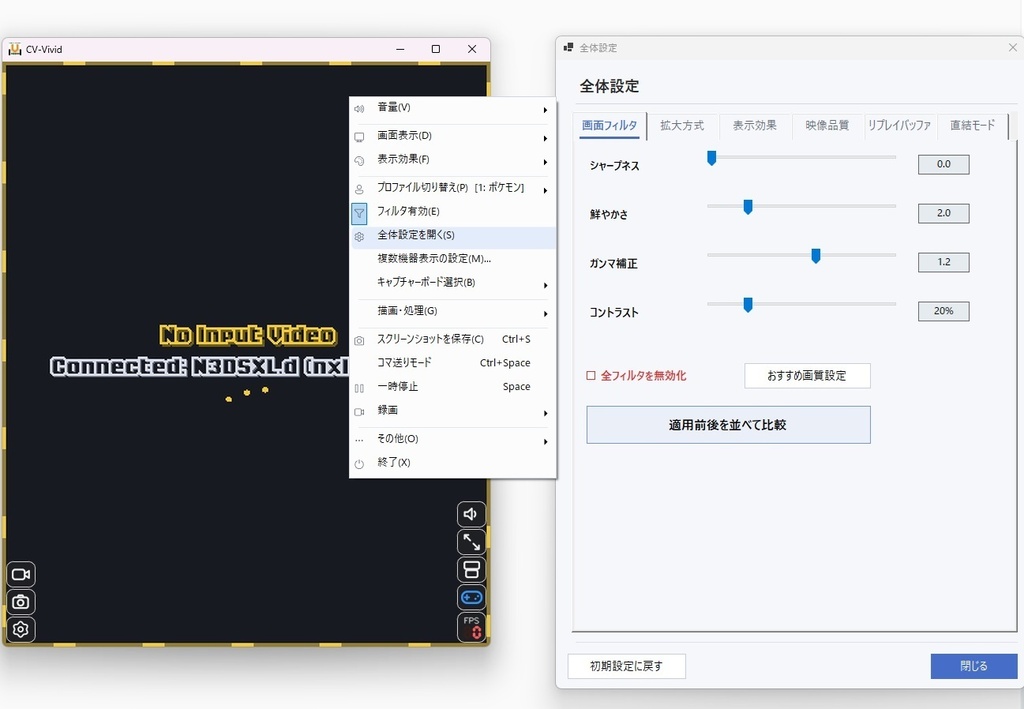

所謂、偽トロキャプチャーと呼ばれているデバイス用の専用ソフトウェアです。 ビューアの映像をシャープネス、彩度、ガンマ、コントラスト、アンチエイリアスをかけて高画質化して表示します。 フレーム生成による高フレームレート化も可能で、特にモンハンのような30fpsの3Dゲームではとても滑らかな映像で表示されます。 ※ある程度のGPU性能が必要で、モニターのリフレッシュレートも120Hz以上ないと効果は落ちます。 複数のキャプチャーボードに接続して映像を並べて表示、個別に音量を調整することも可能です。 起動中は仮想映像キャプチャデバイスとしても使用することができ、OBSで直接映像を取り込むこともできます。 リアルタイムの画像処理の仕様上わずかに遅延が発生しますが、体感できるほどの遅延はないと思います。 滑らかな映像にならない場合は描画設定を下げてご使用ください。 DS・3DS用のキャプチャーボードが導入されていない環境では何も使用できませんのでご注意ください。 PCのスペックが不足している場合は映像が滑らかに表示されない場合があります。 CPUよりもGPU性能に依存した処理が主体となっています。 使用方法についてはこちらをご覧ください。 https://cv-vivid.3dscontroller.com/ 3DS Capture、DS Capture、n3DS_view、new3DS_viewに対応。 Windows 10 / 11対応。Mac非対応。 ------------------------------------------------------------------------------------ This is dedicated software for devices commonly known as "Nisetoro Capture." It enhances the viewer's video feed in real-time, delivering a high-quality display with adjustments for sharpness, saturation, gamma, contrast, and anti-aliasing. Frame generation is also available for high frame rates, displaying 30fps 3D games—such as Monster Hunter—in extremely smooth video. (Note: Requires a moderate GPU performance and a monitor refresh rate of 120Hz or higher for optimal results.) While running, it can also function as a virtual video capture device, allowing you to capture the video feed directly in software like OBS or Zoom. Important Notes on Latency Due to the nature of real-time image processing, a very slight delay occurs, but it should not be perceptibly noticeable. If the video does not display smoothly, please lower the rendering settings. System Requirements & Precautions Required Hardware: This software cannot be used at all in environments where a DS/3DS capture board is not installed. PC Performance: If your PC specifications are insufficient, the video may not display smoothly. The processing relies more on GPU performance than CPU performance. Supported Capture Software: Compatible with 3DS Capture, DS Capture, n3DS_view, and new3DS_view. Supported OS: Windows 10 / 11 (Mac is not supported). How to Use Please visit our guide for instructions: https://cv-vivid.3dscontroller.com/ ------------------------------------------------------------------------------------ [ 2026/10/13 ver4.6 ] ・フレーム生成の新しい処理を試験的に導入 ・30fps>60fps化を規定有効に変更 ・リアルなブラウン管風エフェクトを追加 [ 2026/10/13 ver4.51 ] ・フレーム補間で一瞬で画面表示が大きく変わる場面用の判定と処理を追加 ・optimizeのボードを複数台表示する際の初期化と接続処理を修正 ・フレームアナライズモード中は高FPS化を一時解除するように変更 [ 2026/10/12 ver4.5 ] ・保存した動画のトリミング・音量調整機能を追加 ・CPUとGPU負荷を更に軽減化 ・高FPS化時に滑らかに表示するための様々な処理を追加 ・UIデザイン調整 ・劣化再現エフェクトのクオリティ向上 ・ダークモード実装 ・診断フォーム追加 [ 2026/10/11 ver4.42 ] GPU負荷を大幅に軽減し、映像のチラつきを抑えました。 [ 2026/10/10 ver4.40 ] ・映像をフレーム補完により60fps、120fpsの表示に対応 ・ゲーム画面を判別し最適なフレーム補完処理方法を自動選択 ・音声取り込み設定にライン入力を追加 ・終了時のウィンドウサイズを正しく復元するように調整 ・画面アスペクト比無視のストレッチ表示モードを追加 ・反射事故再現エフェクトを追加 ・右クリックメニューの項目を整理 ・ウィンドウタイトルの表示を調整 [ 2026/10/7 ver4.30 ] ピクセルパーフェクトで拡大表示する機能を追加 実機の液晶画面のように見える表示効果「ピクセルグリッド」を追加 フィルター適用前と後の映像を並べて表示して比較できる機能を追加 フィルターにSharp Bilinear、Edge Adaptive,xBRと設定を追加 表示効果に実機の液晶画面の劣化を再現するエフェクトを追加 起動後に数秒の間、音が濁る症状を改善 デバイスの処理方法を調整 DSiデバイスに対応 右下に音量調整/ミュートボタンを追加 [ 2026/10/5 ver4.20 ] 複数台の機器の映像を並べて表示できる機能追加。並び替えや個別に音量調整も可能。 別アプリ「3DS Controller」ではマウスで選んだ映像の機器をコントロール対象に自動的に変更。 3D映像(Side by Side)表示に対応。 [ 2026/10/2 ver4.00 ] GPU描画モードを実装。CPU負荷を大幅に減らすことに成功。 使用するキャプチャーボードを選択可能に変更。複数検出時は自動的に選択するように調整。 音量調整をマウススクロールで調整可能にして出力先のデバイスも選択可能に調整。高音質化処理を追加。 [ 2026/9/28 ver3.81 ] 描画負荷の軽減と補完処理を調整。 描画品質設定に自動調整を追加し、負荷に合わせて描画処理品質を自動的に調整する機能を追加。 リプレイバッファ録画の負荷を軽減。 ファイル数が非常に多くなったため単一ファイルに組み込み変更。 以前のファイルはすべて削除してください。設定はレジストリに残ります。 [ 2026/9/28 ver3.7 ] 仮想カメラデバイスとして使用できる機能を実装。 一時停止・映像バッファ遡り表示機能を追加。 [ 2026/9/13 ver3.6 ] 右クリックメニューに下画面の非表示機能を追加。 録画機能として全録画とリプレイバッファ録画を実装。 [ 2026/8/15 ver3.5 ] ソフトの多重起動に対応。 [ 2026/7/17 ver3.4 ] 言語設定を追加。 [ 2026/7/16 ver3.3 ] フィルタ詳細設定にガンマ補正の項目を追加。 3DSでStartボタンを押しながらのソフト起動によるDS等倍表示モードに対応。 右クリックメニューからDS dot by dotモードを有効にすることで、 通常の本体による拡大表示よりもくっきりとした映像になります。 横並び、上下画面比率変更にも対応し、スクリーンショット保存時もトリミングするよう変更。 ウィンドウが画面外の座標に復元しないように調整。 [ 2026/7/14 ver3.2 ] 設定の保存と復元時の不具合を修正。 フィルタ詳細設定を開いたときにフィルタが全無効になることがある不具合を修正。 [ 2026/7/13 ver3.1 ] 設定の保存と復元時の不具合を修正。 負荷軽減のため、最後の拡大描画の処理をGPUによるDirect2Dに置き換え。 GPU非搭載のPCの場合は逆に重くなってしまう可能性があり、FPSが低下する場合は同梱の旧バージョンの実行ファイルをご使用ください。 [ 2026/7/10 ver2.0 ] 初期バージョン公開